Reactive Data Client
Reactive Data Client 为远程数据协议提供安全、高性能的客户端访问和变更。拉取/获取(REST 和 GraphQL)与推送/流(WebSockets 或 Server Sent Events)可以同时使用。
它的目标与关系型数据库相似,只不过面向的是交互式应用客户端。因此,如果你的后端使用 Postgres 或 MySQL 这样的 RDBMS,这很好地说明 Reactive Data Client 可能适合你。相应地,就像有人会选择平面文件而不是数据库存储一样,有时一个功能较弱的客户端库就足够了。
这绝非易事。为此,Reactive Data Client 的设计目标是像对待本地数据一样对待远程数据。这意味着组件逻辑不应比 useState 和 setState 更复杂。
定义 API
Endpoint 是你的数据的_方法_。从本质上讲,它们只是异步函数。不过,它们还定义了与 API 相关的其他一切,例如过期策略、数据模型、校验和类型。
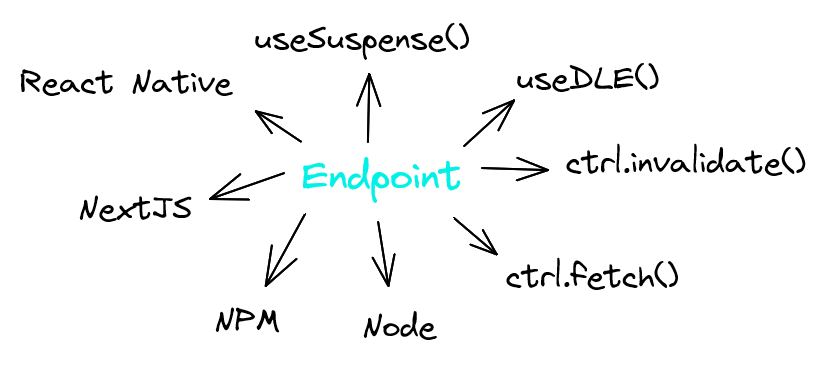
通过将 endpoint 的定义与其使用_解耦_,我们可以在多种场景中复用它们。
- 可以轻松地在不同组件中复用,便于将数据依赖就近放置
- 配合不同的 hook 和**命令式操作**复用,让同一个 endpoint 拥有不同的行为
- 跨不同的**平台**复用,例如 React Native、React web,甚至 React 之外的 Angular、Svelte、Vue 或 Node
- 可以作为独立于使用方的包发布
Endpoint 是可扩展、可组合的,并提供多种协议实现(REST、GraphQL、Websockets+SSE、图片/二进制),帮助你快速上手、进行扩展并共享通用模式。
- Rest
- GraphQL
import { RestEndpoint } from '@data-client/rest';

const getTodo = new RestEndpoint({
  urlPrefix: 'https://jsonplaceholder.typicode.com',
  path: '/todos/:id',
});
import { GQLEndpoint } from '@data-client/graphql';

const gql = new GQLEndpoint('/');
export const getTodo = gql.query(`
  query GetTodo($id: ID!) {
    todo(id: $id) {
      id
      title
      completed
    }
  }
`);
就近放置数据依赖
只需一行 useSuspense(),就能在需要的地方绑定数据,让你的组件可以复用。与 await 非常类似, useSuspense() 一旦返回,就保证数据可用。
import { useSuspense } from '@data-client/react';

export default function TodoDetail({ id }: { id: number }) {
  const todo = useSuspense(getTodo, { id });

  return <div>{todo.title}</div>;
}
不再需要 prop 层层传递,也不再需要繁琐的外部状态管理。Reactive Data Client 保证全局引用相等、数据安全和性能。
就近放置还让服务端渲染可以增量地流式传输 HTML,大幅降低 TTFB。 Reactive Data Client SSR 会自动对其 store 进行 hydrate,使首次加载时无需任何客户端 fetch 即可立即进行交互式变更。
处理加载/错误
将 AsyncBoundary 放在多个会挂起的组件外层,避免出现成百上千个加载指示器。
通常它们会放在页面、路由或模态框等导航边界处或其上层。
import { AsyncBoundary } from '@data-client/react';

function App() {
  return (
    <AsyncBoundary>
      <AnotherRoute />
      <TodoDetail id={5} />
    </AsyncBoundary>
  );
}
在 React 16 和 17 的某些情况下,也可以使用非 Suspense 的 fallback 处理
变更
变更是另一种复用场景——这次复用的是我们的数据。这种情况更加关键,因为它不仅会导致代码膨胀,还会引发数据完整性问题、数据撕裂以及应用整体的卡顿。
当我们调用变更方法/endpoint 时,需要确保该数据的所有使用处都得到更新。否则,我们就只能尝试级联刷新 endpoint,并承受由此带来的复杂性、性能问题和应用卡顿。
保持数据一致且新鲜
Entity 定义了我们的数据模型。
这实现了一种 DRY 的存储模式,可以防止“数据撕裂”造成的卡顿,并提升性能。
- Rest
- GraphQL
import { Entity } from '@data-client/rest';

export class Todo extends Entity {
  id = 0;
  userId = 0;
  title = '';
  completed = false;
}
import { GQLEntity } from '@data-client/graphql';

export class Todo extends GQLEntity {
  userId = 0;
  title = '';
  completed = false;
}
pk()(主键)方法用于构建查找表。这通常称为数据规范化。为了避免 bug、应用卡顿和性能问题,选择正确的(规范化的)状态结构至关重要。
现在我们可以将 Entity 同时绑定到 get endpoint 和 update endpoint,从而获得运行时数据完整性以及 TypeScript 定义。
- Rest
- GraphQL
import { RestEndpoint } from '@data-client/rest';

const get = new RestEndpoint({
  urlPrefix: 'https://jsonplaceholder.typicode.com',
  path: '/todos/:id',
  schema: Todo,
});

const update = getTodo.extend({
  method: 'PUT',
});

export const TodoResource = { get, update };
import { GQLEndpoint } from '@data-client/graphql';

const gql = new GQLEndpoint('/');

const get = gql.query(
  `query GetTodo($id: ID!) {
    todo(id: $id) {
      id
      title
      completed
    }
  }
`,
  { todo: Todo },
);

const update = gql.mutation(
  `mutation UpdateTodo($todo: Todo!) {
    updateTodo(todo: $todo) {
      id
      title
      completed
    }
  }`,
  { updateTodo: Todo },
);

export const TodoResource = { get, update };
通知 react 进行更新
就像 setState()一样,我们必须让 React 感知到所有变更,以便它重新渲染。
Controller 以类型安全的方式提供了这一功能。 Controller.fetch() 让我们可以触发变更。
我们可以在 React 组件中通过 useController 访问它。
- Rest
- GraphQL
import { useController } from '@data-client/react';

function ArticleEdit({ id }: { id: number }) {
  const ctrl = useController();
  const handleSubmit = data =>
    ctrl.fetch(TodoResource.update, { id }, data);
  return <ArticleForm onSubmit={handleSubmit} />;
}
import { useController } from '@data-client/react';

function ArticleEdit({ id }: { id: number }) {
  const ctrl = useController();
  const handleSubmit = data =>
    ctrl.fetch(TodoResource.update, { id, ...data });
  return <ArticleForm onSubmit={handleSubmit} />;
}
跟踪命令式操作的加载/错误状态
useLoading() 通过跟踪异步函数的加载状态和错误状态来增强它们。
import { useController, useLoading } from '@data-client/react';

function ArticleEdit({ id }: { id: number }) {
  const ctrl = useController();
  const [handleSubmit, loading, error] = useLoading(
    data => ctrl.fetch(TodoResource.update, { id }, data),
    [ctrl],
  );
  return <ArticleForm onSubmit={handleSubmit} loading={loading} />;
}
更多数据建模
如果我们的 Entity 不是顶层项呢?这里我们定义了 getList
endpoint,并以 new Collection([Todo]) 作为其 schema。schema 告诉 Reactive Data Client 去_哪里_找到
Entity。将其放在列表中后,Reactive Data Client 就知道响应应当是一个列表,其中每一项都是指定的 Entity。
import { RestEndpoint, Collection } from '@data-client/rest';

// get and update definitions omitted

const getList = new RestEndpoint({
  urlPrefix: 'https://jsonplaceholder.typicode.com',
  path: '/todos',
  schema: new Collection([Todo]),
  searchParams: {} as { userId?: string | number } | undefined,
  paginationField: 'page',
});

export default (TodoResource = { getList, get, update });
schema 还会自动推断并强制约束响应类型,确保变量 todos 拥有精确的类型。
import { useSuspense } from '@data-client/react';

export default function TodoList() {
  const todos = useSuspense(TodoResource.getList);

  return (
    <div>
      {todos.map(todo => (
        <TodoListItem key={todo.pk()} todo={todo} />
      ))}
    </div>
  );
}
现在我们已经在三处使用了数据模型——TodoResource.get、TodoResource.getList 和 TodoResource.update。即使发生变更,这些 endpoint 之间的数据一致性(以及引用相等)也能得到保证。
组织 Endpoint
到目前为止,我们已经定义了 TodoResource.get、TodoResource.getList 和 TodoResource.update。你可能已经注意到,这些 endpoint 定义之间共享了一些逻辑和信息。因此,Reactive Data Client
鼓励提取 endpoint 之间的共享逻辑。
Resource 是一组操作同一份数据的 endpoint。
import { Entity, resource } from '@data-client/rest';

class Todo extends Entity {
  id = 0;
  userId = 0;
  title = '';
  completed = false;
}

const TodoResource = resource({
  urlPrefix: 'https://jsonplaceholder.typicode.com',
  path: '/todos/:id',
  schema: Todo,
  searchParams: {} as { userId?: string | number } | undefined,
  paginationField: 'page',
});
Resource 的 Endpoint
// read
// GET https://jsonplaceholder.typicode.com/todos/5
const todo = useSuspense(TodoResource.get, { id: 5 });

// GET https://jsonplaceholder.typicode.com/todos
const todos = useSuspense(TodoResource.getList);

// GET https://jsonplaceholder.typicode.com/todos?userId=1
const todos = useSuspense(TodoResource.getList, { userId: 1 });

// mutate
const ctrl = useController();

// GET https://jsonplaceholder.typicode.com/todos?userId=1
ctrl.fetch(TodoResource.getList.getPage, { userId: 1, page: 2 });

// POST https://jsonplaceholder.typicode.com/todos
ctrl.fetch(TodoResource.getList.push, { title: 'my todo' });

// POST https://jsonplaceholder.typicode.com/todos?userId=1
ctrl.fetch(TodoResource.getList.push, { userId: 1 }, { title: 'my todo' });

// PUT https://jsonplaceholder.typicode.com/todos/5
ctrl.fetch(TodoResource.update, { id: 5 }, { title: 'my todo' });

// PATCH https://jsonplaceholder.typicode.com/todos/5
ctrl.fetch(TodoResource.partialUpdate, { id: 5 }, { title: 'my todo' });

// DELETE https://jsonplaceholder.typicode.com/todos/5
ctrl.fetch(TodoResource.delete, { id: 5 });
零延迟变更
Controller.fetch 会调用变更 endpoint,并根据响应更新 React。虽然 useTransition 能改善体验,但 UI 最终仍需等待 fetch 完成才会更新。
在很多场景下,例如切换 todo.completed、增加点赞数或拖放一个框架,这样还是太慢了!
我们可以选择让 Reactive Data Client 立即执行 React 渲染。为此,我们需要指定_如何_渲染。
getOptimisticResponse 就像 使用更新函数的 setState。我们使用 snap 访问 store 以获取先前的值,再结合 fetch 参数,返回_预期的_ fetch 响应。
const update = new RestEndpoint({
  urlPrefix: 'https://jsonplaceholder.typicode.com',
  path: '/todos/:id',
  method: 'PUT',
  schema: Todo,
  getOptimisticResponse(snap, { id }, body) {
    return {
      id,
      ...body,
    };
  },
});
Reactive Data Client 能在任何可能的网络故障或竞态条件下确保数据完整性,因此你无需担心网络故障、多次变更调用编辑同一份数据,或异步编程中的其他常见问题。
远程触发的变更
有时数据变化是由远程发起的——可能来自网站上的其他用户、管理员等。声明式的过期策略控制项可以严格控制由获取引起的更新。
然而,对于频繁变化的数据(例如交易所价格行情或实时对话),有时会使用基于推送的协议,例如 Websockets 或 Server Sent Events。Reactive Data Client 拥有一个强大的 middleware 层,称为 Manager,可以在收到服务器推送的新数据时发起数据更新。
StreamManager
import type { Manager, Middleware, ActionTypes } from '@data-client/react';
import { Controller, actionTypes } from '@data-client/react';
import type { EntityInterface } from '@data-client/rest';

export default class StreamManager implements Manager {
  declare protected evtSource: WebSocket | EventSource;
  declare protected entities: Record<string, EntityInterface>;

  constructor(
    evtSource: WebSocket | EventSource,
    entities: Record<string, EntityInterface>,
  ) {
    this.evtSource = evtSource;
    this.entities = entities;
  }

  middleware: Middleware = controller => {
    this.evtSource.onmessage = event => {
      try {
        const msg: { type: string; args: [any]; data: any } = JSON.parse(
          event.data,
        );
        if (msg.type in this.entities)
          controller.set(this.entities[msg.type], ...msg.args, msg.data);
      } catch (e) {
        console.error('Failed to handle message');
        console.error(e);
      }
    };
    return next => async action => next(action);
  };

  cleanup() {
    this.evtSource.close();
  }
}
如果我们不需要完整的数据流,可以使用 useSubscription() 或 useLive(),确保只监听我们关心的数据。
设置了 pollFrequency 的 Endpoint 可以复用现有的 HTTP endpoint,无需额外的 websocket 或 SSE 后端。轮询由 SubscriptionManager 全局编排,因此即使有许多组件订阅,Reactive Data Client 也绝不会过度获取。
调试

安装 Redux DevTools 的 chrome 扩展或 firefox 扩展
点击图标即可打开检查器,你可以在其中观察已 dispatch 的 action、它们对缓存状态的影响以及当前的缓存状态。
模拟数据
fixture 是一种标准格式,可以在所有 @data-client/test 辅助工具以及你自己的场景中使用。
- Detail
- Update
- 404 error
- Interceptor
- Interceptor (stateful)
import type { Fixture } from '@data-client/test';
import { getTodo } from './todo';

const todoDetailFixture: Fixture = {
  endpoint: getTodo,
  args: [{ id: 5 }] as const,
  response: {
    id: 5,
    title: 'Star Reactive Data Client on Github',
    userId: 11,
    completed: false,
  },
};
import type { Fixture } from '@data-client/test';
import { updateTodo } from './todo';

const todoUpdateFixture: Fixture = {
  endpoint: updateTodo,
  args: [{ id: 5 }, { completed: true }] as const,
  response: {
    id: 5,
    title: 'Star Reactive Data Client on Github',
    userId: 11,
    completed: true,
  },
};
import type { Fixture } from '@data-client/test';
import { getTodo } from './todo';

const todoDetail404Fixture: Fixture = {
  endpoint: getTodo,
  args: [{ id: 9001 }] as const,
  response: { status: 404, response: 'Not found' },
  error: true,
};
import type { Interceptor } from '@data-client/test';

const currentTimeInterceptor: Interceptor = {
  endpoint: new RestEndpoint({
    path: '/api/currentTime/:id',
  }),
  response({ id }) {
    return {
      id,
      updatedAt: new Date().toISOString(),
    };
  },
  delay: () => 150,
};
import type { Interceptor } from '@data-client/test';

const incrementInterceptor: Interceptor = {
  endpoint: new RestEndpoint({
    path: '/api/count/increment',
    method: 'POST',
    body: undefined,
  }),
  response() {
    return {
      count: (this.count = this.count + 1),
    };
  },
  delay: () => 150,
};
- 为 storybook 模拟数据,使用 MockResolver
- 测试 hook,使用 renderDataHook()
- 测试组件,使用 MockResolver 和 mockInitialState()
演示
- Todo
- GitHub
- NextJS SSR
 Agent Skills