# Data Client for React
> Reactive Data Client: async state management for React with normalized, type-safe data from REST, GraphQL, and any other source.
Packages: @data-client/react, @data-client/rest, @data-client/graphql. Using Vue? See https://dataclient.io/vue/llms.txt
# The Reactive Data Client
Reactive Data Client provides safe and performant [client access](https://dataclient.io/docs/api/useSuspense.md) and [mutation](https://dataclient.io/docs/api/Controller.md#fetch) over [remote data protocols](https://www.freecodecamp.org/news/what-is-an-api-in-english-please-b880a3214a82/).
Both pull/fetch ([REST](https://dataclient.io/rest.md) and [GraphQL](https://dataclient.io/graphql.md)) and push/stream ([WebSockets or Server Sent Events](https://dataclient.io/docs/concepts/managers.md#data-stream)) can be used simultaneously.
It has similar goals
to [Relational Databases](https://en.wikipedia.org/wiki/Relational_database)
but for interactive application clients. Because of this, **if your backend uses a [RDBMS](https://en.wikipedia.org/wiki/Relational_database) like [Postgres](https://www.postgresql.org/)
or [MySQL](https://www.mysql.com/) this is a good indication Reactive Data Client might be for you**. Respectively,
just like one might choose [flat files](https://www.techopedia.com/definition/25956/flat-file) over database storage,
sometimes a less powerful client library is sufficient.
This is no small task. To achieve this, Reactive Data Client' design is aimed at **treating remote data like it is
local**. This means component logic should be no more complex than useState and setState.
## Define API {#endpoint}
[Endpoints](https://dataclient.io/docs/getting-started/resource.md) are the _methods_ of your data. At their core they
are simply asynchronous functions. However, they also define anything else relevant to the [API](https://www.freecodecamp.org/news/what-is-an-api-in-english-please-b880a3214a82/)
like [expiry policy](https://dataclient.io/docs/concepts/expiry-policy.md), [data model](https://dataclient.io/docs/concepts/normalization.md), [validation](https://dataclient.io/docs/concepts/validation.md), and [types](https://dataclient.io/rest/api/RestEndpoint.md#typing).
By _decoupling_ endpoint definitions from their usage, we are able to reuse them in many contexts.
- Easy reuse in different **components** eases co-locating data dependencies
- Reuse with different **[hooks](https://dataclient.io/docs/api/useSuspense.md)** and **[imperative actions](https://dataclient.io/docs/api/Controller.md)** allows different behaviors with the same endpoint
- Reuse across different **[platforms](https://dataclient.io/docs/getting-started/installation.md)** like React Native, React web, or even beyond React in Angular, Svelte, Vue, or Node
- Published as **packages** independent of their consumption
Endpoints are extensible and composable, with protocol implementations ([REST](https://dataclient.io/rest.md), [GraphQL](https://dataclient.io/graphql.md), [Websockets+SSE](https://dataclient.io/docs/concepts/managers.md#data-stream), [Img/binary](https://dataclient.io/docs/guides/img-media.md))
to get started quickly, extend, and share common patterns.
```ts
import { RestEndpoint } from '@data-client/rest';
const getTodo = new RestEndpoint({
urlPrefix: 'https://jsonplaceholder.typicode.com',
path: '/todos/:id',
});
```
```ts
import { GQLEndpoint } from '@data-client/graphql';
const gql = new GQLEndpoint('/');
export const getTodo = gql.query(`
query GetTodo($id: ID!) {
todo(id: $id) {
id
title
completed
}
}
`);
```
## Co-locate data dependencies
Make your components reusable by binding the data [where you need it](https://dataclient.io/docs/getting-started/data-dependency.md) with the one-line [useSuspense()](https://dataclient.io/docs/api/useSuspense.md). Much like [await](https://developer.mozilla.org/en-US/docs/Web/JavaScript/Reference/Operators/await),
[useSuspense()](https://dataclient.io/docs/api/useSuspense.md) guarantees its data once it returns.
```tsx {4}
import { useSuspense } from '@data-client/react';
export default function TodoDetail({ id }: { id: number }) {
const todo = useSuspense(getTodo, { id });
return
{todo.title}
;
}
```
No more prop drilling, or cumbersome external state management. Reactive Data Client guarantees global referential equality,
data safety and performance.
Co-location also allows [Server Side Rendering](https://dataclient.io/docs/guides/ssr.md) to incrementally stream HTML, greatly reducing [TTFB](https://web.dev/ttfb/).
[Reactive Data Client SSR](https://dataclient.io/docs/guides/ssr.md) automatically hydrates its store, allowing immediate interactive mutations with **zero** client-side
fetches on first load.
## Handle loading/error
Avoid 100s of loading spinners by placing [AsyncBoundary](https://dataclient.io/docs/api/AsyncBoundary.md) around many suspending components.
Typically these are placed at or above navigational boundaries like pages, routes or modals.
```tsx {5,8}
import { AsyncBoundary } from '@data-client/react';
function App() {
return (
);
}
```
[Non-Suspense fallback handling](https://dataclient.io/docs/getting-started/data-dependency.md#stateful) can also be used for certain
cases in React 16 and 17
## Mutations
[Mutations](https://dataclient.io/docs/getting-started/mutations.md) present another case of reuse - this time of our data. This case is even more critical
because it can not just lead to code bloat, but data ingrity, tearing, and general application jankiness.
When we call our mutation method/endpoint, we need to ensure **all** uses of that data are updated.
Otherwise we're stuck with the complexity, performance, and stuttery application jank of attempting
to cascade endpoint refreshes.
### Keep data consistent and fresh {#entities}
[Entities](https://dataclient.io/docs/concepts/normalization.md) define our data model.
This enables a [DRY](https://en.wikipedia.org/wiki/Don%27t_repeat_yourself) storage pattern, which
prevents 'data tearing' jank and improves performance.
```ts
import { Entity } from '@data-client/rest';
export class Todo extends Entity {
id = 0;
userId = 0;
title = '';
completed = false;
}
```
```ts
import { GQLEntity } from '@data-client/graphql';
export class Todo extends GQLEntity {
userId = 0;
title = '';
completed = false;
}
```
The [pk()](https://dataclient.io/rest/api/Entity.md#pk) (primary key) method is used to build a lookup table. This is
commonly known as data normalization. To avoid bugs, application jank and performance problems,
it is critical to [choose the right (normalized) state structure](https://react.dev/learn/choosing-the-state-structure).
We can now bind our Entity to both our get endpoint and update endpoint, providing our runtime
data integrity as well as TypeScript definitions.
```ts {6}
import { RestEndpoint } from '@data-client/rest';
const get = new RestEndpoint({
urlPrefix: 'https://jsonplaceholder.typicode.com',
path: '/todos/:id',
schema: Todo,
});
const update = getTodo.extend({
method: 'PUT',
});
export const TodoResource = { get, update };
```
```ts {14,25}
import { GQLEndpoint } from '@data-client/graphql';
const gql = new GQLEndpoint('/');
const get = gql.query(
`query GetTodo($id: ID!) {
todo(id: $id) {
id
title
completed
}
}
`,
{ todo: Todo },
);
const update = gql.mutation(
`mutation UpdateTodo($todo: Todo!) {
updateTodo(todo: $todo) {
id
title
completed
}
}`,
{ updateTodo: Todo },
);
export const TodoResource = { get, update };
```
### Tell react to update
Just like `setState()`, we must make React aware of the any mutations so it can rerender.
[Controller](https://dataclient.io/docs/api/Controller.md) provides this functionality in a type-safe manner.
[Controller.fetch()](https://dataclient.io/docs/api/Controller.md#fetch) lets us trigger mutations.
We can [useController](https://dataclient.io/docs/api/useController.md) to access it in React components.
```tsx
import { useController } from '@data-client/react';
function ArticleEdit() {
const ctrl = useController();
const handleSubmit = data =>
ctrl.fetch(TodoResource.update, { id }, data);
return ;
}
```
```tsx
import { useController } from '@data-client/react';
function ArticleEdit() {
const ctrl = useController();
const handleSubmit = data =>
ctrl.fetch(TodoResource.update, { id, ...data });
return ;
}
```
Tracking imperative loading/error state
[useLoading()](https://dataclient.io/docs/api/useLoading.md) enhances async functions by tracking their loading and error states.
```tsx
import { useController, useLoading } from '@data-client/react';
function ArticleEdit() {
const ctrl = useController();
const [handleSubmit, loading, error] = useLoading(
data => ctrl.fetch(TodoResource.update, { id }, data),
[ctrl],
);
return ;
}
```
### More data modeling
What if our entity is not the top level item? Here we define the `getList`
endpoint with [new Collection(\[Todo\])](https://dataclient.io/rest/api/Collection.md) as its schema. [Schemas](https://dataclient.io/docs/concepts/normalization.md#schema) tell Reactive Data Client _where_ to find
the Entities. By placing inside a list, Reactive Data Client knows to expect a response
where each item of the list is the entity specified.
```typescript {6}
import { RestEndpoint, Collection } from '@data-client/rest';
// get and update definitions omitted
const getList = new RestEndpoint({
urlPrefix: 'https://jsonplaceholder.typicode.com',
path: '/todos',
schema: new Collection([Todo]),
searchParams: {} as { userId?: string | number } | undefined,
paginationField: 'page',
});
export default (TodoResource = { getList, get, update });
```
[Schemas](https://dataclient.io/docs/concepts/normalization.md) also automatically infer and enforce the response type, ensuring
the variable `todos` will be typed precisely.
```tsx {4}
import { useSuspense } from '@data-client/react';
export default function TodoList() {
const todos = useSuspense(TodoResource.getList);
return (
{todos.map(todo => (
))}
);
}
```
Now we've used our data model in three cases - `TodoResource.get`, `TodoResource.getList` and `TodoResource.update`. Data consistency
(as well as referential equality) will be guaranteed between the endpoints, even after mutations occur.
### Organizing Endpoints
At this point we've defined `TodoResource.get`, `TodoResource.getList` and `TodoResource.update`. You might have noticed
that these endpoint definitions share some logic and information. For this reason Reactive Data Client
encourages extracting shared logic among endpoints.
[Resources](https://dataclient.io/rest/api/resource.md) are collections of endpoints that operate on the same data.
```typescript
import { Entity, resource } from '@data-client/rest';
class Todo extends Entity {
id = 0;
userId = 0;
title = '';
completed = false;
}
const TodoResource = resource({
urlPrefix: 'https://jsonplaceholder.typicode.com',
path: '/todos/:id',
schema: Todo,
searchParams: {} as { userId?: string | number } | undefined,
paginationField: 'page',
});
```
[Introduction to Resource](https://dataclient.io/docs/getting-started/resource.md)
Resource Endpoints
```typescript
// read
// GET https://jsonplaceholder.typicode.com/todos/5
const todo = useSuspense(TodoResource.get, { id: 5 });
// GET https://jsonplaceholder.typicode.com/todos
const todos = useSuspense(TodoResource.getList);
// GET https://jsonplaceholder.typicode.com/todos?userId=1
const todos = useSuspense(TodoResource.getList, { userId: 1 });
// mutate
const ctrl = useController();
// GET https://jsonplaceholder.typicode.com/todos?userId=1
ctrl.fetch(TodoResource.getList.getPage, { userId: 1, page: 2 });
// POST https://jsonplaceholder.typicode.com/todos
ctrl.fetch(TodoResource.getList.push, { title: 'my todo' });
// POST https://jsonplaceholder.typicode.com/todos?userId=1
ctrl.fetch(TodoResource.getList.push, { userId: 1 }, { title: 'my todo' });
// PUT https://jsonplaceholder.typicode.com/todos/5
ctrl.fetch(TodoResource.update, { id: 5 }, { title: 'my todo' });
// PATCH https://jsonplaceholder.typicode.com/todos/5
ctrl.fetch(TodoResource.partialUpdate, { id: 5 }, { title: 'my todo' });
// DELETE https://jsonplaceholder.typicode.com/todos/5
ctrl.fetch(TodoResource.delete, { id: 5 });
```
### Zero delay mutations {#optimistic-updates}
[Controller.fetch](https://dataclient.io/docs/api/Controller.md#fetch) call the mutation endpoint, and update React based on the response.
While [useTransition](https://react.dev/reference/react/useTransition) improves the experience,
the UI still ultimately waits on the fetch completion to update.
For many cases like toggling todo.completed, incrementing an upvote, or dragging and drop
a frame this can be too slow!
We can optionally tell Reactive Data Client to perform the React renders immediately. To do this
we'll need to specify _how_.
[getOptimisticResponse](https://dataclient.io/rest/guides/optimistic-updates.md) is just like [setState with an updater function](https://react.dev/reference/react/useState#updating-state-based-on-the-previous-state). Using [snap](https://dataclient.io/docs/api/Snapshot.md) for access to the store to get the previous
value, as well as the fetch arguments, we return the _expected_ fetch response.
```typescript
const update = new RestEndpoint({
urlPrefix: 'https://jsonplaceholder.typicode.com',
path: '/todos/:id',
method: 'PUT',
schema: Todo,
getOptimisticResponse(snap, { id }, body) {
return {
id,
...body,
};
},
});
```
Reactive Data Client ensures [data integrity against any possible networking failure or race condition](https://dataclient.io/rest/guides/optimistic-updates.md#optimistic-transforms), so don't
worry about network failures, multiple mutation calls editing the same data, or other common
problems in asynchronous programming.
### Remotely triggered mutations
Sometimes data change is initiated remotely - either due to other users on the site, admins, etc. Declarative
[expiry policy](https://dataclient.io/docs/concepts/expiry-policy.md) controls allow tight control over updates due to fetching.
However, for data that changes frequently (like exchange price tickers, or live conversations) sometimes push-based
protocols are used like Websockets or Server Sent Events. Reactive Data Client has a [powerful middleware layer called Managers](https://dataclient.io/docs/api/Manager.md),
which can be used to [initiate data updates](https://dataclient.io/docs/concepts/managers.md#data-stream) when receiving new data pushed from the server.
StreamManager
```typescript
import type { Manager, Middleware, ActionTypes } from '@data-client/react';
import { Controller, actionTypes } from '@data-client/react';
import type { EntityInterface } from '@data-client/rest';
export default class StreamManager implements Manager {
declare protected evtSource: WebSocket | EventSource;
declare protected entities: Record;
constructor(
evtSource: WebSocket | EventSource,
entities: Record,
) {
this.evtSource = evtSource;
this.entities = entities;
}
middleware: Middleware = controller => {
this.evtSource.onmessage = event => {
try {
const msg = JSON.parse(event.data);
if (msg.type in this.endpoints)
controller.set(this.entities[msg.type], ...msg.args, msg.data);
} catch (e) {
console.error('Failed to handle message');
console.error(e);
}
};
return next => async action => next(action);
};
cleanup() {
this.evtSource.close();
}
}
```
If we don't want the full data stream, we can [useSubscription()](https://dataclient.io/docs/api/useSubscription.md) or [useLive()](https://dataclient.io/docs/api/useLive.md)
to ensure we only listen to the data we care about.
Endpoints with [pollFrequency](https://dataclient.io/rest/api/RestEndpoint.md#pollfrequency) allow reusing the existing HTTP endpoints, eliminating
the need for additional websocket or SSE backends.
Polling is globally orchestrated by the [SubscriptionManager](https://dataclient.io/docs/api/SubscriptionManager.md), so even with many
components subscribed Reactive Data Client will never overfetch.
[//]: # "TODO: ## Relational joins and nesting"
## Debugging
Add the Redux DevTools for
[chrome extension](https://chrome.google.com/webstore/detail/redux-devtools/lmhkpmbekcpmknklioeibfkpmmfibljd?hl=en)
or
[firefox extension](https://addons.mozilla.org/en-US/firefox/addon/reduxdevtools/)
Click the icon to open the [inspector](https://dataclient.io/docs/getting-started/debugging.md), which allows you to observe dispatched actions,
their effect on the cache state as well as current cache state.
## Mock data
Writing [Fixtures](https://dataclient.io/docs/api/Fixtures.md) is a standard format that can be used across all `@data-client/test` helpers as well as your own uses.
**Detail**
```typescript
import type { Fixture } from '@data-client/test';
import { getTodo } from './todo';
const todoDetailFixture: Fixture = {
endpoint: getTodo,
args: [{ id: 5 }] as const,
response: {
id: 5,
title: 'Star Reactive Data Client on Github',
userId: 11,
completed: false,
},
};
```
**Update**
```typescript
import type { Fixture } from '@data-client/test';
import { updateTodo } from './todo';
const todoUpdateFixture: Fixture = {
endpoint: updateTodo,
args: [{ id: 5 }, { completed: true }] as const,
response: {
id: 5,
title: 'Star Reactive Data Client on Github',
userId: 11,
completed: true,
},
};
```
**404 error**
```typescript
import type { Fixture } from '@data-client/test';
import { getTodo } from './todo';
const todoDetail404Fixture: Fixture = {
endpoint: getTodo,
args: [{ id: 9001 }] as const,
response: { status: 404, response: 'Not found' },
error: true,
};
```
**Interceptor**
```typescript
import type { Interceptor } from '@data-client/test';
const currentTimeInterceptor: Interceptor = {
endpoint: new RestEndpoint({
path: '/api/currentTime/:id',
}),
response({ id }) {
return {
id,
updatedAt: new Date().toISOString(),
};
},
delay: () => 150,
};
```
**Interceptor (stateful)**
```typescript
import type { Interceptor } from '@data-client/test';
const incrementInterceptor: Interceptor = {
endpoint: new RestEndpoint({
path: '/api/count/increment',
method: 'POST',
body: undefined,
}),
response() {
return {
count: (this.count = this.count + 1),
};
},
delay: () => 150,
};
```
- [Mock data for storybook](https://dataclient.io/docs/guides/storybook.md) with [MockResolver](https://dataclient.io/docs/api/MockResolver.md)
- [Test hooks](https://dataclient.io/docs/guides/unit-testing-hooks.md) with [renderDataHook()](https://dataclient.io/docs/api/renderDataHook.md)
- [Test components](https://dataclient.io/docs/guides/unit-testing-components.md) with [MockResolver](https://dataclient.io/docs/api/MockResolver.md) and [mockInitialState()](https://dataclient.io/docs/api/mockInitialState.md)
## Demo
**Todo**
[](https://github.com/reactive/data-client/tree/master/examples/todo-app)
**GitHub**
[](https://github.com/reactive/data-client/tree/master/examples/github-app)
**NextJS SSR**
[](https://github.com/reactive/data-client/tree/master/examples/nextjs)
[More Demos](https://dataclient.io/demos)
[ Agent Skills](https://skills.sh/reactive/data-client)
# Controller
`Controller` is a singleton providing safe access to the Reactive Data Client [flux store and lifecycle](https://dataclient.io/docs/api/Manager.md#control-flow).
`Controller` memoizes all store access, allowing a global referential equality guarantee and the fastest rendering
and retrieval performance.
`Controller` is provided:
- [Managers](https://dataclient.io/docs/api/Manager.md) as the first argument in [Manager.middleware](https://dataclient.io/docs/api/Manager.md#middleware)
- React with [useController()](https://dataclient.io/docs/api/useController.md)
- [Unit testing hooks](https://dataclient.io/docs/guides/unit-testing-hooks.md) with [renderDataHook()](https://dataclient.io/docs/api/renderDataHook.md#controller)
```ts
class Controller {
/*************** Action Dispatchers ***************/
fetch(endpoint, ...args): ReturnType;
fetchIfStale(endpoint, ...args): ReturnType | undefined;
expireAll({ testKey }): Promise;
invalidate(endpoint, ...args): Promise;
invalidateAll({ testKey }): Promise;
resetEntireStore(): Promise;
set(queryable, ...args, value): Promise;
set([Entity], rows): Promise;
setResponse(endpoint, ...args, response): Promise;
setError(endpoint, ...args, error): Promise;
resolve(endpoint, { args, response, fetchedAt, error }): Promise;
subscribe(endpoint, ...args): Promise;
unsubscribe(endpoint, ...args): Promise;
/*************** Data Access ***************/
get(queryable, ...args, state): Denormalized;
getResponse(endpoint, ...args, state): { data; expiryStatus; expiresAt };
getError(endpoint, ...args, state): ErrorTypes | undefined;
snapshot(state: State, fetchedAt?: number): SnapshotInterface;
getState(): State;
}
```
## Action Dispatchers
### fetch(endpoint, ...args) {#fetch}
Fetches the endpoint with given args, updating the Reactive Data Client cache with
the response or error upon completion.
**Create**
```tsx
function CreatePost() {
const ctrl = useController();
return (
);
}
```
**Update**
```tsx
function UpdatePost({ id }: { id: string }) {
const ctrl = useController();
return (
);
}
```
**Delete**
```tsx
function PostListItem({ post }: { post: PostResource }) {
const ctrl = useController();
const handleDelete = useCallback(
async e => {
await ctrl.fetch(PostResource.delete, { id: post.id });
history.push('/');
},
[ctrl, post.id],
);
return (
{post.title}
);
}
```
> **Tip**
>
> `fetch` has the same return value as the [Endpoint](https://dataclient.io/rest/api/Endpoint.md) passed to it.
> When using schemas, the denormalized value is returned
>
> ```ts
> const controller = useController();
>
> const post = await controller.fetch(
> PostResource.getList.push,
> createPayload,
> );
> post.title;
> post.pk();
> ```
#### Endpoint.sideEffect
[sideEffect](https://dataclient.io/rest/api/Endpoint.md#sideeffect) changes the behavior
##### true
- Resolves _before_ [committing](https://react.dev/learn/render-and-commit#step-3-react-commits-changes-to-the-dom) Reactive Data Client cache updates. (React 16, 17)
- Each call will always cause a new fetch.
##### false | undefined
- Resolves _after_ [committing](https://react.dev/learn/render-and-commit#step-3-react-commits-changes-to-the-dom) Reactive Data Client cache updates.
- Identical requests are deduplicated globally; allowing only one inflight request at a time.
- To ensure a _new_ request is started, make sure to abort any existing inflight requests.
### fetchIfStale(endpoint, ...args) {#fetchIfStale}
Fetches only if endpoint is considered '[stale](https://dataclient.io/docs/concepts/expiry-policy.md#stale)'.
This can be useful when prefetching data, as it avoids overfetching fresh data.
An [example](https://stackblitz.com/github/reactive/data-client/tree/master/examples/github-app?file=src%2Frouting%2Froutes.tsx) with a fetch-as-you-render router:
```ts
{
name: 'IssueList',
component: lazyPage('IssuesPage'),
title: 'issue list',
resolveData: async (
controller: Controller,
{ owner, repo }: { owner: string; repo: string },
searchParams: URLSearchParams,
) => {
const q = searchParams?.get('q') || 'is:issue is:open';
await controller.fetchIfStale(IssueResource.search, {
owner,
repo,
q,
});
},
},
```
Example app: [github-app](https://github.com/reactive/data-client/tree/master/examples/github-app) ([`src/routing/routes.tsx`](https://github.com/reactive/data-client/blob/master/examples/github-app/src/routing/routes.tsx))
### expireAll({ testKey }) {#expireAll}
Sets all responses' [expiry status](https://dataclient.io/docs/concepts/expiry-policy.md) matching `testKey` to [Stale](https://dataclient.io/docs/concepts/expiry-policy.md#stale).
This is sometimes useful to trigger refresh of only data presently shown
when there are many parameterizations in cache.
```tsx
import { type Controller, useController } from '@data-client/react';
const createTradeHandler = (ctrl: Controller) => async trade => {
await ctrl.fetch(TradeResource.getList.push, { user: user.id }, trade);
ctrl.expireAll(AccountResource.get);
ctrl.expireAll(AccountResource.getList);
};
function CreateTrade({ id }: { id: string }) {
const handleTrade = createTradeHandler(useController());
return (
);
}
```
> **Tip**
>
> To reduce load, improve performance, and improve state consistency; it can often be
> better to [include mutation sideeffects in the mutation response](https://dataclient.io/rest/guides/side-effects.md).
### invalidate(endpoint, ...args) {#invalidate}
Forces refetching and suspenseon [useSuspense](https://dataclient.io/docs/api/useSuspense.md) with the same Endpoint
and parameters.
```tsx
function ArticleName({ id }: { id: string }) {
const article = useSuspense(ArticleResource.get, { id });
const ctrl = useController();
return (
{article.title}
);
}
```
> **Tip**
>
> To refresh while continuing to display stale data - [Controller.fetch](#fetch).
> **Tip: Invalidate many endpoints at once**
>
> Use [schema.Invalidate](https://dataclient.io/rest/api/Invalidate.md) to invalidate every endpoint that contains a given entity.
>
> For REST try using [Resource.delete](https://dataclient.io/rest/api/resource.md#delete)
>
> ```ts
> // deletes MyResource(5)
> // this will refetch MyResource.get({id: '5'})
> // and remove it from MyResource.getList
> controller.setResponse(MyResource.delete, { id: '5' }, { id: '5' });
> ```
### invalidateAll({ testKey }) {#invalidateAll}
[Invalidates](https://dataclient.io/docs/concepts/expiry-policy.md#invalid) all [endpoint keys](https://dataclient.io/rest/api/RestEndpoint.md#key) matching `testKey`.
```tsx
function ArticleName({ id }: { id: string }) {
const article = useSuspense(ArticleResource.get, { id });
const ctrl = useController();
return (
{article.title}
);
}
```
> **Tip**
>
> To refresh while continuing to display stale data - [Controller.expireAll](#expireAll) instead.
Here we clear only GET endpoints using the test.com domain. This means other domains remain in cache.
```ts
const myDomain = 'http://test.com';
const testKey = (key: string) => key.startsWith(`GET ${myDomain}`);
function useLogout() {
const ctrl = useController();
return () => ctrl.invalidateAll({ testKey });
}
```
It's usually a good idea to also clear cache on 401 (unauthorized) with [LogoutManager](https://dataclient.io/docs/api/LogoutManager.md)
as well.
```tsx
import {
DataProvider,
LogoutManager,
getDefaultManagers,
} from '@data-client/react';
import { createRoot } from 'react-dom/client';
import { unAuth } from '../authentication';
const myDomain = 'http://test.com';
const testKey = (key: string) => key.startsWith(`GET ${myDomain}`);
const managers = [
new LogoutManager({
handleLogout(controller) {
// call custom unAuth function we defined
unAuth();
// still reset the store
controller.invalidateAll({ testKey });
},
}),
...getDefaultManagers(),
];
createRoot(document.body).render(
,
);
```
### resetEntireStore() {#resetEntireStore}
Resets/clears the entire Reactive Data Client cache. All inflight requests will not resolve.
This is typically used when logging out or changing authenticated users.
```tsx
const USER_NUMBER_ONE: string = '1111';
function UserName() {
const user = useSuspense(CurrentUserResource.get);
const ctrl = useController();
const becomeAdmin = useCallback(() => {
// Changes the current user
impersonateUser(USER_NUMBER_ONE);
ctrl.resetEntireStore();
}, [ctrl]);
return (
{user.name}
);
}
```
### set(queryable, ...args, value) {#set}
Updates any [Queryable](https://dataclient.io/rest/api/schema.md#queryable) [Schema](https://dataclient.io/rest/api/schema.md#schema-overview), or many entities at once with an [Array](https://dataclient.io/rest/api/Array.md) or [Values](https://dataclient.io/rest/api/Values.md) schema.
```ts
ctrl.set(
Todo,
// which Todo to update
{ id: '5' },
// merge this data into the Todo in the store
{ id: '5', title: 'tell me friends how great Data Client is' },
);
```
The value is typed by the schema: an [Entity](https://dataclient.io/rest/api/Entity.md) takes its fields (numbers and strings may be either),
while a [Collection](https://dataclient.io/rest/api/Collection.md) or [All](https://dataclient.io/rest/api/All.md) takes a list of rows. A [Query](https://dataclient.io/rest/api/Query.md)
takes the input of the schema it wraps, since `set()` normalizes that schema rather than reversing `process()`.
```ts
ctrl.set(TodoResource.getList.schema, [{ id: '5', completed: true }]);
```
> **Note: Type checking limits**
>
> To keep type checking fast for large [Unions](https://dataclient.io/rest/api/Union.md), a Union row is checked against the
> combined fields of all its members rather than against one member. Each field's type is still checked,
> but a row that mixes fields from different members (like `{ type: 'first', secondField: 1 }`) is not
> an error. Make sure the fields you set belong to the member the row's discriminator selects.
Functions can be used in the value when derived data is used. This [prevents race conditions](https://react.dev/reference/react/useState#updating-state-based-on-the-previous-state).
```ts
const id = '2';
ctrl.set(Article, { id }, article => ({ id, votes: article.votes + 1 }));
```
#### set(\[Entity], rows) {#set-array}
Pass an [Array](https://dataclient.io/rest/api/Array.md) schema (`[Todo]` or `new schema.Array(Todo)`) and a list of rows to update
many entities in one store update. Each row merges with its stored entity; entities not in the list are untouched.
```ts
ctrl.set(
[Todo],
[
{ id: '5', completed: true },
{ id: '6', completed: false },
],
);
```
Rows are typed by the Entity's fields; numbers and strings may be either, and object, array and Date values are not
checked since rows are raw input.
For lists that mix Entity types, use a [Union](https://dataclient.io/rest/api/Union.md); each row is stored by its `type`:
```ts
const Feed = new schema.Union({ post: Post, comment: Comment }, 'type');
ctrl.set(
[Feed],
[
{ id: '1', type: 'post', title: 'Hello' },
{ id: '7', type: 'comment', body: 'Nice!' },
],
);
```
To delete many entities at once, use [Invalidate](https://dataclient.io/rest/api/Invalidate.md#batch-invalidation); rows only need their pk
fields:
```ts
ctrl.set([new schema.Invalidate(Todo)], [{ id: '5' }, { id: '6' }]);
```
[Values](https://dataclient.io/rest/api/Values.md) schemas take an object of rows instead:
```ts
ctrl.set(new schema.Values(Todo), {
'5': { id: '5', completed: true },
'6': { id: '6', completed: false },
});
```
Array and Values schemas take no `args` (so [Entity.pk()](https://dataclient.io/rest/api/Entity.md#pk) and [Entity.process()](https://dataclient.io/rest/api/Entity.md#process)
receive `[]`) and no updater function. Rows that share a pk merge in list order, without
[Entity.shouldReorder()](https://dataclient.io/rest/api/Entity.md#shouldreorder). Use this instead of calling `set()` once per row, such as when
[batching high-frequency stream updates](https://dataclient.io/docs/concepts/managers.md#batching).
Try both buttons below. This browser check starts from an empty store and times `Promise.all` of 500 `set()`
calls against one batch `set()`. Both paths are one React commit, and each writes 500 new prices.
```ts title="Ticker"
import { Entity } from '@data-client/rest';
export class Ticker extends Entity {
product_id = '';
price = 0;
pk() {
return this.product_id;
}
static key = 'Ticker';
}
export const newPrices = () =>
Array.from({ length: 500 }, (_, i) => ({
product_id: `COIN-${i}`,
price: Math.round(Math.random() * 10000) / 100,
}));
```
```tsx title="PriceStream"
import { useController, useQuery } from '@data-client/react';
import { Ticker, newPrices } from './Ticker';
function PriceStream() {
const ctrl = useController();
const [timing, setTiming] = React.useState('');
const first = useQuery(Ticker, { product_id: 'COIN-0' });
const time = async (
label: string,
write: (rows: ReturnType) => Promise,
) => {
const rows = newPrices();
const start = performance.now();
await write(rows);
setTiming(`${label}: ${(performance.now() - start).toFixed(1)} ms`);
};
const perRow = () =>
time('500 set() calls', rows =>
Promise.all(
rows.map(row => ctrl.set(Ticker, { product_id: row.product_id }, row)),
),
);
const batch = () => time('1 batch set()', rows => ctrl.set([Ticker], rows));
return (
{' '}
COIN-0: {first ? `$${first.price}` : 'no data yet'}
{timing}
);
}
render();
```
### setResponse(endpoint, ...args, response) {#setResponse}
Stores `response` in cache for given [Endpoint](https://dataclient.io/rest/api/Endpoint.md) and args.
Any components suspending for the given [Endpoint](https://dataclient.io/rest/api/Endpoint.md) and args will resolve.
If data already exists for the given [Endpoint](https://dataclient.io/rest/api/Endpoint.md) and args, it will be updated.
```tsx
const ctrl = useController();
useEffect(() => {
const websocket = new Websocket(url);
websocket.onmessage = event =>
ctrl.setResponse(
EndpointLookup[event.endpoint],
...event.args,
event.data,
);
return () => websocket.close();
});
```
This shows a proof of concept in React; however a [Manager websockets implementation](https://dataclient.io/docs/concepts/managers.md#data-stream)
would be much more robust.
### setError(endpoint, ...args, error) {#setError}
Stores the result of [Endpoint](https://dataclient.io/rest/api/Endpoint.md) and args as the error provided.
### resolve(endpoint, { args, response, fetchedAt, error }) {#resolve}
Resolves a specific fetch, storing the `response` in cache.
This is similar to setResponse, except it triggers resolution of an inflight fetch.
This means the corresponding optimistic update will no longer be applies.
This is used in [NetworkManager](https://dataclient.io/docs/api/NetworkManager.md), and should be used when
processing fetch requests.
### subscribe(endpoint, ...args) {#subscribe}
Marks a new subscription to a given [Endpoint](https://dataclient.io/rest/api/Endpoint.md). This should increment the subscription.
[useSubscription](https://dataclient.io/docs/api/useSubscription.md) and [useLive](https://dataclient.io/docs/api/useLive.md) call this on mount.
This might be useful for custom hooks to sub/unsub based on other factors.
```tsx
const controller = useController();
const key = endpoint.key(...args);
useEffect(() => {
controller.subscribe(endpoint, ...args);
return () => controller.unsubscribe(endpoint, ...args);
}, [controller, key]);
```
### unsubscribe(endpoint, ...args) {#unsubscribe}
Marks completion of subscription to a given [Endpoint](https://dataclient.io/rest/api/Endpoint.md). This should
decrement the subscription and if the count reaches 0, more updates won't be received automatically.
[useSubscription](https://dataclient.io/docs/api/useSubscription.md) and [useLive](https://dataclient.io/docs/api/useLive.md) call this on unmount.
## Data Access
### get(schema, ...args, state) {#get}
Looks up any [Queryable](https://dataclient.io/rest/api/schema.md#queryable) [Schema](https://dataclient.io/rest/api/schema.md#schema-overview) in `state`.
#### Example
This is used in [useQuery](https://dataclient.io/docs/api/useQuery.md) and can be used in
[Managers](https://dataclient.io/docs/api/Manager.md) to safely access the store.
```tsx title="useQuery.ts"
import {
useController,
StateContext,
type Queryable,
type SchemaArgs,
type DenormalizeNullable,
} from '@data-client/react';
import { useContext } from 'react';
/** Oversimplified useQuery */
function useQuery(
schema: S,
...args: SchemaArgs
): DenormalizeNullable | undefined {
const state = useContext(StateContext);
const controller = useController();
return controller.get(schema, ...args, state);
}
```
### getResponse(endpoint, ...args, state) {#getResponse}
```ts title="returns"
{
data: DenormalizeNullable;
expiryStatus: ExpiryStatus;
expiresAt: number;
}
```
Gets the (globally referentially stable) response for a given endpoint/args pair from state given.
#### data
The denormalize response data. Guarantees global referential stability for all members.
#### [expiryStatus](https://dataclient.io/docs/concepts/expiry-policy.md#expiry-status)
```ts
export enum ExpiryStatus {
Invalid = 1,
InvalidIfStale,
Valid,
}
```
##### Valid
- Will never suspend.
- Might fetch if data is stale
##### InvalidIfStale
- Will suspend if data is stale.
- Might fetch if data is stale
##### Invalid
- Will always suspend
- Will always fetch
#### expiresAt
A number representing time when it expires. Compare to Date.now().
#### Example
This is used in [useCache](https://dataclient.io/docs/api/useCache.md), [useSuspense](https://dataclient.io/docs/api/useSuspense.md) and can be used in
[Managers](https://dataclient.io/docs/api/Manager.md) to lookup a response with the state provided.
```tsx title="useCache.ts"
import {
useController,
StateContext,
type EndpointInterface,
} from '@data-client/react';
import { useContext } from 'react';
/** Oversimplified useCache */
function useCache(
endpoint: E,
...args: readonly [...Parameters]
) {
const state = useContext(StateContext);
const controller = useController();
return controller.getResponse(endpoint, ...args, state).data;
}
```
```tsx title="MyManager.ts"
import {
type Manager,
type Middleware,
actionTypes,
} from '@data-client/react';
export default class MyManager implements Manager {
middleware: Middleware = controller => {
return next => async action => {
if (action.type === actionTypes.FETCH) {
console.log('The existing response of the requested fetch');
console.log(
controller.getResponse(
action.endpoint,
...(action.meta.args as Parameters),
controller.getState(),
).data,
);
}
next(action);
};
};
cleanup() {
this.websocket.close();
}
}
```
### getError(endpoint, ...args, state) {#getError}
Gets the error, if any, for a given endpoint. Returns undefined for no errors.
### snapshot(state, fetchedAt) {#snapshot}
Returns a [Snapshot](https://dataclient.io/docs/api/Snapshot.md).
### getState() {#getState}
Gets the internal state of Reactive Data Client that has _already been [committed](https://react.dev/learn/render-and-commit#step-3-react-commits-changes-to-the-dom)_.
> **Warning**
>
> This should only be used in event handlers or [Managers](https://dataclient.io/docs/api/Manager.md).
>
> Using getState() in React's render lifecycle can result in data tearing.
```tsx
const controller = useController();
const updateHandler = useCallback(
async updatePayload => {
const response = await controller.fetch(
MyResource.update,
{ id },
updatePayload,
);
// the fetch has completed, but react has not yet re-rendered
// this lets use sequence after the next re-render
// we're working on a better solution to this specific case
setTimeout(() => {
const { data: denormalized } = controller.getResponse(
MyResource.update,
{ id },
updatePayload,
controller.getState(),
);
redirect(denormalized.getterUrl);
}, 40);
},
[id],
);
```
# Snapshot
Snapshots passed to user-defined function that are used to compute state updates. These
allow safe and performant access to the denormalized data based on the current state.
```ts
interface Snapshot {
get(schema, ...args) => DenormalizeNullable | undefined;
getResponse(endpoint, ...args) => { data, expiryStatus, expiresAt };
getError(endpoint, ...args) => ErrorTypes | undefined;
fetchedAt: number;
abort: Error;
}
```
> **Tip**
>
> Use [Controller.snapshot()](https://dataclient.io/docs/api/Controller.md#snapshot) to construct a snapshot
## Usage
```ts title="Post"
import { Entity, schema } from '@data-client/rest';
export class Post extends Entity {
id = 0;
author = { id: 0 };
title = '';
body = '';
votes = 0;
static key = 'Post';
static schema = {
author: EntityMixin(
class User {
id = 0;
},
),
};
get img() {
return `//loremflickr.com/96/72/kitten,cat?lock=${this.id % 16}`;
}
}
```
```ts title="PostResource" {15-22}
import { resource } from '@data-client/rest';
import { Post } from './Post';
export { Post };
export const PostResource = resource({
path: '/posts/:id',
searchParams: {} as { userId?: string | number } | undefined,
schema: Post,
}).extend('vote', {
path: '/posts/:id/vote',
method: 'POST',
body: undefined,
schema: Post,
getOptimisticResponse(snapshot, { id }) {
const post = snapshot.get(Post, { id });
if (!post) throw snapshot.abort;
return {
id,
votes: post.votes + 1,
};
},
});
```
```tsx title="PostItem" {7}
import { useController } from '@data-client/react';
import { PostResource, type Post } from './PostResource';
export default function PostItem({ post }: Props) {
const ctrl = useController();
const handleVote = () => {
ctrl.fetch(PostResource.vote, { id: post.id });
};
return (
);
}
interface Props {
userId: number;
}
```
```tsx title="PostList"
import { useSuspense } from '@data-client/react';
import { PostResource } from './PostResource';
import PostItem from './PostItem';
import TotalVotes from './TotalVotes';
function PostList() {
const userId = 2;
const posts = useSuspense(PostResource.getList, { userId });
return (
{posts.map(post => (
))}
);
}
render();
```
## Members
### get(schema, ...args) {#get}
Looks up any [Queryable](https://dataclient.io/docs/api/useQuery.md#queryable) [Schema](https://dataclient.io/rest/api/schema.md#schema-overview).
### getResponse(endpoint, ...args) {#getResponse}
```ts title="returns"
{
data: DenormalizeNullable;
expiryStatus: ExpiryStatus;
expiresAt: number;
}
```
Gets the (globally referentially stable) response for a given endpoint/args pair from state given.
#### data
The denormalize response data. Guarantees global referential stability for all members.
#### [expiryStatus](https://dataclient.io/docs/concepts/expiry-policy.md#expiry-status)
```ts
export enum ExpiryStatus {
Invalid = 1,
InvalidIfStale,
Valid,
}
```
##### Valid
- Will never suspend.
- Might fetch if data is stale
##### InvalidIfStale
- Will suspend if data is stale.
- Might fetch if data is stale
##### Invalid
- Will always suspend
- Will always fetch
#### expiresAt
A number representing time when it expires. Compare to Date.now().
### getError(endpoint, ...args) {#getError}
Gets the error, if any, for a given endpoint. Returns undefined for no errors.
### fetchedAt
When the fetch was called that resulted in this snapshot.
### abort
This is an Error to be thrown in [Endpoint.getOptimisticResponse()](https://dataclient.io/rest/api/RestEndpoint.md#getoptimisticresponse)
to cancel an optimistic update.
# TypeScript Types
## Manager
```typescript
interface Manager {
middleware: Middleware;
cleanup(): void;
init?: (state: State) => void;
}
```
```typescript
type Middleware = >(
controller: C,
) => (next: C['dispatch']) => C['dispatch'];
```
[More](https://dataclient.io/docs/api/Manager.md) about manager.
## NetworkError
```typescript
interface NetworkError extends Error {
status: number;
response?: Response;
}
```
## UnknownError
This is a catch-all for errors thrown in fetch functions. It is recommended
to try to conform to the `NetworkError` interface above
```typescript
type UnknownError = Error & { status?: unknown; response?: unknown };
```
## State
```typescript
interface State {
readonly entities: {
readonly [entityKey: string]: { readonly [pk: string]: T } | undefined;
};
readonly indexes: NormalizedIndex;
readonly results: { readonly [key: string]: unknown | PK[] | PK | undefined };
readonly meta: {
readonly [key: string]: {
readonly date: number;
readonly error?: ErrorTypes;
readonly expiresAt: number;
readonly prevExpiresAt?: number;
readonly invalidated?: boolean;
readonly errorPolicy?: 'hard' | 'soft' | undefined;
};
};
readonly entitiesMeta: {
readonly [entityKey: string]: {
readonly [pk: string]: {
readonly date: number;
readonly expiresAt: number;
readonly fetchedAt: number;
};
};
};
readonly optimistic: (
| SetAction
| OptimisticAction
)[];
readonly lastReset: number;
}
```
# Agent Skills
The quickest way to get started is to let an [AI Agent](https://agentskills.io) install using skill [/data-client-setup](https://skills.sh/reactive/data-client/data-client-setup).
## Install
Then run skill `/data-client-setup`. It detects your framework and API style (REST, GraphQL,
custom), installs the matching skills below, wires up the provider, and migrates existing endpoints.
### Install all skills up front
To install every skill for your framework now instead, without letting your agent run installs:
## Available Skills
- [**`/data-client-setup`**](https://skills.sh/reactive/data-client/data-client-setup) — installs and configures Data Client for your framework and API style, along with the skills it needs.
- [**`/data-client-rest-setup`**](https://skills.sh/reactive/data-client/data-client-rest-setup) — sets up `@data-client/rest` and migrates existing
`fetch`/`axios` clients.
- [**`/data-client-endpoint-setup`**](https://skills.sh/reactive/data-client/data-client-endpoint-setup) — wraps custom async functions with `Endpoint`
for non-REST and non-GraphQL workflows.
- [**`/data-client-graphql-setup`**](https://skills.sh/reactive/data-client/data-client-graphql-setup) — configures `@data-client/graphql` and `GQLEndpoint`
for GraphQL APIs.
- [**`/data-client-schema`**](https://skills.sh/reactive/data-client/data-client-schema) — designs `Entity`, `Collection`, `Union`, `Query`,
and related schemas.
- [**`/data-client-rest`**](https://skills.sh/reactive/data-client/data-client-rest) — defines REST APIs with `resource()`, `RestEndpoint`,
CRUD methods, and response parsing.
- [**`/data-client-manager`**](https://skills.sh/reactive/data-client/data-client-manager) — implements custom `Manager`s for websockets, SSE,
polling, subscriptions, logging, and middleware.
* [**`/data-client-react`**](https://skills.sh/reactive/data-client/data-client-react) — uses `useSuspense`, `useFetch`, `useQuery`, `useLive`,
and mutation hooks.
* [**`/data-client-react-testing`**](https://skills.sh/reactive/data-client/data-client-react-testing) — writes React tests with `renderDataHook`,
fixtures, interceptors, and `nock`.
Browse the full catalog at [skills.sh/reactive/data-client](https://skills.sh/reactive/data-client).
## Docs for LLMs
Agents without skills can read these docs as plain markdown, following the [llms.txt](https://llmstxt.org) convention:
- [llms.txt](https://dataclient.io/llms.txt) — index of every page, with links to each page's markdown
- [llms-full.txt](https://dataclient.io/llms-full.txt) — all React, REST and GraphQL docs in one file
Any docs page is also available as markdown by adding `.md` to its URL, like [/docs/api/useSuspense.md](https://dataclient.io/docs/api/useSuspense.md).
# Getting Started with Reactive Data Client
```bash
npm install @data-client/react @data-client/test @data-client/rest
```
> **Tip: Use Agent Skills**
>
> Prefer to scaffold via your AI agent? See [Agent Skills](https://dataclient.io/docs/getting-started/agent-skills.md) and run `/data-client-setup`.
## Add provider at top-level component {#add-provider-at-top-level-component}
**Web**
```tsx title="index.tsx"
import { DataProvider } from '@data-client/react';
import { createRoot } from 'react-dom/client';
createRoot(document.body).render(
,
);
```
Alternatively [integrate state with redux](https://dataclient.io/docs/guides/redux.md)
**React Native**
```tsx title="index.tsx"
import { DataProvider } from '@data-client/react';
import { AppRegistry } from 'react-native';
const Root = () => (
);
AppRegistry.registerComponent('MyApp', () => Root);
```
Alternatively [integrate state with redux](https://dataclient.io/docs/guides/redux.md)
**NextJS**
[Full NextJS Guide](https://dataclient.io/docs/guides/ssr.md#nextjs)
```tsx title="app/layout.tsx"
import { DataProvider } from '@data-client/react/nextjs';
export default function RootLayout({ children }) {
return (
{children}
);
}
```
**Expo**
```tsx title="app/_layout.tsx"
import { Stack } from 'expo-router';
import { DataProvider } from '@data-client/react';
export default function RootLayout() {
return (
);
}
```
**Anansi**
[Anansi](https://github.com/ntucker/anansi) (beta) is a fully composable framework for React development with optional
Server Side Rendering.
```bash title="bash"
npx @anansi/cli hatch my-project
```
Anansi includes Reactive Data Client automatically.
[Next: Define Data »](https://dataclient.io/docs/getting-started/resource.md)
## Example
Example app: [todo-app](https://github.com/reactive/data-client/tree/master/examples/todo-app) ([`src/index.tsx`](https://github.com/reactive/data-client/blob/master/examples/todo-app/src/index.tsx), [`src/RootProvider.tsx`](https://github.com/reactive/data-client/blob/master/examples/todo-app/src/RootProvider.tsx))
## Supported Tools
TypeScript 4.0+
TypeScript is optional, but requires at least version [4.0](https://www.typescriptlang.org/docs/handbook/release-notes/typescript-4-0.html#variadic-tuple-types) and [strictNullChecks](https://www.typescriptlang.org/tsconfig#strictNullChecks) for full type enforcement.
Older browser support
If your application targets older browsers (a few years or more), be sure to load polyfills.
Typically this is done with [@babel/preset-env useBuiltIns: 'entry'](https://babeljs.io/docs/en/babel-preset-env#usebuiltins),
coupled with importing [core-js](https://www.npmjs.com/package/core-js) at the entrypoint of your application.
This ensures only the needed polyfills for your browser support targets are included in your application bundle.
For instance `TypeError: Object.hasOwn is not a function`
Internet Explorer support
If you see `Uncaught TypeError: Class constructor Resource cannot be invoked without 'new'`,
follow the instructions to [add legacy browser support to packages](https://dataclient.io/docs/guides/legacy-browser.md)
ReactJS 16-19 and React Native
ReactJS 16.2 and above is supported (the one with hooks!). React 18 provides improved [Suspense](https://dataclient.io/docs/api/useSuspense.md)
support and features. Both React Native, [React Navigation](https://reactnavigation.org/) and [Expo](https://docs.expo.dev) are supported.
If you have a working project using other
React libraries, [feel free to share with others](https://github.com/reactive/data-client/discussions/2422) in our
discussions.
# Define Resources
[Resources](https://dataclient.io/rest/api/resource.md) are a collection of `methods` for a given `data model`.
[Entities](https://dataclient.io/rest/api/Entity.md) and [Schemas](https://dataclient.io/rest/api/schema.md) declaratively define the [_data model_](https://dataclient.io/docs/concepts/normalization.md).
[Endpoints](https://dataclient.io/rest/api/Endpoint.md) are the [_methods_](https://en.wikipedia.org/wiki/Method_\(computer_programming\)) on
that data.
**REST**
```bash
npm install @data-client/rest
```
[ Codegen](https://chatgpt.com/g/g-682609591fe48191a6850901521b4e4b-typescript-rest-codegen)
[ Skills](https://skills.sh/reactive/data-client)
[resource()](https://dataclient.io/rest/api/resource.md) constructs a namespace of [RestEndpoints](https://dataclient.io/rest/api/RestEndpoint.md)
```typescript title="TodoResource"
import { Entity, resource } from '@data-client/rest';
export class Todo extends Entity {
id = 0;
userId = 0;
title = '';
completed = false;
static key = 'Todo';
}
export const TodoResource = resource({
urlPrefix: 'https://jsonplaceholder.typicode.com',
path: '/todos/:id',
schema: Todo,
searchParams: {} as { userId?: string | number } | undefined,
paginationField: 'page',
});
/** Methods can be called as functions or used in hooks */
// GET https://jsonplaceholder.typicode.com/todos/5
TodoResource.get({ id: 5 });
// GET https://jsonplaceholder.typicode.com/todos
TodoResource.getList();
// GET https://jsonplaceholder.typicode.com/todos?userId=1
TodoResource.getList({ userId: 1 });
// POST https://jsonplaceholder.typicode.com/todos
TodoResource.getList.push({ title: 'my todo' });
// POST https://jsonplaceholder.typicode.com/todos?userId=1
TodoResource.getList.push({ userId: 1 }, { title: 'my todo' });
// GET https://jsonplaceholder.typicode.com/todos?userId=1&page=2
TodoResource.getList.getPage({ userId: 1, page: 2 });
// PUT https://jsonplaceholder.typicode.com/todos/5
TodoResource.update({ id: 5 }, { title: 'my todo' });
// PATCH https://jsonplaceholder.typicode.com/todos/5
TodoResource.partialUpdate({ id: 5 }, { title: 'my todo' });
// PATCH https://jsonplaceholder.typicode.com/todos/5
TodoResource.getList.move({ id: 5 }, { completed: true });
// DELETE https://jsonplaceholder.typicode.com/todos/5
TodoResource.delete({ id: 5 });
```
**GraphQL**
```bash
npm install @data-client/graphql
```
[GQLEndpoint](https://dataclient.io/graphql/api/GQLEndpoint.md) helps quickly defined [queries](https://dataclient.io/graphql/api/GQLEndpoint.md#query) and [mutations](https://dataclient.io/graphql/api/GQLEndpoint.md#mutate)
```typescript title="TodoResource"
import { GQLEndpoint, GQLEntity } from '@data-client/graphql';
const gql = new GQLEndpoint('/');
export class Todo extends GQLEntity {
title = '';
completed = false;
static key = 'Todo';
}
export const TodoResource = {
getList: gql.query(
`
query GetTodos {
todo {
id
title
completed
}
}
`,
{ todos: new Collection([Todo]) },
),
update: gql.mutation(
`mutation UpdateTodo($todo: Todo!) {
updateTodo(todo: $todo) {
id
title
completed
}
}`,
{ updateTodo: Todo },
),
};
```
**Async/Promise**
```bash
npm install @data-client/endpoint
```
Pre-existing TypeScript definitions can be used in Data Client with
[Endpoint](https://dataclient.io/rest/api/Endpoint.md) and [EntityMixin](https://dataclient.io/rest/api/EntityMixin.md).
```typescript title="existing/Todo"
export class Todo {
id = 0;
userId = 0;
title = '';
completed = false;
}
/* These are just examples but it could be any promise API */
export const getTodo = (id: string) =>
fetch(`https://jsonplaceholder.typicode.com/todos/${id}`).then(
res => res.json(),
);
export const getTodoList = () =>
fetch('https://jsonplaceholder.typicode.com/todos').then(res =>
res.json(),
);
export const updateTodo = (id: string, body: Partial) =>
fetch(`https://jsonplaceholder.typicode.com/todos/${id}`, {
method: 'PUT',
body: JSON.stringify(body),
}).then(res => res.json());
export const partialUpdateTodo = (id: string, body: Partial) =>
fetch(`https://jsonplaceholder.typicode.com/todos/${id}`, {
method: 'PATCH',
body: JSON.stringify(body),
}).then(res => res.json());
export const createTodo = (body: Partial) =>
fetch(`https://jsonplaceholder.typicode.com/todos`, {
method: 'POST',
body: JSON.stringify(body),
}).then(res => res.json());
export const deleteTodo = (body: Partial) =>
fetch(`https://jsonplaceholder.typicode.com/todos/${id}`, {
method: 'DELETE',
}).then(res => res.json());
```
```typescript title="TodoResource"
import { Collection, Endpoint, EntityMixin, Invalidate } from '@data-client/endpoint';
import {
Todo,
getTodo,
getTodoList,
updateTodo,
partialUpdateTodo,
createTodo,
deleteTodo,
} from './existing/Todo';
export const TodoEntity = EntityMixin(Todo, { key: 'Todo' });
export const TodoResource = {
get: new Endpoint(getTodo, { schema: TodoEntity }),
getList: new Endpoint(getTodoList, {
schema: new Collection([TodoEntity]),
}),
update: new Endpoint(updateTodo, {
schema: TodoEntity,
sideEffect: true,
}),
partialUpdate: new Endpoint(partialUpdateTodo, {
schema: TodoEntity,
sideEffect: true,
}),
create: new Endpoint(createTodo, {
schema: new Collection([TodoEntity]).push,
sideEffect: true,
}),
delete: new Endpoint(deleteTodo, {
schema: new Invalidate(TodoEntity),
sideEffect: true,
}),
};
```
To aid in defining `Resources`, composable and extensible protocol specific helpers are provided for [REST](https://dataclient.io/rest.md), [GraphQL](https://dataclient.io/graphql.md),
[Image/binary](https://dataclient.io/docs/guides/img-media.md),[Websockets+SSE](https://dataclient.io/docs/concepts/managers.md#data-stream).
To use existing API definitions, or define your own protocol specific helpers, use
[Endpoint](https://dataclient.io/rest/api/Endpoint.md) and [EntityMixin](https://dataclient.io/rest/api/EntityMixin.md) from [@data-client/endpoint](https://www.npmjs.com/package/@data-client/endpoint).
\[See `Async/Promise` tab above]
# Rendering Asynchronous Data
Make your components reusable by binding the data where you **use** it with the one-line [useSuspense()](https://dataclient.io/docs/api/useSuspense.md),
which guarantees data like [await](https://developer.mozilla.org/en-US/docs/Web/JavaScript/Reference/Operators/await).
```ts title="Resources"
import { Entity, resource } from '@data-client/rest';
export class User extends Entity {
id = 0;
name = '';
username = '';
email = '';
phone = '';
website = '';
get profileImage() {
return `https://i.pravatar.cc/64?img=${this.id + 4}`;
}
static key = 'User';
}
export const UserResource = resource({
urlPrefix: 'https://jsonplaceholder.typicode.com',
path: '/users/:id',
schema: User,
});
export class Post extends Entity {
id = 0;
author = User.fromJS();
title = '';
body = '';
static key = 'Post';
static schema = {
author: User,
};
}
export const PostResource = resource({
path: '/posts/:id',
schema: Post,
paginationField: 'page',
});
```
```tsx title="PostDetail" {5}
import { useSuspense } from '@data-client/react';
import { PostResource } from './Resources';
export default function PostDetail({ setRoute, id }) {
const post = useSuspense(PostResource.get, { id });
return (
);
}
```
```tsx title="Navigation"
import { useController, useLoading } from '@data-client/react';
import { PostResource } from './Resources';
import PostList from './PostList';
import PostDetail from './PostDetail';
function Navigation() {
const [route, setRoute] = React.useState('list');
if (route.startsWith('detail'))
return ;
return (
<>
);
}
function LoadMore() {
const ctrl = useController();
const posts = useQuery(PostResource.getList.schema);
const [nextPage, isPending] = useLoading(() =>
ctrl.fetch(PostResource.getList.getPage, { page: 2 }),
);
if (!posts || posts.length % 3 !== 0) return null;
return (
);
}
render();
```
[](https://react.dev/learn/passing-data-deeply-with-context)
Do not [prop drill](https://react.dev/learn/passing-data-deeply-with-context#the-problem-with-passing-props). Instead, [useSuspense()](https://dataclient.io/docs/api/useSuspense.md) in the components that render the data from it. This is
known as _data co-location_.
Do not hide data binding hooks inside custom hooks. Instead, put tightly coupled data transformations
in [Query](https://dataclient.io/rest/api/Query.md) — data logic belongs with the data model, where it stays visible, reusable,
and free to change independently of the view.
Instead of writing complex update functions or invalidations cascades, Reactive Data Client automatically updates
bound components immediately upon [data change](https://dataclient.io/docs/getting-started/mutations.md). This is known as _reactive programming_.
## Loading and Error {#async-fallbacks}
You might have noticed the return type shows the value is always there. [useSuspense()](https://dataclient.io/docs/api/useSuspense.md) operates very much
like [await](https://developer.mozilla.org/en-US/docs/Web/JavaScript/Reference/Operators/await). This enables
us to make error/loading disjoint from data usage.
### Async Boundaries {#boundaries}
Instead we place [\](https://dataclient.io/docs/api/AsyncBoundary.md) to handling loading and error conditions at or above navigational boundaries like **pages,
routes, or [modals](https://www.appcues.com/blog/modal-dialog-windows)**.
**React Router**
```tsx {9,11} title="Dashboard.tsx"
import { AsyncBoundary } from '@data-client/react';
import { Outlet } from 'react-router';
export default function Dashboard() {
return (
);
}
```
**Expo**
```tsx {15,17} title="app/dashboard/_layout.tsx"
import { AsyncBoundary } from '@data-client/react';
import { Slot } from 'expo-router';
export default function DashboardLayout() {
return (
}
>
);
}
```
**Antd Modal**
```tsx title="ModalOpen.tsx"
import { AsyncBoundary } from '@data-client/react';
import { Button, Modal } from 'antd';
export default function ModalOpen() {
return (
<>
);
}
```
React 18's [useTransition](https://react.dev/reference/react/useTransition) and [Server Side Rendering](https://dataclient.io/docs/guides/ssr.md)
powered routers or navigation means never seeing a loading fallback again. In React 16 and 17 fallbacks can be centralized
to eliminate redundant loading indicators while keeping components reusable.
[\](https://dataclient.io/docs/api/AsyncBoundary.md) also allows [Server Side Rendering](https://dataclient.io/docs/guides/ssr.md) to incrementally stream HTML,
greatly reducing [TTFB](https://web.dev/ttfb/). [Reactive Data Client SSR's](https://dataclient.io/docs/guides/ssr.md) automatic store hydration
means immediate user interactivity with **zero** client-side fetches on first load.
AsyncBoundary's [error fallback](https://dataclient.io/docs/api/AsyncBoundary.md#errorcomponent) and [loading fallback](https://dataclient.io/docs/api/AsyncBoundary.md#fallback) can both
be customized.
### Stateful
You may find cases where it's still useful to use a stateful approach to fallbacks when using React 16 and 17.
For these cases, or compatibility with some component libraries, [useDLE()](https://dataclient.io/docs/api/useDLE.md) - \[D]ata \[L]oading \[E]rror - is provided.
```typescript title="ProfileResource"
import { Entity, resource } from '@data-client/rest';
export class Profile extends Entity {
id: number | undefined = undefined;
avatar = '';
fullName = '';
bio = '';
static key = 'Profile';
}
export const ProfileResource = resource({
path: '/profiles/:id',
schema: Profile,
});
```
```tsx title="ProfileList"
import { useDLE } from '@data-client/react';
import { ProfileResource } from './ProfileResource';
function ProfileList(): JSX.Element {
const { data, loading, error } = useDLE(ProfileResource.getList);
if (error) return
Error {`${error.status}`}
;
if (loading || !data) return ;
return (
{data.map(profile => (
{profile.fullName}
{profile.bio}
))}
);
}
render();
```
Since [useDLE](https://dataclient.io/docs/api/useDLE.md) does not [useSuspense](https://dataclient.io/docs/api/useSuspense.md), you won't be able to easily centrally
orchestrate loading and error code. Additionally, React 18 features like [useTransition](https://react.dev/reference/react/useTransition),
and [incrementally streaming SSR](https://dataclient.io/docs/guides/ssr.md) won't work with components that use it.
## Conditional
> **Tip: Conditional Dependencies**
>
> Use `null` as the second argument to any Data Client hook means "do nothing."
>
> ```typescript
> // todo could be undefined if id is undefined
> const todo = useSuspense(TodoResource.get, id ? { id } : null);
> ```
## Subscriptions
When data is likely to change due to external factor; [useSubscription()](https://dataclient.io/docs/api/useSubscription.md)
ensures continual updates while a component is mounted. [useLive()](https://dataclient.io/docs/api/useLive.md) calls both
[useSubscription()](https://dataclient.io/docs/api/useSubscription.md) and [useSuspense()](https://dataclient.io/docs/api/useSuspense.md), making it quite
easy to use fresh data.
```typescript title="Ticker" {32}
import { Entity, RestEndpoint } from '@data-client/rest';
export class Ticker extends Entity {
product_id = '';
trade_id = 0;
price = 0;
size = '0';
time = Temporal.Instant.fromEpochMilliseconds(0);
bid = '0';
ask = '0';
volume = '';
pk(): string {
return this.product_id;
}
static key = 'Ticker';
static schema = {
price: Number,
time: Temporal.Instant.from,
};
}
export const getTicker = new RestEndpoint({
urlPrefix: 'https://api.exchange.coinbase.com',
path: '/products/:productId/ticker',
schema: Ticker,
process(value, { productId }) {
value.product_id = productId;
return value;
},
pollFrequency: 2000,
});
```
```tsx title="AssetPrice" {5}
import { useLive } from '@data-client/react';
import { getTicker } from './Ticker';
function AssetPrice({ productId }: Props) {
const ticker = useLive(getTicker, { productId });
return (
{productId}{' '}
);
}
interface Props {
productId: string;
}
render();
```
Subscriptions are orchestrated by [Managers](https://dataclient.io/docs/api/Manager.md). Out of the box,
polling based subscriptions can be used by adding [pollFrequency](https://dataclient.io/rest/api/Endpoint.md#pollfrequency) to an Endpoint or Resource.
For pushed based networking protocols like SSE and websockets, see the [example stream manager](https://dataclient.io/docs/concepts/managers.md#data-stream).
```typescript
export const getTicker = new RestEndpoint({
urlPrefix: 'https://api.exchange.coinbase.com',
path: '/products/:productId/ticker',
schema: Ticker,
pollFrequency: 2000,
});
```
# Data mutations
Using our [Create, Update, and Delete](https://dataclient.io/docs/concepts/atomic-mutations.md) endpoints with
[Controller.fetch()](https://dataclient.io/docs/api/Controller.md#fetch) reactively updates _all_ appropriate components atomically (at the same time).
[useController()](https://dataclient.io/docs/api/useController.md) gives components access to this global supercharged [setState()](https://react.dev/reference/react/useState#setstate).
[//]: # "TODO: Add create, and delete examples as well (in tabs)"
```ts title="TodoResource"
import { Entity, resource } from '@data-client/rest';
export class Todo extends Entity {
id = 0;
userId = 0;
title = '';
completed = false;
static key = 'Todo';
}
export const TodoResource = resource({
urlPrefix: 'https://jsonplaceholder.typicode.com',
path: '/todos/:id',
searchParams: {} as { userId?: string | number } | undefined,
schema: Todo,
optimistic: true,
});
```
```tsx title="TodoItem" {7-11,13-15}
import { useController } from '@data-client/react';
import { TodoResource, type Todo } from './TodoResource';
export default function TodoItem({ todo }: { todo: Todo }) {
const ctrl = useController();
const handleChange = e =>
ctrl.fetch(
TodoResource.partialUpdate,
{ id: todo.id },
{ completed: e.currentTarget.checked },
);
const handleDelete = () =>
ctrl.fetch(TodoResource.delete, {
id: todo.id,
});
return (
);
}
```
```tsx title="CreateTodo" {8-11}
import { useController } from '@data-client/react';
import { TodoResource } from './TodoResource';
export default function CreateTodo({ userId }: { userId: number }) {
const ctrl = useController();
const handleKeyDown = async e => {
if (e.key === 'Enter') {
ctrl.fetch(TodoResource.getList.push, {
userId,
title: e.currentTarget.value,
});
e.currentTarget.value = '';
}
};
return (
);
}
```
```tsx title="TodoList"
import { useSuspense } from '@data-client/react';
import { TodoResource } from './TodoResource';
import TodoItem from './TodoItem';
import CreateTodo from './CreateTodo';
function TodoList() {
const userId = 1;
const todos = useSuspense(TodoResource.getList, { userId });
return (
{todos.map(todo => (
))}
);
}
render();
```
Rather than triggering invalidation cascades or using manually written update functions,
Data Client reactively updates appropriate components using the fetch response.
## Optimistic mutations based on previous state {#optimistic-updates}
```ts title="Post"
import { Entity, schema } from '@data-client/rest';
export class Post extends Entity {
id = 0;
author = { id: 0 };
title = '';
body = '';
votes = 0;
static key = 'Post';
static schema = {
author: EntityMixin(
class User {
id = 0;
},
),
};
get img() {
return `//loremflickr.com/96/72/kitten,cat?lock=${this.id % 16}`;
}
}
```
```ts title="PostResource" {15-22}
import { resource } from '@data-client/rest';
import { Post } from './Post';
export { Post };
export const PostResource = resource({
path: '/posts/:id',
searchParams: {} as { userId?: string | number } | undefined,
schema: Post,
}).extend('vote', {
path: '/posts/:id/vote',
method: 'POST',
body: undefined,
schema: Post,
getOptimisticResponse(snapshot, { id }) {
const post = snapshot.get(Post, { id });
if (!post) throw snapshot.abort;
return {
id,
votes: post.votes + 1,
};
},
});
```
```tsx title="PostItem" {7}
import { useController } from '@data-client/react';
import { PostResource, type Post } from './PostResource';
export default function PostItem({ post }: Props) {
const ctrl = useController();
const handleVote = () => {
ctrl.fetch(PostResource.vote, { id: post.id });
};
return (
);
}
interface Props {
userId: number;
}
```
```tsx title="PostList"
import { useSuspense } from '@data-client/react';
import { PostResource } from './PostResource';
import PostItem from './PostItem';
import TotalVotes from './TotalVotes';
function PostList() {
const userId = 2;
const posts = useSuspense(PostResource.getList, { userId });
return (
{posts.map(post => (
))}
);
}
render();
```
[getOptimisticResponse](https://dataclient.io/rest/guides/optimistic-updates.md) is just like [setState with an updater function](https://react.dev/reference/react/useState#updating-state-based-on-the-previous-state). [Snapshot](https://dataclient.io/docs/api/Snapshot.md) provides typesafe access to the previous store value,
which we use to return the _expected_ fetch response.
Reactive Data Client ensures [data integrity against any possible networking failure or race condition](https://dataclient.io/rest/guides/optimistic-updates.md#optimistic-transforms), so don't
worry about network failures, multiple mutation calls editing the same data, or other common
problems in asynchronous programming.
## Tracking mutation loading
[useLoading()](https://dataclient.io/docs/api/useLoading.md) enhances async functions by tracking their loading and error states.
```ts title="PostResource"
import { Entity, resource } from '@data-client/rest';
export class Post extends Entity {
id = 0;
author = 0;
title = '';
body = '';
votes = 0;
static key = 'Post';
get img() {
return `//loremflickr.com/96/72/kitten,cat?lock=${this.id % 16}`;
}
}
export const PostResource = resource({
path: '/posts/:id',
schema: Post,
});
```
```tsx title="PostDetail"
import { useSuspense } from '@data-client/react';
import { PostResource } from './PostResource';
export default function PostDetail({ id }) {
const post = useSuspense(PostResource.get, { id });
return (
{post.title}
{post.body}
);
}
```
```tsx title="PostForm"
export default function PostForm({ onSubmit, loading, error }) {
const handleSubmit = e => {
e.preventDefault();
const data = new FormData(e.target);
onSubmit(data);
};
return (
);
}
```
```tsx title="PostCreate" {7}
import { useLoading, useController } from '@data-client/react';
import { PostResource } from './PostResource';
import PostForm from './PostForm';
export default function PostCreate({ navigateToPost }) {
const ctrl = useController();
const [handleSubmit, loading, error] = useLoading(
async data => {
const post = await ctrl.fetch(PostResource.getList.push, data);
navigateToPost(post.id);
},
[ctrl],
);
return (
);
}
```
```tsx title="Navigation"
import PostCreate from './PostCreate';
import PostDetail from './PostDetail';
function Navigation() {
const [id, setId] = React.useState(undefined);
if (id) {
return (
);
}
return ;
}
render();
```
# Debugging and Inspection
## Debugging with agents
For many debugging tasks, the fastest path is to use an agent that already knows the
`@data-client/react` debugging workflow.
Install the [`data-client-react` skill](https://skills.sh/reactive/data-client/data-client-react)
in your coding agent, then ask it to inspect the current page or app state.
### How agent debugging works
In dev mode, [DevToolsManager](https://dataclient.io/docs/api/DevToolsManager.md) exposes live `Controller` instances so an agent can inspect
cache state, endpoint metadata, and dispatched actions directly from the running app.
Technically, those controllers are stored on [`globalThis.__DC_CONTROLLERS__`](https://dataclient.io/docs/api/DevToolsManager.md#controllers), which is a
browser-global `Map`. You can think of it as a temporary dev-mode registry that lets tools
and agents look up the active `DataProvider` stores for the current page.
At a high level, the agent can:
- discover the active `DataProvider` controllers
- read normalized or denormalized cache state
- inspect recent fetches, responses, errors, and invalidations
- correlate store changes with browser network activity
- trigger safe controller operations like invalidation or expiration for investigation
This is useful when you want a quick answer to questions like "why didn't this refetch?",
"what is in the cache right now?", or "which action updated this entity?" without manually
clicking through each inspector panel.
## Manual debugging
If you prefer to inspect everything yourself, the browser devtools workflow below remains
the standard manual path.
### Installation
Add the browser extension for
[chrome extension](https://chrome.google.com/webstore/detail/redux-devtools/lmhkpmbekcpmknklioeibfkpmmfibljd?hl=en)
or
[firefox extension](https://addons.mozilla.org/en-US/firefox/addon/reduxdevtools/)
### Open dev tools


After installing and loading your site in [dev-mode](https://webpack.js.org/guides/development/), you either
click the Data Client logo (default bottom-right of window) or the
redux-devtool logo in the location bar.
Clicking that will open the inspector, which allows you to observe dispatched actions,
their effect on the store's state as well as current store state.
The Data Client logo only appears in dev-mode. However, its
location can be moved or completely disabled by setting the [devButton DataProvider prop](https://dataclient.io/docs/api/DataProvider.md#devbutton).
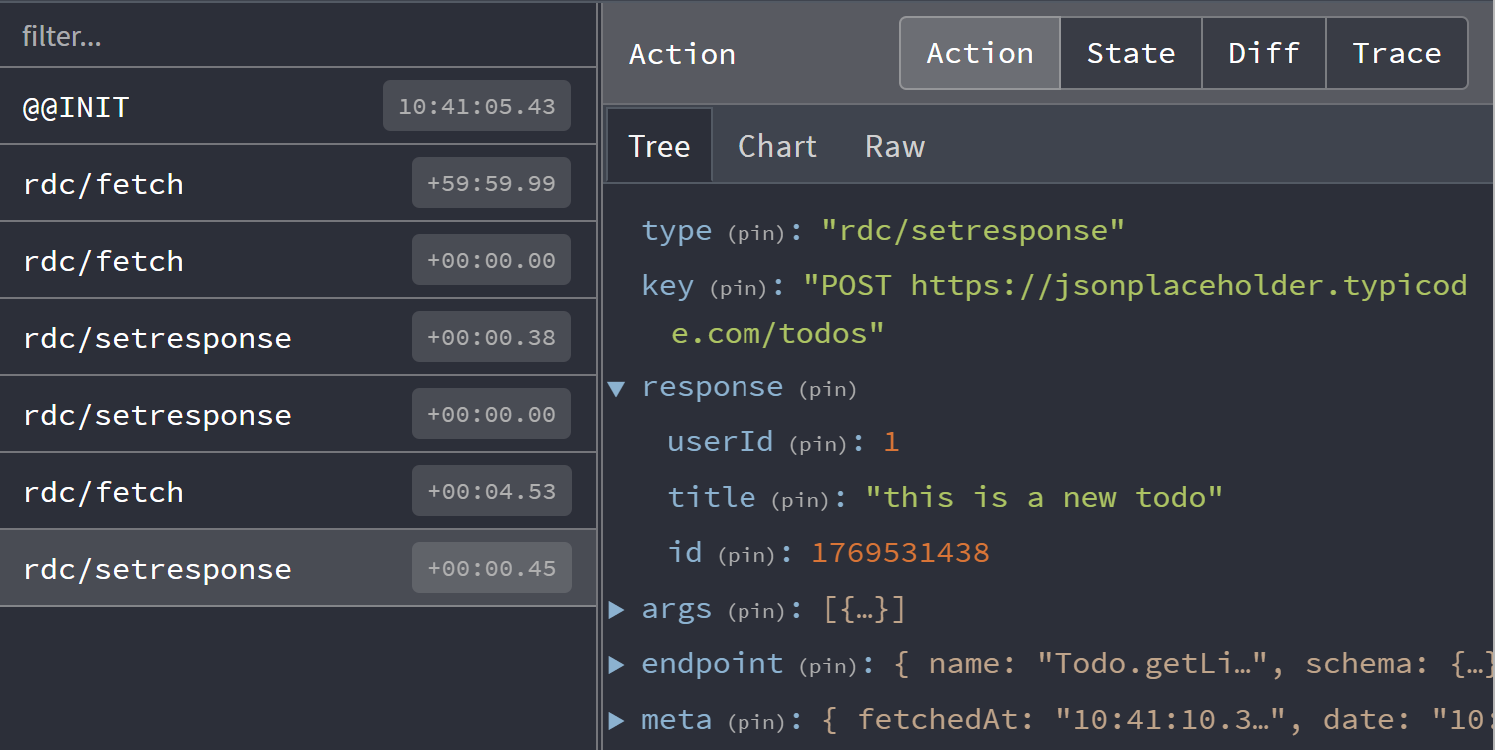
The [Controller](https://dataclient.io/docs/api/Controller.md) dispatches actions, making that page useful for understanding
what actions you see. Here we observe common actions of [fetch](https://dataclient.io/docs/api/Controller.md#fetch)
and [setResponse](https://dataclient.io/docs/api/Controller.md#setResponse).
> **Note**
>
> By default the devtool integration will filter duplicate [fetch](https://dataclient.io/docs/api/Controller.md#fetch) actions.
> This can be changed with [skipLogging](https://dataclient.io/docs/api/DevToolsManager.md#skiplogging) option.
### Control flow
Data Client uses the [flux store](https://facebookarchive.github.io/flux/docs/in-depth-overview/) pattern, making debugging
straightforward as each change is traceable and descriptive.
> [More about control flow](https://dataclient.io/docs/concepts/managers.md)
### State Inspection
Whens [schemas](https://dataclient.io/rest/api/schema.md) are used, responses are [normalized](https://dataclient.io/docs/concepts/normalization.md) into `entities`
and `endpoints` tables. This enables automatic performance advantages over simpler key-value fetch caches; especially
beneficial with dynamic (changing) data. This also eliminates data-inconsistency bugs.

Click on the **'state'**
tab in devtools to see the store's entire state. This can be useful to determine exactly where data is. There is
also a 'meta' section of the cache for information like when the request took place (useful for [TTL](https://dataclient.io/docs/concepts/expiry-policy.md)).
### State Diff
For monitoring a particular fetch response, it might be more useful to see how the store updates.
Click on the 'Diff' tab to see what changed.

Here we toggled the 'completed' status of a todo using an [optimistic update](https://dataclient.io/rest/guides/optimistic-updates.md).
### Action Tracing
Tracing is not enabled by default as it is very computationally expensive. However, it can be very useful
in tracking down where [actions](https://dataclient.io/docs/api/Actions.md) are dispatched from. Customize [DevToolsManager](https://dataclient.io/docs/api/DevToolsManager.md)
by setting the trace option to `true` with [getDefaultManagers](https://dataclient.io/docs/api/getDefaultManagers.md):
```tsx title="index.tsx"
import { DataProvider, getDefaultManagers } from '@data-client/react';
import { createRoot } from 'react-dom/client';
const managers = getDefaultManagers({
devToolsManager: { trace: true },
});
createRoot(document.body).render(
,
);
```
# Entity and Data Normalization
[Entities](https://dataclient.io/rest/api/Entity.md) have a primary key. This enables easy access via a lookup table.
This makes it easy to find, update, create, or delete the same data - no matter what
endpoint it was used in.
**State**

**Response**
```json
[
{ "id": 1, "title": "this is an entity" },
{ "id": 2, "title": "this is the second entity" }
]
```
**Endpoint**
```typescript
const getPresentations = new Endpoint(
() => fetch(`/presentations`).then(res => res.json()),
{ schema: new Collection([Presentation]) },
);
```
**Entity**
```typescript
class Presentation extends Entity {
id = '';
title = '';
static key = 'Presentation';
}
```
**Component**
```tsx
export function PresentationsPage() {
const presentation = useSuspense(getPresentations);
return presentation.map(presentation => (
{presentation.title}
));
}
```
Extracting entities from a response is known as `normalization`. Accessing a response reverses
the process via `denormalization`.
> **Info: Global Referential Equality**
>
> Using entities expands Reactive Data Client' global referential equality guarantee beyond the granularity of
> an entire endpoint response.
## Mutations and Dynamic Data
When an endpoint changes data, this is known as a [side effect](https://dataclient.io/rest/guides/side-effects.md). Marking an endpoint with [sideEffect: true](https://dataclient.io/rest/api/Endpoint.md#sideeffect)
tells Reactive Data Client that this endpoint is not idempotent, and thus should not be allowed in hooks
that may call the endpoint an arbitrary number of times like [useSuspense()](https://dataclient.io/docs/api/useSuspense.md) or [useFetch()](https://dataclient.io/docs/api/useFetch.md)
By including the changed data in the endpoint's response, Reactive Data Client is able to able to update
any entities it extracts by specifying the schema.
**Create**
```typescript
import { RestEndpoint, schema } from '@data-client/rest';
const todoCreate = new RestEndpoint({
urlPrefix: 'https://jsonplaceholder.typicode.com',
path: '/todos',
method: 'POST',
schema: new Collection([Todo]).push,
});
```
Example Usage
```tsx
import { useController } from '@data-client/react';
export default function NewTodoForm() {
const ctrl = useController();
return (
);
}
```
**Update**
```typescript
import { RestEndpoint } from '@data-client/rest';
const todoUpdate = new RestEndpoint({
urlPrefix: 'https://jsonplaceholder.typicode.com',
path: '/todos/:id',
method: 'PUT',
schema: Todo,
});
```
Example Usage
```tsx
import { useController } from '@data-client/react';
export default function UpdateTodoForm({ id }: { id: number }) {
const todo = useSuspense(todoDetail, { id });
const ctrl = useController();
return (
);
}
```
**Delete**
```typescript
import { Invalidate, RestEndpoint } from '@data-client/rest';
const todoDelete = new RestEndpoint({
urlPrefix: 'https://jsonplaceholder.typicode.com',
path: '/todos/:id',
method: 'DELETE',
schema: new Invalidate(Todo),
});
```
Example Usage
```tsx
import { useController } from '@data-client/react';
export default function TodoWithDelete({ todo }: { todo: Todo }) {
const ctrl = useController();
return (
{todo.title}
);
}
```
> **Info**
>
> Mutations automatically update the normalized cache, resulting in consistent and fresh data.
## Schema
Schemas are a declarative definition of how to [process responses](https://dataclient.io/rest/api/schema.md)
- [where](https://dataclient.io/rest/api/schema.md) to expect [Entities](https://dataclient.io/rest/api/Entity.md)
- Functions to [deserialize fields](https://dataclient.io/rest/guides/network-transform.md#deserializing-fields)
```typescript
import { RestEndpoint, Collection } from '@data-client/rest';
const getTodoList = new RestEndpoint({
urlPrefix: 'https://jsonplaceholder.typicode.com',
path: '/todos',
schema: new Collection([Todo]),
});
```
Placing our [Entity](https://dataclient.io/rest/api/Entity.md) `Todo` in an array [Collection](https://dataclient.io/rest/api/Collection.md), allows us to easly
[push](https://dataclient.io/rest/api/RestEndpoint.md#push) or [unshift](https://dataclient.io/rest/api/RestEndpoint.md#unshift) new `Todos` on it.
Aside from array, there are a few more 'schemas' provided for various patterns. The first two (Object and Array)
have shorthands of using object and array literals.
| Data Type | Mutable | Schema | Description | [Queryable](https://dataclient.io/rest/api/schema.md#queryable) |
| ------------------------------------------------------------------- | ------- | ------------------------------------------------------------------ | ------------------------------------------------------------------------------------------ | --------------------------------------------------------------- |
| [Object](https://en.wikipedia.org/wiki/Object_\(computer_science\)) | ✅ | [Entity](https://dataclient.io/rest/api/Entity.md) | single _unique_ object | ✅ |
| [Object](https://en.wikipedia.org/wiki/Object_\(computer_science\)) | ✅ | [Union(Entity)](https://dataclient.io/rest/api/Union.md) | polymorphic objects (`A \| B`) | ✅ |
| [Object](https://en.wikipedia.org/wiki/Object_\(computer_science\)) | 🛑 | [Object](https://dataclient.io/rest/api/Object.md) | statically known keys | 🛑 |
| [Object](https://en.wikipedia.org/wiki/Object_\(computer_science\)) | | [Invalidate(Entity)](https://dataclient.io/rest/api/Invalidate.md) | [delete an entity](https://dataclient.io/docs/concepts/expiry-policy.md#invalidate-entity) | 🛑 |
| [List](https://en.wikipedia.org/wiki/List_\(abstract_data_type\)) | ✅ | [Collection(Array)](https://dataclient.io/rest/api/Collection.md) | growable lists | ✅ |
| [List](https://en.wikipedia.org/wiki/List_\(abstract_data_type\)) | 🛑 | [Array](https://dataclient.io/rest/api/Array.md) | immutable lists | 🛑 |
| [List](https://en.wikipedia.org/wiki/List_\(abstract_data_type\)) | | [All](https://dataclient.io/rest/api/All.md) | list of all entities of a kind | ✅ |
| [Map](https://en.wikipedia.org/wiki/Associative_array) | ✅ | [Collection(Values)](https://dataclient.io/rest/api/Collection.md) | growable maps | ✅ |
| [Map](https://en.wikipedia.org/wiki/Associative_array) | 🛑 | [Values](https://dataclient.io/rest/api/Values.md) | immutable maps | 🛑 |
| [Scalar](https://en.wikipedia.org/wiki/Scalar_\(mathematics\)) | ✅ | [Scalar](https://dataclient.io/rest/api/Scalar.md) | lens-dependent entity fields | ✅ |
| any | | [Query(Queryable)](https://dataclient.io/rest/api/Query.md) | memoized custom transforms | ✅ |
| any | | [Lazy(Schema)](https://dataclient.io/rest/api/Lazy.md) | deferred denormalization | ✅ |
[Learn more](https://dataclient.io/rest/api/schema.md)
### Nesting
Additionally, [Entities](https://dataclient.io/rest/api/Entity.md) themselves can specify [nested schemas](https://dataclient.io/rest/guides/relational-data.md)
by specifying a [static schema](https://dataclient.io/rest/api/Entity.md#schema) member.
**Entity**
```typescript
import { Entity } from '@data-client/endpoint';
class Todo extends Entity {
id = 0;
user = User.fromJS();
title = '';
completed = false;
static key = 'Todo';
static schema = {
user: User,
};
}
class User extends Entity {
id = 0;
username = '';
static key = 'User';
}
```
**Response**
```json
{
"id": 5,
"user": {
"id": 10,
"username": "bob"
},
"title": "Write some Entities",
"completed": false
}
```
[Learn more](https://dataclient.io/rest/guides/relational-data.md)
### Data Representations
Additionally, functions can be [used as a schema](https://dataclient.io/rest/guides/network-transform.md#deserializing-fields). This will be called during denormalization.
This might be useful with representations like [bignumber](https://mikemcl.github.io/bignumber.js/) or [temporal instant](https://tc39.es/proposal-temporal/docs/instant.html)
```ts
import { Entity } from '@data-client/endpoint';
class Todo extends Entity {
id = 0;
user = User.fromJS();
title = '';
completed = false;
dueDate = Temporal.Instant.fromEpochMilliseconds(0);
static key = 'Todo';
static schema = {
user: User,
dueDate: Temporal.Instant.from,
};
}
```
> **Info**
>
> Due to the global referential equality guarantee - construction of members only occurs once
> per update.
## Store Inspection (debugging)
[DevTools browser extension](https://chrome.google.com/webstore/detail/redux-devtools/lmhkpmbekcpmknklioeibfkpmmfibljd?hl=en)
can be installed to inspect and [debug the store](https://dataclient.io/docs/getting-started/debugging.md).

[Data Client Debugging Guide »](https://dataclient.io/docs/getting-started/debugging.md)
## Benchmarks
Entity-level memoization delivers up to **20x** denormalization performance and **90x** faster mutation propagation
compared to non-normalized approaches. See the full [Performance](https://dataclient.io/docs/concepts/performance.md) page for
normalization benchmarks results as well as full React integration benchmarks.
# Endpoint Expiry Policy
By default, Reactive Data Client cache policy can be described as [stale-while-revalidate](https://web.dev/stale-while-revalidate/).
This means that when data is available it can avoid blocking the application by using the stale data. However, in the background
it will still refresh the data if old enough.
## Expiry status
### Fresh
Data in this state is considered new enough that it doesn't need to fetch.
### Stale
Data is still allowed to be shown, however Reactive Data Client might attempt to revalidate by fetching again.
[useSuspense()](https://dataclient.io/docs/api/useSuspense.md) considers fetching on mount as well as when its parameters change.
In these cases it will fetch if the data is considered stale.
> **Info: React Native**
>
> When using React Navigation, [focus events](https://reactnavigation.org/docs/use-focus-effect/) also trigger fetches for stale data.
### Invalid
Data should not be shown. Any components needing this data will trigger fetch and suspense. If no components care about this
data no action will be taken.
## Expiry Time
### Endpoint.dataExpiryLength
[Endpoint.dataExpiryLength](https://dataclient.io/rest/api/Endpoint.md#dataexpirylength) sets how long (in miliseconds) it takes for data
to transition from '[fresh](#fresh)' to '[stale](#stale)' status. Try setting it to a very low number like '50'
to make it becomes [stale](#stale) almost instantly; or a very large number to stay around for a long time.
Toggling between 'first' and 'second' changes the parameters. If the data is still considered fresh
you will continue to see the old time without any refresh.
```ts title="api/lastUpdated"
import { Entity, RestEndpoint } from '@data-client/rest';
export class TimedEntity extends Entity {
id = '';
updatedAt = Temporal.Instant.fromEpochMilliseconds(0);
static schema = {
updatedAt: Temporal.Instant.from,
};
}
export const lastUpdated = new RestEndpoint({
path: '/api/currentTime/:id',
schema: TimedEntity,
});
```
```ts title="getUpdated"
import { lastUpdated } from './api/lastUpdated';
export const getUpdated = lastUpdated.extend({ dataExpiryLength: 10000 });
```
```tsx title="TimePage"
import { getUpdated } from './getUpdated';
export default function TimePage({ id }) {
const { updatedAt } = useSuspense(getUpdated, { id });
return (
API time for {id}:{' '}
);
}
```
```tsx title="Navigator"
import TimePage from './TimePage';
function Navigator() {
const [id, setId] = React.useState('1');
const handleChange = e => setId(e.currentTarget.value);
return (
loading...
}>
Current Time:
);
}
render();
```
@data-client/rest
Long cache lifetime
```typescript title="LongLivingResource.ts"
import {
RestEndpoint,
RestGenerics,
resource,
} from '@data-client/rest';
// We can now use LongLivingEndpoint to create endpoints that will be cached for one hour
class LongLivingEndpoint<
O extends RestGenerics,
> extends RestEndpoint {
dataExpiryLength = 60 * 60 * 1000; // one hour
}
const LongLivingResource = resource({
path: '/:id',
Endpoint: LongLivingEndpoint,
});
```
Never retry on error
```typescript title="NoRetryResource.ts"
import {
RestEndpoint,
RestGenerics,
resource,
} from '@data-client/rest';
// We can now use NoRetryEndpoint to create endpoints that will be cached for one hour
class NoRetryEndpoint<
O extends RestGenerics,
> extends RestEndpoint {
errorExpiryLength = Infinity;
}
const NoRetryResource = resource({
path: '/:id',
Endpoint: NoRetryEndpoint,
});
```
### Endpoint.invalidIfStale
[Endpoint.invalidIfStale](https://dataclient.io/rest/api/Endpoint.md#invalidifstale) eliminates the '[stale](#stale)' status, making data
that expires immediately be considered '[invalid](#invalid)'.
This is demonstrated by the component suspending once its data goes stale. If the data is still
within the expiry time it just continues to display it.
```ts title="api/lastUpdated"
import { Entity, RestEndpoint } from '@data-client/rest';
export class TimedEntity extends Entity {
id = '';
updatedAt = Temporal.Instant.fromEpochMilliseconds(0);
static schema = {
updatedAt: Temporal.Instant.from,
};
}
export const lastUpdated = new RestEndpoint({
path: '/api/currentTime/:id',
schema: TimedEntity,
});
```
```ts title="getUpdated"
import { lastUpdated } from './api/lastUpdated';
export const getUpdated = lastUpdated.extend({
invalidIfStale: true,
dataExpiryLength: 5000,
});
```
```tsx title="TimePage"
import { getUpdated } from './getUpdated';
export default function TimePage({ id }) {
const { updatedAt } = useSuspense(getUpdated, { id });
return (
API time for {id}:{' '}
);
}
```
```tsx title="Navigator"
import TimePage from './TimePage';
function Navigator() {
const [id, setId] = React.useState('1');
const handleChange = e => setId(e.currentTarget.value);
return (
loading...
}>
Current Time:
);
}
render();
```
## Force refresh
We sometimes want to fetch new data; while continuing to show the old (stale) data.
### A specific endpoint
[Controller.fetch](https://dataclient.io/docs/api/Controller.md#fetch) can be used to trigger a fetch while still showing
the previous data. This can be done even with 'fresh' data.
```ts title="api/lastUpdated"
import { Entity, RestEndpoint } from '@data-client/rest';
export class TimedEntity extends Entity {
id = '';
updatedAt = Temporal.Instant.fromEpochMilliseconds(0);
static schema = {
updatedAt: Temporal.Instant.from,
};
}
export const lastUpdated = new RestEndpoint({
path: '/api/currentTime/:id',
schema: TimedEntity,
});
```
```tsx title="ShowTime"
import { lastUpdated } from './api/lastUpdated';
function ShowTime() {
const { updatedAt } = useSuspense(lastUpdated, { id: '1' });
const ctrl = useController();
return (
{' '}
);
}
render();
```
### Refresh visible endpoints
[Controller.expireAll()](https://dataclient.io/docs/api/Controller.md#expireAll) sets all responses' [expiry status](#expiry-status) matching `testKey` to [Stale](#stale).
```ts title="api/lastUpdated"
import { Entity, RestEndpoint } from '@data-client/rest';
export class TimedEntity extends Entity {
id = '';
updatedAt = Temporal.Instant.fromEpochMilliseconds(0);
static schema = {
updatedAt: Temporal.Instant.from,
};
}
export const lastUpdated = new RestEndpoint({
path: '/api/currentTime/:id',
schema: TimedEntity,
});
```
```tsx title="ShowTime"
import { lastUpdated } from './api/lastUpdated';
export default function ShowTime({ id }: { id: string }) {
const { updatedAt } = useSuspense(lastUpdated, { id });
const ctrl = useController();
return (
{id}{' '}
);
}
```
```tsx title="Loading"
export default function Loading({ id }: { id: string }) {
return
{id} Loading...
;
}
```
```tsx title="Demo"
import { AsyncBoundary } from '@data-client/react';
import { lastUpdated } from './api/lastUpdated';
import ShowTime from './ShowTime';
import Loading from './Loading';
function Demo() {
const ctrl = useController();
return (
}>
}>
}>
);
}
render();
```
## Invalidate (re-suspend) {#invalidate}
Both [endpoints](https://dataclient.io/rest/api/Endpoint.md) and [entities](https://dataclient.io/rest/api/Entity.md) can be targetted to be invalidated.
### A specific endpoint {#invalidate-endpoint}
In this example [invalidating the endpoint](https://dataclient.io/docs/api/Controller.md#invalidate) shows the loading fallback since the data is not allowed to be displayed.
```ts title="api/lastUpdated"
import { Entity, RestEndpoint } from '@data-client/rest';
export class TimedEntity extends Entity {
id = '';
updatedAt = Temporal.Instant.fromEpochMilliseconds(0);
static schema = {
updatedAt: Temporal.Instant.from,
};
}
export const lastUpdated = new RestEndpoint({
path: '/api/currentTime/:id',
schema: TimedEntity,
});
```
```tsx title="ShowTime"
import { lastUpdated } from './api/lastUpdated';
export default function ShowTime({ id }: { id: string }) {
const { updatedAt } = useSuspense(lastUpdated, { id });
const ctrl = useController();
return (
{id}{' '}
);
}
```
```tsx title="Loading"
export default function Loading({ id }: { id: string }) {
return
{id} Loading...
;
}
```
```tsx title="Demo"
import { AsyncBoundary } from '@data-client/react';
import { lastUpdated } from './api/lastUpdated';
import ShowTime from './ShowTime';
import Loading from './Loading';
function Demo() {
const ctrl = useController();
return (
}>
}>
}>
);
}
render();
```
### Any endpoint with an entity {#invalidate-entity}
Using the [Invalidate schema](https://dataclient.io/rest/api/Invalidate.md) allows us to invalidate _any_ endpoint that includes that relies on that [entity](https://dataclient.io/rest/api/Entity.md) in their
response. If the endpoint uses the entity in an [Array](https://dataclient.io/rest/api/Array.md), it will simply be removed from that [Array](https://dataclient.io/rest/api/Array.md).
```ts title="api/lastUpdated"
import { Entity, RestEndpoint } from '@data-client/rest';
export class TimedEntity extends Entity {
id = '';
updatedAt = Temporal.Instant.fromEpochMilliseconds(0);
static schema = {
updatedAt: Temporal.Instant.from,
};
}
export const lastUpdated = new RestEndpoint({
path: '/api/currentTime/:id',
schema: TimedEntity,
});
```
```tsx title="TimePage"
import { lastUpdated } from './api/lastUpdated';
export default function TimePage({ id }) {
const { updatedAt } = useSuspense(lastUpdated, { id });
return (
API time for {id}:{' '}
);
}
```
```tsx title="ShowTime"
import { Invalidate } from '@data-client/rest';
import { useLoading } from '@data-client/react';
import { TimedEntity } from './api/lastUpdated';
import TimePage from './TimePage';
const InvalidateTimedEntity = new Invalidate(TimedEntity);
export const deleteLastUpdated = new RestEndpoint({
path: '/api/currentTime/:id',
method: 'DELETE',
schema: InvalidateTimedEntity,
});
function ShowTime() {
const ctrl = useController();
const [handleDelete, loadingDelete] = useLoading(
() => ctrl.fetch(deleteLastUpdated, { id: '1' }),
[],
);
return (
loading...
}>
Current Time:
);
}
render();
```
[Controller.fetch()](https://dataclient.io/docs/api/Controller.md#fetch) lets us update the server and store.
We can use [Controller.setResponse()](https://dataclient.io/docs/api/Controller.md#setResponse) or [Controller.set()](https://dataclient.io/docs/api/Controller.md#set)
when we want to change the local store directly.
#### Conditional Invalidation based on data
If `invalidation` should happen only sometimes, based on the response data, we can
return `undefined` from [Entity.process](https://dataclient.io/rest/api/Entity.md#process).
```ts
class PriceLevel extends Entity {
price = 0;
amount = 0;
pk() {
return this.price;
}
static process(
input: [number, number],
parent: any,
key: string | undefined,
): any {
const [price, amount] = input;
if (amount === 0) return undefined;
return { price, amount };
}
}
```
# Endpoint Error Policy
[Endpoint.errorPolicy](https://dataclient.io/rest/api/Endpoint.md#errorpolicy) controls cache behavior upon a fetch rejection.
It uses the rejection error to determine whether it should be treated as 'soft' or 'hard' error.
### Soft
Soft errors will continue showing valid data if it exists. However, if no previous data is in the store,
it will reject with `error`. In this case [useSuspense()](https://dataclient.io/docs/api/useSuspense.md) throws the
error to be caught by the nearest [ErrorBoundary](https://dataclient.io/docs/api/ErrorBoundary.md) or [AsyncBoundary](https://dataclient.io/docs/api/AsyncBoundary.md)
### Hard
Hard errors always reject with `error` - even when data has previously made available.
'hard' | `undefined` can both be used to indicate this state.
```ts title="api/lastUpdated"
import { Entity, RestEndpoint } from '@data-client/rest';
export class TimedEntity extends Entity {
id = '';
updatedAt = Temporal.Instant.fromEpochMilliseconds(0);
static schema = {
updatedAt: Temporal.Instant.from,
};
}
export const lastUpdated = new RestEndpoint({
path: '/api/currentTime/:id',
schema: TimedEntity,
});
```
```ts title="getUpdated"
import { lastUpdated } from './api/lastUpdated';
export const getUpdated = lastUpdated.extend({
fetch(this: any, arg) {
// fail once with FAKE_ERROR when it is set
const error = this.FAKE_ERROR;
this.FAKE_ERROR = undefined;
return error ? Promise.reject(error) : lastUpdated(arg);
},
errorPolicy: error =>
error.status >= 500 ? ('soft' as const) : ('hard' as const),
FAKE_ERROR: undefined as Error | undefined,
});
export const createError = (status: number) =>
Object.assign(new Error('fake error'), { status });
```
```tsx title="TimePage"
import { getUpdated } from './getUpdated';
export default function TimePage({ id }) {
const { updatedAt } = useSuspense(getUpdated, { id });
return (
API time:{' '}
);
}
```
```tsx title="ShowTime"
import { getUpdated, createError } from './getUpdated';
import TimePage from './TimePage';
function ShowTime() {
const ctrl = useController();
return (
loading...
}>
);
}
render(
,
);
```
### Policy for RestEndpoint
Since `500`s indicate a failure of the server, we want to use stale data
if it exists. On the other hand, something like a `4xx` indicates 'user error', which
means the error indicates something about application flow - like if a record is deleted, resulting
in `404`. Keeping the record around would be inaccurate.
Since this is the typical behavior for REST APIs, this is the default policy in [@data-client/rest](https://www.npmjs.com/package/@data-client/rest)
```ts
errorPolicy(error) {
return error.status >= 500 ? 'soft' : undefined;
}
```
`undefined` is another way of specifying a [hard error](#hard)
# API Validation
[Entity.validate()](https://dataclient.io/rest/api/Entity.md#validate) is called during normalization and denormalization.
`undefined` indicates no error, and a string error message if there is an error.
## Field check
Validation happens after [Entity.process()](https://dataclient.io/rest/api/Entity.md#process) but before [Entity.fromJS()](https://dataclient.io/rest/api/Entity.md#fromJS),
thus operates on POJOs rather than an instance of the class.
Here we can make sure the title field is included, and of the expected type.
```typescript title="api/Article"
export class Article extends Entity {
id = '';
title = '';
static validate(processedEntity) {
if (!Object.hasOwn(processedEntity, 'title')) return 'missing title field';
if (typeof processedEntity.title !== 'string') return 'title is wrong type';
}
}
export const getArticle = new RestEndpoint({
path: '/article/:id',
schema: Article,
});
```
```tsx title="ArticlePage"
import { getArticle } from './api/Article';
function ArticlePage({ id }: { id: string }) {
const article = useSuspense(getArticle, { id });
return
{article.title}
;
}
render();
```
### All fields check
[validateRequired()](https://dataclient.io/rest/api/validateRequired.md) can be used to check if all defined fields are present.
```tsx title="api/Article"
export class Article extends Entity {
id = '';
title = '';
static validate(processedEntity) {
return validateRequired(processedEntity, this.defaults);
}
}
export const getArticle = new RestEndpoint({
path: '/article/:id',
schema: Article,
});
```
```tsx title="ArticlePage"
import { getArticle } from './api/Article';
function ArticlePage({ id }: { id: string }) {
const article = useSuspense(getArticle, { id });
return
{article.title}
;
}
render();
```
## Partial results
Another great use of validation is mixing endpoints that return [incomplete objects](https://dataclient.io/rest/guides/partial-entities.md). This is often
useful when some fields consume lots of bandwidth or are computationally expensive for the backend.
Consider using [validateRequired](https://dataclient.io/rest/api/validateRequired.md) to reduce code.
```typescript title="api/Article"
export class ArticlePreview extends Entity {
id = '';
title = '';
static key = 'Article';
}
export const getArticleList = new RestEndpoint({
path: '/article',
schema: [ArticlePreview],
});
export class ArticleFull extends ArticlePreview {
content = '';
createdAt = Temporal.Instant.fromEpochMilliseconds(0);
static schema = {
createdAt: Temporal.Instant.from,
};
static validate(processedEntity) {
if (!Object.hasOwn(processedEntity, 'content')) return 'Missing content';
}
}
export const getArticle = new RestEndpoint({
path: '/article/:id',
schema: ArticleFull,
});
```
```tsx title="ArticleDetail"
import { getArticle, getArticleList } from './api/Article';
function ArticleDetail({ id, onHome }: { id: string; onHome: () => void }) {
const article = useSuspense(getArticle, { id });
return (
);
}
return setRoute('')} />;
}
render();
```
# Safety beyond types
When a user causes mutations like creating, updating, or deleting resources, it's important
to have those changed be reflected in the application. A simple publish cache
that has no underlying knowledge of the data structures would require a refetch of any endpoints
that are changed. This would reduce performance and put extra burden on the backend.
However, like many other cases, a normalized cache - one with underlying knowledge of the relationships
between resources - is capable of keeping all data consistent and fresh without
any refetches.
## Update
Reactive Data Client uses your schema definitions to understand how to normalize response data into
an `entity table` and `result table`. Of course, this means that there is only ever one copy
of a given `entity`. Aside from providing consistency when using different response endpoints,
this means that by providing an accurate schema definition, Reactive Data Client can automatically keep
all data uses consistent and fresh. The default update endpoints [Resource.update](https://dataclient.io/rest/api/resource.md#update) and
[Resource.partialUpdate](https://dataclient.io/rest/api/resource.md#partialupdate) both do this automatically. [Read more about defining other
update endpoints](https://dataclient.io/rest/guides/side-effects.md)
## Delete
Reactive Data Client automatically deletes entity entries [schema.Invalidate](https://dataclient.io/rest/api/Invalidate.md) is used.
[Resource.delete](https://dataclient.io/rest/api/resource.md#delete)
provides such an endpoint.
## Create
Created entities are immediately available. They can also be added to existing [Collections](https://dataclient.io/rest/api/Collection.md)
with [.push](https://dataclient.io/rest/api/RestEndpoint.md#push), [.unshift](https://dataclient.io/rest/api/RestEndpoint.md#unshift), or [.assign](https://dataclient.io/rest/api/RestEndpoint.md#assign).
# Managers and Middleware
Reactive Data Client uses the [flux store](https://facebookarchive.github.io/flux/docs/in-depth-overview/) pattern, which is
characterized by an easy to [understand and debug](https://dataclient.io/docs/getting-started/debugging.md) the store's [undirectional data flow](https://en.wikipedia.org/wiki/Unidirectional_Data_Flow_\(computer_science\)). State updates are performed by a [reducer function](https://github.com/reactive/data-client/blob/master/packages/core/src/state/reducer/createReducer.ts#L19).
In flux architectures, it is critical all functions in the flux loop are [pure](https://react.dev/learn/keeping-components-pure).
Managers provide centralized orchestration of side effects. In other words, they are the means to interface
with the world outside Data Client.
For instance, [NetworkManager](https://dataclient.io/docs/api/NetworkManager.md) orchestrates data fetching and [SubscriptionManager](https://dataclient.io/docs/api/SubscriptionManager.md)
keeps track of which resources are subscribed with [useLive](https://dataclient.io/docs/api/useLive.md) or [useSubscription](https://dataclient.io/docs/api/useSubscription.md). By centralizing control, [NetworkManager](https://dataclient.io/docs/api/NetworkManager.md) automatically deduplicates fetches, and [SubscriptionManager](https://dataclient.io/docs/api/SubscriptionManager.md)
will keep only actively rendered resources updated.
This makes [Managers](https://dataclient.io/docs/api/Manager.md) the best way to integrate additional side-effects like
[logging](#middleware-logging), [error reporting](#error-reporting), [metrics](#metrics),
[notifications](#notifications), [data streams](#data-stream), [refreshing on focus or reconnect](#refresh-on-focus),
[cross-tab synchronization](#cross-tab-sync), and [offline persistence](#persistence).
They can also be customized to change core behaviors.
| Default managers | |
| ---------------------------------------------------------------------------- | ------------------------------------------------------------------------------------------------------------ |
| [NetworkManager](https://dataclient.io/docs/api/NetworkManager.md) | Turns fetch dispatches into network calls |
| [SubscriptionManager](https://dataclient.io/docs/api/SubscriptionManager.md) | Handles polling [subscriptions](https://dataclient.io/docs/getting-started/data-dependency.md#subscriptions) |
| [DevToolsManager](https://dataclient.io/docs/api/DevToolsManager.md) | Enables [debugging](https://dataclient.io/docs/getting-started/debugging.md) |
| Extra managers | |
| [LogoutManager](https://dataclient.io/docs/api/LogoutManager.md) | Handles HTTP `401` (or other logout conditions) |
## Examples
Reactive Data Client improves type-safety and ergonomics by performing dispatches and store access with
its [Controller](https://dataclient.io/docs/api/Controller.md)
### Middleware logging
```typescript
import type { Manager, Middleware } from '@data-client/react';
export default class LoggingManager implements Manager {
middleware: Middleware = controller => next => async action => {
console.log('before', action, controller.getState());
await next(action);
console.log('after', action, controller.getState());
};
cleanup() {}
}
```
### Error reporting {#error-reporting}
Report failed fetches to monitoring services like [Sentry](https://sentry.io) by inspecting
[SET\_RESPONSE](https://dataclient.io/docs/api/Actions.md#set_response) actions with `error` set.
```typescript
import {
type Manager,
type Middleware,
actionTypes,
} from '@data-client/react';
import { captureException } from '@sentry/react';
export default class ErrorReportManager implements Manager {
middleware: Middleware = controller => next => async action => {
if (action.type === actionTypes.SET_RESPONSE && action.error)
captureException(action.response, {
extra: { endpoint: action.endpoint.name, args: action.args },
});
return next(action);
};
cleanup() {}
}
```
### Metrics {#metrics}
Track fetch timing by observing [FETCH](https://dataclient.io/docs/api/Actions.md#fetch) actions. `action.meta.promise`
resolves when the fetch completes.
```typescript
import {
type Manager,
type Middleware,
actionTypes,
} from '@data-client/react';
import { trackTiming } from './analytics';
export default class MetricsManager implements Manager {
middleware: Middleware = controller => next => async action => {
if (action.type === actionTypes.FETCH) {
const start = performance.now();
action.meta.promise.finally(() => {
trackTiming(action.endpoint.name, performance.now() - start);
});
}
return next(action);
};
cleanup() {}
}
```
### Notifications (toasts) {#notifications}
Show a toast when any [mutation](https://dataclient.io/rest/guides/side-effects.md) succeeds or fails.
```typescript
import {
type Manager,
type Middleware,
actionTypes,
} from '@data-client/react';
import { toast } from './toast';
export default class ToastManager implements Manager {
middleware: Middleware = controller => next => async action => {
if (
action.type === actionTypes.SET_RESPONSE &&
action.endpoint.sideEffect
) {
if (action.error) toast.error(`${action.endpoint.name} failed`);
else toast.success(`${action.endpoint.name} succeeded`);
}
return next(action);
};
cleanup() {}
}
```
### Refresh on focus or reconnect {#refresh-on-focus}
[Controller.expireAll()](https://dataclient.io/docs/api/Controller.md#expireAll) marks data as [Stale](https://dataclient.io/docs/concepts/expiry-policy.md#stale),
triggering refetch of any _actively rendered_ data without suspending ([stale-while-revalidate](https://dataclient.io/docs/concepts/expiry-policy.md)).
[init()](https://dataclient.io/docs/api/Manager.md#init) and [cleanup()](https://dataclient.io/docs/api/Manager.md#cleanup) manage the event listeners.
```typescript
import type { Manager, Middleware, Controller } from '@data-client/react';
export default class RefreshManager implements Manager {
declare protected controller: Controller;
protected handle = () =>
this.controller.expireAll({ testKey: () => true });
middleware: Middleware = controller => {
this.controller = controller;
return next => async action => next(action);
};
init() {
window.addEventListener('focus', this.handle);
window.addEventListener('online', this.handle);
}
cleanup() {
window.removeEventListener('focus', this.handle);
window.removeEventListener('online', this.handle);
}
}
```
### Cross-tab synchronization {#cross-tab-sync}
When a mutation succeeds in one tab, mark data stale in all other tabs using
[BroadcastChannel](https://developer.mozilla.org/en-US/docs/Web/API/BroadcastChannel).
```typescript
import {
type Manager,
type Middleware,
actionTypes,
} from '@data-client/react';
export default class TabSyncManager implements Manager {
protected channel = new BroadcastChannel('data-client');
middleware: Middleware = controller => {
this.channel.onmessage = () =>
controller.expireAll({ testKey: () => true });
return next => async action => {
if (
action.type === actionTypes.SET_RESPONSE &&
action.endpoint.sideEffect &&
!action.error
)
this.channel.postMessage('mutation');
return next(action);
};
};
cleanup() {
this.channel.close();
}
}
```
### Offline persistence {#persistence}
Persist the store with [IndexedDB](https://developer.mozilla.org/en-US/docs/Web/API/IndexedDB_API)
(here via [idb-keyval](https://www.npmjs.com/package/idb-keyval)); restore it with
[DataProvider's initialState](https://dataclient.io/docs/api/DataProvider.md#initialState). IndexedDB writes are
asynchronous and use [structured clone](https://developer.mozilla.org/en-US/docs/Web/API/Web_Workers_API/Structured_clone_algorithm)
instead of blocking the main thread with JSON serialization like `localStorage` would.
Debouncing writes keeps rapid action bursts cheap. Consider [expiry times](https://dataclient.io/docs/concepts/expiry-policy.md)
when restoring.
```typescript
import type { Manager, Middleware } from '@data-client/react';
import { set } from 'idb-keyval';
export default class PersistManager implements Manager {
declare protected timer?: ReturnType;
middleware: Middleware = controller => next => async action => {
await next(action);
// debounce: persist at most once per second
clearTimeout(this.timer);
this.timer = setTimeout(() => {
// in-flight optimistic updates reference functions, so are not persistable
const state = { ...controller.getState(), optimistic: [] };
set('data-client', state);
}, 1000);
};
cleanup() {
clearTimeout(this.timer);
}
}
```
```tsx title="index.tsx"
import { DataProvider, getDefaultManagers } from '@data-client/react';
import { createRoot } from 'react-dom/client';
import { get } from 'idb-keyval';
import App from './App';
import PersistManager from './PersistManager';
const managers = [...getDefaultManagers(), new PersistManager()];
const initialState = await get('data-client');
createRoot(document.body).render(
,
);
```
### Middleware data stream (push-based) {#data-stream}
Adding a manager to process data pushed from the server by [websockets](https://developer.mozilla.org/en-US/docs/Web/API/WebSockets_API)
or [Server Sent Events](https://developer.mozilla.org/en-US/docs/Web/API/Server-sent_events) ensures
we can maintain fresh data when the data updates are independent of user action. For example, a trading app's
price, or a real-time collaborative editor.
```typescript
import type {
Manager,
Middleware,
Controller,
EntityInterface,
} from '@data-client/react';
export default class StreamManager implements Manager {
declare protected controller: Controller;
declare protected evtSource: WebSocket; // | EventSource;
declare protected createEventSource: () => WebSocket | EventSource;
declare protected entities: Record;
constructor(
createEventSource: () => WebSocket | EventSource,
entities: Record,
) {
this.createEventSource = createEventSource;
this.entities = entities;
}
middleware: Middleware = controller => {
this.controller = controller;
return next => async action => next(action);
};
connect() {
this.evtSource = this.createEventSource();
this.evtSource.onmessage = event => {
try {
const msg = JSON.parse(event.data);
if (msg.type in this.entities)
this.controller.set(
this.entities[msg.type],
...msg.args,
msg.data,
);
} catch (e) {
console.error('Failed to handle message');
console.error(e);
}
};
}
init() {
this.connect();
}
cleanup() {
this.evtSource?.close();
}
}
```
[Controller.set()](https://dataclient.io/docs/api/Controller.md#set) allows directly updating [Querable Schemas](https://dataclient.io/rest/api/schema.md#queryable)
directly with `event.data`.
#### Batching high-frequency updates {#batching}
Streams like exchange tickers can send hundreds of messages per second, and connections often start with a large snapshot.
Rather than calling `set()` per message, buffer them and write each batch with an [Array](https://dataclient.io/rest/api/Array.md) schema.
[Controller.set(\[Entity\], rows)](https://dataclient.io/docs/api/Controller.md#set-array) normalizes every row in one store update.
```typescript
export default class StreamManager implements Manager {
// ...
protected buffer: Record = {};
declare protected flushTimeout?: ReturnType;
connect() {
this.evtSource = this.createEventSource();
this.evtSource.onmessage = event => {
const msg = JSON.parse(event.data);
if (msg.type in this.entities) {
(this.buffer[msg.type] ??= []).push(msg.data);
this.flushTimeout ??= setTimeout(this.flush, 50);
}
};
}
flush = () => {
const buffer = this.buffer;
this.buffer = {};
this.flushTimeout = undefined;
for (const type in buffer) {
this.controller.set([this.entities[type]], buffer[type]);
}
};
cleanup() {
this.evtSource?.close();
clearTimeout(this.flushTimeout);
this.flushTimeout = undefined;
this.buffer = {};
}
}
```
Rows in one batch that share a pk merge in order and skip [Entity.shouldReorder()](https://dataclient.io/rest/api/Entity.md#shouldreorder),
so buffer only the latest message per pk when order matters.
Try both buttons below. This browser check starts from an empty store and times `Promise.all` of 500 `set()`
calls against one batch `set()`. Both paths are one React commit, and each writes 500 new prices.
```ts title="Ticker"
import { Entity } from '@data-client/rest';
export class Ticker extends Entity {
product_id = '';
price = 0;
pk() {
return this.product_id;
}
static key = 'Ticker';
}
export const newPrices = () =>
Array.from({ length: 500 }, (_, i) => ({
product_id: `COIN-${i}`,
price: Math.round(Math.random() * 10000) / 100,
}));
```
```tsx title="PriceStream"
import { useController, useQuery } from '@data-client/react';
import { Ticker, newPrices } from './Ticker';
function PriceStream() {
const ctrl = useController();
const [timing, setTiming] = React.useState('');
const first = useQuery(Ticker, { product_id: 'COIN-0' });
const time = async (
label: string,
write: (rows: ReturnType) => Promise,
) => {
const rows = newPrices();
const start = performance.now();
await write(rows);
setTiming(`${label}: ${(performance.now() - start).toFixed(1)} ms`);
};
const perRow = () =>
time('500 set() calls', rows =>
Promise.all(
rows.map(row => ctrl.set(Ticker, { product_id: row.product_id }, row)),
),
);
const batch = () => time('1 batch set()', rows => ctrl.set([Ticker], rows));
return (
{' '}
COIN-0: {first ? `$${first.price}` : 'no data yet'}
{timing}
);
}
render();
```
#### Skipping DevTools for high-frequency updates
When using WebSockets or other real-time data sources, you may want to skip logging
certain high-frequency actions to [DevToolsManager](https://dataclient.io/docs/api/DevToolsManager.md) to avoid
overwhelming the browser extension.
```typescript
import { getDefaultManagers, actionTypes } from '@data-client/react';
import StreamManager from './StreamManager';
import { Ticker } from './Ticker';
export default function getManagers() {
return [
new StreamManager(() => new WebSocket('wss://ws-feed.example.com'), {
ticker: Ticker,
}),
...getDefaultManagers({
devToolsManager: {
// Increase latency buffer for high-frequency updates
latency: 1000,
// Skip WebSocket SET actions to avoid log spam
// (batched writes use the [Ticker] schema)
predicate: (state, action) =>
action.type !== actionTypes.SET ||
(action.schema !== Ticker && action.schema[0] !== Ticker),
},
}),
];
}
```
### Coin App
Example app: [coin-app](https://github.com/reactive/data-client/tree/master/examples/coin-app) ([`src/getManagers.ts`](https://github.com/reactive/data-client/blob/master/examples/coin-app/src/getManagers.ts), [`src/resources/Ticker.ts`](https://github.com/reactive/data-client/blob/master/examples/coin-app/src/resources/Ticker.ts), [`src/pages/AssetDetail/AssetPrice.tsx`](https://github.com/reactive/data-client/blob/master/examples/coin-app/src/pages/AssetDetail/AssetPrice.tsx), [`src/resources/StreamManager.ts`](https://github.com/reactive/data-client/blob/master/examples/coin-app/src/resources/StreamManager.ts))
# Performance
In addition to the data integirty benefits, [normalized caching](https://dataclient.io/docs/concepts/normalization.md) with entity-level memoization enables
significant performance gains for rich interactive applications.
## React rendering benchmarks
Full rendering pipeline (fetch through DOM commit) measured in a real browser via Playwright.
React baseline uses useEffect + useState from the React docs.
[View benchmark source](https://github.com/reactive/data-client/tree/master/examples/benchmark-react) · [Performance over time](https://reactive.github.io/data-client/react-bench/)
- **Cached Navigation**: Navigating between a full list and items in the list ten times.
- **Mutation Propagation**: One store write updates every view that references the entity.
- **Scaling**: Mutations with 10k items in the list rendered.
These benchmarks measure the framework's impact within the larger system. That
makes them most useful as comparisons between approaches, rather than as
absolute measurements of an application's overall performance. We use them to
guide library optimizations and catch performance regressions over time.
## Normalization benchmarks
Denormalization compared with the legacy [normalizr](https://github.com/paularmstrong/normalizr)
library. Entity-level memoization maintains global referential equality and
speeds up repeated access, including after [mutations](https://dataclient.io/docs/getting-started/mutations.md).
[View benchmark source](https://github.com/reactive/data-client/blob/master/examples/benchmark)
# Mocking data for Storybook
[Storybook](https://storybook.js.org/) is a great utility to do isolated development and
testing, potentially speeding up development time greatly.
[\](https://dataclient.io/docs/api/MockResolver.md) enables easy loading of [fixtures or interceptors](https://dataclient.io/docs/api/Fixtures.md) to see what
different network responses might look like. It can be layered, composed, and even used
for [imperative fetches](https://dataclient.io/docs/api/Controller.md#fetch) usually used with side-effect endpoints like [getList.push](https://dataclient.io/rest/api/resource.md#push) and [update](https://dataclient.io/rest/api/resource.md#update).
## Setup
**Resource**
```typescript title="ArticleResource.ts"
export class Article extends Entity {
id: number | undefined = undefined;
content = '';
author: number | null = null;
contributors: number[] = [];
static key = 'Article';
}
export const ArticleResource = resource({
urlPrefix: 'http://test.com',
path: '/article/:id',
schema: Article,
searchParams: {} as { maxResults: number },
});
export let ArticleFixtures: Record = {};
```
**Component**
```tsx title="ArticleList.tsx"
import { ArticleResource } from 'resources/ArticleResource';
import ArticleSummary from './ArticleSummary';
export default function ArticleList({
maxResults,
}: {
maxResults: number;
}) {
const articles = useSuspense(ArticleResource.getList, { maxResults });
return (
{articles.map(article => (
))}
);
}
```
## Fixtures
We'll test three cases with our [fixtures and interceptors](https://dataclient.io/docs/api/Fixtures.md): some interesting results in the list, an empty list, and data not
existing so loading fallback is shown.
```typescript title="ArticleResource.ts"
// leave out in production so we don't bloat the bundle
if (process.env.NODE_ENV !== 'production') {
ArticleFixtures = {
full: [
{
endpoint: ArticleResource.getList,
args: [{ maxResults: 10 }] as const,
response: [
{
id: 5,
content: 'have a merry christmas',
author: 2,
contributors: [],
},
{
id: 532,
content: 'never again',
author: 23,
contributors: [5],
},
],
},
{
endpoint: ArticleResource.update,
response: ({ id }, body) => ({
...body,
id,
}),
},
],
empty: [
{
endpoint: ArticleResource.getList,
args: [{ maxResults: 10 }] as const,
response: [],
},
],
error: [
{
endpoint: ArticleResource.getList,
args: [{ maxResults: 10 }] as const,
response: {
message: 'Bad request',
status: 400,
name: 'Not Found',
},
error: true,
},
],
loading: [],
};
}
```
## Decorators
You'll need to add the appropriate [global decorators](https://storybook.js.org/docs/react/writing-stories/decorators#global-decorators) to establish the correct context.
This should resemble what you have added in [initial setup](https://dataclient.io/docs/getting-started/installation.md#add-provider-at-top-level-component)
```tsx title=".storybook/preview.tsx"
import { Suspense } from 'react';
import { DataProvider, AsyncBoundary } from '@data-client/react';
export const decorators = [
Story => (
),
];
```
## Story
Wrapping our component with [\](https://dataclient.io/docs/api/MockResolver.md) enables us to declaratively
control how Reactive Data Client' fetches are resolved.
Here we select which fixtures should be used by [storybook controls](https://storybook.js.org/docs/react/essentials/controls).
```tsx title="ArticleList.stories.tsx"
import { type StoryObj } from '@storybook/react';
import { MockResolver } from '@data-client/test';
import type { Fixture } from '@data-client/test';
import ArticleList from 'ArticleList';
import { ArticleFixtures } from 'resources/ArticleResource';
export default {
title: 'Pages/ArticleList',
component: ArticleList,
argTypes: {
result: {
description: 'Results',
defaultValue: 'full',
control: {
type: 'select',
options: Object.keys(ArticleFixtures),
},
},
},
};
export const FullArticleList: StoryObj<{ result: keyof typeof options }> =
{
render: ({ result }) => (
),
args: { result: 'full' },
};
```
# Unit testing hooks
> **Warning**
>
> Be careful when using [jest.mock](https://jestjs.io/docs/jest-object#jestmockmodulename-factory-options) on modules like Reactive Data Client. Eliminating expected
> exports can lead to hard-to trace
> errors like `TypeError: Class extends value undefined is not a function or null`.
>
> Instead either do a [partial mock](https://jestjs.io/docs/mock-functions#mocking-partials),
> or better [mockResolvedValue](https://jestjs.io/docs/mock-functions#mocking-modules) on your
> endpoints.
Hooks allow you to pull complex behaviors out of your components into succinct,
composable functions. This makes testing component behavior potentially much
easier. But how does this work if you want to use hooks from `Reactive Data Client`?
We have provided some simple utilities to reduce boilerplate for unit tests
that are wrappers around [@testing-library/react-hooks](https://github.com/testing-library/react-hooks-testing-library)'s [renderHook()](https://react-hooks-testing-library.com/reference/api#renderhook-options).
We want a [renderDataHook()](https://dataclient.io/docs/api/renderDataHook.md) function that renders in the context of both
a `Provider` and `Suspense` boundary.
These will generally be done during test setup. Cleanup runs automatically after each test.
> **Note**
>
> `renderDataHook()` creates a Provider context with new manager instances. This means each call
> to `renderDataHook()` will result in a completely fresh cache state as well as manager state.
### Polyfill fetch in node < 18
Node doesn't come with fetch out of the box, so we need to be sure to polyfill it.
```bash
npm install --save-dev whatwg-fetch
```
### Jest
```js
// jest.config.js
module.exports = {
// other things
setupFiles: ['./testSetup.js'],
};
```
```js
// testSetup.js
require('whatwg-fetch');
```
### Example:
**@data-client/react**
```typescript
import nock from 'nock';
import { renderDataHook } from '@data-client/test';
describe('useSuspense()', () => {
beforeEach(() => {
nock(/.*/)
.persist()
.defaultReplyHeaders({
'Access-Control-Allow-Origin': '*',
'Content-Type': 'application/json',
})
.options(/.*/)
.reply(200)
.get(`/article/0`)
.reply(403, {});
});
afterEach(() => {
nock.cleanAll();
});
it('should throw errors on bad network', async () => {
const { result, waitFor } = renderDataHook(() => {
return useSuspense(ArticleResource.get, {
title: '0',
});
});
expect(result.current).toBeUndefined();
await waitFor(() => expect(result.current).toBeDefined());
expect(result.error).toBeDefined();
expect((result.error as any).status).toBe(403);
});
});
```
**@data-client/react/redux**
```typescript
import nock from 'nock';
import { makeRenderDataHook } from '@data-client/test';
import { DataProvider } from '@data-client/react/redux';
describe('useSuspense()', () => {
let renderDataHook: ReturnType;
beforeEach(() => {
nock(/.*/)
.persist()
.defaultReplyHeaders({
'Access-Control-Allow-Origin': '*',
'Content-Type': 'application/json',
})
.options(/.*/)
.reply(200)
.get(`/article/0`)
.reply(403, {});
renderDataHook = makeRenderDataHook(DataProvider);
});
afterEach(() => {
nock.cleanAll();
});
it('should throw errors on bad network', async () => {
const { result, waitFor } = renderDataHook(() => {
return useSuspense(ArticleResource.get, {
title: '0',
});
});
expect(result.current).toBeUndefined();
await waitFor(() => expect(result.current).toBeDefined());
expect(result.error).toBeDefined();
expect((result.error as any).status).toBe(403);
});
});
```
# Unit testing components
> **Warning**
>
> Be careful when using [jest.mock](https://jestjs.io/docs/jest-object#jestmockmodulename-factory-options) on modules like Reactive Data Client. Eliminating expected
> exports can lead to hard-to trace
> errors like `TypeError: Class extends value undefined is not a function or null`.
>
> Instead either do a [partial mock](https://jestjs.io/docs/mock-functions#mocking-partials),
> or better [mockResolvedValue](https://jestjs.io/docs/mock-functions#mocking-modules) on your
> endpoints.
If you need to add unit tests to your components to check some behavior you might want
avoid dealing with network fetch cycle as that is probably orthogonal to what your are
trying to test. Using [\](https://dataclient.io/docs/api/DataProvider.md) with [mockInitialState](https://dataclient.io/docs/api/mockInitialState.md) and [Fixtures](https://dataclient.io/docs/api/Fixtures.md) in our tests allow
us to prime the cache with provided fixtures so the components will immediately render
with said results.
Testing user interactions that trigger mutations can be aided with the use of [\](https://dataclient.io/docs/api/MockResolver.md)
and [Interceptors](https://dataclient.io/docs/api/Fixtures.md#interceptor)
```typescript title="__tests__/fixtures.ts"
export default {
full: [
{
endpoint: ArticleResource.getList,
args: [{ maxResults: 10 }] as const,
response: [
{
id: 5,
content: 'have a merry christmas',
author: 2,
contributors: [],
},
{
id: 532,
content: 'never again',
author: 23,
contributors: [5],
},
],
},
{
endpoint: ArticleResource.update,
args: [{ id: 532 }] as const,
response({ id }, body) {
return {
id,
...body,
};
},
},
],
empty: [
{
endpoint: ArticleResource.getList,
args: [{ maxResults: 10 }] as const,
response: [],
},
],
error: [
{
endpoint: ArticleResource.getList,
args: [{ maxResults: 10 }] as const,
response: { message: 'Bad request', status: 400, name: 'Not Found' },
error: true,
},
],
loading: [],
};
```
```tsx title="__tests__/ArticleList.tsx"
import { DataProvider, AsyncBoundary } from '@data-client/react';
import { render, waitFor } from '@testing-library/react';
import { MockResolver, mockInitialState } from '@data-client/test';
import ArticleList from 'components/ArticleList';
import results from './fixtures';
describe('', () => {
it('renders', () => {
const tree = (
);
const { findByText } = render(tree);
const content = findByText(results.full.result[0].content);
expect(content).toBeDefined();
});
it('suspends then resolves', async () => {
const tree = (
);
const { findByText } = render(tree);
expect(findByText('loading')).toBeDefined();
await waitFor(expect(findByText(results.full.result[0].content)).toBeDefined());
})
});
```
# Images and other Media
After setting up Reactive Data Client for structured data fetching, you might want to incorporate
some media fetches as well to take advantage of suspense and [concurrent mode support](https://dataclient.io/docs/guides/render-as-you-fetch.md).
## Storing ArrayBuffer
[Resource](https://dataclient.io/rest/api/resource.md) and [Entity](https://dataclient.io/rest/api/Entity.md) should not be used in this case, since they both represent
string -> value map structures. Instead, we'll define our own simple [Endpoint](https://dataclient.io/rest/api/Endpoint.md).
```typescript
import { Endpoint } from '@data-client/react';
export const getPhoto = new Endpoint(async ({ userId }: { userId: string }) => {
const response = await fetch(`/users/${userId}/photo`);
const photoArrayBuffer = await response.arrayBuffer();
return photoArrayBuffer;
});
```
**useSuspense**
```tsx
// photo is typed as ArrayBuffer
const photo = useSuspense(getPhoto, { userId });
```
**useCache**
```tsx
// photo will be undefined if the fetch hasn't completed
// photo will be ArrayBuffer if the fetch has completed
const photo = useCache(getPhoto, { userId });
```
**JS/Node**
```tsx
// photo is typed as ArrayBuffer
const photo = await getPhoto({ userId });
```
## Just Images
In many cases, it would be useful to suspend loading of expensive items like
images using suspense. This becomes especially powerful [with the fetch as you render](https://dataclient.io/docs/guides/render-as-you-fetch.md) pattern in concurrent mode.
[@data-client/img](https://www.npmjs.com/package/@data-client/img) provides use with `` component that suspends, as well as `getImage` endpoint to prefetch.
## Installation
```bash
npm install @data-client/img
```
## Usage
```tsx title="Profile.tsx"
import React, { ImgHTMLAttributes } from 'react';
import { useSuspense } from '@data-client/react';
import { Img } from '@data-client/img';
export default function Profile({ username }: { username: string }) {
const user = useSuspense(UserResource.get, { username });
return (
{user.fullName}
);
}
```
#### Prefetching
Note this will cascade the requests, waiting for user to resolve before
the image request can start. If the image url is deterministic based on the same parameters, we can start that request at the same time as the user request:
```tsx title="Profile.tsx"
import React, { ImgHTMLAttributes } from 'react';
import { useSuspense, useFetch } from '@data-client/react';
import { Img, getImage } from '@data-client/img';
export default function Profile({ username }: { username: string }) {
const imageSrc = `/profile_images/${username}}`;
useFetch(getImage, { src: imageSrc });
const user = useSuspense(UserResource.get, { username });
return (
{user.fullName}
);
}
```
When using the [fetch as you render](https://dataclient.io/docs/guides/render-as-you-fetch.md) pattern in concurrent mode, [Controller.fetch()](https://dataclient.io/docs/api/Controller.md#fetch) with the `getImage`
[Endpoint](https://dataclient.io/rest/api/Endpoint.md) to preload the image.
# TypeScript Standard Endpoints
[Endpoints](https://dataclient.io/rest/api/Endpoint.md) describe an asynchronous [API](https://www.freecodecamp.org/news/what-is-an-api-in-english-please-b880a3214a82/). This includes both runtime behavior as well as (optionally) typing.
```bash
npm install @data-client/endpoint
```
```typescript
interface Todo {
userId: number;
id: number;
title: string;
completed: boolean;
}
interface Params {
id: number;
}
const fetchTodoDetail = ({ id }: Params): Promise =>
fetch(`https://jsonplaceholder.typicode.com/todos/${id}`).then(res =>
res.json(),
);
const todoDetail = new Endpoint(fetchTodoDetail);
```
```js
const fetchTodoDetail = ({ id }) =>
fetch(`https://jsonplaceholder.typicode.com/todos/${id}`).then(res =>
res.json(),
);
const todoDetail = new Endpoint(fetchTodoDetail);
```
Example Usage
```js
console.log(await todoDetail({ id: '1' }));
```
```json
{
"userId": 1,
"id": 1,
"title": "delectus aut autem",
"completed": false
}
```
We will likely want to use this endpoint in many places with differing needs.
By defining a reusable function of _just_ the network definition, we empower
its use in _any_ context.
This is especially useful when we start adding more information related to the
endpoint. For instance, TypeScript definitions help us avoid common mistakes, typos
and speed up development with autocomplete.
By _tightly coupling_ the interface definition, while _loosely coupling_ its usage,
we reduce boilerplate, complexity, and common mistakes, while increasing performance and
enabling global application consistency and integrity even in the face of unreliable
asynchronous data.
## More than just a function
In addition to an async function and (optional) types, [Endpoint](https://dataclient.io/rest/api/Endpoint.md)s are objects,
allowing them to provide any additional relevant information about the endpoint itself.
For instance, to allow integration into a cache as well as knowing when to recompute and/or refetch
when parameters change, Endpoints have a [key()](https://dataclient.io/rest/api/Endpoint.md#key) member that serializes
the endpoint and parameters to a unique string.
```js
console.log(todoDetail.key({ id: '1' }));
// fetchTodoDetail {"id":"1"}
```
### Members
The second optional arg is an object to initialize the endpoint with. By avoiding arrow functions,
we can use [this](https://developer.mozilla.org/en-US/docs/Web/JavaScript/Reference/Operators/this)
to access other members we defined.
```js
const todoDetailWithCustomizedKey = new Endpoint(fetchTodoDetail, {
key({ id }) {
return `${this.endpointIdentifier}/${id}`;
},
endpointIdentifier: 'todoDetail',
});
```
```js
console.log(todoDetailWithCustomizedKey.key({ id: '1' }));
// todoDetail/1
```
### Endpoint.extend()
For convenience, [extend()](https://dataclient.io/rest/api/Endpoint.md#extend) allows type-correct
prototypical inheritance extensions of an endpoint.
This is greatly reduces boilerplate when strong patterns are established for an API like
authentication.
Here we show the benefits of customizing [method](https://developer.mozilla.org/en-US/docs/Web/HTTP/Methods) member.
```js
const fetchTodoDetail = function ({ id }) {
return fetch(`${this.urlBase}/todos/${id}`, { method: this.method }).then(
res => res.json(),
);
};
const todoDetail = new Endpoint(fetchTodoDetail, {
method: 'GET',
urlBase: 'https://jsonplaceholder.typicode.com',
});
```
```js
const todoCreate = todoDetail.extend({ method: 'POST' });
const todoUpdate = todoDetail.extend({ method: 'PUT' });
```
# Redux integration
Using [redux](https://redux.js.org/) is completely optional. However, for many it means easy integration or migration
with existing projects, or just a nice centralized state management abstraction.
**just Reactive Data Client**
```tsx title="index.tsx"
import {
ExternalDataProvider,
prepareStore,
type Middleware,
} from '@data-client/react/redux';
import { getDefaultManagers, Controller } from '@data-client/react';
import { createRoot } from 'react-dom/client';
const managers = getDefaultManagers();
// be sure to include your other reducers here
const otherReducers = {};
const extraMiddlewares: Middleware = [];
const { store, selector, controller } = prepareStore(
initialState,
managers,
Controller,
otherReducers,
extraMiddlewares,
);
createRoot(document.body).render(
,
);
```
**with React-Redux**
```tsx title="index.tsx"
import {
ExternalDataProvider,
prepareStore,
type Middleware,
} from '@data-client/react/redux';
import { getDefaultManagers, Controller } from '@data-client/react';
import { Provider } from 'react-redux';
import { createRoot } from 'react-dom/client';
const managers = getDefaultManagers();
// be sure to include your other reducers here
const otherReducers = {};
const extraMiddlewares: Middleware = [];
const { store, selector, controller } = prepareStore(
initialState,
managers,
Controller,
otherReducers,
extraMiddlewares,
);
createRoot(document.body).render(
,
);
```
Then you'll want to use the [\](https://dataclient.io/docs/api/ExternalDataProvider.md) instead of
[\](https://dataclient.io/docs/api/DataProvider.md) and pass in the store and a selector function to grab
the Reactive Data Client specific part of the state.
> **Info: Note**
>
> You should only use ONE provider; nested another provider will override the previous.
> **Info: Note**
>
> Because `Reactive Data Client` [manager middlewares](https://dataclient.io/docs/api/Manager.md#middleware) return promises,
> all redux middlewares are placed after the [Managers](https://dataclient.io/docs/concepts/managers.md).
>
> If you need a middlware to run before the managers, you will need to wrap it in a [manager](https://dataclient.io/docs/api/Manager.md).
# Server Side Rendering
Server Side Rendering (SSR) can improve the first-load performance of your application. Reactive Data
Client takes this one step further by pre-populating the data store. Unlike other SSR methodologies,
Reactive Data Client becomes interactive the moment the page is visible, making [data mutations](https://dataclient.io/docs/getting-started/mutations.md) instantaneous. Additionally there is no need for additional data fetches that increase server
load and slow client hydration, potentially causing application stutters.
## NextJS SSR {#nextjs}
### App Router
NextJS 12 includes a new way of routing in the '/app' directory. This allows further
performance improvements, as well as dynamic and nested routing.
#### Root Layout
Place [DataProvider](https://dataclient.io/docs/api/DataProvider.md) in your [root layout](https://nextjs.org/docs/app/building-your-application/routing/pages-and-layouts#root-layout-required)
```tsx title="app/layout.tsx"
import { DataProvider } from '@data-client/react/nextjs';
import { AsyncBoundary } from '@data-client/react';
export default function RootLayout({ children }) {
return (
Title{children}
);
}
```
#### Client Components
To keep your data fresh and performant, you can use client components and [useSuspense()](https://dataclient.io/docs/api/useSuspense.md)
```tsx title="app/todos/[userId]/page.tsx"
'use client';
import { useSuspense } from '@data-client/react';
import { TodoResource } from '@/resources/Todo';
export default function InteractivePage({ params }: { params: { userId: number } }) {
const todos = useSuspense(TodoResource.getList, params);
return ;
}
```
Note that this is identical to how you would write components without SSR. This makes
makes the components usable across platforms.
#### Server Components
However, if your data never changes, you can slightly decrease the javascript bundle sent, by
using a server component. Simply `await` the endpoint:
```tsx title="app/todos/[userId]/page.tsx"
import { TodoResource } from '@/resources/Todo';
export default async function StaticPage({ params }: { params: { userId: number } }) {
const todos = await TodoResource.getList(params);
return ;
}
```
#### Demo
Example app: [nextjs](https://github.com/reactive/data-client/tree/master/examples/nextjs) ([`components/todo/TodoList.tsx`](https://github.com/reactive/data-client/blob/master/examples/nextjs/components/todo/TodoList.tsx), [`app/layout.tsx`](https://github.com/reactive/data-client/blob/master/examples/nextjs/app/layout.tsx))
#### Class mangling and Entity.key
NextJS will rename classes for production builds. Due to this, it's critical to
define [Entity.key](https://dataclient.io/rest/api/Entity.md#key) as its default implementation is based on
the class name.
```ts
class User extends Entity {
id = '';
username = '';
static key = 'User';
}
```
### Pages Router
With NextJS < 14, you might be using the pages router. For this we have [Document](https://nextjs.org/docs/advanced-features/custom-document)
and NextJS specific wrapper for [App](https://nextjs.org/docs/advanced-features/custom-app)
```bash
npm install @data-client/ssr @data-client/redux redux
```
```tsx title="pages/_document.tsx"
import { DataClientDocument } from '@data-client/ssr/nextjs';
export default DataClientDocument;
```
```tsx title="pages/_app.tsx"
import { AppDataProvider } from '@data-client/ssr/nextjs';
import type { AppProps } from 'next/app';
export default function App({ Component, pageProps }: AppProps) {
return (
);
}
```
> **Warning**
>
> When fetching from parameters from [useRouter()](https://nextjs.org/docs/api-reference/next/router#userouter), you will need to
> add getServerSideProps to avoid [NextJS setting router.query to nothing](https://nextjs.org/docs/advanced-features/automatic-static-optimization)
>
> ```typescript
> export default function MyComponent() {
> const id: string; = useRouter().query.id;
> const post = useSuspense(getPost, { id });
> // etc
> }
> export const getServerSideProps = () => ({ props: {} });
> ```
#### Further customizing Document
To further customize Document, simply extend from the provided document.
Make sure you use `super.getInitialProps()` instead of `Document.getInitialProps()`
or the Reactive Data Client code won't run!
```tsx title="pages/_document.tsx"
import { Html, Head, Main, NextScript } from 'next/document';
import { DataClientDocument } from '@data-client/ssr/nextjs';
export default class MyDocument extends DataClientDocument {
static async getInitialProps(ctx) {
const originalRenderPage = ctx.renderPage;
// Run the React rendering logic synchronously
ctx.renderPage = () =>
originalRenderPage({
// Useful for wrapping the whole react tree
enhanceApp: App => App,
// Useful for wrapping in a per-page basis
enhanceComponent: Component => Component,
});
// Run the parent `getInitialProps`, it now includes the custom `renderPage`
const initialProps = await super.getInitialProps(ctx);
return initialProps;
}
render() {
return (
);
}
}
```
#### CSP Nonce
Reactive Data Client Document serializes the store state in a script tag. In case you have
Content Security Policy restrictions that require use of a nonce, you can override
`DataClientDocument.getNonce`.
Since there is no standard way of handling [nonce](https://developer.mozilla.org/en-US/docs/Web/HTML/Global_attributes/nonce)
in NextJS, this allows you
to retrieve any nonce you created in the DocumentContext to use with Reactive Data Client.
```tsx title="pages/_document.tsx"
import { DataClientDocument } from '@data-client/ssr/nextjs';
import type { DocumentContext } from 'next/document.js';
export default class MyDocument extends DataClientDocument {
static getNonce(ctx: DocumentContext & { res: { nonce?: string } }) {
// this assumes nonce has been added here - customize as you need
return ctx?.res?.nonce;
}
}
```
## Express JS SSR
When implementing your own server using express.
### Server side
```tsx
import express from 'express';
import { renderToPipeableStream } from 'react-dom/server';
import {
createPersistedStore,
createServerDataComponent,
} from '@data-client/react/ssr';
const rootId = 'react-root';
const app = express();
app.get('/*', (req: any, res: any) => {
const [ServerDataProvider, useReadyCacheState, controller] =
createPersistedStore();
const ServerDataComponent =
createServerDataComponent(useReadyCacheState);
controller.fetch(NeededForPage, { id: 5 });
const { pipe, abort } = renderToPipeableStream(
]}
rootId={rootId}
>
{children}
,
{
onCompleteShell() {
// If something errored before we started streaming, we set the error code appropriately.
res.statusCode = didError ? 500 : 200;
res.setHeader('Content-type', 'text/html');
pipe(res);
},
onError(x: any) {
didError = true;
console.error(x);
res.statusCode = 500;
pipe(res);
},
},
);
// Abandon and switch to client rendering if enough time passes.
// Try lowering this to see the client recover.
setTimeout(abort, 1000);
});
app.listen(3000, () => {
console.log(`Listening at ${PORT}...`);
});
```
### Client
```tsx
import { hydrateRoot } from 'react-dom/client';
import { DataProvider } from '@data-client/react';
import { awaitInitialData } from '@data-client/react/ssr';
const rootId = 'react-root';
awaitInitialData().then(initialState => {
hydrateRoot(
document.getElementById(rootId),
{children},
);
});
```
# Render as you Fetch
A core design feature of Reactive Data Client is decoupling actual data retrieval from data
usage. This means hooks that want to ensure data availability like [useFetch()](https://dataclient.io/docs/api/useFetch.md)
or [useSuspense()](https://dataclient.io/docs/api/useSuspense.md) actually only dispatch the request to fetch. [NetworkManager](https://dataclient.io/docs/api/NetworkManager.md)
then uses its global awareness to determine whether to fetch. This means, for instance, that
duplicate requests for data can be deduped into one fetch, with one promise to resolve.
Another interesting implication is that fetches started imperatively via [Controller.fetchIfStale()](https://dataclient.io/docs/api/Controller.md#fetchIfStale) and [Controller.fetch()](https://dataclient.io/docs/api/Controller.md#fetch)
won't result in redundant fetches. This is known as 'fetch as you render,' and often results
in an improved user experience.
These are some scenarios where this pattern is especially useful:
- Server Side Rendering
- Loading data in parallel with code
- [Concurrent Mode](https://react.dev/blog/2022/03/29/react-v18#what-is-concurrent-react)
- [useTransition()](https://react.dev/reference/react/useTransition)
Fetch-as-you-render can be adopted incrementally. Components using data can [useSuspense()](https://dataclient.io/docs/api/useSuspense.md)
and be assured they will get their data when it's ready. And when render-as-you-fetch optimizations
are added later - _those components don't need to change_. This makes data usage _tightly coupled_,
and fetch optimization _loosely coupled_.
## Routes that preload
In most cases the best time to pre-fetch data is at the routing layer. Doing this
makes incorporating all of the above capabilities quite easy.
Use [Controller.fetchIfStale](https://dataclient.io/docs/api/Controller.md#fetchIfStale) in the route event handler (before startTransition)
```ts
import { Controller } from '@data-client/react';
import { lazy, Route } from '@anansi/router';
import { getImage } from '@data-client/img';
export const routes: Route[] = [
{
name: 'UserDetail',
component: lazyPage('UserDetail'),
resolveData: async (controller: Controller, match: { id: string }) => {
if (match) {
const fakeUser = UserResource.fromJS({
id: Number.parseInt(match.id, 10),
});
// don't block on posts but start fetching
controller.fetchIfStale(PostResource.getList, { userId: match.id });
await Promise.all([
controller.fetchIfStale(UserResource.get, match),
controller.fetchIfStale(getImage, {
src: fakeUser.profileImage,
}),
controller.fetchIfStale(getImage, {
src: fakeUser.coverImage,
}),
controller.fetchIfStale(getImage, {
src: fakeUser.coverImageFallback,
}),
]);
}
},
},
];
```
### Components using data
[UserDetail page](https://stackblitz.com/github/ntucker/anansi/tree/master/examples/concurrent?file=src%2Fpages%2FUserDetail%2Findex.tsx)
```tsx
import { useSuspense } from '@data-client/react';
import { Img } from '@data-client/img';
import { Card, Avatar } from 'antd';
import { UserResource } from 'resources/Discuss';
import Boundary from 'Boundary';
import PostList from 'pages/Posts';
export type Props = { id: string };
const { Meta } = Card;
export default function UserDetail({ id }: Props) {
const user = useSuspense(UserResource.get, { id });
return (
<>
}>
}
title={user.name}
description={
<>
{user.website}
{user.company.catchPhrase}
}
/>
}>
);
}
export function CardLoading() {
return ;
}
```
# Aborting Fetch
[AbortController](https://developer.mozilla.org/en-US/docs/Web/API/AbortController) provides a new way of cancelling
fetches that are no longer considered relevant. This can be hooked into fetch via the second `RequestInit` parameter.
## Resource
Easy integration is provided with the [RestEndpoint](https://dataclient.io/rest/api/RestEndpoint.md) via the signal member:
```typescript
const abort = new AbortController();
const AbortableArticle = CoolerArticleResource.get.extend({
signal: abort.signal,
});
// ...somewhere later trigger cancellation
abort.abort();
```
## Endpoint
Additionally similar functionality can easily be added to any endpoint using custom members.
```typescript
type Params = { id: string };
const UserDetail = new Endpoint(
function ({ id }: Params) {
const init: RequestInit = {};
if (this.signal) {
init.signal = this.signal;
}
return fetch(this.url({ id }), init).then(res => res.json()) as Promise<
typeof payload
>;
},
{
url({ id }: Params) { return `/users/${id}` },
signal: undefined as AbortSignal | undefined,
},
);
```
```typescript
const abort = new AbortController();
const AbortableUserDetail = UserDetail.extend({
signal: abort.signal,
});
// ...somewhere later trigger cancellation
abort.abort();
```
## Cancelling on params change
Sometimes a user has the opportunity to fill out a field that is used to affect the results of a network call.
If this is a text input, they could potentially type quite quickly, thus creating a lot of network requests.
Using [useCancelling()](https://dataclient.io/docs/api/useCancelling.md) will automatically cancel in-flight requests if the parameters
change before the request is resolved.
```tsx title="resources/Todo"
export class Todo extends Entity {
id = 0;
userId = 0;
title = '';
completed = false;
static key = 'Todo';
}
export const TodoResource = resource({
urlPrefix: 'https://jsonplaceholder.typicode.com',
path: '/todos/:id',
schema: Todo,
});
```
```tsx title="TodoDetail" {5}
import { useSuspense, useCancelling } from '@data-client/react';
import { TodoResource } from './resources/Todo';
export default function TodoDetail({ id }: { id: number }) {
const todo = useSuspense(useCancelling(TodoResource.get, { id }), {
id,
});
return
{todo.title}
;
}
```
```tsx title="Demo"
import React from 'react';
import { AsyncBoundary } from '@data-client/react';
import TodoDetail from './TodoDetail';
function AbortDemo() {
const [id, setId] = React.useState(1);
return (
{id}
);
}
render();
```
Try clicking the `»` very quickly. If you increment before it resolves the request will be cancelled and you should
not see results in the store.
> **Warning: Warning**
>
> Be careful when using this with many disjoint components fetching the same
> arguments (Endpoint/params pair) to useSuspense(). This solution aborts fetches per-component,
> which means you might end up canceling a fetch that another component still cares about.
# Using hooks with class components
Hooks are great, but many of us are working with existing codebases or libraries
with class based components. Some might be easy to migrate but others might be
more diffcult. Should this block you from adopting Reactive Data Client? Of course not!
Using the simple [hook-hoc](https://github.com/ntucker/hook-hoc) interop library
we can create Higher Order Components from hooks quite easily. This enables us
to easily replace any existing HOC with ease.
## Install [hook-hoc](https://github.com/ntucker/hook-hoc)
```bash
npm install hook-hoc
```
## Use with class
```tsx
import withHook from 'hook-hoc';
import { useSuspense } from '@data-client/react';
import UserResource from 'resources/user';
class Profile extends React.PureComponent<{
id: number;
user: UserResource;
friends: UserResource[];
}> {
//...
}
export default withHook(({ id }: { id: number }) => {
const [user, friends] = useSuspense(
[UserResource.get, { id }],
[UserResource.getList, { friendid: id }],
);
return { user, friends };
})(Profile);
```
Here you can see the return value of the function you pass in gets injected into the props
of the component you wrap.
## Extracting the function
You might notice the function we pass to `withHook()` is a function that calls
hooks. That makes it a hook by definition. To make this detectable by the [rules of hooks](https://www.npmjs.com/package/eslint-plugin-react-hooks)
and also potentially reusable, let's move it out to a named function:
```tsx
import withHook from 'hook-hoc';
import { useSuspense } from '@data-client/react';
import UserResource from 'resources/user';
function useProfile({ id }: { id: number }) {
const [user, friends] = useSuspense(
[UserResource.get, { id }],
[UserResource.getList, { friendid: id }],
);
return { user, friends };
}
class Profile extends React.PureComponent<{
id: number;
user: UserResource;
friends: UserResource[];
}> {
//...
}
export default withHook(useProfile)(Profile);
```
## Filters, debounce and more
Often times you'll be doing a bit more than just retrieving the data. We can
do all of that extra work in the hook we just created. Here we'll add some
client-side filtering as well as [debouncing](https://usehooks.com/useDebounce/) the requests themselves.
You can combine any hooks here - the sky's the limit.
```tsx
import { useSuspense } from '@data-client/react';
import UserResource from 'resources/user';
function useProfile({ id }: { id: number }) {
const debouncedId = useDebounce(id, 150);
const [user, friends] = useSuspense(
[UserResource.get, { id }],
[UserResource.getList, { friendid: id }],
);
const realFriends = friends.filter(friend => friend.isReal);
return { user, friends: realFriends };
}
// rest of file...
```
# Legacy browser support
Reactive Data Client is designed to work out of the box with most tooling.
If you see, `Uncaught TypeError: Class constructor Resource cannot be invoked without 'new'`
this is most likely due to targeting Internet Explorer support with a custom webpack configuration.
This will occur even when using a modern browser, so long as your target (typically set with [browserslist](https://www.npmjs.com/package/browserslist))
includes legacy browsers like Internet Explorer.
In this case, follow the instructions below to ensure compatibility.
### Transpile packages
Adding [webpack-plugin-modern-npm](https://www.npmjs.com/package/webpack-plugin-modern-npm) will ensure compatibility of all installed
packages with legacy browsers.
```bash
npm install --save-dev webpack-plugin-modern-npm
```
Then install the plugin by adding to webpack config.
```js title="webpack.config.js"
const ModernNpmPlugin = require('webpack-plugin-modern-npm');
module.exports = {
plugins: [
new ModernNpmPlugin()
]
};
```
### Polyfills
Use [CRA polyfill](https://github.com/facebook/create-react-app/tree/master/packages/react-app-polyfill)
or follow instructions below.
```bash
npm install core-js whatwg-fetch
```
```tsx title="index.tsx"
import 'core-js/stable';
import 'whatwg-fetch';
// place the above line at top
```
# useSuspense()
High performance async data rendering without overfetching.
`useSuspense()` is like [await](https://developer.mozilla.org/en-US/docs/Web/JavaScript/Reference/Operators/await) for React components. This means the remainder of the component only runs after the data has loaded, avoiding the complexity of handling loading and error conditions. Instead, fallback handling is
[centralized](https://dataclient.io/docs/getting-started/data-dependency.md#boundaries) with a singular [AsyncBoundary](https://dataclient.io/docs/api/AsyncBoundary.md).
`useSuspense()` is reactive to data [mutations](https://dataclient.io/docs/getting-started/mutations.md); rerendering only when necessary.
## Usage
**Rest**
```typescript title="ProfileResource"
import { Entity, resource } from '@data-client/rest';
export class Profile extends Entity {
id: number | undefined = undefined;
avatar = '';
fullName = '';
bio = '';
static key = 'Profile';
}
export const ProfileResource = resource({
path: '/profiles/:id',
schema: Profile,
});
```
```tsx title="ProfileDetail"
import { useSuspense } from '@data-client/react';
import { ProfileResource } from './ProfileResource';
function ProfileDetail(): JSX.Element {
const profile = useSuspense(ProfileResource.get, { id: 1 });
return (
);
}
```
```tsx title="PostList" {7}
import { useSuspense } from '@data-client/react';
import PostItem from './PostItem';
import LoadMore from './LoadMore';
import { PostResource } from './Post';
export default function PostList() {
const { posts, cursor } = useSuspense(PostResource.getList);
return (
{posts.map(post => (
))}
{cursor ? : null}
);
}
render();
```
### Sequential
When fetch parameters depend on data from another resource.
```tsx
function PostWithAuthor() {
const post = useSuspense(PostResource.get, { id });
const author = useSuspense(UserResource.get, {
id: post.userId,
});
}
```
### Conditional
`null` will avoid binding and fetching data
```ts title="Resources"
import { Entity, resource } from '@data-client/rest';
export class Post extends Entity {
id = 0;
userId = 0;
title = '';
body = '';
static key = 'Post';
}
export const PostResource = resource({
path: '/posts/:id',
schema: Post,
});
export class User extends Entity {
id = 0;
name = '';
username = '';
email = '';
phone = '';
website = '';
get profileImage() {
return `https://i.pravatar.cc/64?img=${this.id + 4}`;
}
static key = 'User';
}
export const UserResource = resource({
urlPrefix: 'https://jsonplaceholder.typicode.com',
path: '/users/:id',
schema: User,
});
```
```tsx title="PostWithAuthor" {7-11}
import { PostResource, UserResource } from './Resources';
export default function PostWithAuthor({ id }: { id: string }) {
const post = useSuspense(PostResource.get, { id });
const author = useSuspense(
UserResource.get,
post.userId
? {
id: post.userId,
}
: null,
);
// author as User | undefined
if (!author) return;
}
```
### Embedded data
When entities are stored in [nested structures](https://dataclient.io/rest/guides/relational-data.md#nesting), that structure will remain.
```typescript title="api/Post" {12-16}
export class PaginatedPost extends Entity {
id = '';
title = '';
content = '';
static key = 'PaginatedPost';
}
export const getPosts = new RestEndpoint({
path: '/post',
searchParams: { page: '' },
schema: {
posts: new Collection([PaginatedPost]),
nextPage: '',
lastPage: '',
},
});
```
```tsx title="ArticleList" {5-7}
import { getPosts } from './api/Post';
export default function ArticleList({ page }: { page: string }) {
const {
posts,
nextPage,
lastPage,
} = useSuspense(getPosts, { page });
return (
{posts.map(post => (
{post.title}
))}
);
}
```
### Server Side Rendering
[Server Side Rendering](https://dataclient.io/docs/guides/ssr.md) to incrementally stream HTML,
greatly reducing [TTFB](https://web.dev/ttfb/). [Reactive Data Client SSR's](https://dataclient.io/docs/guides/ssr.md) automatic store hydration
means immediate user interactivity with **zero** client-side fetches on first load.
Example app: [nextjs](https://github.com/reactive/data-client/tree/master/examples/nextjs) ([`resources/TodoResource.ts`](https://github.com/reactive/data-client/blob/master/examples/nextjs/resources/TodoResource.ts), [`components/todo/TodoList.tsx`](https://github.com/reactive/data-client/blob/master/examples/nextjs/components/todo/TodoList.tsx))
Usage in components is identical, which means you can easily share components between SSR and non-SSR
applications, as well as migrate to SSR without needing data-client code changes.
### Concurrent Mode
In React 18 navigating with [startTransition](https://react.dev/reference/react/useTransition#starttransition) allows [AsyncBoundaries](https://dataclient.io/docs/api/AsyncBoundary.md) to
continue showing the previous screen while the new data loads. Combined with
[streaming server side rendering](https://dataclient.io/docs/guides/ssr.md), this eliminates the need to flash annoying
loading indicators - improving the user experience.
Click one of the names to navigate to their todos. Here long loading states are indicated by the
less intrusive _loading bar_, like [YouTube](https://youtube.com) and [Robinhood](https://robinhood.com) use.
Example app: [todo-app](https://github.com/reactive/data-client/tree/master/examples/todo-app) ([`src/pages/Home/TodoList.tsx`](https://github.com/reactive/data-client/blob/master/examples/todo-app/src/pages/Home/TodoList.tsx), [`src/pages/Home/index.tsx`](https://github.com/reactive/data-client/blob/master/examples/todo-app/src/pages/Home/index.tsx), [`src/useNavigationState.ts`](https://github.com/reactive/data-client/blob/master/examples/todo-app/src/useNavigationState.ts))
If you need help adding this to your own custom router, check out the [official React guide](https://react.dev/reference/react/useTransition#building-a-suspense-enabled-router)
# useController()
[Controller](https://dataclient.io/docs/api/Controller.md) provides type-safe methods to access and dispatch actions to the store.
For instance [fetch](https://dataclient.io/docs/api/Controller.md#fetch), [invalidate](https://dataclient.io/docs/api/Controller.md#invalidate),
and [setResponse](https://dataclient.io/docs/api/Controller.md#setResponse)
```tsx
import { useController } from '@data-client/react';
function MyComponent({ id }) {
const ctrl = useController();
const handleRefresh = useCallback(
async e => {
await ctrl.fetch(MyResource.get, { id });
},
[fetch, id],
);
const handleSuspend = useCallback(
async e => {
await ctrl.invalidate(MyResource.get, { id });
},
[invalidate, id],
);
const handleLogout = useCallback(
async e => {
ctrl.resetEntireStore();
},
[resetEntireStore],
);
}
```
## Examples
### Form submission
[fetch](https://dataclient.io/docs/api/Controller.md#fetch) returns the denormalized response, matching [useSuspense()](https://dataclient.io/docs/api/useSuspense.md)'s return type. This allows using Entity methods like `pk()`.
```tsx
function CreatePost() {
const ctrl = useController();
const handleSubmit = async (e: FormEvent) => {
e.preventDefault();
const post = await ctrl.fetch(
PostResource.getList.push,
new FormData(e.target as HTMLFormElement),
);
post.title;
post.computedField;
navigate(`/post/${post.pk()}`);
};
return ;
}
```
### Direct entity update
Use [set](https://dataclient.io/docs/api/Controller.md#set) for immediate updates without network requests. Supports functional updates to avoid race conditions.
```tsx
function VoteButton({ articleId }: { articleId: string }) {
const ctrl = useController();
return (
);
}
```
### Invalidate after mutation
Force refetch of related data using [invalidate](https://dataclient.io/docs/api/Controller.md#invalidate) or [expireAll](https://dataclient.io/docs/api/Controller.md#expireAll).
```tsx
function ClearUserCache({ userId }: { userId: string }) {
const ctrl = useController();
const handleClear = async () => {
// invalidate() causes suspense; expireAll() refetches silently
ctrl.expireAll(UserResource.get);
ctrl.expireAll(UserResource.getList);
};
return ;
}
```
> **Tip**
>
> For better performance and consistency, prefer [including side effect updates in mutation responses](https://dataclient.io/rest/guides/side-effects.md).
### Prefetching
Use [fetchIfStale](https://dataclient.io/docs/api/Controller.md#fetchIfStale) to prefetch without overfetching fresh data.
```tsx
function ArticleLink({ id }: { id: string }) {
const ctrl = useController();
return (
ctrl.fetchIfStale(ArticleResource.get, { id })}
>
Read more
);
}
```
### Websocket updates
Populate cache with external data via [set](https://dataclient.io/docs/api/Controller.md#set).
```tsx
function useWebsocket(url: string) {
const ctrl = useController();
useEffect(() => {
const ws = new WebSocket(url);
ws.onmessage = event => {
const { entity, args, data } = JSON.parse(event.data);
ctrl.set(EntityMap[entity], args, data);
};
return () => ws.close();
}, [ctrl, url]);
}
```
> **Warning**
>
> For production use, implement a [Manager for data streams](https://dataclient.io/docs/concepts/managers.md#data-stream) rather than component-level effects. Managers handle connection lifecycle globally and work with SSR.
### Todo App
Example app: [todo-app](https://github.com/reactive/data-client/tree/master/examples/todo-app) ([`src/resources/TodoResource.ts`](https://github.com/reactive/data-client/blob/master/examples/todo-app/src/resources/TodoResource.ts), [`src/pages/Home/TodoListItem.tsx`](https://github.com/reactive/data-client/blob/master/examples/todo-app/src/pages/Home/TodoListItem.tsx))
# useCache()
Data rendering without the fetch.
Access any [Endpoint](https://dataclient.io/rest/api/Endpoint.md)'s response. If the response does not exist, returns
`undefined`. This can be used to check for an `Endpoint's` existance like for authentication.
`useCache()` is reactive to data [mutations](https://dataclient.io/docs/getting-started/mutations.md); rerendering only when necessary.
## Usage
```ts title="UserResource"
import { Entity, resource } from '@data-client/rest';
export class User extends Entity {
id = '';
name = '';
isAdmin = false;
static key = 'User';
}
export const UserResource = resource({
path: '/users/:id',
schema: User,
}).extend('current', {
path: '/user',
schema: User,
});
```
```tsx title="Unauthed"
import { useLoading } from '@data-client/react';
import { UserResource } from './UserResource';
export default function Unauthed() {
const ctrl = useController();
const [handleLogin, loading] = useLoading(
(e: any) => ctrl.fetch(UserResource.current),
[],
);
return (
Not authorized
{loading ? (
'logging in...'
) : (
)}
);
}
```
```tsx title="Authorized"
import { User, UserResource } from './UserResource';
export default function Authorized({ user }: { user: User }) {
const ctrl = useController();
const handleLogout = (e: any) => ctrl.invalidate(UserResource.current);
return (
Welcome, {user.name}!
);
}
```
```tsx title="Entry"
import { UserResource } from './UserResource';
import Unauthed from './Unauthed';
import Authorized from './Authorized';
function AuthorizedPage() {
// currentUser as User | undefined
const currentUser = useCache(UserResource.current);
// user is not logged in
if (!currentUser) return ;
// currentUser as User (typeguarded)
return ;
}
render();
```
See [truthiness narrowing](https://www.typescriptlang.org/docs/handbook/2/narrowing.html#truthiness-narrowing) for
more information about type handling
## Behavior
| Expiry Status | Returns | Conditions |
| ------------- | ------------ | --------------------------------------------------------------------------------------------------------------------------------------------------------------------------------------------------------------------------------------------------- |
| Invalid | `undefined` | not in store, [deletion](https://dataclient.io/rest/api/resource.md#delete), [invalidation](https://dataclient.io/docs/api/Controller.md#invalidate), [invalidIfStale](https://dataclient.io/docs/concepts/expiry-policy.md#endpointinvalidifstale) |
| Stale | denormalized | (first-render, arg change) & [expiry < now](https://dataclient.io/docs/concepts/expiry-policy.md) |
| Valid | denormalized | fetch completion |
| | `undefined` | `null` used as second argument |
> **Tip: Conditional Dependencies**
>
> Use `null` as the second argument to any Data Client hook means "do nothing."
>
> ```typescript
> // todo could be undefined if id is undefined
> const todo = useCache(TodoResource.get, id ? { id } : null);
> ```
## Types
```typescript
function useCache(
endpoint: ReadEndpoint,
...args: Parameters | [null]
): Denormalize | null;
```
```typescript
function useCache<
E extends Pick<
EndpointInterface,
'key' | 'schema' | 'invalidIfStale'
>,
Args extends readonly [...Parameters] | readonly [null],
>(endpoint: E, ...args: Args): DenormalizeNullable;
```
## Examples
### Github Navbar login/logout
Our current user only exists when we are authenticated. Thus we can `useCache(UserResource.current)`
to determine whether to show the login or logout navigation buttons.
Example app: [github-app](https://github.com/reactive/data-client/tree/master/examples/github-app) ([`src/resources/User.ts`](https://github.com/reactive/data-client/blob/master/examples/github-app/src/resources/User.ts), [`src/navigation/NavBar.tsx`](https://github.com/reactive/data-client/blob/master/examples/github-app/src/navigation/NavBar.tsx))
### Github Comment Authorization
Here we only show commenting form if the user is authenticated.
Example app: [github-app](https://github.com/reactive/data-client/tree/master/examples/github-app) ([`src/resources/User.ts`](https://github.com/reactive/data-client/blob/master/examples/github-app/src/resources/User.ts), [`src/pages/IssueDetail/CreateComment.tsx`](https://github.com/reactive/data-client/blob/master/examples/github-app/src/pages/IssueDetail/CreateComment.tsx))
# useQuery()
Data rendering without the fetch.
Access any [Queryable Schema](https://dataclient.io/rest/api/schema.md#queryable)'s store value; like [Entity](https://dataclient.io/rest/api/Entity.md), [All](https://dataclient.io/rest/api/All.md), [Collection](https://dataclient.io/rest/api/Collection.md), [Query](https://dataclient.io/rest/api/Query.md),
[Union](https://dataclient.io/rest/api/Union.md), and [Scalar](https://dataclient.io/rest/api/Scalar.md). [Lazy](https://dataclient.io/rest/api/Lazy.md) fields also work via their [`.query`](https://dataclient.io/rest/api/Lazy.md#query) accessor.
If the value does not exist, returns `undefined`.
`useQuery()` is reactive to data [mutations](https://dataclient.io/docs/getting-started/mutations.md); rerendering only when necessary. Returns `undefined`
when data is [Invalid](https://dataclient.io/docs/concepts/expiry-policy.md#invalid).
> **Tip**
>
> [Queries](https://dataclient.io/rest/api/Query.md) are a great companion to efficiently render aggregate computations like those that use [groupBy](https://developer.mozilla.org/en-US/docs/Web/JavaScript/Reference/Global_Objects/Object/groupBy#browser_compatibility),
> [map](https://developer.mozilla.org/en-US/docs/Web/JavaScript/Reference/Global_Objects/Array/map), [reduce](https://developer.mozilla.org/en-US/docs/Web/JavaScript/Reference/Global_Objects/Array/reduce), and [filter](https://developer.mozilla.org/en-US/docs/Web/JavaScript/Reference/Global_Objects/Array/filter).
## Usage
```ts title="Post"
import { Entity, schema } from '@data-client/rest';
export class Post extends Entity {
id = 0;
author = { id: 0 };
title = '';
body = '';
votes = 0;
static key = 'Post';
static schema = {
author: EntityMixin(
class User {
id = 0;
},
),
};
get img() {
return `//loremflickr.com/96/72/kitten,cat?lock=${this.id % 16}`;
}
}
```
```ts title="PostResource" {15-22}
import { resource } from '@data-client/rest';
import { Post } from './Post';
export { Post };
export const PostResource = resource({
path: '/posts/:id',
searchParams: {} as { userId?: string | number } | undefined,
schema: Post,
}).extend('vote', {
path: '/posts/:id/vote',
method: 'POST',
body: undefined,
schema: Post,
getOptimisticResponse(snapshot, { id }) {
const post = snapshot.get(Post, { id });
if (!post) throw snapshot.abort;
return {
id,
votes: post.votes + 1,
};
},
});
```
```tsx title="PostItem" {7}
import { useController } from '@data-client/react';
import { PostResource, type Post } from './PostResource';
export default function PostItem({ post }: Props) {
const ctrl = useController();
const handleVote = () => {
ctrl.fetch(PostResource.vote, { id: post.id });
};
return (
);
}
interface Props {
userId: number;
}
```
```tsx title="PostList"
import { useSuspense } from '@data-client/react';
import { PostResource } from './PostResource';
import PostItem from './PostItem';
import TotalVotes from './TotalVotes';
function PostList() {
const userId = 2;
const posts = useSuspense(PostResource.getList, { userId });
return (
{posts.map(post => (
))}
);
}
render();
```
See [truthiness narrowing](https://www.typescriptlang.org/docs/handbook/2/narrowing.html#truthiness-narrowing) for
more information about type handling
## Types
```typescript
function useQuery(
schema: Queryable,
...args: SchemaArgs
): DenormalizeNullable | undefined;
```
```typescript
function useQuery(
schema: S,
...args: SchemaArgs
): DenormalizeNullable | undefined;
```
### Queryable
[Queryable](https://dataclient.io/rest/api/schema.md#queryable) schemas require an `queryKey()` method that returns something. These include
[Entity](https://dataclient.io/rest/api/Entity.md), [All](https://dataclient.io/rest/api/All.md), [Collection](https://dataclient.io/rest/api/Collection.md), [Query](https://dataclient.io/rest/api/Query.md),
[Union](https://dataclient.io/rest/api/Union.md), and [Scalar](https://dataclient.io/rest/api/Scalar.md). [Lazy](https://dataclient.io/rest/api/Lazy.md) fields produce a Queryable via their [`.query`](https://dataclient.io/rest/api/Lazy.md#query) accessor.
```ts
interface Queryable {
queryKey(
args: readonly any[],
queryKey: (...args: any) => any,
getEntity: GetEntity,
getIndex: GetIndex,
// Must be non-void
): {};
}
```
## Examples
### Sorting & Filtering
[Query](https://dataclient.io/rest/api/Query.md) provides programmatic access to the Reactive Data Client store.
```ts title="UserResource"
export class User extends Entity {
id = '';
name = '';
isAdmin = false;
static key = 'User';
}
export const UserResource = resource({
path: '/users/:id',
schema: User,
});
```
```tsx title="UsersPage" {22}
import { Query } from '@data-client/rest';
import { useQuery, useFetch } from '@data-client/react';
import { UserResource, User } from './UserResource';
interface Args {
asc: boolean;
isAdmin?: boolean;
}
const sortedUsers = new Query(
new All(User),
(entries, { asc, isAdmin }: Args = { asc: false }) => {
let sorted = [...entries].sort((a, b) => a.name.localeCompare(b.name));
if (isAdmin !== undefined)
sorted = sorted.filter(user => user.isAdmin === isAdmin);
if (asc) return sorted;
return sorted.reverse();
},
);
function UsersPage() {
useFetch(UserResource.getList);
const users = useQuery(sortedUsers, { asc: true });
if (!users) return
No users in cache yet
;
return (
{users.map(user => (
{user.name}
))}
);
}
render();
```
### Remaining Todo total
[Queries](https://dataclient.io/rest/api/Query.md) can also be used to compute aggregates
Example app: [todo-app](https://github.com/reactive/data-client/tree/master/examples/todo-app) ([`src/resources/TodoResource.ts`](https://github.com/reactive/data-client/blob/master/examples/todo-app/src/resources/TodoResource.ts), [`src/pages/Home/TodoStats.tsx`](https://github.com/reactive/data-client/blob/master/examples/todo-app/src/pages/Home/TodoStats.tsx))
### Lazy relationships
[Lazy](https://dataclient.io/rest/api/Lazy.md) fields keep raw IDs during parent denormalization. Use [`.query`](https://dataclient.io/rest/api/Lazy.md#query) with `useQuery` to resolve them on demand,
isolating re-renders to only the components that need the related data.
```ts title="Resources"
export class Building extends Entity {
id = '';
name = '';
static key = 'Building';
}
export class Department extends Entity {
id = '';
name = '';
buildings: string[] = [];
static schema = {
buildings: new Lazy([Building]),
};
static key = 'Department';
}
export const DepartmentResource = resource({
path: '/departments/:id',
schema: Department,
});
```
```tsx title="DepartmentsPage" {7}
import { useQuery, useFetch } from '@data-client/react';
import { DepartmentResource, Department } from './Resources';
function BuildingList({ dept }: { dept: Department }) {
const buildings = useQuery(
Department.schema.buildings.query,
dept.buildings,
);
if (!buildings) return null;
return {buildings.map(b => b.name).join(', ')};
}
function DepartmentsPage() {
useFetch(DepartmentResource.getList);
const departments = useQuery(new All(Department));
if (!departments) return
Loading...
;
return (
{departments.map(dept => (
{dept.name}:
))}
);
}
render();
```
### Data fallbacks
In this case `Ticker` is constantly updated from a websocket stream. However, there is no bulk/list
fetch for `Ticker` - making it inefficient for getting the prices on a list view.
So in this case we can fetch a list of `Stats` as a fallback since it has price data as well.
Example app: [coin-app](https://github.com/reactive/data-client/tree/master/examples/coin-app) ([`src/pages/Home/CurrencyList.tsx`](https://github.com/reactive/data-client/blob/master/examples/coin-app/src/pages/Home/CurrencyList.tsx), [`src/resources/fallbackQueries.ts`](https://github.com/reactive/data-client/blob/master/examples/coin-app/src/resources/fallbackQueries.ts), [`src/pages/Home/AssetPrice.tsx`](https://github.com/reactive/data-client/blob/master/examples/coin-app/src/pages/Home/AssetPrice.tsx))
# useLive()
Async rendering of remotely triggered data mutations.
[useSuspense()](https://dataclient.io/docs/api/useSuspense.md) + [useSubscription()](https://dataclient.io/docs/api/useSubscription.md) in one hook.
`useLive()` is reactive to data [mutations](https://dataclient.io/docs/getting-started/mutations.md); rerendering only when necessary.
## Usage
```typescript title="Ticker" {32}
import { Entity, RestEndpoint } from '@data-client/rest';
export class Ticker extends Entity {
product_id = '';
trade_id = 0;
price = 0;
size = '0';
time = Temporal.Instant.fromEpochMilliseconds(0);
bid = '0';
ask = '0';
volume = '';
pk(): string {
return this.product_id;
}
static key = 'Ticker';
static schema = {
price: Number,
time: Temporal.Instant.from,
};
}
export const getTicker = new RestEndpoint({
urlPrefix: 'https://api.exchange.coinbase.com',
path: '/products/:productId/ticker',
schema: Ticker,
process(value, { productId }) {
value.product_id = productId;
return value;
},
pollFrequency: 2000,
});
```
```tsx title="AssetPrice" {5}
import { useLive } from '@data-client/react';
import { getTicker } from './Ticker';
function AssetPrice({ productId }: Props) {
const ticker = useLive(getTicker, { productId });
return (
{productId}{' '}
);
}
interface Props {
productId: string;
}
render();
```
## Behavior
> **Tip: Conditional Dependencies**
>
> Use `null` as the second argument to any Data Client hook means "do nothing."
>
> ```typescript
> // todo could be undefined if id is undefined
> const todo = useLive(TodoResource.get, id ? { id } : null);
> ```
> **Info: React Native**
>
> When using React Navigation, useLive() will trigger fetches on focus if the data is considered
> stale. useLive() will also sub/unsub with focus/unfocus respectively.
## Types
```typescript
function useLive(
endpoint: ReadEndpoint,
...args: Parameters | [null]
): Denormalize;
```
```typescript
function useLive<
E extends EndpointInterface<
FetchFunction,
Schema | undefined,
undefined
>,
Args extends readonly [...Parameters] | readonly [null],
>(
endpoint: E,
...args: Args
): E['schema'] extends Exclude
? Denormalize
: ReturnType;
```
## Examples
### Bitcoin Price (polling)
When our component with `useLive` is rendered, `getTicker` will fetch at [pollFrequency](https://dataclient.io/rest/api/RestEndpoint.md#pollfrequency)
miliseconds.
Example app: [nextjs](https://github.com/reactive/data-client/tree/master/examples/nextjs) ([`resources/Ticker.ts`](https://github.com/reactive/data-client/blob/master/examples/nextjs/resources/Ticker.ts), [`components/AssetPrice.tsx`](https://github.com/reactive/data-client/blob/master/examples/nextjs/components/AssetPrice.tsx))
# useSubscription()
Great for keeping resources up-to-date with frequent changes.
When using the default [polling subscriptions](https://dataclient.io/docs/api/PollingSubscription.md), frequency must be set in
[Endpoint](https://dataclient.io/rest/api/Endpoint.md), otherwise will have no effect.
> **Tip**
>
> [useLive()](https://dataclient.io/docs/api/useLive.md) is a terser way to use in combination with [useSuspense()](https://dataclient.io/docs/api/useSuspense.md),
## Usage
```typescript title="api/Price"
import { RestEndpoint, Entity } from '@data-client/rest';
export class Price extends Entity {
symbol = '';
price = '0.0';
// ...
pk() {
return this.symbol;
}
}
export const getPrice = new RestEndpoint({
urlPrefix: 'http://test.com',
path: '/price/:symbol',
schema: Price,
pollFrequency: 5000,
});
```
```tsx title="MasterPrice"
import { useSuspense, useSubscription } from '@data-client/react';
import { getPrice } from 'api/Price';
function MasterPrice({ symbol }: { symbol: string }) {
const price = useSuspense(getPrice, { symbol });
useSubscription(getPrice, { symbol });
// ...
}
```
## Behavior
> **Tip: Conditional Dependencies**
>
> Use `null` as the second argument to any Data Client hook means "do nothing."
>
> ```typescript
> // todo could be undefined if id is undefined
> const todo = useSubscription(TodoResource.get, id ? { id } : null);
> ```
> **Info: React Native**
>
> When using React Navigation, useSubscription() will sub/unsub with focus/unfocus respectively.
## Types
```typescript
function useSubscription(
endpoint: ReadEndpoint,
...args: Parameters | [null]
): void;
```
```typescript
function useSubscription<
E extends EndpointInterface<
FetchFunction,
Schema | undefined,
undefined
>,
Args extends readonly [...Parameters] | readonly [null],
>(endpoint: E, ...args: Args): void;
```
## Examples
### Only subscribe while element is visible
```tsx title="MasterPrice.tsx"
import { useIntersectionObserver } from '@uidotdev/usehooks';
import { useSuspense, useSubscription } from '@data-client/react';
import { getPrice } from 'api/Price';
function MasterPrice({ symbol }: { symbol: string }) {
const price = useSuspense(getPrice, { symbol });
const [ref, entry] = useIntersectionObserver();
// null params means don't subscribe
useSubscription(getPrice, entry?.isIntersecting ? { symbol } : null);
return
{price.price}
;
}
```
When `null` is sent as the second argument, the subscription is deactivated. Of course,
if other components are still subscribed the data updates will still be active.
[useIntersectionObserver()](https://usehooks.com/useintersectionobserver) uses [IntersectionObserver](https://developer.mozilla.org/en-US/docs/Web/API/Intersection_Observer_API), which is very performant. [ref](https://react.dev/reference/react/useRef) allows
us to access the [DOM](https://developer.mozilla.org/en-US/docs/Web/API/Document_Object_Model).
### Crypto prices (websockets)
We implemented our own `StreamManager` to handle our custom websocket protocol. Here we listen to the [subcribe/unsubcribe
actions](https://dataclient.io/docs/api/Actions.md#subscribe) sent by `useSubscription` to ensure we only listen to updates for components that are rendered.
Example app: [coin-app](https://github.com/reactive/data-client/tree/master/examples/coin-app) ([`src/resources/StreamManager.ts`](https://github.com/reactive/data-client/blob/master/examples/coin-app/src/resources/StreamManager.ts), [`src/resources/Ticker.ts`](https://github.com/reactive/data-client/blob/master/examples/coin-app/src/resources/Ticker.ts), [`src/pages/Home/AssetPrice.tsx`](https://github.com/reactive/data-client/blob/master/examples/coin-app/src/pages/Home/AssetPrice.tsx))
# useFetch()
Fetch an Endpoint if it is not in cache or stale. Returns a thenable that works with
[React.use()](https://react.dev/reference/react/use) -- `use(useFetch(endpoint, args))` operates
like [useSuspense()](https://dataclient.io/docs/api/useSuspense.md), suspending when data is loading, returning denormalized data when
available, and re-suspending on [invalidation](https://dataclient.io/docs/api/Controller.md#invalidate).
## Usage
### Parallel data loading
Since `useFetch()` and `use()` are separate calls, multiple fetches start in parallel — even when the first `use()` suspends. See the [parallel fetches example](#parallel-data-loading) below.
```ts title="Resources"
import { Entity, resource } from '@data-client/rest';
export class Post extends Entity {
id = 0;
title = '';
body = '';
static key = 'Post';
}
export const PostResource = resource({
path: '/posts/:id',
schema: Post,
});
export class Comment extends Entity {
id = 0;
postId = 0;
author = '';
text = '';
static key = 'Comment';
}
export const CommentResource = resource({
path: '/comments/:id',
searchParams: {} as { postId: number },
schema: Comment,
});
```
```tsx title="PostWithComments" {7-13}
import { use } from 'react';
import { useFetch } from '@data-client/react';
import { PostResource, CommentResource } from './Resources';
function PostWithComments({ id }: { id: number }) {
// Both fetches start in parallel
const postPromise = useFetch(PostResource.get, { id });
const commentsPromise = useFetch(CommentResource.getList, {
postId: id,
});
// use() reads the results — if the first suspends,
// the second fetch is already in-flight
const post = use(postPromise);
const comments = use(commentsPromise);
return (
{post.title}
{post.body}
Comments
{comments.map(comment => (
{comment.author}: {comment.text}
))}
);
}
render();
```
### Prefetching
`useFetch()` can also be used standalone to ensure resources are available early in a render tree before they are needed.
> **Tip**
>
> Use in combination with a data-binding hook ([useCache()](https://dataclient.io/docs/api/useCache.md), [useSuspense()](https://dataclient.io/docs/api/useSuspense.md), [useDLE()](https://dataclient.io/docs/api/useDLE.md), [useLive()](https://dataclient.io/docs/api/useLive.md))
> in another component.
```tsx
function MasterPost({ id }: { id: number }) {
useFetch(PostResource.get, { id });
// ...
}
```
## Behavior
| Expiry Status | Fetch | `use()` behavior | `resolved` | Conditions |
| ------------- | --------------- | ---------------- | ---------- | ---------------------------------------------------------------------------------------------------------------------------------------------------- |
| Invalid | yes1 | suspends | `false` | not in store, [deletion](https://dataclient.io/rest/api/resource.md#delete), [invalidation](https://dataclient.io/docs/api/Controller.md#invalidate) |
| Stale | yes1 | suspends | `false` | (first-render, arg change) & [expiry < now](https://dataclient.io/docs/concepts/expiry-policy.md) |
| Valid | no | returns data | `true` | fetch completion |
| Error | no | throws error | `true` | fetch failed, caught by [Error Boundary](https://react.dev/reference/react/Component#catching-rendering-errors-with-an-error-boundary) |
| | no | `undefined` | | `null` used as second argument |
When the store updates (e.g., via mutations or [Controller.set()](https://dataclient.io/docs/api/Controller.md#set)), the component
re-renders and `useFetch()` returns updated denormalized data automatically.
> **Note**
>
> 1. Identical fetches are automatically deduplicated
> **Info: React Native**
>
> When using React Navigation, useFetch() will trigger fetches on focus if the data is considered
> stale.
> **Tip: Conditional Dependencies**
>
> Use `null` as the second argument to any Data Client hook means "do nothing."
>
> ```typescript
> // todo could be undefined if id is undefined
> const todo = useFetch(TodoResource.get, id ? { id } : null);
> ```
## Types
```typescript
function useFetch(
endpoint: ReadEndpoint,
...args: Parameters | [null]
): (PromiseLike & { resolved: boolean }) | undefined;
```
```typescript
function useFetch<
E extends EndpointInterface<
FetchFunction,
Schema | undefined,
undefined
>,
Args extends readonly [...Parameters] | readonly [null],
>(endpoint: E, ...args: Args): UsablePromise>;
```
## Examples
### Checking fetch status
Use `promise.resolved` to check whether data is still loading:
```tsx
function MasterPost({ id }: { id: number }) {
const promise = useFetch(PostResource.get, { id });
if (!promise.resolved) {
// fetch is in-flight
}
// ...
}
```
### NextJS Preload
To prevent fetch waterfalls in NextJS, sometimes you might need to add [preloads](https://nextjs.org/docs/app/building-your-application/data-fetching/patterns#preloading-data) to top level routes.
# useDLE() - \[D]ata \[L]oading \[E]rror
High performance async data rendering without overfetching. With fetch meta data.
In case you cannot use [suspense](https://dataclient.io/docs/getting-started/data-dependency.md#async-fallbacks), useDLE() is just like [useSuspense()](https://dataclient.io/docs/api/useSuspense.md) but returns \[D]ata \[L]oading \[E]rror values.
`useDLE()` is reactive to data [mutations](https://dataclient.io/docs/getting-started/mutations.md); rerendering only when necessary.
## Usage
```typescript title="ProfileResource"
import { Entity, resource } from '@data-client/rest';
export class Profile extends Entity {
id: number | undefined = undefined;
avatar = '';
fullName = '';
bio = '';
static key = 'Profile';
}
export const ProfileResource = resource({
path: '/profiles/:id',
schema: Profile,
});
```
```tsx title="ProfileList"
import { useDLE } from '@data-client/react';
import { ProfileResource } from './ProfileResource';
function ProfileList(): JSX.Element {
const { data, loading, error } = useDLE(ProfileResource.getList);
if (error) return
Error {`${error.status}`}
;
if (loading || !data) return ;
return (
{data.map(profile => (
{profile.fullName}
{profile.bio}
))}
);
}
render();
```
## Behavior
| Expiry Status | Fetch | Data | Loading | Error | Conditions |
| ------------- | --------------- | ------------ | ------- | ----------------- | --------------------------------------------------------------------------------------------------------------------------------------------------------------------------------------------------------------------------------------------------- |
| Invalid | yes1 | `undefined` | true | false | not in store, [deletion](https://dataclient.io/rest/api/resource.md#delete), [invalidation](https://dataclient.io/docs/api/Controller.md#invalidate), [invalidIfStale](https://dataclient.io/docs/concepts/expiry-policy.md#endpointinvalidifstale) |
| Stale | yes1 | denormalized | false | false | (first-render, arg change) & [expiry < now](https://dataclient.io/docs/concepts/expiry-policy.md) |
| Valid | no | denormalized | false | maybe2 | fetch completion |
| | no | `undefined` | false | false | `null` used as second argument |
> **Note**
>
> 1. Identical fetches are automatically deduplicated
> 2. [Hard errors](https://dataclient.io/docs/concepts/error-policy.md#hard) to be [caught](https://dataclient.io/docs/getting-started/data-dependency.md#async-fallbacks) by [Error Boundaries](https://dataclient.io/docs/api/AsyncBoundary.md)
> **Info: React Native**
>
> When using React Navigation, useDLE() will trigger fetches on focus if the data is considered
> stale.
> **Tip: Conditional Dependencies**
>
> Use `null` as the second argument to any Data Client hook means "do nothing."
>
> ```typescript
> // todo could be undefined if id is undefined
> const todo = useDLE(TodoResource.get, id ? { id } : null);
> ```
## Types
```typescript
function useDLE(
endpoint: ReadEndpoint,
...args: Parameters | [null]
): {
data: Denormalize;
loading: boolean;
error: Error | undefined;
};
```
```typescript
function useDLE<
E extends EndpointInterface<
FetchFunction,
Schema | undefined,
undefined
>,
Args extends readonly [...Parameters] | readonly [null],
>(
endpoint: E,
...args: Args
): {
data: DenormalizeNullable;
loading: boolean;
error: Error | undefined;
};
```
## Examples
### Detail
```typescript title="ProfileResource"
import { Entity, resource } from '@data-client/rest';
export class Profile extends Entity {
id: number | undefined = undefined;
avatar = '';
fullName = '';
bio = '';
static key = 'Profile';
}
export const ProfileResource = resource({
path: '/profiles/:id',
schema: Profile,
});
```
```tsx title="ProfileDetail"
import { useDLE } from '@data-client/react';
import { ProfileResource } from './ProfileResource';
function ProfileDetail(): JSX.Element {
const {
data: profile,
loading,
error,
} = useDLE(ProfileResource.get, { id: 1 });
if (error) return
Error {`${error.status}`}
;
if (loading || !profile) return ;
return (
{profile.fullName}
{profile.bio}
);
}
render();
```
### Conditional
`null` will avoid binding and fetching data
```ts title="Resources"
import { Entity, resource } from '@data-client/rest';
export class Post extends Entity {
id = 0;
userId = 0;
title = '';
body = '';
static key = 'Post';
}
export const PostResource = resource({
path: '/posts/:id',
schema: Post,
});
export class User extends Entity {
id = 0;
name = '';
username = '';
email = '';
phone = '';
website = '';
get profileImage() {
return `https://i.pravatar.cc/64?img=${this.id + 4}`;
}
static key = 'User';
}
export const UserResource = resource({
urlPrefix: 'https://jsonplaceholder.typicode.com',
path: '/users/:id',
schema: User,
});
```
```tsx title="PostWithAuthor"
import { PostResource, UserResource } from './Resources';
export default function PostWithAuthor({ id }: { id: string }) {
const postDLE = useDLE(PostResource.get, { id });
if (postDLE.error) return
);
}
```
### Github Reactions
`useDLE()` allows us to declaratively fetch reactions on any issue page the moment we navigate to it. This allows
us to not block the issues page from showing if the reactions are not completed loading.
It's usually better to wrap cases like this in new [Suspense Boundaries](https://dataclient.io/docs/getting-started/data-dependency.md#boundaries).
However, our component library `ant design` does not allow this.
Example app: [github-app](https://github.com/reactive/data-client/tree/master/examples/github-app) ([`src/resources/Reaction.tsx`](https://github.com/reactive/data-client/blob/master/examples/github-app/src/resources/Reaction.tsx), [`src/pages/IssueDetail/index.tsx`](https://github.com/reactive/data-client/blob/master/examples/github-app/src/pages/IssueDetail/index.tsx))
# useError()
```typescript
export interface SyntheticError extends Error {
status: number;
response?: undefined;
synthetic: true;
}
function useError(
endpoint: Endpoint,
...args: Parameters | [null]
): NetworkError | Unknown | SyntheticError | undefined;
```
[NetworkError](https://dataclient.io/docs/api/types.md#networkerror)
Provides error information about a request.
Used in
- [useFetch()](https://dataclient.io/docs/api/useFetch.md)
- [useSuspense()](https://dataclient.io/docs/api/useSuspense.md)
- [useCache()](https://dataclient.io/docs/api/useCache.md)
# useLoading()
Helps track loading and error state of imperative async functions.
> **Tip**
>
> [useSuspense()](https://dataclient.io/docs/api/useSuspense.md) or [useDLE()](https://dataclient.io/docs/api/useDLE.md) are better for GET/read endpoints.
## Usage
```ts title="PostResource"
import { Entity, resource } from '@data-client/rest';
export class Post extends Entity {
id = 0;
author = 0;
title = '';
body = '';
votes = 0;
static key = 'Post';
get img() {
return `//loremflickr.com/96/72/kitten,cat?lock=${this.id % 16}`;
}
}
export const PostResource = resource({
path: '/posts/:id',
schema: Post,
});
```
```tsx title="PostDetail"
import { useSuspense } from '@data-client/react';
import { PostResource } from './PostResource';
export default function PostDetail({ id }) {
const post = useSuspense(PostResource.get, { id });
return (
{post.title}
{post.body}
);
}
```
```tsx title="PostForm"
export default function PostForm({ onSubmit, loading, error }) {
const handleSubmit = e => {
e.preventDefault();
const data = new FormData(e.target);
onSubmit(data);
};
return (
);
}
```
```tsx title="PostCreate" {7}
import { useLoading, useController } from '@data-client/react';
import { PostResource } from './PostResource';
import PostForm from './PostForm';
export default function PostCreate({ navigateToPost }) {
const ctrl = useController();
const [handleSubmit, loading, error] = useLoading(
async data => {
const post = await ctrl.fetch(PostResource.getList.push, data);
navigateToPost(post.id);
},
[ctrl],
);
return (
);
}
```
```tsx title="Navigation"
import PostCreate from './PostCreate';
import PostDetail from './PostDetail';
function Navigation() {
const [id, setId] = React.useState(undefined);
if (id) {
return (
);
}
return ;
}
render();
```
Like [useCallback](https://react.dev/reference/react/useCallback), takes a dependency list to
ensure referential consistency of the function.
## Eslint
> **Tip: Eslint configuration**
>
> Since we use the deps list, be sure to add useLoading to the 'additionalHooks' configuration
> of [react-hooks/exhaustive-deps](https://www.npmjs.com/package/eslint-plugin-react-hooks) rule if you use it.
>
> ```js
> {
> "rules": {
> // ...
> "react-hooks/exhaustive-deps": ["warn", {
> "additionalHooks": "(useLoading)"
> }]
> }
> }
> ```
## Types
```typescript
export default function useLoading<
F extends (...args: any) => Promise,
>(func: F, deps: readonly any[] = []): [F, boolean];
```
## Examples
### Github pagination
Example app: [github-app](https://github.com/reactive/data-client/tree/master/examples/github-app) ([`src/resources/Issue.tsx`](https://github.com/reactive/data-client/blob/master/examples/github-app/src/resources/Issue.tsx), [`src/pages/IssueList.tsx`](https://github.com/reactive/data-client/blob/master/examples/github-app/src/pages/IssueList.tsx), [`src/pages/NextPage.tsx`](https://github.com/reactive/data-client/blob/master/examples/github-app/src/pages/NextPage.tsx))
### Github comment form submission
Example app: [github-app](https://github.com/reactive/data-client/tree/master/examples/github-app) ([`src/pages/IssueDetail/CreateComment.tsx`](https://github.com/reactive/data-client/blob/master/examples/github-app/src/pages/IssueDetail/CreateComment.tsx), [`src/pages/IssueDetail/CommentForm.tsx`](https://github.com/reactive/data-client/blob/master/examples/github-app/src/pages/IssueDetail/CommentForm.tsx))
# useDebounce()
Delays updating the parameters by [debouncing](https://css-tricks.com/debouncing-throttling-explained-examples/).
Useful to avoid spamming network requests when parameters might change quickly (like a typeahead field).
> **Tip: React 18+**
>
> When loading new data, the [AsyncBoundary](https://dataclient.io/docs/api/AsyncBoundary.md) will continue rendering the previous data until it is ready.
> `isPending` will be true while loading.
## Usage
```ts title="IssueQuery"
import { RestEndpoint, Entity, Collection } from '@data-client/rest';
export class Issue extends Entity {
number = 0;
repository_url = '';
labels_url = '';
html_url = '';
body = '';
title = '';
state: 'open' | 'closed' = 'open';
locked = false;
comments = 0;
created_at = Temporal.Instant.fromEpochMilliseconds(0);
updated_at = Temporal.Instant.fromEpochMilliseconds(0);
closed_at: Temporal.Instant | null = null;
authorAssociation = 'NONE';
pullRequest: Record | null = null;
declare draft?: boolean;
static schema = {
created_at: Temporal.Instant.from,
updated_at: Temporal.Instant.from,
closed_at: Temporal.Instant.from,
};
pk() {
return [this.repository_url, this.number].join(',');
}
}
export const issueQuery = new RestEndpoint({
urlPrefix: 'https://api.github.com',
path: '/search/issues',
searchParams: {} as { q: string },
paginationField: 'page',
schema: {
incomplete_results: false,
items: new Collection([Issue]),
total_count: 0,
},
});
```
```tsx title="IssueList"
import { useSuspense } from '@data-client/react';
import { issueQuery } from './IssueQuery';
function IssueList({ query, owner, repo }) {
const q = `${query} repo:${owner}/${repo}`;
const response = useSuspense(issueQuery, { q });
return (
<>
{response.total_count} results
{response.items.slice(0, 5).map(issue => (
))}
);
}
export default React.memo(IssueList) as typeof IssueList;
```
```tsx title="SearchIssues" {8}
import { AsyncBoundary } from '@data-client/react';
import { useDebounce } from '@data-client/react';
import IssueList from './IssueList';
export default function SearchIssues() {
const [query, setQuery] = React.useState('');
const handleChange = e => setQuery(e.currentTarget.value);
const [debouncedQuery, isPending] = useDebounce(query, 200);
return (
<>
}>
);
}
render();
```
## Types
```typescript
function useDebounce(value: T, delay: number, updatable?: boolean): T;
```
# useCancelling()
Builds an Endpoint that cancels fetch everytime parameters change
[Aborts](https://developer.mozilla.org/en-US/docs/Web/API/AbortController) inflight request if the parameters change.
## Usage
```tsx title="resources/Todo"
export class Todo extends Entity {
id = 0;
userId = 0;
title = '';
completed = false;
static key = 'Todo';
}
export const TodoResource = resource({
urlPrefix: 'https://jsonplaceholder.typicode.com',
path: '/todos/:id',
schema: Todo,
});
```
```tsx title="TodoDetail" {5}
import { useSuspense, useCancelling } from '@data-client/react';
import { TodoResource } from './resources/Todo';
export default function TodoDetail({ id }: { id: number }) {
const todo = useSuspense(useCancelling(TodoResource.get, { id }), {
id,
});
return
{todo.title}
;
}
```
```tsx title="Demo"
import React from 'react';
import { AsyncBoundary } from '@data-client/react';
import TodoDetail from './TodoDetail';
function AbortDemo() {
const [id, setId] = React.useState(1);
return (
{id}
);
}
render();
```
Try clicking the `»` very quickly. If you increment before it resolves the request will be cancelled and you should
not see results in the store.
> **Warning: Warning**
>
> Be careful when using this with many disjoint components fetching the same
> arguments (Endpoint/params pair) to useSuspense(). This solution aborts fetches per-component,
> which means you might end up canceling a fetch that another component still cares about.
## Types
```typescript
function useCancelling<
E extends EndpointInterface & {
extend: (o: { signal?: AbortSignal }) => any;
},
>(endpoint: E, ...args: readonly [...Parameters] | readonly [null]): E {
```
# \
Manages state, providing all context needed to use the hooks. Should be placed as high as possible
in application tree as any usage of the hooks is only possible for components below the provider
in the React tree.
**Web**
```tsx title="index.tsx"
import { DataProvider } from '@data-client/react';
import { createRoot } from 'react-dom/client';
createRoot(document.body).render(
,
);
```
Alternatively [integrate state with redux](https://dataclient.io/docs/guides/redux.md)
**React Native**
```tsx title="index.tsx"
import { DataProvider } from '@data-client/react';
import { AppRegistry } from 'react-native';
const Root = () => (
);
AppRegistry.registerComponent('MyApp', () => Root);
```
Alternatively [integrate state with redux](https://dataclient.io/docs/guides/redux.md)
**NextJS**
[Full NextJS Guide](https://dataclient.io/docs/guides/ssr.md#nextjs)
```tsx title="app/layout.tsx"
import { DataProvider } from '@data-client/react/nextjs';
export default function RootLayout({ children }) {
return (
{children}
);
}
```
**Expo**
```tsx title="app/_layout.tsx"
import { Stack } from 'expo-router';
import { DataProvider } from '@data-client/react';
export default function RootLayout() {
return (
);
}
```
**Anansi**
[Anansi](https://github.com/ntucker/anansi) (beta) is a fully composable framework for React development with optional
Server Side Rendering.
```bash title="bash"
npx @anansi/cli hatch my-project
```
Anansi includes Reactive Data Client automatically.
## Props
```typescript
interface ProviderProps {
children: ReactNode;
managers?: Manager[];
initialState?: State;
Controller?: typeof Controller;
devButton?:
| 'bottom-right'
| 'bottom-left'
| 'top-right'
| 'top-left'
| null;
}
```
### initialState: State\ {#initialState}
```typescript
export interface State {
readonly entities: {
readonly [entityKey: string]: { readonly [pk: string]: T } | undefined;
};
readonly endpoints: {
readonly [key: string]: unknown | PK[] | PK | undefined;
};
readonly indexes: NormalizedIndex;
readonly meta: {
readonly [key: string]: {
readonly date: number;
readonly error?: ErrorTypes;
readonly expiresAt: number;
readonly prevExpiresAt?: number;
readonly invalidated?: boolean;
readonly errorPolicy?: 'hard' | 'soft' | undefined;
};
};
readonly entitiesMeta: {
readonly [entityKey: string]: {
readonly [pk: string]: {
readonly date: number;
readonly expiresAt: number;
readonly fetchedAt: number;
};
};
};
readonly optimistic: (SetResponseAction | OptimisticAction)[];
readonly lastReset: number;
}
```
Instead of starting with an empty cache, you can provide your own initial state. This can
be useful for testing, or rehydrating the cache state when using server side rendering.
### managers?: Manager\[] {#managers}
List of [Manager](https://dataclient.io/docs/api/Manager.md)s use. This is the main extensibility point of the provider.
[getDefaultManagers()](https://dataclient.io/docs/api/getDefaultManagers.md) can be used to extend the default managers.
Default Production:
```typescript
[new NetworkManager(), new SubscriptionManager(PollingSubscription)];
```
Default Development:
```typescript
[
new DevToolsManager(),
new NetworkManager(),
new SubscriptionManager(PollingSubscription),
];
```
### Controller: typeof Controller {#Controller}
This allows you to extend [Controller](https://dataclient.io/docs/api/Controller.md) to provide additional functionality.
This might be useful if you have additional actions you want to dispatch to custom [Managers](https://dataclient.io/docs/api/Manager.md)
```tsx
class MyController extends Controller {
doSomething = () => {
console.log('hi');
};
}
const RealApp = (
);
```
### devButton
In development, a small button will appear that gives easy access to [browser devtools](https://dataclient.io/docs/getting-started/debugging.md) if
installed. This option configures where it shows up, or if null will disable it altogether.
`'bottom-right' | 'bottom-left' | 'top-right'| 'top-left' | null` = `'bottom-right'`
```tsx title="Disable button"
```
```tsx title="Place in top right corner"
```
# \
Integrates external stores with `Reactive Data Client`. Should be placed as high as possible
in application tree as any usage of the hooks is only possible for components below the provider
in the React tree.
> **Warning**
>
> **Is a replacement for [\](https://dataclient.io/docs/api/DataProvider.md) - do _NOT_ use both at once**
## Usage
```tsx title="index.tsx"
import { ExternalDataProvider } from '@data-client/react/redux';
import { createRoot } from 'react-dom/client';
import { store, selector } from './store';
createRoot(document.body).render(
,
);
```
See [redux example](https://dataclient.io/docs/guides/redux.md) for a more complete example.
## Props
### store
```typescript
interface Store {
subscribe(listener: () => void): () => void;
getState(): S;
}
```
Store simply needs to conform to this interface. A common implementation is a [redux store](https://redux.js.org/api/store),
but theoretically any external store could be used.
[Read more about integrating redux.](https://dataclient.io/docs/guides/redux.md)
### selector
```typescript
(state: S) => State
```
This function is used to retrieve the `Reactive Data Client` specific part of the store's state tree.
### controller
[Controller](https://dataclient.io/docs/api/Controller.md) instance to use.
### devButton
In development, a small button will appear that gives easy access to browser devtools if
installed. This option configures where it shows up, or if null will disable it altogether.
`'bottom-right' | 'bottom-left' | 'top-right'| 'top-left' | null` = `'bottom-right'`
```tsx title="Disable button"
```
```tsx title="Place in top right corner"
```
# \
Handles loading and error conditions of Suspense.
In React 18, this will create a [concurrent split](https://react.dev/reference/react/useTransition), and in 16 and 17 it will show loading fallbacks. If there is an irrecoverable error, it will show an error fallback.
> **Tip**
>
> Learn more about boundary placement by learning how to [co-locate data dependencies](https://dataclient.io/docs/getting-started/data-dependency.md)
## Usage
Place `AsyncBoundary` [at or above navigational boundaries](https://dataclient.io/docs/getting-started/data-dependency.md#boundaries) like **pages, routes, or modals**.
**React Router**
```tsx {9,11} title="Dashboard.tsx"
import { AsyncBoundary } from '@data-client/react';
import { Outlet } from 'react-router';
export default function Dashboard() {
return (
);
}
```
**Expo**
```tsx {15,17} title="app/dashboard/_layout.tsx"
import { AsyncBoundary } from '@data-client/react';
import { Slot } from 'expo-router';
export default function DashboardLayout() {
return (
}
>
);
}
```
**Antd Modal**
```tsx title="ModalOpen.tsx"
import { AsyncBoundary } from '@data-client/react';
import { Button, Modal } from 'antd';
export default function ModalOpen() {
return (
<>
);
}
```
Then [useSuspense()](https://dataclient.io/docs/api/useSuspense.md) in the components that render the data. Any errors or loading state
from _any_ descendant of the `` will be rendered at the ``. This consolidation
of fallback UI improves performance and usability.
```ts
function SuspendingComponent() {
const data = useSuspense(getMyThing);
return
{data.text}
;
}
```
## Props
```ts
interface BoundaryProps {
children: React.ReactNode;
fallback?: React.ReactNode;
errorClassName?: string;
errorComponent?: React.ComponentType<{
error: NetworkError;
resetErrorBoundary: () => void;
className?: string;
}>;
listen?: (resetListener: () => void) => () => void;
}
```
### fallback
Any renderable (React Node) element to show when loading
### errorComponent
Component to handle caught errors
#### Custom fallback example {#custom-fallback}
```tsx
import React from 'react';
import { DataProvider, AsyncBoundary } from '@data-client/react';
function ErrorPage({
error,
className,
resetErrorBoundary,
}: {
error: Error;
resetErrorBoundary: () => void;
className?: string;
}) {
return (
{error.message}
);
}
export default function App() {
return (
);
}
```
### errorClassName
`className` to forward to [errorComponent](#errorcomponent)
### listen
Subscription handler to reset error state on events like URL location changes. This is great
for placing a boundary to wrap routing components.
An example using [Anansi Router](https://www.npmjs.com/package/@anansi/router), which uses
[history](https://www.npmjs.com/package/history) subscription.
```tsx
import { useController } from '@anansi/router';
import { AsyncBoundary } from '@data-client/react';
function App() {
const { history } = useController();
return (
);
}
```
# \
Displays a fallback component an error is thrown (including rejected [useSuspense()](https://dataclient.io/docs/api/useSuspense.md)).
> **Info**
>
> Reusable React error boundary component.
## Usage
Place `ErrorBoundary` [at or above navigational boundaries](https://dataclient.io/docs/getting-started/data-dependency.md#boundaries) like **pages, routes, or modals** to "catch" errors and render a fallback UI.
```tsx
import React from 'react';
import { ErrorBoundary } from '@data-client/react';
export default function MyPage() {
return (
);
}
function SuspendingComponent() {
const data = useSuspense(MyEndpoint);
return
);
}
export default function App() {
return (
);
}
```
### listen
Subscription handler to reset error state on events like URL location changes. This is great
for placing a boundary to wrap routing components.
An example using [Anansi Router](https://www.npmjs.com/package/@anansi/router), which uses
[history](https://www.npmjs.com/package/history) subscription.
```tsx
import { useController } from '@anansi/router';
import { ErrorBoundary } from '@data-client/react';
function App() {
const { history } = useController();
return (
);
}
```
### className
`className` to forward to [fallbackComponent](#fallbackcomponent)
# Manager
`Managers` are singletons that handle global side-effects. Kind of like [useEffect()](https://react.dev/reference/react/useEffect) for the central data
store.
The default managers orchestrate the complex asynchronous behavior that Data Client
provides out of the box. These can easily be configured with [getDefaultManagers()](https://dataclient.io/docs/api/getDefaultManagers.md), and
extended with your own custom `Managers`.
Managers must implement [middleware](#middleware), which hooks them into the central store's
[control flow](#control-flow). Additionally, [cleanup()](#cleanup) and [init()](#init) hook into the
store's lifecycle for setup/teardown behaviors.
```typescript
type Dispatch = (action: ActionTypes) => Promise;
type Middleware = (controller: Controller) => (next: Dispatch) => Dispatch;
interface Manager {
middleware: Middleware;
cleanup(): void;
init?: (state: State) => void;
}
```
## Lifecycle
### middleware
`middleware` is very similar to a [redux middleware](https://redux.js.org/advanced/middleware).
The only differences is that the `next()` function returns a `Promise`.
This promise resolves when the reducer update is
[committed](https://indepth.dev/inside-fiber-in-depth-overview-of-the-new-reconciliation-algorithm-in-react/#general-algorithm)
when using \. This is necessary since the commit phase is asynchronously scheduled. This enables building
managers that perform work after the DOM is updated and also with the newly computed state.
Since redux is fully synchronous, an adapter must be placed in front of Reactive Data Client style middleware to
ensure they can consume a promise. Conversely, redux middleware must be changed to pass through promises.
Middlewares will [intercept actions](#reading-and-consuming-actions) that are dispatched and then potentially [dispatch their own actions](#dispatching-actions) as well.
To read more about middlewares, see the [redux documentation](https://redux.js.org/advanced/middleware).
### init(state) {#init}
Called with initial state after provider is mounted. Can be useful to run setup at start that
relies on state actually existing.
### cleanup()
Provides any cleanup of dangling resources after manager is no longer in use.
## Adding managers to Reactive Data Client {#adding}
Use the [managers](https://dataclient.io/docs/api/DataProvider.md#managers) prop of [DataProvider](https://dataclient.io/docs/api/DataProvider.md). Be
sure to hoist to _module level_ or wrap in a _useMemo()_ to ensure they are not recreated. Managers
have internal state, so it is important to not constantly recreate them.
**Web**
```tsx title="/index.tsx"
import { DataProvider, getDefaultManagers } from '@data-client/react';
import { createRoot } from 'react-dom/client';
const managers = [...getDefaultManagers(), new MyManager()];
createRoot(document.body).render(
,
);
```
**React Native**
```tsx title="/index.tsx"
import { DataProvider, getDefaultManagers } from '@data-client/react';
import { AppRegistry } from 'react-native';
const managers = [...getDefaultManagers(), new MyManager()];
const Root = () => (
);
AppRegistry.registerComponent('MyApp', () => Root);
```
**NextJS**
```tsx title="app/Provider.tsx"
'use client';
import { getDefaultManagers } from '@data-client/react';
import { DataProvider } from '@data-client/react/nextjs';
const managers = [...getDefaultManagers(), new MyManager()];
export default function Provider({
children,
}: {
children: React.ReactNode;
}) {
return {children};
}
```
```tsx title="app/_layout.tsx"
import Provider from './Provider';
export default function RootLayout({ children }) {
return (
{children}
);
}
```
**Expo**
```tsx title="app/Provider.tsx"
import { getDefaultManagers, DataProvider } from '@data-client/react';
import {
DarkTheme,
DefaultTheme,
ThemeProvider,
} from '@react-navigation/native';
import { useColorScheme } from '@/hooks/useColorScheme';
const managers = [...getDefaultManagers(), new MyManager()];
export default function Provider({
children,
}: {
children: React.ReactNode;
}) {
const colorScheme = useColorScheme();
return (
{children}
);
}
```
```tsx title="app/_layout.tsx"
import { Stack } from 'expo-router';
import 'react-native-reanimated';
import Provider from './Provider';
export default function RootLayout() {
return (
);
}
```
## Control flow
Managers integrate with the DataProvider store with their lifecycles and middleware. They orchestrate complex control
flows by interfacing via intercepting and dispatching [actions](https://dataclient.io/docs/api/Actions.md), as well as reading the internal state.
The job of `middleware` is to dispatch actions, respond to [actions](https://dataclient.io/docs/api/Actions.md), or both.
### Dispatching Actions
[Controller](https://dataclient.io/docs/api/Controller.md) provides type-safe action dispatchers.
```ts title="CurrentTime"
import { Entity } from '@data-client/rest';
export default class CurrentTime extends Entity {
id = 0;
time = 0;
}
```
```ts title="TimeManager"
import type { Manager, Middleware } from '@data-client/react';
import CurrentTime from './CurrentTime';
export default class TimeManager implements Manager {
declare protected intervalID?: ReturnType;
middleware: Middleware = controller => {
this.intervalID = setInterval(() => {
controller.set(CurrentTime, { id: 1 }, { id: 1, time: Date.now() });
}, 1000);
return next => async action => next(action);
};
cleanup() {
clearInterval(this.intervalID);
}
}
```
### Reading and Consuming Actions
`actionTypes` includes all constants to distinguish between different [actions](https://dataclient.io/docs/api/Actions.md).
```ts
import type { Manager, Middleware } from '@data-client/react';
import { actionTypes } from '@data-client/react';
export default class LoggingManager implements Manager {
middleware: Middleware = controller => next => async action => {
switch (action.type) {
case actionTypes.SET_RESPONSE:
if (action.endpoint.sideEffect) {
console.info(
`${action.endpoint.name} ${JSON.stringify(action.response)}`,
);
// wait for state update to be committed
await next(action);
// get the data from the store, which may be merged with existing state
const { data } = controller.getResponse(
action.endpoint,
...action.args,
controller.getState(),
);
console.info(`${action.endpoint.name} ${JSON.stringify(data)}`);
return;
}
// actions must be explicitly passed to next middleware
default:
return next(action);
}
};
cleanup() {}
}
```
In conditional blocks, the action [type narrows](https://www.typescriptlang.org/docs/handbook/2/everyday-types.html#working-with-union-types),
encouraging safe access to its members.
In case we want to 'handle' a certain [action](https://dataclient.io/docs/api/Actions.md), we can 'consume' it by not calling next.
```ts title="isEntity"
import type { Schema, EntityInterface } from '@data-client/react';
export default function isEntity(
schema: Schema,
): schema is EntityInterface {
return schema !== null && (schema as any).pk !== undefined;
}
```
```ts title="SubsManager"
import type {
Manager,
Middleware,
EntityInterface,
} from '@data-client/react';
import { actionTypes } from '@data-client/react';
import isEntity from './isEntity';
export default class CustomSubsManager implements Manager {
declare protected entities: Record;
middleware: Middleware = controller => next => async action => {
switch (action.type) {
case actionTypes.SUBSCRIBE:
case actionTypes.UNSUBSCRIBE:
const { schema } = action.endpoint;
// only process registered entities
if (schema && isEntity(schema) && schema.key in this.entities) {
if (action.type === actionTypes.SUBSCRIBE) {
this.subscribe(schema.key, action.args[0]?.product_id);
} else {
this.unsubscribe(schema.key, action.args[0]?.product_id);
}
// consume subscription if we use it
return Promise.resolve();
}
default:
return next(action);
}
};
cleanup() {}
subscribe(channel: string, product_id: string) {}
unsubscribe(channel: string, product_id: string) {}
}
```
By `return Promise.resolve();` instead of calling `next(action)`, we prevent managers listed
after this one from seeing that [action](https://dataclient.io/docs/api/Actions.md).
Types: [`FETCH`](https://dataclient.io/docs/api/Actions.md#fetch), [`SET`](https://dataclient.io/docs/api/Actions.md#set), [`SET_RESPONSE`](https://dataclient.io/docs/api/Actions.md#set_response),
[`RESET`](https://dataclient.io/docs/api/Actions.md#reset), [`SUBSCRIBE`](https://dataclient.io/docs/api/Actions.md#subscribe), [`UNSUBSCRIBE`](https://dataclient.io/docs/api/Actions.md#unsubscribe),
[`INVALIDATE`](https://dataclient.io/docs/api/Actions.md#invalidate), [`INVALIDATEALL`](https://dataclient.io/docs/api/Actions.md#invalidateall), [`EXPIREALL`](https://dataclient.io/docs/api/Actions.md#expireall)
## Use cases
Minimal examples for common Manager use cases:
- [Logging](https://dataclient.io/docs/concepts/managers.md#middleware-logging)
- [Error reporting (monitoring)](https://dataclient.io/docs/concepts/managers.md#error-reporting)
- [Metrics (fetch timing)](https://dataclient.io/docs/concepts/managers.md#metrics)
- [Notifications (toasts)](https://dataclient.io/docs/concepts/managers.md#notifications)
- [Refresh on focus or reconnect](https://dataclient.io/docs/concepts/managers.md#refresh-on-focus)
- [Cross-tab synchronization](https://dataclient.io/docs/concepts/managers.md#cross-tab-sync)
- [Offline persistence](https://dataclient.io/docs/concepts/managers.md#persistence)
- [Data streams (websockets/SSE)](https://dataclient.io/docs/concepts/managers.md#data-stream)
- [Authentication: logout on 401](https://dataclient.io/docs/api/LogoutManager.md)
- [Periodic updates (interval/ticker)](#dispatching-actions)
- [Custom transport subscriptions](#reading-and-consuming-actions)
# Actions
Actions are minimal descriptions of store updates.
They are [dispatched by Controller methods](https://dataclient.io/docs/api/Controller.md#action-dispatchers) ->
[read and consumed by Manager middleware](https://dataclient.io/docs/api/Manager.md#reading-and-consuming-actions) ->
processed by [reducers](https://react.dev/reference/react/useReducer) registered with [DataProvider](https://dataclient.io/docs/api/DataProvider.md)
to update the store's state.
Many actions use the same meta information:
```ts
interface ActionMeta {
readonly fetchedAt: number;
readonly date: number;
readonly expiresAt: number;
}
```
## FETCH
```ts
interface FetchMeta {
fetchedAt: number;
resolve: (value?: any | PromiseLike) => void;
reject: (reason?: any) => void;
promise: PromiseLike;
}
interface FetchAction {
type: typeof actionTypes.FETCH;
endpoint: Endpoint;
args: readonly [...Parameters];
key: string;
meta: FetchMeta;
}
```
```js
{
type: 'rdc/fetch',
key: 'GET https://jsonplaceholder.typicode.com/todos?userId=1',
args: [
{
userId: 1
}
],
endpoint: Endpoint('User.getList'),
meta: {
fetchedAt: '5:09:41.975 PM',
resolve: function (){},
reject: function (){},
promise: {}
}
}
```
Sent by [Controller.fetch()](https://dataclient.io/docs/api/Controller.md#fetch), [Controller.fetchIfStale()](https://dataclient.io/docs/api/Controller.md#fetchIfStale),
[useSuspense()](https://dataclient.io/docs/api/useSuspense.md), [useDLE()](https://dataclient.io/docs/api/useDLE.md), [useLive()](https://dataclient.io/docs/api/useLive.md), [useFetch()](https://dataclient.io/docs/api/useFetch.md)
Read by [NetworkManager](https://dataclient.io/docs/api/NetworkManager.md)
## SET
```ts
interface SetAction {
type: typeof actionTypes.SET;
schema: Queryable;
args: readonly any[];
meta: ActionMeta;
value: {} | ((previousValue: Denormalize) => {});
}
```
```js
{
type: 'rdc/set',
value: {
userId: 1,
id: 1,
title: 'delectus aut autem',
completed: true
},
args: [
{
id: 1
}
],
schema: Todo,
meta: {
fetchedAt: '5:18:26.394 PM',
date: '5:18:26.636 PM',
expiresAt: '6:18:26.636 PM'
}
}
```
Sent by [Controller.set()](https://dataclient.io/docs/api/Controller.md#set)
## SET\_RESPONSE
```ts
interface SetResponseAction {
type: typeof actionTypes.SET_RESPONSE;
endpoint: Endpoint;
args: readonly any[];
key: string;
meta: ActionMeta;
response: ResolveType | Error;
error: boolean;
}
```
```js
{
type: 'rdc/setresponse',
key: 'PATCH https://jsonplaceholder.typicode.com/todos/1',
response: {
userId: 1,
id: 1,
title: 'delectus aut autem',
completed: true
},
args: [
{
id: 1
},
{
completed: true
}
],
endpoint: Endpont('Todo.partialUpdate'),
meta: {
fetchedAt: '5:18:26.394 PM',
date: '5:18:26.636 PM',
expiresAt: '6:18:26.636 PM'
},
error: false
}
```
Sent by [Controller.setResponse()](https://dataclient.io/docs/api/Controller.md#setResponse), [NetworkManager](https://dataclient.io/docs/api/NetworkManager.md)
Read by [NetworkManager](https://dataclient.io/docs/api/NetworkManager.md), [LogoutManager](https://dataclient.io/docs/api/LogoutManager.md)
## RESET
```ts
interface ResetAction {
type: typeof actionTypes.RESET;
date: number;
}
```
```js
{
type: 'rdc/reset',
date: '5:09:41.975 PM',
}
```
Sent by [Controller.resetEntireStore()](https://dataclient.io/docs/api/Controller.md#resetEntireStore)
Read by [NetworkManager](https://dataclient.io/docs/api/NetworkManager.md)
## SUBSCRIBE
```ts
interface SubscribeAction {
type: typeof actionTypes.SUBSCRIBE;
endpoint: Endpoint;
args: readonly any[];
key: string;
}
```
```js
{
type: 'rdc/subscribe',
key: 'GET https://api.exchange.coinbase.com/products/BTC-USD/ticker',
args: [
{
product_id: 'BTC-USD'
}
],
endpoint: Endpoint('https://api.exchange.coinbase.com/products/:product_id/ticker'),
}
```
Sent by [Controller.subscribe()](https://dataclient.io/docs/api/Controller.md#subscribe), [useSubscription()](https://dataclient.io/docs/api/useSubscription.md), [useLive()](https://dataclient.io/docs/api/useLive.md)
Read by [SubscriptionManager](https://dataclient.io/docs/api/SubscriptionManager.md)
## UNSUBSCRIBE
```ts
interface UnsubscribeAction {
type: typeof actionTypes.UNSUBSCRIBE;
endpoint: Endpoint;
args: readonly any[];
key: string;
}
```
```js
{
type: 'rdc/unsubscribe',
key: 'GET https://api.exchange.coinbase.com/products/BTC-USD/ticker',
args: [
{
product_id: 'BTC-USD'
}
],
endpoint: Endpoint('https://api.exchange.coinbase.com/products/:product_id/ticker'),
}
```
Sent by [Controller.unsubscribe()](https://dataclient.io/docs/api/Controller.md#unsubscribe), [useSubscription()](https://dataclient.io/docs/api/useSubscription.md), [useLive()](https://dataclient.io/docs/api/useLive.md)
Read by [SubscriptionManager](https://dataclient.io/docs/api/SubscriptionManager.md)
## INVALIDATE
```ts
interface InvalidateAction {
type: typeof actionTypes.INVALIDATE;
key: string;
}
```
```js
{
type: 'rdc/invalidate',
key: 'GET https://jsonplaceholder.typicode.com/todos?userId=1',
}
```
Sent by [Controller.invalidate()](https://dataclient.io/docs/api/Controller.md#invalidate)
## INVALIDATEALL
```ts
interface InvalidateAllAction {
type: typeof actionTypes.INVALIDATEALL;
testKey: (key: string) => boolean;
}
```
```js
{
type: 'rdc/invalidateall',
testKey: Endpoint('User.getList'),
}
```
Sent by [Controller.invalidateAll()](https://dataclient.io/docs/api/Controller.md#invalidateAll)
## EXPIREALL
```ts
interface ExpireAllAction {
type: typeof actionTypes.EXPIREALL;
testKey: (key: string) => boolean;
}
```
```js
{
type: 'rdc/expireall',
testKey: Endpoint('User.getList'),
}
```
Sent by [Controller.expireAll()](https://dataclient.io/docs/api/Controller.md#expireAll)
# getDefaultManagers()
`getDefaultManagers` returns an Array of [Managers](https://dataclient.io/docs/api/Manager.md) to be sent to [\](https://dataclient.io/docs/api/DataProvider.md).
This makes it simple to configure and add custom [Managers](https://dataclient.io/docs/api/Manager.md), while remaining robust against
any potential changes to the default managers.
Currently returns \[[DevToolsManager](https://dataclient.io/docs/api/DevToolsManager.md)\*, [NetworkManager](https://dataclient.io/docs/api/NetworkManager.md), [SubscriptionManager](https://dataclient.io/docs/api/SubscriptionManager.md)].
\*(`DevToolsManager` is excluded in production builds.)
## Usage
```tsx
import { DataProvider, getDefaultManagers } from '@data-client/react';
import { createRoot } from 'react-dom/client';
const managers = getDefaultManagers({
// set fallback expiry time to an hour
networkManager: { dataExpiryLength: 1000 * 60 * 60 },
});
createRoot(document.body).render(
,
);
```
See [DataProvider](https://dataclient.io/docs/api/DataProvider.md) for details on usage in different environments.
## Arguments
Each argument represents a configuration of the manager. It can be of three possible types:
- Any plain object is used as options to be sent to the manager's constructor.
- An instance of the manager to be used directly.
- `null`. When sent will exclude the manager.
```ts
getDefaultManagers({
devToolsManager: { trace: true },
networkManager: new NetworkManager({ errorExpiryLength: 1 }),
subscriptionManager: null,
});
```
### networkManager
> **Note**
>
> `null` is not allowed here since NetworkManager is required
`dataExpiryLength` is used as a fallback when an Endpoint does not have [dataExpiryLength](https://dataclient.io/docs/concepts/expiry-policy#endpointdataexpirylength) defined.
`errorExpiryLength` is used as a fallback when an Endpoint does not have [errorExpiryLength](https://dataclient.io/docs/concepts/expiry-policy#endpointerrorexpirylength) defined.
### devToolsManager
[Arguments](https://github.com/reduxjs/redux-devtools/blob/main/extension/docs/API/Arguments.md)
to send to redux devtools.
### subscriptionManager
A class that implements `SubscriptionConstructable` like [PollingSubscription](https://dataclient.io/docs/api/PollingSubscription.md)
## Examples
### Tracing actions
For example, we can enable the [trace](https://github.com/reduxjs/redux-devtools/blob/main/extension/docs/API/Arguments.md#trace) option to help track down where actions are dispatched from. This has a large performance impact, so it is normally disabled.
```ts
const managers = getDefaultManagers({
devToolsManager: { trace: true },
});
```
### Manager inheritance
Sending manager instances allows us to customize managers using inheritance.
```ts
import { IdlingNetworkManager } from '@data-client/react';
const managers = getDefaultManagers({
networkManager: new IdlingNetworkManager(),
});
```
`IdlingNetworkManager` can prevent stuttering by delaying [sideEffect](https://dataclient.io/rest/api/Endpoint.md#sideeffect)-free (read-only/GET) fetches
until animations are complete. This works in web using [requestIdleCallback](https://developer.mozilla.org/en-US/docs/Web/API/Window/requestIdleCallback), and react native using InteractionManager.runAfterInteractions.
### Disabling
Using `null` will remove managers completely. [NetworkManager](https://dataclient.io/docs/api/NetworkManager.md) cannot be removed this way.
```ts
const managers = getDefaultManagers({
devToolsManager: null,
subscriptionManager: null,
});
```
Here we disable every manager except [NetworkManager](https://dataclient.io/docs/api/NetworkManager.md).
### Coin App
New prices are streamed in many times a second; to reduce devtool spam, we set it
to ignore [SET](https://dataclient.io/docs/api/Controller.md#set) actions for `Ticker`.
Example app: [coin-app](https://github.com/reactive/data-client/tree/master/examples/coin-app) ([`src/index.tsx`](https://github.com/reactive/data-client/blob/master/examples/coin-app/src/index.tsx), [`src/resources/StreamManager.ts`](https://github.com/reactive/data-client/blob/master/examples/coin-app/src/resources/StreamManager.ts), [`src/getManagers.ts`](https://github.com/reactive/data-client/blob/master/examples/coin-app/src/getManagers.ts))
# NetworkManager
NetworkManager orchestrates asynchronous fetches. By keeping track of all in-flight requests
it is able to dedupe identical requests if they are made using the throttle flag.
> **Info: implements**
>
> `NetworkManager` implements [Manager](https://dataclient.io/docs/api/Manager.md)
## Lifecycle
### Success
```mermaid
flowchart LR
subgraph Controller.fetch
direction TB
key("Endpoint.key(...args)")--->dispatch("dispatch(FETCH)")
end
subgraph managers
NetworkManager-->endpoint("endpoint(...args)")
endpoint--resolves-->Controller.resolve
Controller.resolve("Controller.resolve(response)")-->dispatchR("dispatch(SET_RESPONSE)")
end
managers--FETCH-->reducer:FETCH
Controller.fetch--FETCH-->managers
subgraph reducer:FETCH
optimistic("Endpoint.?getOptimisticResponse()")-->SET_RESPONSE
subgraph SET_RESPONSE
normalize(normalize)-->update("Endpoint.update()")
end
end
subgraph reducer:SET_RESPONSE
direction LR
normalize2(normalize)-->update2("Endpoint.update()")
end
managers--SET_RESPONSE-->reducer:SET_RESPONSE
click key "/rest/api/Endpoint#key"
click NetworkManager "/docs/api/NetworkManager"
click optimistic "/rest/api/Endpoint#getoptimisticresponse"
click update "/rest/api/Endpoint#update"
click update2 "/rest/api/Endpoint#update"
click dispatch "/docs/api/Actions#fetch"
click dispatchR "/docs/api/Actions#set_response"
```
### Error
```mermaid
flowchart LR
subgraph Controller.fetch
direction TB
key("Endpoint.key(...args)")--->dispatch("dispatch(FETCH)")
end
subgraph managers
NetworkManager-->endpoint("endpoint(...args)")
endpoint--rejects-->Controller.resolve
Controller.resolve("Controller.resolve(error)")-->dispatchR("dispatch(SET_RESPONSE)")
end
managers--FETCH-->reducer:FETCH
Controller.fetch--FETCH-->managers
subgraph reducer:FETCH
optimistic("Endpoint.?getOptimisticResponse()")-->SET_RESPONSE
subgraph SET_RESPONSE
normalize(normalize)-->update("Endpoint.update()")
end
end
subgraph reducer:reduceError
direction LR
filterOptimistic(filterOptimistic)-->errorPolicy("Endpoint.errorPolicy()")
end
managers--SET_RESPONSE:error-->reducer:reduceError
click key "/rest/api/Endpoint#key"
click optimistic "/rest/api/Endpoint#getoptimisticresponse"
click update "/rest/api/Endpoint#update"
click errorPolicy "/rest/api/Endpoint#errorpolicy"
click NetworkManager "/docs/api/NetworkManager"
click dispatch "/docs/api/Actions#fetch"
click dispatchR "/docs/api/Actions#set_response"
```
## Members
### constructor({ dataExpiryLength = 60000, errorExpiryLength = 1000 }) {#constructor}
Arguments represent the default time (in miliseconds) before a resource is considered 'stale'.
### middleware
#### Consumed Actions
- [fetch](https://dataclient.io/docs/api/Controller.md#fetch)
Will initiate network request and then dispatch upon completion.
#### Processed Actions
- [fetch](https://dataclient.io/docs/api/Controller.md#fetch)
- [setResponse](https://dataclient.io/docs/api/Controller.md#setResponse)
- [resetEntireStore](https://dataclient.io/docs/api/Controller.md#resetEntireStore)
#### Dispatched Actions
- [resolve](https://dataclient.io/docs/api/Controller.md#resolve)
### allSettled(): Promise {#allSettled}
Resolves once all fetches inflight are complete. Conceptually [Promise.allSettled](https://developer.mozilla.org/en-US/docs/Web/JavaScript/Reference/Global_Objects/Promise/allSettled)
### skipLogging(action) {#skipLogging}
Used by DevtoolsManager to determine whether to log an action
Default:
```ts
skipLogging(action: ActionTypes) {
return action.type === FETCH && action.meta.key in this.fetched;
}
```
## Protected members
### handleFetch(fetchAction) {#handlefetch}
Called when middleware intercepts 'rdc/fetch' action.
Will then start a promise for a key and potentially start the network
fetch.
Uses throttle only when instructed by action meta. This is valuable
for ensures mutation requests always go through.
### handleSet(setAction) {#handleset}
Called when middleware intercepts a set action.
Will resolve the promise associated with set key.
### throttle(key, fetch) {#throttle}
Ensures only one request for a given key is in flight at any time
Uses key to either retrieve in-flight promise, or if not
create a new promise and call fetch.
### getLastReset(): number {#getlastreset}
Timestamp when entire store was last reset
### clear(key) {#clear}
Clear promise state for a given key
### clearAll() {#clearall}
Ensures all promises are completed by rejecting remaining
# SubscriptionManager
```typescript
class SubscriptionManager implements Manager
```
Orchestrates all subscriptions; ensuring fresh data without overfetching.
> **Info: implements**
>
> `SubscriptionManager` implements [Manager](https://dataclient.io/docs/api/Manager.md)
## constructor(Subscription: S)
[Subscription](#subscription) is the class that will be used to handle subscriptions to each endpoint.
Each instance represents one subscription to a specific unique endpoint.
## Consumed Actions
- 'rdc/subscribe'
- 'rdc/unsubscribe'
## Subscription
`Subscription` is a class that implements `SubscriptionConstructable`. `Subscription` instances
handle the actual subscriptions.
```typescript
/** Interface handling a single resource subscription */
interface Subscription {
add(frequency?: number): void;
remove(frequency?: number): boolean;
cleanup(): void;
}
/** The static class that constructs Subscription */
export interface SubscriptionConstructable {
new (
action: Omit,
controller: Controller,
): Subscription;
}
```
### add(frequency?: number): void
Adds a new subscription at the provided frequency for the resource.
### remove(frequency?: number): boolean
Removes a subscription for the given frequency. Returns `true` if there are no
more subscriptions after. This is used to clean up unused `Subscription`s.
### cleanup(): void
Provides any cleanup of dangling resources after Subscription is no longer in use.
### Included implementation
- [PollingSubscription](https://dataclient.io/docs/api/PollingSubscription.md)
> **Note**
>
> Implementing your own `Subscription` to handle websockets can be done by
> [dispatching](https://dataclient.io/docs/api/Controller.md#set) `rdc/set` actions with the data it gets to update.
> Be sure to handle connection opening in the constructor and close the connection
> in `cleanup()`
# PollingSubscription
Will dispatch a `fetch` action at the minimum interval of all subscriptions to this
resource.
- Pauses when offline.
- Immediately fetches when online status returns.
- Immediately fetches any new subscriptions.
> **Info: implements**
>
> `PollingSubscription` implements [Subscription](https://dataclient.io/docs/api/SubscriptionManager.md#subscription)
```tsx
import {
SubscriptionManager,
PollingSubscription,
DataProvider,
NetworkManager,
} from '@data-client/react';
import { createRoot } from 'react-dom/client';
const managers = [
new NetworkManager(),
new SubscriptionManager(PollingSubscription)
]
createRoot(document.body).render(
,
);
```
## Dispatched Actions
- 'rdc/fetch'
> #### Note:
>
> This is already used by `DataProvider` by default.
# DevToolsManager
```typescript
class DevToolsManager implements Manager
```
Integrates with [Redux DevTools](https://github.com/reduxjs/redux-devtools) to track
state and [actions](https://dataclient.io/docs/api/Actions.md). Note: does not integrate time-travel.
Add the [chrome extension](https://chrome.google.com/webstore/detail/redux-devtools/lmhkpmbekcpmknklioeibfkpmmfibljd?hl=en)
or [firefox extension](https://addons.mozilla.org/en-US/firefox/addon/reduxdevtools/) to your
browser to get started.
> **Info: implements**
>
> `DevToolsManager` implements [Manager](https://dataclient.io/docs/api/Manager.md)
## constructor(options?, skipLogging?)
### options
[Arguments](https://github.com/reduxjs/redux-devtools/blob/main/extension/docs/API/Arguments.md)
to send to redux devtools.
For example, we can enable the [trace](https://github.com/reduxjs/redux-devtools/blob/main/extension/docs/API/Arguments.md#trace) option to help track down where actions are dispatched from.
```tsx title="index.tsx"
import { DataProvider, getDefaultManagers } from '@data-client/react';
import { createRoot } from 'react-dom/client';
const managers = getDefaultManagers({
devToolsManager: { trace: true },
});
createRoot(document.body).render(
,
);
```
### skipLogging
`(action: ActionTypes) => boolean`
Can skip some actions to be registered in the browser devtool.
By default will skip inflight [fetch actions](https://dataclient.io/docs/api/Controller.md#fetch)
```tsx title="index.tsx"
import {
DevToolsManager,
DataProvider,
getDefaultManagers,
} from '@data-client/react';
import { createRoot } from 'react-dom/client';
// production builds leave out DevToolsManager
const managers = getDefaultManagers({
devToolsManager: new DevToolsManager(undefined, () => true),
});
createRoot(document.body).render(
,
);
```
#### Skipping high-frequency updates
When using [WebSockets](https://dataclient.io/docs/concepts/managers.md#data-stream) or other real-time data sources,
high-frequency updates can overwhelm the DevTools extension. Use the `predicate` option to
filter out specific action types or schemas:
```ts title="managers.ts"
import { getDefaultManagers, actionTypes } from '@data-client/react';
import { Ticker } from './resources/Ticker';
const managers = getDefaultManagers({
devToolsManager: {
// Increase latency buffer for high-frequency updates
latency: 1000,
// Skip WebSocket SET actions for Ticker to reduce log spam
// (including batched set([Ticker], rows) writes)
predicate: (state, action) =>
action.type !== actionTypes.SET ||
(action.schema !== Ticker && action.schema[0] !== Ticker),
},
});
```
## Programmatic store access {#controllers}
In development mode, `DevToolsManager` registers each [Controller](https://dataclient.io/docs/api/Controller.md) on
`globalThis.__DC_CONTROLLERS__` — a `Map` keyed by the devtools connection name. This works
in browsers, React Native, and Node.
```js title="Browser DevTools console"
// List all registered providers
__DC_CONTROLLERS__.keys();
// Get state from the first provider
__DC_CONTROLLERS__.values().next().value.getState();
// Get state by name
__DC_CONTROLLERS__.get('Data Client: My App').getState();
```
This is useful for AI coding assistants using the [Chrome DevTools MCP](https://developer.chrome.com/blog/chrome-devtools-mcp)
or [Expo MCP](https://docs.expo.dev/eas/ai/mcp/) to programmatically inspect and interact
with the store. Each [DataProvider](https://dataclient.io/docs/api/DataProvider.md) registers independently, so
multiple providers on the same page are fully supported.
Controllers are removed from the map when `cleanup()` is called.
## More info
Using this Manager allows in browser [debugging and store inspection](https://dataclient.io/docs/getting-started/debugging.md).
# LogoutManager
Logs out based on fetch responses. By default this is triggered by [401 (Unauthorized)](https://developer.mozilla.org/en-US/docs/Web/HTTP/Status/401) status responses.
> **Info: implements**
>
> `LogoutManager` implements [Manager](https://dataclient.io/docs/api/Manager.md)
## Usage
**Web**
```tsx title="/index.tsx"
import {
DataProvider,
LogoutManager,
getDefaultManagers,
} from '@data-client/react';
import { createRoot } from 'react-dom/client';
const managers = [new LogoutManager(), ...getDefaultManagers()];
createRoot(document.body).render(
,
);
```
**React Native**
```tsx title="/index.tsx"
import {
DataProvider,
LogoutManager,
getDefaultManagers,
} from '@data-client/react';
import { AppRegistry } from 'react-native';
const managers = [new LogoutManager(), ...getDefaultManagers()];
const Root = () => (
);
AppRegistry.registerComponent('MyApp', () => Root);
```
**NextJS**
```tsx title="app/Provider.tsx"
'use client';
import { LogoutManager, getDefaultManagers } from '@data-client/react';
import { DataProvider } from '@data-client/react/nextjs';
const managers = [new LogoutManager(), ...getDefaultManagers()];
export default function Provider({
children,
}: {
children: React.ReactNode;
}) {
return {children};
}
```
```tsx title="app/_layout.tsx"
import Provider from './Provider';
export default function RootLayout({ children }) {
return (
{children}
);
}
```
**Expo**
```tsx title="app/Provider.tsx"
import {
LogoutManager,
getDefaultManagers,
DataProvider,
} from '@data-client/react';
import {
DarkTheme,
DefaultTheme,
ThemeProvider,
} from '@react-navigation/native';
import { useColorScheme } from '@/hooks/useColorScheme';
const managers = [new LogoutManager(), ...getDefaultManagers()];
export default function Provider({
children,
}: {
children: React.ReactNode;
}) {
const colorScheme = useColorScheme();
return (
{children}
);
}
```
```tsx title="app/_layout.tsx"
import { Stack } from 'expo-router';
import 'react-native-reanimated';
import Provider from './Provider';
export default function RootLayout() {
return (
);
}
```
### Custom logout handler
```ts
import { unAuth } from '../authentication';
const managers = [
new LogoutManager({
handleLogout(controller) {
// call custom unAuth function we defined
unAuth();
// still reset the store
controller.resetEntireStore();
},
}),
...getDefaultManagers(),
];
```
> **Tip**
>
> Use [controller.invalidateAll](https://dataclient.io/docs/api/Controller.md#invalidateAll) to only clear part of the cache.
>
> ```ts
> import { unAuth } from '../authentication';
>
> const myDomain = 'http://test.com';
> const testKey = (key: string) => key.startsWith(`GET ${myDomain}`);
>
> const managers = [
> new LogoutManager({
> handleLogout(controller) {
> // call custom unAuth function we defined
> unAuth();
> // still reset the store
> controller.invalidateAll({ testKey });
> },
> }),
> ...getDefaultManagers(),
> ];
> ```
## Members
### handleLogout(controller)
By default simply calls [controller.resetEntireStore()](https://dataclient.io/docs/api/Controller.md#resetEntireStore)
This should be sufficient if login state is determined by a user entity existance in the Reactive Data Client store. However,
you can override this method via inheritance if more should be done.
### shouldLogout(error)
```ts
protected shouldLogout(error: UnknownError) {
// 401 indicates reauthorization is needed
return error.status === 401;
}
```
## Github Example
Example app: [github-app](https://github.com/reactive/data-client/tree/master/examples/github-app) ([`src/RootProvider.tsx`](https://github.com/reactive/data-client/blob/master/examples/github-app/src/RootProvider.tsx))
# Fixtures and Interceptors
Fixtures and Interceptors allow universal data mocking without the need for monkeypatching
fetch behaviors. Fixtures define static responses to specific endpoint arg combinations. This
allows them to be used in static contexts like [mockInitialState()](https://dataclient.io/docs/api/mockInitialState.md).
Interceptors are functions run and match a fetch pattern. This restricts them to being used only
in dynamic response contexts like [MockResolver](https://dataclient.io/docs/api/MockResolver.md).
## SuccessFixture
Represents a successful response
```ts
export interface SuccessFixture {
endpoint;
args;
response;
error?;
delay?;
}
```
```ts
export interface SuccessFixture<
E extends EndpointInterface = EndpointInterface,
> {
readonly endpoint: E;
readonly args: Parameters;
readonly response:
| ResolveType
| ((...args: Parameters) => ResolveType);
readonly error?: false;
/** Number of miliseconds to wait before resolving */
readonly delay?: number;
}
```
```ts
const countFixture = {
endpoint: new RestEndpoint({ path: '/api/count' }),
args: [],
response: { count: 0 },
};
```
## ErrorFixtures
Represents a failed/errored response
```ts
export interface ErrorFixture {
endpoint;
args;
response;
error;
delay?;
}
```
```ts
export interface ErrorFixture {
readonly endpoint: E;
readonly args: Parameters;
readonly response: any;
readonly error: true;
/** Number of miliseconds to wait before resolving */
readonly delay?: number;
}
```
```ts
const countErrorFixture = {
endpoint: new RestEndpoint({ path: '/api/count' }),
args: [],
response: { message: 'Not found', status: 404 },
error: true,
};
```
## Interceptor
Interceptors will match a request based on its [`testKey()`](https://dataclient.io/rest/api/RestEndpoint.md#testKey) method, then
compute the response dynamically using the `response()` method.
```ts
interface ResponseInterceptor {
endpoint;
response(...args);
delay?;
delayCollapse?;
}
interface FetchInterceptor {
endpoint;
fetchResponse(input, init);
delay?;
delayCollapse?;
}
type Interceptor = ResponseInterceptor | FetchInterceptor;
```
```ts
interface ResponseInterceptor<
T = any,
E extends EndpointInterface & {
update?: Updater;
testKey(key: string): boolean;
} = EndpointInterface & { testKey(key: string): boolean },
> {
readonly endpoint: E;
response(this: T, ...args: Parameters): ResolveType;
/** Number of miliseconds (or function that returns) to wait before resolving */
readonly delay?: number | ((...args: Parameters) => number);
/** Waits to run `response()` after `delay` time */
readonly delayCollapse?: boolean;
}
interface FetchInterceptor<
T = any,
E extends EndpointInterface & {
update?: Updater;
testKey(key: string): boolean;
fetchResponse(input: RequestInfo, init: RequestInit): Promise;
extend(options: any): any;
} = EndpointInterface & {
testKey(key: string): boolean;
fetchResponse(input: RequestInfo, init: RequestInit): Promise;
extend(options: any): any;
},
> {
readonly endpoint: E;
fetchResponse(this: T, input: RequestInfo, init: RequestInit): ResolveType;
/** Number of miliseconds (or function that returns) to wait before resolving */
readonly delay?: number | ((...args: Parameters) => number);
/** Waits to run `response()` after `delay` time */
readonly delayCollapse?: boolean;
}
type Interceptor = ResponseInterceptor | FetchInterceptor;
```
```ts
const incrementInterceptor = {
endpoint: new RestEndpoint({
path: '/api/count/increment',
method: 'POST',
body: undefined,
}),
response() {
return {
count: (this.count = this.count + 1),
};
},
delay: () => 500 + Math.random() * 4500,
};
```
## Arguments
### endpoint
The endpoint to match.
### args
(Fixtures only) The args to match.
### response(...args) {#response}
Determines what the response for this mock should be. If a function it will be run.
Function running is called 'collapsing' after the mechanism in [Quantum Mechanics](https://www.wondriumdaily.com/copenhagen-interpretation-of-quantum-mechanics/)
`this` can be used to store simulated server-side data. It is initialized using [getInitialInterceptorData](https://dataclient.io/docs/api/MockResolver.md#getinitialinterceptordata). It's important to not use arrow functions when using this as they disallow `this` binding.
### fetchResponse(input, init) {#fetchResponse}
When provided, will construct a response() method to be used based on overriding
(by calling [.extend](https://dataclient.io/rest/api/RestEndpoint.md#extend)) [fetchResponse](https://dataclient.io/rest/api/RestEndpoint.md#fetchResponse).
Simply return the value expected, rather than an actual HTTP [Response](https://developer.mozilla.org/en-US/docs/Web/API/Response).
```ts
const incrementInterceptor = {
endpoint: new RestEndpoint({
path: '/api/count/increment',
method: 'POST',
body: undefined,
}),
fetchResponse(input, init) {
return {
count: (this.count = this.count + 1),
updatedAt: JSON.parse(init.body).updatedAt,
};
},
};
```
This can be useful when you want to use the body generated in a custom [getRequestInit()](https://dataclient.io/rest/api/RestEndpoint.md#getRequestInit)
### delay: number {#delay}
This is the number of miliseconds to wait before resolving the promise. This can be useful
when simulating race conditions.
When a function is sent, its return value is used as the number of miliseconds.
### delayCollapse: boolean {#delayCollapse}
`true`: Runs response() after [delay](#delay) time
`false`: Runs response() immediately, then resolves it after [delay](#delay) time
This can be useful for simulating server-processing delays.
# \
```typescript
function MockResolver(props: {
children: React.ReactNode;
fixtures: (Fixture | Interceptor)[];
getInitialInterceptorData: () => T;
}): JSX.Element;
```
\ enables easy loading of fixtures to see what different network responses might look like.
This is useful for [storybook](https://dataclient.io/docs/guides/storybook.md) as well as component testing.
## Arguments
### fixtures
```ts
(Fixture | Interceptor)[]
```
This prop specifies the [fixtures or interceptors](https://dataclient.io/docs/api/Fixtures.md) to use data from. Each item represents a fetch defined by the
[Endpoint](https://dataclient.io/rest/api/Endpoint.md) and params. `Result` contains the JSON response expected from said fetch.
### getInitialInterceptorData
Function that initializes the `this` attribute for all interceptors.
```ts
500 + Math.random() * 4500,
},
]}
getInitialInterceptorData={() => ({ count: 0 })}
>
{children}
```
## Example
```tsx
import { MockResolver } from '@data-client/test';
import ArticleResource from 'resources/ArticleResource';
import MyComponentToTest from 'components/MyComponentToTest';
const results = [
// fixture
{
endpoint: ArticleResource.getList,
args: [{ maxResults: 10 }] as const,
response: [
{
id: 5,
content: 'have a merry christmas',
author: 2,
contributors: [],
},
{
id: 532,
content: 'never again',
author: 23,
contributors: [5],
},
],
},
// interceptor
{
endpoint: ArticleResource.partialUpdate,
response: ({ id }, body) => ({
...body,
id,
}),
},
];
const Template: Story = () => (
);
export const MyStory = Template.bind({});
```
# renderDataHook()
`renderDataHook()` is useful to test hooks that rely on the `Reactive Data Client`. It mirrors [@testing-library/react-hooks](https://github.com/testing-library/react-hooks-testing-library)'s [renderHook()](https://react-hooks-testing-library.com/reference/api#renderhook-options) but does so with a `` boundary
as well as in a `` context.
> **Note**
>
> `renderDataHook()` creates a Provider context with new manager instances. This means each call
> to `renderDataHook()` will result in a completely fresh cache state as well as manager state.
Type
```typescript
type RenderDataHook = {
(
callback: (props: P) => R,
options?: {
initialProps?: P;
initialFixtures?: Fixture[];
resolverFixtures?: (Fixture | Interceptor)[];
getInitialInterceptorData?: () => T;
wrapper?: React.ComponentType;
},
): {
rerender: (props?: Props) => void;
result: {
current: Result;
error?: Error;
};
unmount: () => void;
controller: Controller;
cleanup(): void;
allSettled(): Promise;
/* @deprecated */
waitForNextUpdate: (options?: waitForOptions) => Promise;
waitFor(
callback: () => Promise | T,
options?: waitForOptions,
): Promise;
};
/** cleanup is automatic; only needed for ordering (e.g., before jest.useRealTimers()) */
cleanup(): void;
allSettled(): Promise;
};
```
## Usage
```typescript
import { renderDataHook } from '@data-client/test';
const response = {
id: 5,
title: 'hi ho',
content: 'whatever',
tags: ['a', 'best', 'react'],
};
it('useSuspense() should render the response', async () => {
const { result, waitFor } = renderDataHook(
() => {
return useSuspense(ArticleResource.get, { id: 5 });
},
{
initialFixtures: [
{
endpoint: ArticleResource.get,
args: [{ id: 5 }],
response,
},
],
},
);
expect(result.current instanceof ArticleResource).toBe(true);
expect(result.current.title).toBe(payload.title);
});
```
## Arguments
### callback
Hook to run inside React. Return value will become available in [result.current](#result)
### options.initialFixtures
Can be used to prime the cache if test expects cache values to already be filled. Takes an
[array of fixtures](https://dataclient.io/docs/api/Fixtures.md)
This has the same effect as initializing [\](https://dataclient.io/docs/api/DataProvider.md) with [mockInitialState()](https://dataclient.io/docs/api/mockInitialState.md)
### options.resolverFixtures
These [fixtures or interceptors](https://dataclient.io/docs/api/Fixtures.md) are used to resolve any new requests. This is most useful for mocking imperative fetches like mutations, but can also allow testing suspending states or transitions.
Works by adding [MockResolver](https://dataclient.io/docs/api/MockResolver.md) as a wrapper.
### options.getInitialInterceptorData
Function that initializes the `this` attribute for all interceptors.
### options.initialProps
The initial values to pass to the callback function
### options.wrapper
Pass a React Component as the wrapper option to have it rendered around the inner element
## Returns
### controller
[Controller](https://dataclient.io/docs/api/Controller.md) to dispatch imperative effects
```ts
it('should update', async () => {
const id = 5;
const payload = { title: 'first item', id, completed: false };
const { result, controller } = renderDataHook(
() => {
return useSuspense(TodoResource.getList);
},
{
initialFixtures: [
{
endpoint: TodoResource.getList,
args: [],
response: [payload],
},
],
{
endpoint: TodoResource.update,
response: body => body,
},
},
);
expect(result.current).toEqual([TodoResource.fromJS(payload)]);
await act(() => {
await controller.fetch(TodoResource.update, {
id,
title: 'updated title',
});
});
expect(result.current[0].title).toBe('updated title');
});
```
### cleanup()
Cleans up all managers used in this render.
This is especially important when mocking timers, as Reactive Data Client's internals rely on real timers to
avoid race conditions.
Cleanup runs automatically after each test via a module-level `afterEach` hook (similar to `@testing-library/react`).
Manual calls are only needed when you must control cleanup ordering within a test body -- for example,
cleaning up before switching from fake timers to real timers:
```ts
it('should handle polling', async () => {
jest.useFakeTimers();
const { result } = renderDataHook(/* ... */);
// ... assertions ...
renderDataHook.cleanup(); // must run while fake timers are still active
jest.useRealTimers();
});
```
### allSettled()
Returns a promise that resolves once all inflight requests are completed.
Also available on the return value of each `renderDataHook()` call.
### result
- `current` (`any`) - the return value of the `callback` function
- `error` (`Error`) - the error that was thrown if the `callback` function threw an error during rendering
### waitFor
Returns a `Promise` that resolves if the provided callback executes without exception and returns a truthy or undefined value. It is safe to use the result of renderDataHook in the callback to perform assertion or to test values.
### waitForNextUpdate
> **Warning: Deprecated**
>
> Use waitFor instead
Returns a `Promise` that resolves the next time the hook renders, commonly when state is updated as the result of a asynchronous action.
### rerender
(`function([newProps])`) - function to rerender the test component including any hooks called in the `callback` function. If `newProps` are passed, the will replace the `initialProps` passed the the `callback` function for future renders.
### unmount
(`function()`) - function to unmount the test component, commonly used to trigger cleanup effects for `useEffect` hooks.
## Examples
```typescript
import { DataProvider } from '@data-client/react';
import { renderDataHook } from '@data-client/test';
const response = {
id: 5,
title: 'hi ho',
content: 'whatever',
tags: ['a', 'best', 'react'],
};
it('should resolve useSuspense()', async () => {
const { result, waitFor } = renderDataHook(
() => {
return useSuspense(ArticleResource.get, response);
},
{
resolverFixtures: [
{
endpoint: ArticleResource.get,
response: ({ id }) => ({ ...response, id }),
},
{
endpoint: ArticleResource.partialUpdate,
response: ({ id }, body) => ({ ...body, id }),
},
],
},
);
// this indicates suspense
expect(result.current).toBeUndefined();
await waitFor(() => expect(result.current).toBeDefined());
expect(result.current instanceof ArticleResource).toBe(true);
expect(result.current.title).toBe(response.title);
await controller.fetch(
ArticleResource.partialUpdate,
{ id: response.id },
{ title: 'updated title' },
);
expect(result.current.title).toBe('updated title');
});
```
# mockInitialState()
```typescript
function mockInitialState(results: Fixture[]): State;
```
`mockInitialState()` makes it easy to construct prefill the cache with [fixtures](https://dataclient.io/docs/api/Fixtures.md). It's
used in [\](https://dataclient.io/docs/api/MockResolver.md) to process the results prop. However, this
can also be useful to send into a normal provider when testing more complete flows
that need to handle `dispatches` (and thus fetch).
### Arguments
#### results
```typescript
export type Fixture = SuccessFixture | ErrorFixture;
```
This prop specifies the [fixtures](https://dataclient.io/docs/api/Fixtures.md) to use data from. Each item represents a fetch defined by the
[Endpoint](https://dataclient.io/rest/api/Endpoint.md) and params. `Result` contains the JSON response expected from said fetch.
This can be used as the initialState prop for [\](https://dataclient.io/docs/api/DataProvider.md)
## Example
```ts title="fixtures.ts"
import ArticleResource from 'resources/ArticleResource';
export const results = [
{
endpoint: ArticleResource.getList,
args: [{ maxResults: 10 }],
response: [
{
id: 5,
content: 'have a merry christmas',
author: 2,
contributors: [],
},
{
id: 532,
content: 'never again',
author: 23,
contributors: [5],
},
],
},
];
```
```tsx
import { DataProvider } from '@data-client/react';
import { mockInitialState } from '@data-client/test';
import MyComponentToTest from 'components/MyComponentToTest';
import { results } from './fixtures';
;
```
# makeRenderDataHook()
```typescript
function makeRenderDataHook(
Provider: React.ComponentType,
): RenderDataClientFunction;
```
`makeRenderDataHook()` is useful to test hooks that rely on the `Reactive Data Client`. It creates a renderDataClient()
function that mirrors [@testing-library/react-hooks](https://github.com/testing-library/react-hooks-testing-library)'s [renderHook()](https://react-hooks-testing-library.com/reference/api#renderhook-options) but does so with a `` boundary
as well as in a `` context.
## Arguments
### Provider
```typescript
interface ProviderProps {
children: React.ReactNode;
managers: Manager[];
initialState: State;
Controller: typeof Controller;
}
```
The Reactive Data Client [\](https://dataclient.io/docs/api/DataProvider.md)
- `import { DataProvider } from @data-client/react;`
- `import { DataProvider } from @data-client/react/redux;`
## Example
```typescript
import { DataProvider } from '@data-client/react/redux';
import { makeRenderDataHook } from '@data-client/test';
const response = {
id: 5,
title: 'hi ho',
content: 'whatever',
tags: ['a', 'best', 'react'],
};
beforeEach(() => {
renderDataHook = makeRenderDataHook(DataProvider);
});
it('should resolve useSuspense()', async () => {
const { result, waitFor } = renderDataHook(
() => {
return useSuspense(ArticleResource.get, response);
},
{
resolverFixtures: [
{
endpoint: ArticleResource.get,
response: ({ id }) => ({ ...response, id }),
},
{
endpoint: ArticleResource.partialUpdate,
response: ({ id }, body) => ({ ...body, id }),
},
],
},
);
// this indicates suspense
expect(result.current).toBeUndefined();
await waitFor(() => expect(result.current).toBeDefined());
expect(result.current instanceof ArticleResource).toBe(true);
expect(result.current.title).toBe(response.title);
await controller.fetch(
ArticleResource.partialUpdate,
{ id: response.id },
{ title: 'updated title' },
);
expect(result.current.title).toBe('updated title');
});
```
# Using REST APIs with Reactive Data Client
```bash
npm install @data-client/rest
```
## Define the Resources
[Resources](https://dataclient.io/rest/api/resource.md) are a collection of `methods` for a given `data model`. [Entities](https://dataclient.io/rest/api/Entity.md) and [Schemas](https://dataclient.io/rest/api/schema.md) are the declarative _data model_.
[RestEndpoint](https://dataclient.io/rest/api/RestEndpoint.md) are the [_methods_](https://en.wikipedia.org/wiki/Method_\(computer_programming\)) on
that data.
**Class**
```typescript title="User"
import { Entity } from '@data-client/rest';
export class User extends Entity {
id = '';
username = '';
static key = 'User';
}
```
```typescript title="Article"
import { Entity, resource } from '@data-client/rest';
import { User } from './User';
export class Article extends Entity {
slug = '';
title = '';
content = '';
author = User.fromJS();
tags: string[] = [];
createdAt = Temporal.Instant.fromEpochMilliseconds(0);
pk() {
return this.slug;
}
static key = 'Article';
static schema = {
author: User,
createdAt: Temporal.Instant.from,
};
}
export const ArticleResource = resource({
urlPrefix: 'http://test.com',
path: '/article/:slug',
searchParams: {} as { userId?: string } | undefined,
schema: Article,
paginationField: 'page',
});
```
**Mixin**
```typescript title="User"
import { EntityMixin } from '@data-client/rest';
export class User {
id = '';
username = '';
}
export class UserEntity extends EntityMixin(User) {}
```
```typescript title="Article"
import { EntityMixin, resource } from '@data-client/rest';
import { UserEntity } from './User';
export class Article {
slug = '';
title = '';
content = '';
author = UserEntity.fromJS();
tags: string[] = [];
createdAt = Temporal.Instant.fromEpochMilliseconds(0);
}
export class ArticleEntity extends EntityMixin(Article, {
schema: {
author: UserEntity,
createdAt: Temporal.Instant.from,
},
key: 'Article',
pk: 'slug',
}) {}
export const ArticleResource = resource({
urlPrefix: 'http://test.com',
path: '/article/:slug',
searchParams: {} as { userId?: string } | undefined,
schema: ArticleEntity,
paginationField: 'page',
});
```
[Entity](https://dataclient.io/rest/api/Entity.md) is a kind of schema that [has a primary key (pk)](https://dataclient.io/docs/concepts/normalization.md). This is what allows us
to [avoid state duplication](https://react.dev/learn/choosing-the-state-structure#principles-for-structuring-state), which
is one of the core design choices that enable such high safety and performance characteristics.
[static schema](https://dataclient.io/rest/api/Entity.md#schema) lets us specify declarative transformations like auto [field deserialization](https://dataclient.io/rest/guides/network-transform.md#deserializing-fields) with `createdAt` and [nesting the author field](https://dataclient.io/rest/guides/relational-data.md).
[Urls are constructed](https://dataclient.io/rest/api/RestEndpoint.md#url) by combining the urlPrefix with [path templating](https://github.com/pillarjs/path-to-regexp).
TypeScript enforces the arguments specified with a prefixed colon like `:slug` in this example.
```ts
// GET http://test.com/article/use-reactive-data-client
ArticleResource.get({ slug: 'use-reactive-data-client' });
```
## Render the data
**Single**
```tsx
import { useSuspense } from '@data-client/react';
import { ArticleResource } from '@/resources/Article';
export default function ArticleDetail({ slug }: { slug: string }) {
const article = useSuspense(ArticleResource.get, { slug });
return (
{article.title}
{article.content}
);
}
```
> **Info**
>
> [useSuspense()](https://dataclient.io/docs/api/useSuspense.md) acts like [await](https://developer.mozilla.org/en-US/docs/Web/JavaScript/Reference/Operators/await), ensuring the data is available before returning. [Learn how to be declare your data dependencies](https://dataclient.io/docs/getting-started/data-dependency.md)
**List**
```tsx
import { useSuspense } from '@data-client/react';
import { ArticleResource } from '@/resources/Article';
import ArticleSummary from './ArticleSummary';
export default function ArticleList({ userId }: { userId?: number }) {
const articles = useSuspense(ArticleResource.getList, { userId });
return (
{articles.map(article => (
))}
);
}
```
> **Info**
>
> [useSuspense()](https://dataclient.io/docs/api/useSuspense.md) acts like [await](https://developer.mozilla.org/en-US/docs/Web/JavaScript/Reference/Operators/await), ensuring the data is available before returning. [Learn how to be declare your data dependencies](https://dataclient.io/docs/getting-started/data-dependency.md)
**Server Component**
```tsx title="app/articles/[userId]/page.tsx"
import { useSuspense } from '@data-client/react';
import { ArticleResource } from '@/resources/Article';
import ArticleSummary from './ArticleSummary';
export default async function ArticleList({ params }: { params: { userId: number } }) {
const articles = await ArticleResource.getList(params);
return (
{articles.map(article => (
))}
);
}
```
> **Warning**
>
> [Server Components](https://dataclient.io/docs/guides/ssr.md#server-components) makes the data static and un-mutable.
## Mutate the data
**Create**
```tsx title="NewArticleForm.tsx"
import { useController } from '@data-client/react';
import { ArticleResource } from '@/resources/Article';
export default function NewArticleForm() {
const ctrl = useController();
return (
);
}
```
[getList.push](https://dataclient.io/rest/api/resource.md#push) then takes any `keyable` body to send as the payload and then returns a promise that
resolves to the new Resource created by the API. It will automatically be added in the cache for any consumers to display.
**Update**
```tsx title="UpdateArticleForm.tsx"
import { useController } from '@data-client/react';
import { ArticleResource } from '@/resources/Article';
export default function UpdateArticleForm({ slug }: { slug: string }) {
const article = useSuspense(ArticleResource.get, { slug });
const ctrl = useController();
return (
);
}
```
[update](https://dataclient.io/rest/api/resource.md#update) then takes any `keyable` body to send as the payload and then returns a promise that
then takes any `keyable` body to send as the payload and then returns a promise that
resolves to the new Resource created by the API. It will automatically be added in the cache for any consumers to display.
**Delete**
```tsx title="ArticleWithDelete.tsx"
import { useController } from '@data-client/react';
import { Article, ArticleResource } from '@/resources/Article';
export default function ArticleWithDelete({
article,
}: {
article: Article;
}) {
const ctrl = useController();
return (
{article.title}
{article.content}
);
}
```
We use [FormData](https://developer.mozilla.org/en-US/docs/Web/API/FormData/FormData) in
the example since it doesn't require any opinionated form state management solution.
Feel free to use whichever one you prefer.
[Mutations](https://dataclient.io/docs/getting-started/mutations.md) automatically updates _all_ usages without the need for
additional requests.
> **Tip: TypeScript 4**
>
> When using TypeScript (optional), version 4.0 or above is required.
## REST Agent Skills
Then call `/data-client-rest-setup` to migrate
[ REST Codegen Skill](https://skills.sh/reactive/data-client/data-client-rest)
### Migrating from Axios
The `data-client-rest-setup` skill automatically detects axios usage and applies the axios migration — including the [codemod](https://dataclient.io/rest/guides/axios-migration.md#codemod), interceptor conversion, and error handling migration.
See the full [Axios Migration Guide](https://dataclient.io/rest/guides/axios-migration.md) for step-by-step examples, a quick reference table, and a standalone codemod.
# Rest Pagination
## Expanding Lists
In case you want to append results to your existing list, rather than move to another page
[Resource.getList.getPage](https://dataclient.io/rest/api/resource.md#getpage) can be used as long as [paginationField](https://dataclient.io/rest/api/resource.md#paginationfield) was provided.
```ts title="User"
import { Entity } from '@data-client/rest';
export class User extends Entity {
id = 0;
name = '';
username = '';
email = '';
phone = '';
website = '';
get profileImage() {
return `https://i.pravatar.cc/64?img=${this.id + 4}`;
}
pk() {
return this.id;
}
static key = 'User';
}
```
```ts title="Post" {22,24}
import { Entity, resource, Collection } from '@data-client/rest';
import { User } from './User';
export class Post extends Entity {
id = 0;
author = User.fromJS();
title = '';
body = '';
pk() {
return this.id;
}
static key = 'Post';
static schema = {
author: User,
};
}
export const PostResource = resource({
path: '/posts/:id',
schema: Post,
paginationField: 'cursor',
}).extend('getList', {
schema: { posts: new Collection([Post]), cursor: '' },
});
```
```tsx title="PostItem"
import { type Post } from './Post';
export default function PostItem({ post }: Props) {
return (
);
}
```
```tsx title="ValidatorList"
import { useSuspense } from '@data-client/react';
import ValidatorItem from './ValidatorItem';
import { getValidators } from './Validator';
import LoadMore from './LoadMore';
const PAGE_LIMIT = '3';
export default function ValidatorList() {
const { validators, pagination } = useSuspense(getValidators, {
'pagination.limit': PAGE_LIMIT,
});
return (
{validators.map(validator => (
))}
);
}
render();
```
### Infinite Scrolling
Since UI behaviors vary widely, and implementations vary from platform (react-native or web),
we'll just assume a `Pagination` component is built, that uses a callback to trigger next
page fetching. On web, it is recommended to use something based on [Intersection Observers](https://developer.mozilla.org/en-US/docs/Web/API/Intersection_Observer_API)
```tsx
import { useSuspense, useController } from '@data-client/react';
import { PostResource } from 'resources/Post';
function NewsList() {
const { results, cursor } = useSuspense(PostResource.getList);
const ctrl = useController();
return (
ctrl.fetch(PostResource.getList.getPage, { cursor })
}
>
);
}
```
## Tokens in HTTP Headers
In some cases the pagination tokens will be embeded in HTTP headers, rather than part of the payload. In this
case you'll need to customize the [parseResponse()](https://dataclient.io/rest/api/RestEndpoint.md#parseResponse) function
for [getList](https://dataclient.io/rest/api/resource.md#getlist) so the pagination headers are included fetch object.
We show the custom `getList` below. All other parts of the above example remain the same.
Pagination token is stored in the header `link` for this example.
```typescript
import { Collection, Resource } from '@data-client/rest';
export const ArticleResource = resource({
path: '/articles/:id',
schema: Article,
}).extend(Base => ({
getList: Base.getList.extend({
schema: { results: [Article], link: '' },
async parseResponse(response: Response) {
const results = await Base.getList.parseResponse(response);
if (
(response.headers && response.headers.has('link')) ||
Array.isArray(results)
) {
return {
link: response.headers.get('link'),
results,
};
}
return results;
},
}),
}));
```
### Code organization
If much of your API share a similar pagination, you might
try a custom Endpoint class that shares this logic.
```ts title="resources/PagingEndpoint.ts"
import { Collection, RestEndpoint, type RestGenerics } from '@data-client/rest';
export class PagingEndpoint<
O extends RestGenerics = any,
> extends RestEndpoint {
async parseResponse(response: Response) {
const results = await super.parseResponse(response);
if (
(response.headers && response.headers.has('link')) ||
Array.isArray(results)
) {
return {
link: response.headers.get('link'),
results,
};
}
return results;
}
}
```
```ts title="resources/MyResource.ts"
import { Collection, Entity, resource } from '@data-client/rest';
import { PagingEndpoint } from './PagingEndpoint';
export const MyResource = resource({
path: '/stuff/:id',
schema: MyEntity,
Endpoint: PagingEndpoint,
});
```
# Rest Authentication
All network requests are run through the [getRequestInit](https://dataclient.io/rest/api/RestEndpoint.md#getRequestInit) optionally
defined in your [RestEndpoint](https://dataclient.io/rest/api/RestEndpoint.md).
## Cookie Auth (credentials)
Here's an example using simple [cookie](https://developer.mozilla.org/en-US/docs/Web/HTTP/Cookies) auth by sending [fetch credentials](https://developer.mozilla.org/en-US/docs/Web/API/Fetch_API/Using_Fetch#sending_a_request_with_credentials_included):
```ts title="AuthdEndpoint" {9}
import { RestEndpoint } from '@data-client/rest';
export default class AuthdEndpoint<
O extends RestGenerics = any,
> extends RestEndpoint {
async getRequestInit(body: any): Promise {
return {
...(await super.getRequestInit(body)),
credentials: 'same-origin',
};
}
}
```
```ts title="MyResource"
import { resource, Entity } from '@data-client/rest';
import AuthdEndpoint from './AuthdEndpoint';
class MyEntity extends Entity {
id = '';
title = '';
}
export const MyResource = resource({
path: '/my/:id',
schema: MyEntity,
Endpoint: AuthdEndpoint,
});
```
```ts title="Usage" column
import { MyResource } from './MyResource';
MyResource.get({ id: 1 });
```
See [Django Integration](https://dataclient.io/rest/guides/django.md) for an example that also includes [CSRF protection](https://docs.djangoproject.com/en/5.0/howto/csrf/#using-csrf-protection-with-ajax).
## Access Tokens or JWT
**static member**
```ts title="login"
export const login = async (data: FormData) =>
(
await fetch('/login', { method: 'POST', body: data })
).json() as Promise<{
accessToken: string;
}>;
```
```ts title="AuthdEndpoint" {7,15,22}
import { RestEndpoint } from '@data-client/rest';
import { login } from './login';
export default class AuthdEndpoint<
O extends RestGenerics = any,
> extends RestEndpoint {
declare static accessToken?: string;
getHeaders(headers: HeadersInit) {
// TypeScript doesn't infer properly
const EP = this.constructor as typeof AuthdEndpoint;
if (!EP.accessToken) return headers;
return {
...headers,
'Access-Token': EP.accessToken,
};
}
}
export const handleLogin = async e => {
const { accessToken } = await login(new FormData(e.target));
AuthdEndpoint.accessToken = accessToken;
};
```
```tsx title="Auth"
import { handleLogin } from './AuthdEndpoint';
export default function Auth() {
return ;
}
```
```ts title="MyResource"
import { resource, Entity } from '@data-client/rest';
import AuthdEndpoint from './AuthdEndpoint';
class MyEntity extends Entity {
id = '';
title = '';
}
export const MyResource = resource({
path: '/my/:id',
schema: MyEntity,
Endpoint: AuthdEndpoint,
});
```
```ts title="Usage" column
import { MyResource } from './MyResource';
MyResource.get({ id: 1 });
```
**async function**
```ts title="login"
export const login = async (data: FormData) =>
(
await fetch('/login', { method: 'POST', body: data })
).json() as Promise<{
accessToken: string;
}>;
let token = '';
// imagine this used an async API like indexedDB
export const getAuthToken = async () => token;
export const setAuthToken = (accessToken: string) => {
token = accessToken;
};
```
```ts title="AuthdEndpoint" {10,17}
import { RestEndpoint } from '@data-client/rest';
import { getAuthToken, setAuthToken, login } from './login';
export default class AuthdEndpoint<
O extends RestGenerics = any,
> extends RestEndpoint {
async getHeaders(headers: HeadersInit) {
return {
...headers,
'Access-Token': await getAuthToken(),
};
}
}
export const handleLogin = async e => {
const { accessToken } = await login(new FormData(e.target));
setAuthToken(accessToken);
};
```
```tsx title="Auth"
import { handleLogin } from './AuthdEndpoint';
export default function Auth() {
return ;
}
```
```ts title="MyResource"
import { resource, Entity } from '@data-client/rest';
import AuthdEndpoint from './AuthdEndpoint';
class MyEntity extends Entity {
id = '';
title = '';
pk() {
return this.id;
}
}
export const MyResource = resource({
path: '/my/:id',
schema: MyEntity,
Endpoint: AuthdEndpoint,
});
```
```ts title="Usage" column
import { MyResource } from './MyResource';
MyResource.get({ id: 1 });
```
**function singleton**
```ts title="login"
export const login = async (data: FormData) =>
(
await fetch('/login', { method: 'POST', body: data })
).json() as Promise<{
accessToken: string;
}>;
let token = '';
export const getAuthToken = () => token;
export const setAuthToken = (accessToken: string) => {
token = accessToken;
};
```
```ts title="AuthdEndpoint" {10,17}
import { RestEndpoint } from '@data-client/rest';
import { getAuthToken, setAuthToken, login } from './login';
export default class AuthdEndpoint<
O extends RestGenerics = any,
> extends RestEndpoint {
getHeaders(headers: HeadersInit) {
return {
...headers,
'Access-Token': getAuthToken(),
};
}
}
export const handleLogin = async e => {
const { accessToken } = await login(new FormData(e.target));
setAuthToken(accessToken);
};
```
```tsx title="Auth"
import { handleLogin } from './AuthdEndpoint';
export default function Auth() {
return ;
}
```
```ts title="MyResource"
import { resource, Entity } from '@data-client/rest';
import AuthdEndpoint from './AuthdEndpoint';
class MyEntity extends Entity {
id = '';
title = '';
pk() {
return this.id;
}
}
export const MyResource = resource({
path: '/my/:id',
schema: MyEntity,
Endpoint: AuthdEndpoint,
});
```
```ts title="Usage" column
import { MyResource } from './MyResource';
MyResource.get({ id: 1 });
```
## Auth Headers from React Context
> **Warning**
>
> Using React Context for state that is not displayed (like auth tokens) is not recommended.
> This will result in unnecessary re-renders and application complexity.
**Resource**
We can transform any [Resource](https://dataclient.io/rest/api/resource.md) into one that uses hooks to create endpoints
by using [hookifyResource](https://dataclient.io/rest/api/hookifyResource.md)
```ts title="resources/Post.ts"
import { resource, hookifyResource } from '@data-client/rest';
// Post defined here
export const PostResource = hookifyResource(
resource({ path: '/posts/:id', schema: Post }),
function useInit(): RequestInit {
const accessToken = useAuthContext();
return {
headers: {
'Access-Token': accessToken,
},
};
},
);
```
Then we can get the endpoints as hooks in our React Components
```tsx
import { useSuspense } from '@data-client/react';
import { PostResource } from 'resources/Post';
function PostDetail({ id }) {
const post = useSuspense(PostResource.useGet(), { id });
return
{post.title}
;
}
```
> **Warning**
>
> Using this means all endpoint calls must only occur during a function render.
>
> ```tsx
> function CreatePost() {
> const controller = useController();
> const createPost = PostResource.useCreate();
>
> return (
>
> );
> }
> ```
**RestEndpoint**
We will first provide an easy way of using the context to alter the fetch headers.
```ts title="api/AuthdEndpoint.ts"
import { RestEndpoint } from '@data-client/rest';
export default class AuthdEndpoint<
O extends RestGenerics = any,
> extends RestEndpoint {
declare accessToken?: string;
getHeaders(headers: HeadersInit): HeadersInit {
return {
...headers,
'Access-Token': this.accessToken,
};
}
}
```
Next we will [extend](https://dataclient.io/rest/api/RestEndpoint.md#extend) to generate a new endpoint with this context injected.
```tsx
function useEndpoint(endpoint: RestEndpoint) {
const accessToken = useAuthContext();
return useMemo(
() => endpoint.extend({ accessToken }),
[endpoint, accessToken],
);
}
```
> **Warning**
>
> Using this means all endpoint calls must only occur during a function render.
>
> ```tsx
> function CreatePost() {
> const controller = useController();
> const createPost = useEndpoint(PostResource.create);
>
> return (
>
> );
> }
> ```
## Code organization
If much of your `Resources` share a similar auth mechanism, you might
try extending from a base class that defines such common customizations.
## 401 Logout Handling
In case a users authorization expires, the server will typically responsd to indicate
as such. The standard way of doing this is with a 401. [LogoutManager](https://dataclient.io/docs/api/LogoutManager.md)
can be used to easily trigger any de-authorization cleanup.
# Optimistic Updates
Optimistic updates enable highly responsive and fast interfaces by avoiding network wait times.
An update is optimistic by assuming the network is successful.
Doing this amplifies and creates new race conditions; thankfully Reactive Data Client automatically
handles these for you.
## Resources
[resource()](https://dataclient.io/rest/api/resource.md) can be configured by setting [optimistic: true](https://dataclient.io/rest/api/resource.md#optimistic).
```ts title="TodoResource" {16}
import { Entity, resource } from '@data-client/rest';
export class Todo extends Entity {
id = 0;
userId = 0;
title = '';
completed = false;
static key = 'Todo';
}
export const TodoResource = resource({
urlPrefix: 'https://jsonplaceholder.typicode.com',
path: '/todos/:id',
searchParams: {} as { userId?: string | number } | undefined,
schema: Todo,
optimistic: true,
});
```
```tsx title="TodoItem"
import { useController } from '@data-client/react';
import { TodoResource, type Todo } from './TodoResource';
export default function TodoItem({ todo }: { todo: Todo }) {
const ctrl = useController();
const handleChange = e =>
ctrl.fetch(
TodoResource.partialUpdate,
{ id: todo.id },
{ completed: e.currentTarget.checked },
);
const handleDelete = () =>
ctrl.fetch(TodoResource.delete, {
id: todo.id,
});
return (
);
}
```
```tsx title="CreateTodo"
import { useController } from '@data-client/react';
import { TodoResource } from './TodoResource';
export default function CreateTodo({ userId }: { userId: number }) {
const ctrl = useController();
const handleKeyDown = async e => {
if (e.key === 'Enter') {
ctrl.fetch(TodoResource.getList.push, {
userId,
title: e.currentTarget.value,
});
e.currentTarget.value = '';
}
};
return (
);
}
```
```tsx title="TodoList"
import { useSuspense } from '@data-client/react';
import { TodoResource } from './TodoResource';
import TodoItem from './TodoItem';
import CreateTodo from './CreateTodo';
function TodoList() {
const userId = 1;
const todos = useSuspense(TodoResource.getList, { userId });
return (
{todos.map(todo => (
))}
);
}
render();
```
This makes all mutations optimistic using some sensible default implementations that handle most cases.
### update/getList.push/getList.unshift
```ts
function optimisticUpdate(
snap: SnapshotInterface,
params: any,
body: any,
) {
return {
...params,
...ensureBodyPojo(body),
};
}
function ensureBodyPojo(body: any) {
return body instanceof FormData
? Object.fromEntries((body as any).entries())
: body;
}
```
For creates (push/unshift) this typically results in no `id` in the response to compute a pk.
Data Client will create a random `pk` to make this work.
Until the object is actually created, doing mutations on that object generally does not work.
Therefore, it may be prudent in these cases to disable further mutations until the actual
`POST` is completed. One way to determine this is to simply look for the existance of
a real `id` in the entity.
### partialUpdate
```ts
function optimisticPartial(schema: Queryable) {
return function (snap: SnapshotInterface, params: any, body: any) {
const data = snap.get(schema, params);
if (!data) throw snap.abort;
return {
...params,
...data,
// even tho we don't always have two arguments, the extra one will simply be undefined which spreads fine
...ensurePojo(body),
};
};
}
```
Partial updates do not send the entire body, so we can use the entity from
the store to compute the expected response. [Snapshots](https://dataclient.io/docs/api/Snapshot.md)
give us safe access to the existing store value that is robust against any
race conditions.
### delete
```ts
function optimisticDelete(snap: SnapshotInterface, params: any) {
return params;
}
```
In case you do not want all endpoints to be optimistic, or if you have unusual API designs,
you can set [getOptimisticResponse()](https://dataclient.io/rest/api/RestEndpoint.md#getoptimisticresponse) using
[Resource.extend()](https://dataclient.io/rest/api/resource.md#extend)
## Optimistic Transforms
Sometimes user actions should result in data transformations that are dependent on the previous state of data.
The simplest examples of this are toggling a boolean, or incrementing a counter; but the same principal applies to
more complicated transforms. To make it more obvious we're using a simple counter here.
```ts title="count"
export class CountEntity extends Entity {
count = 0;
pk() {
return `SINGLETON`;
}
}
export const getCount = new RestEndpoint({
path: '/api/count',
schema: CountEntity,
name: 'get',
});
```
```ts title="increment" {9-15}
import { CountEntity, getCount } from './count';
export const increment = new RestEndpoint({
path: '/api/count/increment',
method: 'POST',
body: undefined,
name: 'increment',
schema: CountEntity,
getOptimisticResponse(snap) {
const data = snap.get(CountEntity, {});
if (!data) throw snap.abort;
return {
count: data.count + 1,
};
},
});
```
```tsx title="CounterPage"
import { useLoading } from '@data-client/react';
import { getCount } from './count';
import { increment } from './increment';
function CounterPage() {
const ctrl = useController();
const { count } = useSuspense(getCount);
const [stateCount, setStateCount] = React.useState(0);
const [responseCount, setResponseCount] = React.useState(0);
const [clickHandler, loading, error] = useLoading(async () => {
setStateCount(stateCount + 1);
const val = await ctrl.fetch(increment);
setResponseCount(val.count);
setStateCount(val.count);
});
return (
Click the button multiple times quickly to trigger the race
condition
Optimistic
Normal
Data Client:
{count}
Other:
{stateCount}
{responseCount}
{loading ? ' ...loading' : ''}
);
}
render();
```
Reactive Data Client automatically handles all race conditions due to network timings. Reactive Data Client both tracks
fetch timings, pairs responses with their respective optimistic update and rollsback in case of resolution or
rejection/failure.
You can see how this is problematic for other libraries even without optimistic updates;
but optimistic updates make it even worse.
### Example race condition
Here's an example of the race condition. Here we request an increment twice; but the first response comes back to
client after the second response.
```mermaid
sequenceDiagram
autonumber
participant Client
participant Server
Client->>+Server: Increment from 0
Client->>+Server: Increment from 1
Server->>-Client: Response: 2
Server->>-Client: Response: 1
```
With other libraries and no optimistic updates this would result in showing 0, then, 2, then 1.
If the other library does have optimistic updates, it should show 0, 1, 2, 2, then 1.
In both cases we end up showing an incorrect state, and along the way see weird janky state updates.
### Compensating for Server timing variations {#server-timings}
```mermaid
sequenceDiagram
autonumber
participant Client
participant Server
Client->>Server: Request timing
Note over Client,Server: Server timing
Server->>Client: Response timing
```
There are three timings which can vary in an async mutation.
1. Request timing
2. Server timing
3. Response timing
Reactive Data Client is able to automatically handling the network timings, aka request and response timing. Typically this
is sufficient, as servers tend to process requests received first before others. However, in case persist order
varies from request order in the server this could cause another race condition.
This can be be solved by maintaining a [total order](https://en.wikipedia.org/wiki/Total_order). Because the
servers and clients can potentially has different times, we will need to track time from a consistent perspective.
Since we are performing optimistic updates this means we must use the client's clock. This means we will send the request
timing to the server in an `updatedAt` header via [getRequestInit()](https://dataclient.io/rest/api/RestEndpoint.md#getRequestInit). The server should then ensure processing based on that order, and
then store this `updatedAt` in the entity to return in any request.
Overriding [shouldReorder](https://dataclient.io/rest/api/Entity.md#shouldreorder), we can reorder out-of-order responses based on the
server timestamp.
We use [snap.fetchedAt](https://dataclient.io/docs/api/Snapshot.md#fetchedat) in our [getOptimisticResponse](https://dataclient.io/rest/api/RestEndpoint.md#getoptimisticresponse). This respresents the moment the fetch is triggered, which will be the same time the `updatedAt` header is computed.
```ts title="count" {9-11}
export class CountEntity extends Entity {
count = 0;
updatedAt = 0;
pk() {
return `SINGLETON`;
}
static shouldReorder(existingMeta, incomingMeta, existing, incoming) {
return incoming.updatedAt < existing.updatedAt;
}
}
export const getCount = new RestEndpoint({
path: '/api/count',
schema: CountEntity,
name: 'get',
});
```
```ts title="increment" {9-15,21}
import { CountEntity } from './count';
export const increment = new RestEndpoint({
path: '/api/count/increment',
method: 'POST',
body: undefined,
name: 'increment',
schema: CountEntity,
getRequestInit() {
// this is a substitute for super.getRequestInit()
// since we aren't in a class context
return RestEndpoint.prototype.getRequestInit.call(this, {
updatedAt: Date.now(),
});
},
getOptimisticResponse(snap) {
const data = snap.get(CountEntity, {});
if (!data) throw snap.abort;
return {
count: data.count + 1,
updatedAt: snap.fetchedAt,
};
},
});
```
```tsx title="CounterPage"
import { useLoading } from '@data-client/react';
import { getCount } from './count';
import { increment } from './increment';
function CounterPage() {
const ctrl = useController();
const { count } = useSuspense(getCount);
const [n, setN] = React.useState(count);
const [clickHandler, loading, error] = useLoading(() => {
setN(n => n + 1);
return ctrl.fetch(increment);
});
return (
Click the button multiple times quickly to trigger the
potential race condition. This time our vector clock protects
us.
Data Client: {count} Should be: {n}
{loading ? ' ...loading' : ''}
);
}
render();
```
# Transforming data on fetch
All network requests flow through the `fetch()` method, so any transforms needed can simply
be done by overriding it with a call to super.
> **Tip**
>
> Note: If you retain control over the API design, generally it's preferred to
> update the data sent over the network. Keeping the client as `thin` as possible
> is helpful to both performance and complexity.
>
> That said, in many cases you want to consume APIs you don't have control over -
> be they public APIs, or due to internal organizational structure.
## Snakes to camels
Commonly APIs are designed with keys using `snake_case`, but many in typescript/javascript
prefer `camelCase`. This snippet lets us make the transform needed.
```typescript title="CamelResource.ts"
import { camelCase, snakeCase } from 'lodash';
import { RestEndpoint, RestGenerics } from '@data-client/rest';
function deeplyApplyKeyTransform(obj: any, transform: (key: string) => string) {
const ret: Record = Array.isArray(obj) ? [] : {};
Object.keys(obj).forEach(key => {
if (obj[key] != null && typeof obj[key] === 'object') {
ret[transform(key)] = deeplyApplyKeyTransform(obj[key], transform);
} else {
ret[transform(key)] = obj[key];
}
});
return ret;
}
class CamelEndpoint extends RestEndpoint {
getRequestInit(body) {
// we'll need to do the inverse operation when sending data back to the server
if (body) {
return super.getRequestInit(deeplyApplyKeyTransform(body, snakeCase));
}
return super.getRequestInit(body);
}
process(value) {
return deeplyApplyKeyTransform(value, camelCase);
}
}
```
## Deserializing fields
In many cases, data sent through JSON is serialized into strings since JSON
only has a few primitive types. Common examples include [ISO 8601](https://en.wikipedia.org/wiki/ISO_8601)
for dates or even strings for decimals that require high precision ([floats can be lossy](https://floating-point-gui.de/)).
Keeping data in the serialized form is often fine, especially if it is only being used to
be displayed. However, this can be problematic when derived data is computed like adding time to a date
or multiplying two numbers.
In this case, simply use the [static schema](https://dataclient.io/rest/api/Entity.md#schema) with [Temporal.Instant](https://tc39.es/proposal-temporal/) and [BigNumber](https://github.com/MikeMcl/bignumber.js)
```tsx title="api/Price"
import BigNumber from 'bignumber.js';
export class ExchangePrice extends Entity {
exchangePair = '';
updatedAt = Temporal.Instant.fromEpochMilliseconds(0);
price = new BigNumber(0);
pk() {
return this.exchangePair;
}
static key = 'ExchangePrice';
static schema = {
updatedAt: Temporal.Instant.from,
price: BigNumber,
};
}
export const getPrice = new RestEndpoint({
path: '/price/:exchangePair',
schema: ExchangePrice,
});
```
```tsx title="PricePage"
import { getPrice } from './api/Price';
function PricePage() {
const currentPrice = useSuspense(getPrice, {
exchangePair: 'btc-usd',
});
return (
${currentPrice.price.toFormat(2)} as of{' '}
);
}
render();
```
### Deserializing Date
In case you want to use legacy [Date](https://developer.mozilla.org/en-US/docs/Web/JavaScript/Reference/Global_Objects/Date),
you can turn the constructor into a function [schema](https://dataclient.io/rest/api/schema.md).
```ts
export class ExchangePrice extends Entity {
exchangePair = '';
updatedAt = new Date(0);
price = new BigNumber(0);
pk() {
return this.exchangePair;
}
static key = 'ExchangePrice';
static schema = {
updatedAt: iso => new Date(iso),
price: BigNumber,
};
}
```
## Case of the missing `Id`
You now want to interface with a great new streaming site called `mystreamsite.tv`. It has
a simple API to retireve information about current streams. You can get a stream with the
url pattern `https://mystreamsite.tv/[username]/`. However, for some reason they don't
return the username in the response body! You want to be able to refer to it and it's
the only uniquely defining identifier for the class.
We can simply parse the username from the request url itself and add that to the
response.
```json title="GET https://mystreamsite.tv/ntucker/"
{
"title": "When I'm Grandmaster, I will play faster.",
"game": "Starcraft II",
"current_viewers": 1337,
"live": true
}
```
```typescript title="api/Stream.ts"
const USERNAME_MATCHER = /.*\/([^\/]+)\/?/;
class Stream extends Entity {
username = '';
title = '';
game = '';
currentViewers = 0;
live = false;
pk() {
return this.username;
}
static key = 'Stream';
}
const getStream = new RestEndpoint({
urlPrefix: 'https://mystreamsite.tv',
path: '/:username',
schema: Stream,
process(value, { username }) {
value.username = username;
return value;
},
});
```
### Ticker prices
Here's a real world example of an API that does where ticket data does not include its primary key `product_id`.
We use [RestEndpoint.process()](https://dataclient.io/rest/api/RestEndpoint.md#process) to add the `product_id` member from its argument.
```typescript title="Ticker" {28-31}
import { Entity, RestEndpoint } from '@data-client/rest';
export class Ticker extends Entity {
product_id = '';
trade_id = 0;
price = 0;
size = '0';
time = Temporal.Instant.fromEpochMilliseconds(0);
bid = '0';
ask = '0';
volume = '';
pk(): string {
return this.product_id;
}
static key = 'Ticker';
static schema = {
price: Number,
time: Temporal.Instant.from,
};
}
export const getTicker = new RestEndpoint({
urlPrefix: 'https://api.exchange.coinbase.com',
path: '/products/:productId/ticker',
schema: Ticker,
process(value, { productId }) {
value.product_id = productId;
return value;
},
pollFrequency: 2000,
});
```
```tsx title="AssetPrice" {5}
import { useLive } from '@data-client/react';
import { getTicker } from './Ticker';
function AssetPrice({ productId }: Props) {
const ticker = useLive(getTicker, { productId });
return (
{productId}{' '}
);
}
interface Props {
productId: string;
}
render();
```
## Using HTTP Headers
HTTP [Headers](https://developer.mozilla.org/en-US/docs/Web/API/Headers) are accessible in the fetch
[Response](https://developer.mozilla.org/en-US/docs/Web/API/Response). [RestEndpoint.fetchResponse()](https://dataclient.io/rest/api/RestEndpoint.md#fetchResponse)
can be used to construct [RestEndpoint](https://dataclient.io/rest/api/RestEndpoint.md).
Sometimes this is used for cursor based [pagination](https://dataclient.io/rest/guides/pagination.md#tokens-in-http-headers).
```typescript
import { RestEndpoint, RestGenerics } from '@data-client/rest';
class GithubEndpoint<
O extends RestGenerics = any,
> extends RestEndpoint {
async parseResponse(response: Response) {
const results = await super.parseResponse(response);
if (
(response.headers && response.headers.has('link')) ||
Array.isArray(results)
) {
return {
link: response.headers.get('link'),
results,
};
}
return results;
}
}
```
## File download {#file-download}
For endpoints that return binary data (files, images, PDFs), set
[`content: 'blob'`](https://dataclient.io/rest/api/RestEndpoint.md#content). The return type is `Blob` and
`schema` defaults to `undefined` (binary data isn't normalizable). Use `dataExpiryLength: 0`
to avoid caching large blobs in memory.
```typescript title="downloadFile.ts"
import { RestEndpoint } from '@data-client/rest';
const downloadFile = new RestEndpoint({
path: '/files/:id/download',
content: 'blob',
dataExpiryLength: 0,
});
```
```tsx title="DownloadButton.tsx"
import { useController } from '@data-client/react';
import { downloadFile } from './downloadFile';
function DownloadButton({ id }: { id: string }) {
const ctrl = useController();
const handleDownload = async () => {
const blob: Blob = await ctrl.fetch(downloadFile, { id });
const url = URL.createObjectURL(blob);
const a = document.createElement('a');
a.href = url;
a.download = 'download';
a.click();
URL.revokeObjectURL(url);
};
return ;
}
```
To extract the filename from the `Content-Disposition` header, override
[parseResponse](https://dataclient.io/rest/api/RestEndpoint.md#parseResponse):
```typescript title="downloadFile.ts"
import { RestEndpoint } from '@data-client/rest';
const downloadFile = new RestEndpoint({
path: '/files/:id/download',
content: 'blob',
dataExpiryLength: 0,
async parseResponse(response) {
const blob = await response.blob();
const disposition = response.headers.get('Content-Disposition');
const filename =
disposition?.match(/filename="?(.+?)"?$/)?.[1] ?? 'download';
return { blob, filename };
},
process(value): { blob: Blob; filename: string } {
return value;
},
});
```
For `ArrayBuffer` responses (useful for processing binary data in-memory), use
`content: 'arrayBuffer'` the same way.
## Name calling
Sometimes an API might change a key name, or choose one you don't like. Of course
you have much better naming standards, so instead of your `Resource` class definition
and all your code, you just want to remap that key.
```typescript title="ArticleResource.ts"
class RenamedEndpoint<
O extends RestGenerics = any,
> extends RestEndpoint {
getRequestInit(body) {
if (body && 'carrotsUsed' in body) {
const newBody = {
...body,
carrotsUSedIsThisNameTooLong: carrotsUsed,
};
delete newBody.carrotsUsed;
return super.getRequestInit(newBody);
}
return super.getRequestInit(body);
}
process(value) {
if ('carrotsUsedIsThisNameTooLong' in value) {
// ok to mutate jsonResponse since we control it
value.carrotsUsed = value.carrotsUsedIsThisNameTooLong;
delete value.carrotsUsedIsThisNameTooLong;
}
return value;
}
}
```
# Mocking unfinished endpoints
You have agreed to an API schema with a backend engineer who will implement it;
but they are starting to code the same time as you. It would be nice to easily
mock the endpoint and use it in a way such that when the endpoint is done
you won't need to make major changes to your code.
```typescript title="resources/Rating"
import { Entity, resource } from '@data-client/rest';
export class Rating extends Entity {
id = '';
rating = 4.6;
author = '';
date = Temporal.Instant.fromEpochMilliseconds(0);
static key = 'Rating';
static schema = {
date: Temporal.Instant.from,
};
}
export const RatingResource = resource({
path: '/ratings/:id',
schema: Rating,
}).extend({
getList: {
dataExpiryLength: Infinity,
fetch() {
return Promise.resolve(
['Morningstar', 'Seekingalpha', 'Morningstar', 'CNBC'].map(author => ({
id: `${Math.random()}`,
rating: randomFloatInRange(2, 5).toFixed(1),
author,
date: '1990-01-01T00:00:00Z',
})),
);
},
},
});
```
```tsx title="Demo"
import { RatingResource } from './resources/Rating';
function Demo() {
const ratings = useSuspense(RatingResource.getList);
return (
{ratings.map(rating => (
{rating.author}: {rating.rating}{' '}
))}
);
}
render();
```
By mocking the
[RestEndpoint](https://dataclient.io/rest/api/RestEndpoint.md) we can easily fake the data the server will return. Doing
this allows free use of the strongly typed RatingResource as normal throughout the codebase.
Once the API is implemented you can simply remove the custom fetch (and the entire list()
override if that's all it's doing).
In this example we also set the dataExpiryLength to a longer time so the random values generated
persist longer. This makes for a more realistic demo.
# Aborting Fetch
[AbortController](https://developer.mozilla.org/en-US/docs/Web/API/AbortController) provides a new way of cancelling
fetches that are no longer considered relevant. This can be hooked into fetch via the second `RequestInit` parameter.
## Cancelling on params change
Sometimes a user has the opportunity to fill out a field that is used to affect the results of a network call.
If this is a text input, they could potentially type quite quickly, thus creating a lot of network requests.
Using [useCancelling()](https://dataclient.io/docs/api/useCancelling.md) will automatically cancel in-flight requests if the parameters
change before the request is resolved.
```tsx title="resources/Todo"
export class Todo extends Entity {
id = 0;
userId = 0;
title = '';
completed = false;
static key = 'Todo';
}
export const TodoResource = resource({
urlPrefix: 'https://jsonplaceholder.typicode.com',
path: '/todos/:id',
schema: Todo,
});
```
```tsx title="TodoDetail" {5}
import { useSuspense, useCancelling } from '@data-client/react';
import { TodoResource } from './resources/Todo';
export default function TodoDetail({ id }: { id: number }) {
const todo = useSuspense(useCancelling(TodoResource.get, { id }), {
id,
});
return
{todo.title}
;
}
```
```tsx title="Demo"
import React from 'react';
import { AsyncBoundary } from '@data-client/react';
import TodoDetail from './TodoDetail';
function AbortDemo() {
const [id, setId] = React.useState(1);
return (
{id}
);
}
render();
```
Try clicking the `»` very quickly. If you increment before it resolves the request will be cancelled and you should
not see results in the store.
> **Warning: Warning**
>
> Be careful when using this with many disjoint components fetching the same
> arguments (Endpoint/params pair) to useSuspense(). This solution aborts fetches per-component,
> which means you might end up canceling a fetch that another component still cares about.
# Django Integration
## Cookie Auth + CSRF
Django add protection against Cross Site Request Forgery, by [requiring the 'X-CSRFToken' header in requests](https://docs.djangoproject.com/en/5.0/howto/csrf/#using-csrf-protection-with-ajax).
Additionally Django's authentication uses [cookies](https://developer.mozilla.org/en-US/docs/Web/HTTP/Cookies), so we need to send credentials [fetch credentials](https://developer.mozilla.org/en-US/docs/Web/API/Fetch_API/Using_Fetch#sending_a_request_with_credentials_included). If you use
an auth type other than the default 'django.contrib.auth', see [authentication guide](https://dataclient.io/rest/guides/auth.md) for more examples.
```ts title="getCookie"
export default function getCookie(name): string {
let cookieValue = '';
if (document.cookie && document.cookie != '') {
const cookies = document.cookie.split(';');
for (let i = 0; i < cookies.length; i++) {
const cookie = cookies[i].trim();
// Does this cookie string begin with the name we want?
if (cookie.substring(0, name.length + 1) == (name + '=')) {
cookieValue = decodeURIComponent(cookie.substring(name.length + 1));
break;
}
}
}
return cookieValue;
}
```
```ts title="DjangoEndpoint"
import { RestEndpoint } from '@data-client/rest';
import getCookie from './getCookie';
export default class DjangoEndpoint<
O extends RestGenerics = any,
> extends RestEndpoint {
async getRequestInit(body: any): Promise {
return {
...(await super.getRequestInit(body)),
credentials: 'same-origin',
};
}
getHeaders(headers: HeadersInit) {
if (this.method === 'GET') return headers;
return {
...headers,
'X-CSRFToken': getCookie('csrftoken'),
};
}
}
```
```ts title="MyResource" {15}
import { resource, Entity } from '@data-client/rest';
import DjangoEndpoint from './DjangoEndpoint';
class MyEntity extends Entity {
id = '';
title = '';
}
export const MyResource = resource({
path: '/my/:id',
schema: MyEntity,
Endpoint: DjangoEndpoint,
});
```
```ts title="Usage" column
import { MyResource } from './MyResource';
MyResource.get({ id: 1 });
```
# Client Side Sorting
Here we have an API that sorts based on the `orderBy` field. By wrapping our [Collection](https://dataclient.io/rest/api/Collection.md)
in a [Query](https://dataclient.io/rest/api/Query.md) that sorts, we can ensure we maintain the correct order after [pushing](https://dataclient.io/rest/api/RestEndpoint.md#push)
new posts.
Our example code starts sorting by `title`. Try adding some posts and see them inserted in the correct sort
order.
```ts title="getPosts" {17-24}
import { Collection, Entity, Query, RestEndpoint } from '@data-client/rest';
export class Post extends Entity {
id = '';
title = '';
group = '';
author = '';
}
export const getPosts = new RestEndpoint({
path: '/:group/posts',
searchParams: {} as { orderBy?: string; author?: string },
schema: new Query(
new Collection([Post], {
nonFilterArgumentKeys: /orderBy/,
}),
(posts, { orderBy } = {}) => {
if (orderBy) {
return [...posts].sort((a, b) =>
a[orderBy].localeCompare(b[orderBy]),
);
}
return posts;
},
),
});
```
```tsx title="NewPost"
import { useLoading } from '@data-client/react';
import { getPosts } from './getPosts';
export default function NewPost({ author }: Props) {
const ctrl = useController();
const [handlePress, loading] = useLoading(async e => {
if (e.key === 'Enter') {
const title = e.currentTarget.value;
e.currentTarget.value = '';
await ctrl.fetch(
getPosts.push,
{ group: 'react' },
{
title,
author,
},
);
}
});
return ;
}
interface Props {
author: string;
}
```
```tsx title="PostList" {8}
import { useSuspense } from '@data-client/react';
import { getPosts } from './getPosts';
import NewPost from './NewPost';
export default function PostList({ author }: Props) {
const posts = useSuspense(getPosts, {
author,
orderBy: 'title',
group: 'react',
});
return (
);
}
render();
```
## Client side joins
Nesting data when your endpoint doesn't.
Even if the network responses don't nest data, we can perform client-side joins by specifying
the relationship in [Entity.schema](https://dataclient.io/rest/api/Entity.md#schema)
```ts title="resources/User"
export class User extends Entity {
id = 0;
username = '';
name = '';
email = '';
website = '';
}
export const UserResource = resource({
urlPrefix: 'https://jsonplaceholder.typicode.com',
path: '/users/:id',
schema: User,
});
```
```ts title="resources/Todo"
import { User } from './User';
export class Todo extends Entity {
id = 0;
userId = 0;
user? = User.fromJS();
title = '';
completed = false;
static schema = {
user: User,
};
static process(todo) {
return { ...todo, user: todo.userId };
}
}
export const TodoResource = resource({
urlPrefix: 'https://jsonplaceholder.typicode.com',
path: '/todos/:id',
schema: Todo,
});
```
```tsx title="TodoJoined"
import { TodoResource } from './resources/Todo';
import { UserResource } from './resources/User';
function TodosPage() {
useFetch(UserResource.getList);
const todos = useSuspense(TodoResource.getList);
return (
{todos.slice(17, 24).map(todo => (
{todo.title} by {todo.user?.name}
))}
);
}
render();
```
### Key-based joins
For more complex scenarios where related entities are fetched separately, use [Entity.process()](https://dataclient.io/rest/api/Entity.md#process)
to create a reference key that links to another Entity. This is useful when:
- Related data comes from different API endpoints
- You want to avoid over-fetching nested data
- The relationship is optional or varies by context
```typescript
import { Entity, resource } from '@data-client/rest';
class Stats extends Entity {
product_id = '';
volume = 0;
price = 0;
pk() {
return this.product_id;
}
static key = 'Stats';
}
class Currency extends Entity {
id = '';
name = '';
// Default value allows Currency to exist without Stats loaded
stats = Stats.fromJS();
pk() {
return this.id;
}
static key = 'Currency';
// Create a reference key that links to Stats entity
static process(input: any, parent: any, key: string, args: any[]) {
// The stats field becomes a reference to Stats with pk `${id}-USD`
return { ...input, stats: `${input.id}-USD` };
}
static schema = {
// Stats will be looked up by the key from process()
stats: Stats,
};
}
```
When both `CurrencyResource.getList` and `StatsResource.getList` are fetched, the `stats`
field will automatically resolve to the matching `Stats` entity.
### Crypto price example
Here we want to sort `Currencies` by their trade volume. However, trade volume is only available in the `Stats`
Entity. Even though `CurrencyResource.getList` fetch does not include `Stats` in the response, we can additionally
call `StatsResource.getList`, while adding it to our `Currency's` [Entity.schema](https://dataclient.io/rest/api/Entity.md#schema) - enabling
`Stats` inclusion in our `Currency` Entity, which enables sorting with:
```ts
entries.sort((a, b) => {
return b?.stats?.volume_usd - a?.stats?.volume_usd;
});
```
Example app: [coin-app](https://github.com/reactive/data-client/tree/master/examples/coin-app) ([`src/pages/Home/CurrencyList.tsx`](https://github.com/reactive/data-client/blob/master/examples/coin-app/src/pages/Home/CurrencyList.tsx), [`src/resources/Stats.ts`](https://github.com/reactive/data-client/blob/master/examples/coin-app/src/resources/Stats.ts), [`src/resources/Currency.ts`](https://github.com/reactive/data-client/blob/master/examples/coin-app/src/resources/Currency.ts))
## Reverse lookups
Nesting data when your endpoint doesn't (part 2).
Even though a response may only nest in one direction, Reactive Data Client can handle reverse relationships
by overriding [Entity.process](https://dataclient.io/rest/api/Entity.md#process). Additionally, [Entity.merge](https://dataclient.io/rest/api/Entity.md#merge)
may need overriding to ensure deep merging of those expected fields.
This allows you to traverse the relationship after processing only one fetch request, rather than having to fetch
each time you want access to a different view.
```typescript title="resources/Post"
import { Collection, Entity } from '@data-client/rest';
export class User extends Entity {
id = '';
name = '';
posts: Post[] = [];
comments: Comment[] = [];
static merge(existing, incoming) {
return {
...existing,
...incoming,
posts: [...(existing.posts || []), ...(incoming.posts || [])],
comments: [
...(existing.comments || []),
...(incoming.comments || []),
],
};
}
static process(value, parent, key) {
switch (key) {
case 'author':
return { ...value, posts: [parent.id] };
case 'commenter':
return { ...value, comments: [parent.id] };
default:
return { ...value };
}
}
}
export class Comment extends Entity {
id = '';
content = '';
commenter = User.fromJS();
post = Post.fromJS();
static schema: Record = {
commenter: User,
};
static process(value, parent, key) {
return { ...value, post: parent.id };
}
}
export class Post extends Entity {
id = '';
title = '';
author = User.fromJS();
comments: Comment[] = [];
static schema = {
author: User,
comments: [Comment],
};
}
// with cirucular dependencies we must set schema after they are all defined
User.schema = {
posts: [Post],
comments: [Comment],
};
Comment.schema = {
...Comment.schema,
post: Post,
};
export const PostResource = resource({
path: '/posts/:id',
schema: Post,
dataExpiryLength: Infinity,
});
export const UserResource = resource({
path: '/users/:id',
schema: User,
});
```
```tsx title="UserPage"
import { UserResource } from './resources/Post';
export default function UserPage({ setRoute, id }) {
const user = useSuspense(UserResource.get, { id });
return (
);
}
```
```tsx title="Navigation"
import PostPage from './PostPage';
import UserPage from './UserPage';
function Navigation() {
const [route, setRoute] = React.useState('posts');
if (route.startsWith('user'))
return ;
return ;
}
render();
```
### Circular dependencies
Because circular imports and circular class definitions are not allowed, sometimes it
will be necessary to define the [schema][3] after the [Entities][1] definition.
```typescript title="resources/Post"
import { Collection, Entity } from '@data-client/rest';
import { User } from './User';
export class Post extends Entity {
id = '';
title = '';
author = User.fromJS();
static schema = {
author: User,
};
}
// both User and Post are now defined, so it's okay to refer to both of them
User.schema = {
// ensure we keep the 'createdAt' member
...User.schema,
posts: [Post],
};
```
```typescript title="resources/User"
import { Collection, Entity } from '@data-client/rest';
import type { Post } from './Post';
// we can only import the type else we break javascript imports
// thus we change the schema of UserResource above
export class User extends Entity {
id = '';
name = '';
posts: Post[] = [];
createdAt = Temporal.Instant.fromEpochMilliseconds(0);
static schema: Record = {
createdAt: Temporal.Instant.from,
};
}
```
> **Tip**
>
> For bidirectional relationships that don't need eager denormalization,
> [Lazy](https://dataclient.io/rest/api/Lazy.md) defers resolution and lets you resolve on demand
> via [useQuery](https://dataclient.io/docs/api/useQuery.md), avoiding deep recursion and improving
> memoization isolation.
[1]: https://dataclient.io/rest/api/Entity.md
[2]: https://dataclient.io/docs/api/useCache.md
[3]: https://dataclient.io/rest/api/Entity.md#schema
# Mutation Side-Effects
When mutations update more than one resource, it may be tempting to simply
[expire all](https://dataclient.io/docs/api/Controller.md#expireAll) the other resources.
However, we can still achieve the high performance atomic mutations if we
simply bundle _all_ updated resources in the mutation response, we can
avoid this slow networking cascade.
Network Cascade
```mermaid
sequenceDiagram
autonumber
participant Client
participant Server
Client->>Server: POST Trade
Note over Client,Server: Backend performs trade
Server->>Client: New Trade Object
Note over Client,Server: Client Expires Account
Client->>Server: GET Account
Note over Client,Server: Lookup Account
Server->>Client: Account
```
Response Bundling
```mermaid
sequenceDiagram
autonumber
participant Client
participant Server
Client->>Server: POST Trade
Note over Client,Server: Backend performs trade
Server->>Client: Trade + Account
```
## Example
You're running a crypto trading platform called `dogebase`. Every time
a user creates a trade, you need to update some balance information
in their accounts object. So upon `POST`ing to the `/trade/` endpoint,
you nest both the updated accounts object along with the trade you just
created.
```json title="POST /trade/"
{
"trade": {
"id": 2893232,
"user": 1,
"amount": "50.2335324",
"coin": "doge",
"created_at": ""
},
"account": {
"id": 899,
"user": 1,
"balance": "1337.00",
"coin_value": "3.50"
}
}
```
To handle this, we just need to update the `schema` to include the custom
endpoint.
```typescript title="resources/Trade.ts"
import { resource, Entity } from '@data-client/rest';
import { Account } from './Account';
export class Trade extends Entity {
id = 0;
user = 0;
amount = '0';
coin = '';
created_at = '';
}
export const TradeResource = resource({
path: '/trade/:id',
schema: Trade,
}).extend(Base => ({
create: Base.getList.push.extend({
schema: {
trade: Base.getList.push.schema,
account: Account,
},
}),
}));
```
Now if when we use the [getList.push](https://dataclient.io/rest/api/resource.md#push) Endpoint generator method,
we will be happy knowing both the trade and account information will
be updated in the cache after the `POST` request is complete.
```typescript title="CreateTrade.tsx"
export default function CreateTrade() {
const ctrl = useController();
const handleSubmit = payload =>
ctrl.fetch(TradeResource.create, payload);
//...
}
```
> **Note**
>
> Feel free to create completely new [RestEndpoint](https://dataclient.io/rest/api/RestEndpoint.md) methods for any custom
> endpoints you have. This endpoint tells `Reactive Data Client` how to process any
> request.
# Computed Properties
## Singular computations
[Entity](https://dataclient.io/rest/api/Entity.md) classes are just normal classes, so any common derived data can just be added as
getters to the class itself.
```typescript
import { All, Entity, Query } from '@data-client/rest';
class User extends Entity {
id = '';
firstName = '';
lastName = '';
username = '';
email = '';
get fullName() {
return `${this.firstName} ${this.lastName}`;
}
static key = 'User';
}
```
If the computations are expensive feel free to add some
[memoization](https://github.com/anywhichway/nano-memoize).
```typescript
import { All, Entity, Query } from '@data-client/rest';
import memoize from 'nano-memoize';
class User extends Entity {
truelyExpensiveValue = memoize(() => {
// compute that expensive thing!
});
}
```
> **Tip**
>
> If you simply want to [deserialize a field](https://dataclient.io/rest/guides/network-transform.md#deserializing-fields) to a more useful form like [Temporal.Instant](https://tc39.es/proposal-temporal/docs/instant.html) or [BigNumber](https://github.com/MikeMcl/bignumber.js), you can use
> the declarative [static schema](https://dataclient.io/rest/guides/network-transform.md#deserializing-fields).
>
> ```typescript
> import { All, Entity, Query } from '@data-client/rest';
> import BigNumber from 'bignumber.js';
>
> class User extends Entity {
> id = '';
> firstName = '';
> lastName = '';
> createdAt = Temporal.Instant.fromEpochMilliseconds(0);
> lifetimeBlinkCount = BigNumber(0);
>
> static key = 'User';
>
> static schema = {
> createdAt: Temporal.Instant.from,
> lifetimeBlinkCount: BigNumber,
> };
> }
> ```
## Global computations
[Query](https://dataclient.io/rest/api/Query.md) can be used for computations of derived data from more than
one entity. We generally call these aggregates.
```ts title="resources/User"
export class User extends Entity {
id = '';
name = '';
isAdmin = false;
}
export const UserResource = resource({
path: '/users/:id',
schema: User,
});
```
```tsx title="UsersPage"
import { All, Query, schema } from '@data-client/rest';
import { useQuery, useSuspense } from '@data-client/react';
import { UserResource, User } from './resources/User';
const getUserCount = new Query(
new All(User),
(entries, { isAdmin } = {}) => {
if (isAdmin !== undefined)
return entries.filter(user => user.isAdmin === isAdmin).length;
return entries.length;
},
);
function UsersPage() {
useSuspense(UserResource.getList);
const userCount = useQuery(getUserCount);
const adminCount = useQuery(getUserCount, { isAdmin: true });
// this should never happen since we suspense but typescript does not know that
if (userCount === undefined) return null;
return (
Total users: {userCount}
Total admins: {adminCount}
);
}
render();
```
# Partial Entities
Sometimes you have a [list endpoint](https://dataclient.io/rest/api/resource.md#getlist) whose entities only include
a subset of fields needed to summarize.
```json title="ArticleSummary"
{
"id": "1",
"title": "first"
}
```
```json title="Article"
{
"id": "1",
"title": "first",
"content": "Imagine there was much more here.",
"createdAt": "2011-10-05T14:48:00.000Z"
}
```
In this case we can override [Entity.validate()](https://dataclient.io/rest/api/Entity.md#validate) using [validateRequired()](https://dataclient.io/rest/api/validateRequired.md) to ensure
we have the full and complete response when needed (detail views), while keeping our state [DRY](https://deviq.com/principles/dont-repeat-yourself) and normalized to ensure data integrity.
```typescript title="resources/Article" {12,24}
import { validateRequired, Collection, Entity, resource } from '@data-client/rest';
export class ArticleSummary extends Entity {
id = '';
title = '';
// this ensures `Article` maps to the same entity
static key = 'Article';
static schema = {
createdAt: Temporal.Instant.from,
};
}
export class Article extends ArticleSummary {
content = '';
createdAt = Temporal.Instant.fromEpochMilliseconds(0);
static validate(processedEntity) {
return validateRequired(processedEntity, this.defaults);
}
}
export const ArticleResource = resource({
path: '/article/:id',
schema: Article,
}).extend({
getList: {
schema: new Collection([ArticleSummary]),
},
});
```
```tsx title="ArticleDetail"
import { ArticleResource } from './resources/Article';
function ArticleDetail({ id, onHome }: Props) {
const article = useSuspense(ArticleResource.get, { id });
return (
);
}
return setRoute('')} />;
}
render();
```
## Detail data in nested entity
It's often better to move expensive data into another entity to simplify conditional
logic.
```typescript title="resources/Article.ts"
class ArticleSummary extends Entity {
id = '';
title = '';
content = '';
createdAt = Temporal.Instant.fromEpochMilliseconds(0);
static schema = {
createdAt: Temporal.Instant.from,
meta: ArticleMeta,
};
// this ensures `Article` maps to the same entity
static key = 'Article';
}
class Article extends ArticleSummary {
meta = ArticleMeta.fromJS();
static validate(processedEntity) {
return validateRequired(processedEntity, this.defaults);
}
}
class ArticleMeta extends Entity {
viewCount = 0;
likeCount = 0;
relatedArticles: ArticleSummary[] = [];
static schema = {
relatedArticles: [ArticleSummary],
};
}
const ArticleResource = resource({
path: '/article/:id',
schema: Article,
}).extend({
getList: { schema: new Collection([ArticleSummary]) },
});
```
# RestEndpoint
`RestEndpoints` are for [HTTP](https://developer.mozilla.org/en-US/docs/Web/HTTP) based protocols like REST.
> **Info: extends**
>
> `RestEndpoint` extends [Endpoint](https://dataclient.io/rest/api/Endpoint.md)
Interface
**RestEndpoint**
```typescript
interface RestGenerics {
readonly path: string;
readonly schema?: Schema | undefined;
readonly method?: string;
readonly body?: any;
readonly searchParams?: any;
readonly paginationField?: string;
readonly content?: 'json' | 'blob' | 'text' | 'arrayBuffer' | 'stream';
process?(value: any, ...args: any): any;
}
export class RestEndpoint extends Endpoint {
/* Prepare fetch */
readonly path: string;
readonly urlPrefix: string;
readonly requestInit: RequestInit;
readonly method: string;
readonly paginationField?: string;
readonly content?: 'json' | 'blob' | 'text' | 'arrayBuffer' | 'stream';
readonly signal: AbortSignal | undefined;
url(...args: Parameters): string;
searchToString(searchParams: Record): string;
getRequestInit(
this: any,
body?: RequestInit['body'] | Record,
): Promise | RequestInit;
getHeaders(headers: HeadersInit): Promise | HeadersInit;
/* Perform/process fetch */
fetchResponse(input: RequestInfo, init: RequestInit): Promise;
parseResponse(response: Response): Promise;
process(value: any, ...args: Parameters): any;
testKey(key: string): boolean;
}
```
**Endpoint**
```typescript
class Endpoint Promise> {
constructor(fetchFunction: F, options: EndpointOptions);
key(...args: Parameters): string;
readonly sideEffect?: true;
readonly schema?: Schema;
/** Default data expiry length, will fall back to NetworkManager default if not defined */
readonly dataExpiryLength?: number;
/** Default error expiry length, will fall back to NetworkManager default if not defined */
readonly errorExpiryLength?: number;
/** Poll with at least this frequency in miliseconds */
readonly pollFrequency?: number;
/** Marks cached resources as invalid if they are stale */
readonly invalidIfStale?: boolean;
/** Enables optimistic updates for this request - uses return value as assumed network response */
readonly getOptimisticResponse?: (
snap: SnapshotInterface,
...args: Parameters
) => ResolveType;
/** Determines whether to throw or fallback to */
readonly errorPolicy?: (error: any) => 'soft' | undefined;
testKey(key: string): boolean;
}
```
## Usage
All options are supported as arguments to the constructor, [extend](#extend), and as overrides when using [inheritance](#inheritance)
### Simplest retrieval
```ts
const getTodo = new RestEndpoint({
path: '/todos/:id',
});
```
```ts
const todo = await getTodo({ id: 1 });
```
### Configuration sharing
Use [RestEndpoint.extend()](#extend) instead of `{...getTodo}` ([Object spread](https://developer.mozilla.org/en-US/docs/Web/JavaScript/Reference/Operators/Spread_syntax#spread_in_object_literals))
```ts
const updateTodo = getTodo.extend({ method: 'PUT' });
```
### Managing state
```ts path=Todo.ts
export class Todo extends Entity {
id = '';
title = '';
completed = false;
}
export const getTodo = new RestEndpoint({
urlPrefix: 'https://jsonplaceholder.typicode.com',
path: '/todos/:id',
schema: Todo,
});
export const updateTodo = getTodo.extend({ method: 'PUT' });
```
Using a [Schema](https://dataclient.io/rest/api/schema.md) enables [automatic data consistency](https://dataclient.io/docs/concepts/normalization.md) without the need to hurt performance with [refetching](https://dataclient.io/docs/api/Controller.md#expireAll).
### Typing
```ts title="Comment"
export class Comment extends Entity {
id = '';
title = '';
body = '';
postId = '';
static key = 'Comment';
}
```
```ts title="Usage"
import { Comment } from './Comment';
const getComments = new RestEndpoint({
path: '/posts/:postId/comments',
schema: new Collection([Comment]),
searchParams: {} as { sortBy?: 'votes' | 'recent' } | undefined,
});
// Hover your mouse over 'comments' to see its type
const comments = useSuspense(getComments, {
postId: '5',
sortBy: 'votes',
});
const ctrl = useController();
const createComment = async data =>
ctrl.fetch(getComments.push, { postId: '5' }, data);
```
#### Resolution/Return
[schema](#schema) determines the return value when used with data-binding hooks like [useSuspense](https://dataclient.io/docs/api/useSuspense.md), [useDLE](https://dataclient.io/docs/api/useDLE.md), [useCache](https://dataclient.io/docs/api/useCache.md)
or when used with [Controller.fetch](https://dataclient.io/docs/api/Controller.md#fetch)
```ts title="Todo.ts"
export class Todo extends Entity {
id = '';
title = '';
completed = false;
static key = 'Todo';
}
```
```ts title="getTodo.ts"
import { Todo } from './Todo';
const getTodo = new RestEndpoint({ path: '/', schema: Todo });
// Hover your mouse over 'todo' to see its type
const todo = useSuspense(getTodo);
async () => {
const ctrl = useController();
const todo2 = await ctrl.fetch(getTodo);
};
```
[process](#process) determines the resolution value when the endpoint is called directly. For
`RestEndpoints` without a schema, it also determines the return type of [hooks](https://dataclient.io/docs/api/useSuspense.md) and [Controller.fetch](https://dataclient.io/docs/api/Controller.md#fetch).
```ts path="process.ts"
interface TodoInterface {
title: string;
completed: boolean;
}
const getTodo = new RestEndpoint({
path: '/',
process(value): TodoInterface {
return value;
},
});
async () => {
// todo is TodoInterface
const todo = await getTodo();
const ctrl = useController();
const todo2 = await ctrl.fetch(getTodo);
};
```
#### Function Parameters
[path](#path) used to construct the url determines the type of the first argument. If it has no patterns,
then the 'first' argument is skipped.
```ts
const getRoot = new RestEndpoint({ path: '/' });
getRoot();
const getById = new RestEndpoint({ path: '/:id' });
// both number and string types work as they are serialized into strings to construct the url
getById({ id: 5 });
getById({ id: '5' });
```
[method](#method) determines whether there is a second argument to be sent as the [body](https://developer.mozilla.org/en-US/docs/Web/API/Fetch_API/Using_Fetch#body).
```ts path=method.ts
export const update = new RestEndpoint({
path: '/:id',
method: 'PUT',
});
update({ id: 5 }, { title: 'updated', completed: true });
```
However, this is typed as 'any' so it won't catch typos.
[body](#body) can be used to type the argument after the url parameters. It is only used for typing so the
value sent does not matter. `undefined` value can be used to 'disable' the second argument.
```ts path=body.ts
export const update = new RestEndpoint({
path: '/:id',
method: 'PUT',
body: {} as TodoInterface,
});
update({ id: 5 }, { title: 'updated', completed: true });
// `undefined` disables 'body' argument
const rpc = new RestEndpoint({
path: '/:id',
method: 'PUT',
body: undefined,
});
rpc({ id: 5 });
```
[searchParams](#searchParams) can be used in a similar way to `body` to specify types extra parameters, used
for the GET searchParams/queryParams in a [url()](#url).
```ts
const getUsers = new RestEndpoint({
path: '/:group/user/:id',
searchParams: {} as { isAdmin?: boolean; sort: 'asc' | 'desc' },
});
getUsers.url({ group: 'big', id: '5', sort: 'asc' }) ===
'/big/user/5?sort=asc';
getUsers.url({
group: 'big',
id: '5',
sort: 'desc',
isAdmin: true,
}) === '/big/user/5?isAdmin=true&sort=desc';
```
## Fetch Lifecycle
RestEndpoint adds to Endpoint by providing customizations for a provided fetch method using
[inheritance](#inheritance) or [.extend()](#extend).
```mermaid
flowchart TB
URL-->response
INIT-->response
subgraph Prepare Fetch
subgraph URL
direction BT
urlPrefix-->url("url(urlParams)")
path-->url
searchToString("searchToString()")-->url
searchParams-->searchToString("searchToString()")
end
subgraph INIT
direction BT
getHeaders("getHeaders()")-->reqinit("getRequestInit(body)")
method-->reqinit
signal-->reqinit
end
end
subgraph Perform Fetch
response("fetchResponse()")-->parse("parseResponse()")
parse-->process("process()")
end
click url "/rest/api/RestEndpoint#url"
click searchToString "/rest/api/RestEndpoint#searchToString"
click searchParams "/rest/api/RestEndpoint#searchParams"
click urlPrefix "/rest/api/RestEndpoint#urlPrefix"
click path "/rest/api/RestEndpoint#path"
click getHeaders "/rest/api/RestEndpoint#getHeaders"
click method "/rest/api/RestEndpoint#method"
click signal "https://developer.mozilla.org/en-US/docs/Web/API/AbortSignal"
click reqinit "/rest/api/RestEndpoint#getRequestInit"
click response "/rest/api/RestEndpoint#fetchResponse"
click parse "/rest/api/RestEndpoint#parseResponse"
click process "/rest/api/RestEndpoint#process"
```
```ts title="fetch implementation for RestEndpoint"
function fetch(...args) {
const urlParams = this.#hasBody && args.length < 2 ? {} : args[0] || {};
const body = this.#hasBody ? args[args.length - 1] : undefined;
return this.fetchResponse(
this.url(urlParams),
await this.getRequestInit(body),
)
.then(response => this.parseResponse(response))
.then(res => this.process(res, ...args));
}
```
## Prepare Fetch
Members double as options (second constructor arg). While none are required, the first few
have defaults.
### url(params): string {#url}
`urlPrefix` + `path template` + '?' + searchToString(`searchParams`)
`url()` uses the `params` to fill in the [path template](#path). Any unused `params` members are then used
as [searchParams](https://developer.mozilla.org/en-US/docs/Web/API/URL/searchParams) (aka 'GET' params - the stuff after `?`).
Implementation
```typescript
import { getUrlBase, getUrlTokens } from '@data-client/rest';
url(urlParams = {}) {
const urlBase = getUrlBase(this.path)(urlParams);
const tokens = getUrlTokens(this.path);
const searchParams = {};
Object.keys(urlParams).forEach(k => {
if (!tokens.has(k)) {
searchParams[k] = urlParams[k];
}
});
if (Object.keys(searchParams).length) {
return `${this.urlPrefix}${urlBase}?${this.searchToString(searchParams)}`;
}
return `${this.urlPrefix}${urlBase}`;
}
```
### searchToString(searchParams): string {#searchToString}
Constructs the [searchParams](https://developer.mozilla.org/en-US/docs/Web/API/URL/searchParams) component of [url](#url).
By default uses the standard [URLSearchParams](https://developer.mozilla.org/en-US/docs/Web/API/URLSearchParams) global.
[searchParams](https://developer.mozilla.org/en-US/docs/Web/API/URL/searchParams) (aka queryParams) are sorted to maintain determinism.
Implementation
```typescript
searchToString(searchParams) {
const params = new URLSearchParams(searchParams);
params.sort();
return params.toString();
}
```
#### Using `qs` library
To encode complex objects in the searchParams, you can use the [qs](https://github.com/ljharb/qs) library.
```typescript
import { RestEndpoint, RestGenerics } from '@data-client/rest';
import qs from 'qs';
class QSEndpoint extends RestEndpoint {
searchToString(searchParams) {
return qs.stringify(searchParams);
}
}
```
```typescript title="QSEndpoint" {7}
import { RestEndpoint, RestGenerics } from '@data-client/rest';
import qs from 'qs';
export default class QSEndpoint<
O extends RestGenerics = any,
> extends RestEndpoint {
searchToString(searchParams) {
return qs.stringify(searchParams);
}
}
```
```typescript title="getFoo"
import QSEndpoint from './QSEndpoint';
const getFoo = new QSEndpoint({
path: '/foo',
searchParams: {} as { a: Record },
});
getFoo({ a: { b: 'c' } });
```
### path: string {#path}
Uses [path-to-regexp v8](https://github.com/pillarjs/path-to-regexp) to build
urls using the parameters passed. This also informs the types so they are properly enforced.
#### Parameters
`:` prefixed words are parameter names. Both strings and numbers are accepted as values,
since they are serialized into the url string.
```ts
const getThing = new RestEndpoint({ path: '/:group/things/:id' });
getThing({ group: 'first', id: 77 });
```
#### Optional parameters
Wrap the optional segment (including its prefix) in `{}` to make it [optional](https://github.com/pillarjs/path-to-regexp?tab=readme-ov-file#optional).
The type of optional parameters becomes `string | number | undefined`.
```ts
const optional = new RestEndpoint({
path: '/:group/things{/:number}',
});
optional({ group: 'first' });
optional({ group: 'first', number: 'fifty' });
```
Multiple optional segments can be chained with different prefixes:
```ts
const ep = new RestEndpoint({
path: '{/:attr1}{-:attr2}{-:attr3}',
});
ep({ attr1: 'hi' });
ep({ attr2: 'hi' });
ep({ attr1: 'hi', attr3: 'ho' });
```
#### Wildcards (repeating parameters)
`*name` matches one-or-more path segments. Wrap in `{}` to make it zero-or-more (optional).
Wildcard parameters are typed as `string[]` (arrays), since they represent multiple path segments.
```ts
const files = new RestEndpoint({ path: '/files/*path' });
files({ path: ['documents', 'reports', 'q4'] });
// URL: /files/documents/reports/q4
const optionalFiles = new RestEndpoint({ path: '/files{/*path}' });
optionalFiles({});
// URL: /files
optionalFiles({ path: ['documents'] });
// URL: /files/documents
```
#### Quoted parameter names
Parameter names must be valid JavaScript identifiers. Names containing special characters
like `-` or `.` must be quoted with double quotes:
```ts
const ep = new RestEndpoint({ path: '/:"with-dash"/:"my.param"' });
ep({ 'with-dash': 'hello', 'my.param': 'world' });
```
#### Escaping special characters
Characters `{}()*:` and `\\` are special in path-to-regexp and must be escaped with `\\` when used as literals.
```ts
const getSite = new RestEndpoint({
path: 'https\\://site.com/:slug',
});
getSite({ slug: 'first' });
```
`?` and `+` are **not** special in path-to-regexp v8 and do not need escaping.
This means query strings can be embedded in the path without escaping `?`:
```ts
const search = new RestEndpoint({
path: '/search?{q=:q}{&page=:page}',
});
search({ q: 'test', page: 1 });
// URL: /search?q=test&page=1
```
> **Info**
>
> Types are inferred automatically from `path`.
>
> Additional parameters can be specified with [searchParams](#searchParams)
> and [body](#body).
### searchParams {#searchParams}
`searchParams` can be to specify types extra parameters, used for the GET searchParams/queryParams in a [url()](#url).
The actual **value is not used** in any way - this only determines [typing](#typing).
```typescript title="getFoo"
const getReactSite = new RestEndpoint({
path: 'https\\://site.com/:slug',
searchParams: {} as { isReact: boolean },
});
getReactSite({ slug: 'cool', isReact: true });
```
### body {#body}
`body` can be used to set a second argument for mutation endpoints. The actual **value is not
used** in any way - this only determines [typing](#typing).
This is only used by endpoings with a method that uses body: 'POST', 'PUT', 'PATCH'.
```ts {4}
const updateSite = new RestEndpoint({
path: 'https\\://site.com/:slug',
method: 'POST',
body: {} as { url: string },
});
updateSite({ slug: 'cool' }, { url: '/' });
```
### paginationField
If specified, will add [getPage](#getpage) method on the `RestEndpoint`. [Pagination guide](https://dataclient.io/rest/guides/pagination.md). Schema
must also contain a [Collection](https://dataclient.io/rest/api/Collection.md).
### urlPrefix: string = '' {#urlPrefix}
Prepends this to the compiled [path](#path)
#### Inheritance defaults
```typescript
export class MyEndpoint<
O extends RestGenerics = any,
> extends RestEndpoint {
// this allows us to override the prefix in production environments, with a dev fallback
urlPrefix = process.env.API_SERVER ?? 'http://localhost:8000';
}
```
[Learn more about inheritance patterns](#inheritance) for RestEndpoint
#### Instance overrides
```typescript
export const getTicker = new RestEndpoint({
urlPrefix: 'https://api.exchange.coinbase.com',
path: '/products/:product_id/ticker',
schema: Ticker,
});
```
#### Dynamic prefix
> **Tip**
>
> For a dynamic prefix, try overriding the url() method instead:
>
> ```ts
> const getTodo = new RestEndpoint({
> path: '/todo/:id',
> url(...args) {
> return dynamicPrefix() + super.url(...args);
> },
> });
> ```
### method: string = 'GET' {#method}
[Method](https://developer.mozilla.org/en-US/docs/Web/API/Request/method) is part of the HTTP protocol.
REST protocols use these to indicate the type of operation. Because of this RestEndpoint uses this
to inform `sideEffect` and whether the endpoint should use a `body` payload. Setting
`sideEffect` explicitly will override this behavior, allowing for non-standard API designs.
`GET` is 'readonly', other methods imply sideEffects.
`GET` and `DELETE` both default to no `body`.
> **Tip: How method affects function Parameters**
>
> `method` only influences parameters in the RestEndpoint constructor and _not_ [.extend()](#extend).
> This allows non-standard method-body combinations.
>
> `body` will default to `any`. You can always set body explicitly to take full control. `undefined` can be used
> to indicate there is no body.
>
> ```ts
> (id: string, myPayload: Record) => {
> const standardCreate = new RestEndpoint({
> path: '/:id',
> method: 'POST',
> });
> standardCreate({ id }, myPayload);
> const nonStandardEndpoint = new RestEndpoint({
> path: '/:id',
> method: 'POST',
> body: undefined,
> });
> // no second 'body' argument, because body was set to 'undefined'
> nonStandardEndpoint({ id });
> };
> ```
### getRequestInit(body): RequestInit {#getRequestInit}
Prepares [RequestInit](https://developer.mozilla.org/en-US/docs/Web/API/WindowOrWorkerGlobalScope/fetch) used in fetch.
This is sent to [fetchResponse](#fetchResponse)
> **Tip: async**
>
> ```ts
> import { RestEndpoint, RestGenerics } from '@data-client/rest';
>
> export default class AuthdEndpoint<
> O extends RestGenerics = any,
> > extends RestEndpoint {
> async getRequestInit(body) {
> return {
> ...(await super.getRequestInit(body)),
> method: await getMethod(),
> };
> }
> }
>
> async function getMethod() {
> return 'GET';
> }
> ```
### getHeaders(headers: HeadersInit): HeadersInit {#getHeaders}
Called by [getRequestInit](#getRequestInit) to determine [HTTP Headers](https://developer.mozilla.org/en-US/docs/Web/API/Request/headers)
This is often useful for [authentication](https://dataclient.io/rest/guides/auth.md)
> **Warning**
>
> Don't use hooks here. If you need to use hooks, try using [hookifyResource](https://dataclient.io/rest/api/hookifyResource.md)
> **Tip: async**
>
> ```ts
> import { RestEndpoint, RestGenerics } from '@data-client/rest';
>
> export default class AuthdEndpoint<
> O extends RestGenerics = any,
> > extends RestEndpoint {
> async getHeaders(headers: HeadersInit) {
> return {
> ...headers,
> 'Access-Token': await getAuthToken(),
> };
> }
> }
>
> async function getAuthToken() {
> return 'example';
> }
> ```
## Handle fetch
### fetchResponse(input, init): Promise {#fetchResponse}
Performs the [fetch(input, init)](https://developer.mozilla.org/en-US/docs/Web/API/Fetch_API) call. When
[response.ok](https://developer.mozilla.org/en-US/docs/Web/API/Response/ok) is not `true` (like 404),
will throw a NetworkError.
### content {#content}
Controls how the [Response](https://developer.mozilla.org/en-US/docs/Web/API/Response) body is parsed.
When set, the return type is inferred automatically, and `schema` is constrained to `undefined`
for non-JSON content types.
| Value | Parses via | Return type |
| --------------- | ----------------------------------------------------------------------------------------------- | ---------------------------- |
| `'json'` | [response.json()](https://developer.mozilla.org/en-US/docs/Web/API/Response/json) | `any` |
| `'blob'` | [response.blob()](https://developer.mozilla.org/en-US/docs/Web/API/Response/blob) | `Blob` |
| `'text'` | [response.text()](https://developer.mozilla.org/en-US/docs/Web/API/Response/text) | `string` |
| `'arrayBuffer'` | [response.arrayBuffer()](https://developer.mozilla.org/en-US/docs/Web/API/Response/arrayBuffer) | `ArrayBuffer` |
| `'stream'` | `response.body` | `ReadableStream` |
| _unset_ | Auto-detect from Content-Type header | `any` |
When `content` is not set, `parseResponse` auto-detects the response type from the
`Content-Type` header: JSON types call `.json()`, binary types (images, `application/octet-stream`,
PDFs, etc.) call `.blob()`, and text-like types call `.text()`.
#### File downloads {#file-download}
For file downloads, set `content: 'blob'`. The return type is `Blob` and `schema` must be
`undefined` (binary data cannot be normalized). Use `dataExpiryLength: 0` to avoid caching
large blobs in memory.
```ts
const downloadFile = new RestEndpoint({
path: '/files/:id/download',
content: 'blob',
dataExpiryLength: 0,
});
```
To extract the filename from the `Content-Disposition` header, override `parseResponse`:
```ts
const downloadFile = new RestEndpoint({
path: '/files/:id/download',
content: 'blob',
dataExpiryLength: 0,
async parseResponse(response) {
const blob = await response.blob();
const disposition = response.headers.get('Content-Disposition');
const filename =
disposition?.match(/filename="?(.+?)"?$/)?.[1] ?? 'download';
return { blob, filename };
},
process(value): { blob: Blob; filename: string } {
return value;
},
});
```
See [file download guide](https://dataclient.io/rest/guides/network-transform.md#file-download) for complete usage with browser download trigger.
### parseResponse(response): Promise {#parseResponse}
Takes the [Response](https://developer.mozilla.org/en-US/docs/Web/API/Response) and parses the body.
When [`content`](#content) is set, it controls parsing directly. Otherwise, auto-detection runs
based on the [`Content-Type` header](https://developer.mozilla.org/en-US/docs/Web/HTTP/Headers/Content-Type):
JSON types call [.json()](https://developer.mozilla.org/en-US/docs/Web/API/Response/json), binary
types call [.blob()](https://developer.mozilla.org/en-US/docs/Web/API/Response/blob), and text-like
types call [.text()](https://developer.mozilla.org/en-US/docs/Web/API/Response/text).
If `status` is 204, resolves as `null`.
Override this for advanced cases like extracting headers alongside the body.
### process(value, ...args): any {#process}
Perform any transforms with the parsed result. Defaults to identity function (do nothing).
> **Tip**
>
> The return type of process can be used to set the return type of the endpoint fetch:
>
> ```ts title="getTodo.ts" {4}
> export const getTodo = new RestEndpoint({
> path: '/todos/:id',
> // The identity function is the default value; so we aren't changing any runtime behavior
> process(value): TodoInterface {
> return value;
> },
> });
>
> interface TodoInterface {
> id: string;
> title: string;
> completed: boolean;
> }
> ```
>
> ```ts title="useTodo.ts"
> import { getTodo } from './getTodo';
>
> async (id: string) => {
> // hover title to see it is a string
> // see TS autocomplete by deleting `.title` and retyping the `.`
> const title = (await getTodo({ id })).title;
> };
> ```
## Endpoint Lifecycle
### schema?: Schema {#schema}
[Declarative data lifecycle](https://dataclient.io/rest/api/schema.md)
- Global data consistency and performance with [DRY](https://www.plutora.com/blog/understanding-the-dry-dont-repeat-yourself-principle) state: [where](https://dataclient.io/rest/api/schema.md) to expect [Entities](https://dataclient.io/rest/api/Entity.md)
- Functions to [deserialize fields](https://dataclient.io/rest/guides/network-transform.md#deserializing-fields)
- [Race condition handling](https://dataclient.io/rest/api/Entity.md#shouldreorder)
- [Validation](https://dataclient.io/rest/api/Entity.md#validate)
```tsx
import { Entity, RestEndpoint } from '@data-client/rest';
class User extends Entity {
id = '';
username = '';
}
const getUser = new RestEndpoint({
path: '/users/:id',
schema: User,
});
```
### key(urlParams): string {#key}
Serializes the parameters. This is used to build a lookup key in global stores.
Default:
```typescript
`${this.method} ${this.url(urlParams)}`;
```
### testKey(key): boolean {#testKey}
Returns `true` if the provided (fetch) [key](#key) matches this endpoint.
This is used for mock interceptors with with [\](https://dataclient.io/docs/api/MockResolver.md),
[Controller.expireAll()](https://dataclient.io/docs/api/Controller.md#expireAll), and [Controller.invalidateAll()](https://dataclient.io/docs/api/Controller.md#invalidateAll).
### dataExpiryLength?: number {#dataexpirylength}
Custom data cache lifetime for the fetched resource. Will override the value set in NetworkManager.
[Learn more about expiry time](https://dataclient.io/docs/concepts/expiry-policy.md#expiry-time)
### errorExpiryLength?: number {#errorexpirylength}
Custom data error lifetime for the fetched resource. Will override the value set in NetworkManager.
### errorPolicy?: (error: any) => 'soft' | undefined {#errorpolicy}
'soft' will use stale data (if exists) in case of error; undefined or not providing option will result
in error.
[Learn more about errorPolicy](https://dataclient.io/docs/concepts/error-policy.md)
```ts
errorPolicy(error) {
return error.status >= 500 ? 'soft' : undefined;
}
```
### invalidIfStale: boolean {#invalidifstale}
Indicates stale data should be considered unusable and thus not be returned from the cache. This means
that useSuspense() will suspend when data is stale even if it already exists in cache.
### pollFrequency: number {#pollfrequency}
Frequency in millisecond to poll at. Requires using [useSubscription()](https://dataclient.io/docs/api/useSubscription.md) or
[useLive()](https://dataclient.io/docs/api/useLive.md) to have an effect.
### getOptimisticResponse: (snap, ...args) => expectedResponse {#getoptimisticresponse}
When provided, any fetches with this endpoint will behave as though the `expectedResponse` return value
from this function was a succesful network response. When the actual fetch completes (regardless
of failure or success), the optimistic update will be replaced with the actual network response.
```ts title="Post"
import { Entity, schema } from '@data-client/rest';
export class Post extends Entity {
id = 0;
author = { id: 0 };
title = '';
body = '';
votes = 0;
static key = 'Post';
static schema = {
author: EntityMixin(
class User {
id = 0;
},
),
};
get img() {
return `//loremflickr.com/96/72/kitten,cat?lock=${this.id % 16}`;
}
}
```
```ts title="PostResource" {15-22}
import { resource } from '@data-client/rest';
import { Post } from './Post';
export { Post };
export const PostResource = resource({
path: '/posts/:id',
searchParams: {} as { userId?: string | number } | undefined,
schema: Post,
}).extend('vote', {
path: '/posts/:id/vote',
method: 'POST',
body: undefined,
schema: Post,
getOptimisticResponse(snapshot, { id }) {
const post = snapshot.get(Post, { id });
if (!post) throw snapshot.abort;
return {
id,
votes: post.votes + 1,
};
},
});
```
```tsx title="PostItem" {7}
import { useController } from '@data-client/react';
import { PostResource, type Post } from './PostResource';
export default function PostItem({ post }: Props) {
const ctrl = useController();
const handleVote = () => {
ctrl.fetch(PostResource.vote, { id: post.id });
};
return (
);
}
interface Props {
userId: number;
}
```
```tsx title="PostList"
import { useSuspense } from '@data-client/react';
import { PostResource } from './PostResource';
import PostItem from './PostItem';
import TotalVotes from './TotalVotes';
function PostList() {
const userId = 2;
const posts = useSuspense(PostResource.getList, { userId });
return (
{posts.map(post => (
))}
);
}
render();
```
[Optimistic update guide](https://dataclient.io/rest/guides/optimistic-updates.md)
### update() {#update}
```ts
(normalizedResponseOfThis, ...args) =>
({ [endpointKey]: (normalizedResponseOfEndpointToUpdate) => updatedNormalizedResponse) })
```
> **Tip**
>
> Try using [Collections](https://dataclient.io/rest/api/Collection.md) instead.
>
> They are much easier to use and more robust!
```ts title="UpdateType.ts"
type UpdateFunction<
Source extends EndpointInterface,
Updaters extends Record = Record,
> = (
source: ResultEntry,
...args: Parameters
) => { [K in keyof Updaters]: (result: Updaters[K]) => Updaters[K] };
```
Simplest case:
```ts title="userEndpoint.ts"
const createUser = new RestEndpoint({
path: '/user',
method: 'POST',
schema: User,
update: (newUserId: string) => ({
[userList.key()]: (users = []) => [newUserId, ...users],
}),
});
```
More updates:
```typescript title="Component.tsx"
const allusers = useSuspense(userList);
const adminUsers = useSuspense(userList, { admin: true });
```
The endpoint below ensures the new user shows up immediately in the usages above.
```ts title="userEndpoint.ts"
const createUser = new RestEndpoint({
path: '/user',
method: 'POST',
schema: User,
update: (newUserId, newUser) => {
const updates = {
[userList.key()]: (users = []) => [newUserId, ...users],
];
if (newUser.isAdmin) {
updates[userList.key({ admin: true })] = (users = []) => [newUserId, ...users];
}
return updates;
},
});
```
## extend(options): RestEndpoint {#extend}
Can be used to further customize the endpoint definition
```typescript
const getUser = new RestEndpoint({ path: '/users/:id' });
const UserDetailNormalized = getUser.extend({
schema: User,
getHeaders(headers: HeadersInit): HeadersInit {
return {
...headers,
'Access-Token': getAuth(),
};
},
});
```
## Specialized extenders
These convenience accessors create new endpoints for common [Collection](https://dataclient.io/rest/api/Collection.md) operations.
They only work when the `RestEndpoint`'s schema contains a [Collection](https://dataclient.io/rest/api/Collection.md).
### push
Creates a POST endpoint that places newly created Entities at the _end_ of a [Collection](https://dataclient.io/rest/api/Collection.md).
Returns a new RestEndpoint with [method](#method): 'POST' and schema: [Collection.push](https://dataclient.io/rest/api/Collection.md#push)
```tsx
const getTodos = new RestEndpoint({
path: '/todos',
searchParams: {} as { userId?: string },
schema: new Collection([Todo]),
});
// POST /todos - adds new Todo to the end of the list
const newTodo = await ctrl.fetch(
getTodos.push,
{ userId: '1' },
{ title: 'Buy groceries' },
);
```
```tsx
const UserResource = resource({
path: '/groups/:group/users/:id',
schema: User,
});
// POST /groups/five/users - adds new User to the end of the list
const newUser = await ctrl.fetch(
UserResource.getList.push,
{ group: 'five' },
{ username: 'newuser', email: 'new@example.com' },
);
```
### unshift
Creates a POST endpoint that places newly created Entities at the _start_ of a [Collection](https://dataclient.io/rest/api/Collection.md).
Returns a new RestEndpoint with [method](#method): 'POST' and schema: [Collection.unshift](https://dataclient.io/rest/api/Collection.md#unshift)
```tsx
const getTodos = new RestEndpoint({
path: '/todos',
searchParams: {} as { userId?: string },
schema: new Collection([Todo]),
});
// POST /todos - adds new Todo to the beginning of the list
const newTodo = await ctrl.fetch(
getTodos.unshift,
{ userId: '1' },
{ title: 'Urgent task' },
);
```
```tsx
const UserResource = resource({
path: '/groups/:group/users/:id',
schema: User,
});
// POST /groups/five/users - adds new User to the start of the list
const newUser = await ctrl.fetch(
UserResource.getList.unshift,
{ group: 'five' },
{ username: 'priorityuser', email: 'priority@example.com' },
);
```
### assign
Creates a POST endpoint that merges Entities into a [Values](https://dataclient.io/rest/api/Values.md) [Collection](https://dataclient.io/rest/api/Collection.md).
Returns a new RestEndpoint with [method](#method): 'POST' and schema: [Collection.assign](https://dataclient.io/rest/api/Collection.md#assign)
```tsx
const getStats = new RestEndpoint({
path: '/products/stats',
schema: new Collection(new Values(Stats)),
});
// POST /products/stats - add/update entries in the Values collection
await ctrl.fetch(getStats.assign, {
'BTC-USD': { product_id: 'BTC-USD', volume: 1000 },
'ETH-USD': { product_id: 'ETH-USD', volume: 500 },
});
```
```tsx
const StatsResource = resource({
urlPrefix: 'https://api.exchange.example.com',
path: '/products/:product_id/stats',
schema: Stats,
}).extend({
getList: {
path: '/products/stats',
schema: new Collection(new Values(Stats)),
},
});
// POST /products/stats - add/update entries
await ctrl.fetch(StatsResource.getList.assign, {
'BTC-USD': { product_id: 'BTC-USD', volume: 1000 },
});
```
### remove
Creates a PATCH endpoint that removes Entities from a [Collection](https://dataclient.io/rest/api/Collection.md) and updates them with the response.
Returns a new RestEndpoint with [method](#method): 'PATCH' and schema: [Collection.remove](https://dataclient.io/rest/api/Collection.md#remove)
```tsx
const getTodos = new RestEndpoint({
path: '/todos',
schema: new Collection([Todo]),
});
// PATCH /todos - removes Todo from collection AND updates the entity
await ctrl.fetch(getTodos.remove, {}, { id: '123', completed: true });
```
```tsx
const UserResource = resource({
path: '/groups/:group/users/:id',
schema: User,
});
// PATCH /groups/five/users - removes user from 'five' group list
// AND updates the user entity with response data (e.g., new group)
await ctrl.fetch(
UserResource.getList.remove,
{ group: 'five' },
{ id: '2', group: 'newgroup' },
);
```
To use the remove schema with a different endpoint (e.g., DELETE):
```ts
const deleteAndRemove = MyResource.delete.extend({
schema: MyResource.getList.schema.remove,
});
```
### move
Creates a PATCH endpoint that moves Entities between [Collections](https://dataclient.io/rest/api/Collection.md). It removes from
collections matching the entity's existing state and adds to collections matching the new values
(from the body/last arg).
Returns a new RestEndpoint with [method](#method): 'PATCH' and schema: [Collection.move](https://dataclient.io/rest/api/Collection.md#move)
```ts title="TaskResource"
import { Entity, resource } from '@data-client/rest';
export class Task extends Entity {
id = '';
title = '';
status = 'backlog';
pk() { return this.id; }
static key = 'Task';
}
export const TaskResource = resource({
path: '/tasks/:id',
searchParams: {} as { status: string },
schema: Task,
optimistic: true,
});
```
```tsx title="TaskCard" {5-9}
import { useController } from '@data-client/react';
import { TaskResource, type Task } from './TaskResource';
export default function TaskCard({ task }: { task: Task }) {
const handleMove = () => ctrl.fetch(
TaskResource.getList.move,
{ id: task.id },
{ id: task.id, status: task.status === 'backlog' ? 'in-progress' : 'backlog' },
);
const ctrl = useController();
return (
);
}
render();
```
The remove filter is based on the entity's **existing** values in the store.
The add filter is based on the merged entity values (existing + body).
This uses the same [createCollectionFilter](https://dataclient.io/rest/api/Collection.md#createcollectionfilter) logic as push/remove.
```tsx
const UserResource = resource({
path: '/groups/:group/users/:id',
schema: User,
});
// PATCH /groups/five/users/5 - moves user 5 from 'five' group to 'ten' group
await ctrl.fetch(
UserResource.getList.move,
{ group: 'five', id: '2' },
{ id: '2', group: 'ten' },
);
```
### getPage
An endpoint to retrieve the next page using [paginationField](#paginationfield) as the searchParameter key. Schema
must also contain a [Collection](https://dataclient.io/rest/api/Collection.md)
```tsx
const getTodos = new RestEndpoint({
path: '/todos',
schema: Todo,
paginationField: 'page',
});
const todos = useSuspense(getTodos);
return (
// fetches url `/todos?page=${nextPage}`
ctrl.fetch(TodoResource.getList.getPage, { page: nextPage })
}
/>
);
```
See [pagination guide](https://dataclient.io/rest/guides/pagination.md) for more info.
### paginated(paginationfield) {#paginated}
Creates a new endpoint with an extra `paginationfield` string that will be used to find the specific
page, to append to this endpoint. See [Infinite Scrolling Pagination](https://dataclient.io/rest/guides/pagination.md#infinite-scrolling) for more info.
```ts
const getNextPage = getList.paginated('cursor');
```
Schema must also contain a [Collection](https://dataclient.io/rest/api/Collection.md)
### paginated(removeCursor) {#paginated-function}
```typescript
function paginated(
this: E,
removeCursor: (...args: A) => readonly [...Parameters],
): PaginationEndpoint;
```
The function form allows any argument processing. This is the equivalent of sending `cursor` string like above.
```ts
const getNextPage = getList.paginated(
({ cursor, ...rest }: { cursor: string | number }) =>
(Object.keys(rest).length ? [rest] : []) as any,
);
```
`removeCusor` is a function that takes the arguments sent in fetch of `getNextPage` and returns
the arguments to update `getList`.
Schema must also contain a [Collection](https://dataclient.io/rest/api/Collection.md)
## Inheritance
Make sure you use `RestGenerics` to keep types working.
```ts
import { RestEndpoint, type RestGenerics } from '@data-client/rest';
class GithubEndpoint<
O extends RestGenerics = any,
> extends RestEndpoint {
urlPrefix = 'https://api.github.com';
getHeaders(headers: HeadersInit): HeadersInit {
return {
...headers,
'Access-Token': getAuth(),
};
}
}
```
# Endpoint
`Endpoint` are for any asynchronous function (one that returns a Promise).
`Endpoints` define a strongly typed standard interface of relevant metadata and lifecycles
useful for Reactive Data Client and other stores.
Package: [@data-client/endpoint](https://www.npmjs.com/package/@data-client/endpoint)
> **Tip**
>
> Endpoint is a protocol independent class. Try using the protocol specific patterns
> [REST](https://dataclient.io/rest/api/RestEndpoint.md), [GraphQL](https://dataclient.io/graphql/api/GQLEndpoint.md),
> or [getImage](https://dataclient.io/docs/guides/img-media.md#just-images) instead.
Interface
**Interface**
```typescript
export interface EndpointInterface<
F extends FetchFunction = FetchFunction,
S extends Schema | undefined = Schema | undefined,
M extends true | undefined = true | undefined,
> extends EndpointExtraOptions {
(...args: Parameters): InferReturn;
key(...args: Parameters): string;
readonly sideEffect?: M;
readonly schema?: S;
}
```
**Class**
```typescript
class Endpoint Promise>
implements EndpointInterface
{
constructor(fetchFunction: F, options: EndpointOptions);
key(...args: Parameters): string;
readonly sideEffect?: true;
readonly schema?: Schema;
fetch: F;
extend(options: EndpointOptions): Endpoint;
}
export interface EndpointOptions extends EndpointExtraOptions {
key?: (params: any) => string;
sideEffect?: true | undefined;
schema?: Schema;
}
```
**EndpointExtraOptions**
```typescript
export interface EndpointExtraOptions {
/** Default data expiry length, will fall back to NetworkManager default if not defined */
readonly dataExpiryLength?: number;
/** Default error expiry length, will fall back to NetworkManager default if not defined */
readonly errorExpiryLength?: number;
/** Poll with at least this frequency in miliseconds */
readonly pollFrequency?: number;
/** Marks cached resources as invalid if they are stale */
readonly invalidIfStale?: boolean;
/** Enables optimistic updates for this request - uses return value as assumed network response */
readonly getOptimisticResponse?: (
snap: SnapshotInterface,
...args: Parameters
) => ResolveType;
/** Determines whether to throw or fallback to */
readonly errorPolicy?: (error: any) => 'soft' | undefined;
/** User-land extra data to send */
readonly extra?: any;
}
```
## Usage
`Endpoint` makes existing async functions usable in any Reactive Data Client context with full TypeScript enforcement.
```ts title="interface"
export interface Todo {
id: number;
userId: number;
title: string;
completed: boolean;
}
```
```ts title="api" {11}
import { Todo } from './interface';
const getTodoOriginal = (id: number): Promise =>
Promise.resolve({
id,
title: 'delectus aut autem ' + id,
completed: false,
userId: 1,
});
export const getTodo = new Endpoint(getTodoOriginal);
```
```tsx title="React"
import { getTodo } from './api';
function TodoDetail() {
const todo = useSuspense(getTodo, 1);
return
{todo.title}
;
}
render();
```
### Configuration sharing
Use [Endpoint.extend()](#extend) instead of `{...getTodo}` (spread)
```ts
const getTodoNormalized = getTodo.extend({ schema: Todo });
const getTodoUpdatingEveryFiveSeconds = getTodo.extend({ pollFrequency: 5000 });
```
## Lifecycle
### Success
```mermaid
flowchart LR
subgraph Controller.fetch
direction TB
key("Endpoint.key(...args)")--->dispatch("dispatch(FETCH)")
end
subgraph managers
NetworkManager-->endpoint("endpoint(...args)")
endpoint--resolves-->Controller.resolve
Controller.resolve("Controller.resolve(response)")-->dispatchR("dispatch(SET_RESPONSE)")
end
managers--FETCH-->reducer:FETCH
Controller.fetch--FETCH-->managers
subgraph reducer:FETCH
optimistic("Endpoint.?getOptimisticResponse()")-->SET_RESPONSE
subgraph SET_RESPONSE
normalize(normalize)-->update("Endpoint.update()")
end
end
subgraph reducer:SET_RESPONSE
direction LR
normalize2(normalize)-->update2("Endpoint.update()")
end
managers--SET_RESPONSE-->reducer:SET_RESPONSE
click key "/rest/api/Endpoint#key"
click NetworkManager "/docs/api/NetworkManager"
click optimistic "/rest/api/Endpoint#getoptimisticresponse"
click update "/rest/api/Endpoint#update"
click update2 "/rest/api/Endpoint#update"
click dispatch "/docs/api/Actions#fetch"
click dispatchR "/docs/api/Actions#set_response"
```
### Error
```mermaid
flowchart LR
subgraph Controller.fetch
direction TB
key("Endpoint.key(...args)")--->dispatch("dispatch(FETCH)")
end
subgraph managers
NetworkManager-->endpoint("endpoint(...args)")
endpoint--rejects-->Controller.resolve
Controller.resolve("Controller.resolve(error)")-->dispatchR("dispatch(SET_RESPONSE)")
end
managers--FETCH-->reducer:FETCH
Controller.fetch--FETCH-->managers
subgraph reducer:FETCH
optimistic("Endpoint.?getOptimisticResponse()")-->SET_RESPONSE
subgraph SET_RESPONSE
normalize(normalize)-->update("Endpoint.update()")
end
end
subgraph reducer:reduceError
direction LR
filterOptimistic(filterOptimistic)-->errorPolicy("Endpoint.errorPolicy()")
end
managers--SET_RESPONSE:error-->reducer:reduceError
click key "/rest/api/Endpoint#key"
click optimistic "/rest/api/Endpoint#getoptimisticresponse"
click update "/rest/api/Endpoint#update"
click errorPolicy "/rest/api/Endpoint#errorpolicy"
click NetworkManager "/docs/api/NetworkManager"
click dispatch "/docs/api/Actions#fetch"
click dispatchR "/docs/api/Actions#set_response"
```
## Endpoint Members
Members double as options (second constructor arg). While none are required, the first few
have defaults.
### key: (params) => string {#key}
Serializes the parameters. This is used to build a lookup key in global stores.
Default:
```typescript
`${this.name} ${JSON.stringify(params)}`;
```
> **Warning: Overrides**
>
> When overriding `key`, be sure to also include an updated [testKey](#testKey) if
> you intend on using that method.
### testKey(key): boolean {#testKey}
Returns `true` if the provided (fetch) [key](#key) matches this endpoint.
This is used for mock interceptors with with [\](https://dataclient.io/docs/api/MockResolver.md)
### name: string {#name}
Used in [key](#key) to distinguish endpoints. Should be globally unique.
Defaults to `this.fetch.name`
> **Warning**
>
> This may break in production builds that change function names.
> This is often know as [function name mangling](https://terser.org/docs/api-reference#mangle-options).
>
> In these cases you can override `name` or disable function mangling.
### sideEffect: boolean {#sideeffect}
Used to indicate endpoint might have side-effects (non-idempotent). This restricts it
from being used with [useSuspense()](https://dataclient.io/docs/api/useSuspense.md) or [useFetch()](https://dataclient.io/docs/api/useFetch.md) as those can hit the
endpoint an unpredictable number of times.
### schema: Schema {#schema}
Declarative definition of how to [process responses](https://dataclient.io/rest/api/schema.md)
- [where](https://dataclient.io/rest/api/schema.md) to expect [Entities](https://dataclient.io/rest/api/Entity.md)
- Functions to [deserialize fields](https://dataclient.io/rest/guides/network-transform.md#deserializing-fields)
Not providing this option means no entities will be extracted.
```tsx
import { Entity } from '@data-client/normalizr';
import { Endpoint } from '@data-client/endpoint';
class User extends Entity {
id = '';
username = '';
}
const getUser = new Endpoint(
({ id }) ⇒ fetch(`/users/${id}`),
{ schema: User }
);
```
### dataExpiryLength?: number {#dataexpirylength}
Custom data cache lifetime for the fetched resource. Will override the value set in NetworkManager.
[Learn more about expiry time](https://dataclient.io/docs/concepts/expiry-policy.md#expiry-time)
### errorExpiryLength?: number {#errorexpirylength}
Custom data error lifetime for the fetched resource. Will override the value set in NetworkManager.
### errorPolicy?: (error: any) => 'soft' | undefined {#errorpolicy}
'soft' will use stale data (if exists) in case of error; undefined or not providing option will result
in error.
[Learn more about errorPolicy](https://dataclient.io/docs/concepts/error-policy.md)
```ts
errorPolicy(error) {
return error.status >= 500 ? 'soft' : undefined;
}
```
### invalidIfStale: boolean {#invalidifstale}
Indicates stale data should be considered unusable and thus not be returned from the cache. This means
that useSuspense() will suspend when data is stale even if it already exists in cache.
### pollFrequency: number {#pollfrequency}
Frequency in millisecond to poll at. Requires using [useSubscription()](https://dataclient.io/docs/api/useSubscription.md) or
[useLive()](https://dataclient.io/docs/api/useLive.md) to have an effect.
### getOptimisticResponse: (snap, ...args) => expectedResponse {#getoptimisticresponse}
When provided, any fetches with this endpoint will behave as though the `expectedResponse` return value
from this function was a succesful network response. When the actual fetch completes (regardless
of failure or success), the optimistic update will be replaced with the actual network response.
```ts title="Post"
import { Entity, schema } from '@data-client/rest';
export class Post extends Entity {
id = 0;
author = { id: 0 };
title = '';
body = '';
votes = 0;
static key = 'Post';
static schema = {
author: EntityMixin(
class User {
id = 0;
},
),
};
get img() {
return `//loremflickr.com/96/72/kitten,cat?lock=${this.id % 16}`;
}
}
```
```ts title="PostResource" {15-22}
import { resource } from '@data-client/rest';
import { Post } from './Post';
export { Post };
export const PostResource = resource({
path: '/posts/:id',
searchParams: {} as { userId?: string | number } | undefined,
schema: Post,
}).extend('vote', {
path: '/posts/:id/vote',
method: 'POST',
body: undefined,
schema: Post,
getOptimisticResponse(snapshot, { id }) {
const post = snapshot.get(Post, { id });
if (!post) throw snapshot.abort;
return {
id,
votes: post.votes + 1,
};
},
});
```
```tsx title="PostItem" {7}
import { useController } from '@data-client/react';
import { PostResource, type Post } from './PostResource';
export default function PostItem({ post }: Props) {
const ctrl = useController();
const handleVote = () => {
ctrl.fetch(PostResource.vote, { id: post.id });
};
return (
);
}
interface Props {
userId: number;
}
```
```tsx title="PostList"
import { useSuspense } from '@data-client/react';
import { PostResource } from './PostResource';
import PostItem from './PostItem';
import TotalVotes from './TotalVotes';
function PostList() {
const userId = 2;
const posts = useSuspense(PostResource.getList, { userId });
return (
{posts.map(post => (
))}
);
}
render();
```
[Optimistic update guide](https://dataclient.io/rest/guides/optimistic-updates.md)
### update() {#update}
```ts
(normalizedResponseOfThis, ...args) =>
({ [endpointKey]: (normalizedResponseOfEndpointToUpdate) => updatedNormalizedResponse) })
```
> **Tip**
>
> Try using [Collections](https://dataclient.io/rest/api/Collection.md) instead.
>
> They are much easier to use and more robust!
```ts title="UpdateType.ts"
type UpdateFunction<
Source extends EndpointInterface,
Updaters extends Record = Record,
> = (
source: ResultEntry,
...args: Parameters
) => { [K in keyof Updaters]: (result: Updaters[K]) => Updaters[K] };
```
Simplest case:
```ts title="userEndpoint.ts"
const createUser = new RestEndpoint({
path: '/user',
method: 'POST',
schema: User,
update: (newUserId: string) => ({
[userList.key()]: (users = []) => [newUserId, ...users],
}),
});
```
More updates:
```typescript title="Component.tsx"
const allusers = useSuspense(userList);
const adminUsers = useSuspense(userList, { admin: true });
```
The endpoint below ensures the new user shows up immediately in the usages above.
```ts title="userEndpoint.ts"
const createUser = new RestEndpoint({
path: '/user',
method: 'POST',
schema: User,
update: (newUserId, newUser) => {
const updates = {
[userList.key()]: (users = []) => [newUserId, ...users],
];
if (newUser.isAdmin) {
updates[userList.key({ admin: true })] = (users = []) => [newUserId, ...users];
}
return updates;
},
});
```
### extend(options): Endpoint {#extend}
Can be used to further customize the endpoint definition
```typescript
const getUser = new Endpoint(({ id }) ⇒ fetch(`/users/${id}`));
const getUserNormalized = getUser.extend({ schema: User });
```
In addition to the members, `fetch` can be sent to override the fetch function.
## Examples
**Basic**
```typescript
import { Endpoint } from '@data-client/endpoint';
const UserDetail = new Endpoint(
({ id }) ⇒ fetch(`/users/${id}`).then(res => res.json())
);
```
**With Schema**
```typescript
import { Endpoint, Entity } from '@data-client/endpoint';
class User extends Entity {
id = '';
username = '';
}
const UserDetail = new Endpoint(
({ id }) ⇒ fetch(`/users/${id}`).then(res => res.json()),
{ schema: User }
);
```
**List**
```typescript
import { Endpoint, Entity } from '@data-client/endpoint';
class User extends Entity {
id = '';
username = '';
}
const UserList = new Endpoint(
() ⇒ fetch(`/users/`).then(res => res.json()),
{ schema: [User] }
);
```
**React**
```tsx
function UserProfile() {
const user = useSuspense(UserDetail, { id });
const ctrl = useController();
return ctrl.fetch(UserDetail)} />;
}
```
**JS/Node Schema**
```typescript
const user = await UserDetail({ id: '5' });
console.log(user);
```
### Additional
- [Pagination](https://dataclient.io/rest/guides/pagination.md)
- [Mocking unfinished endpoints](https://dataclient.io/rest/guides/mocking-unfinished.md)
- [Optimistic updates](https://dataclient.io/rest/guides/optimistic-updates.md)
## Motivation
There is a distinction between
- What are networking API is
- How to make a request, expected response fields, etc.
- How it is used
- Binding data, polling, triggering imperative fetch, etc.
Thus, there are many benefits to creating a distinct seperation of concerns between
these two concepts.
With `TypeScript Standard Endpoints`, we define a standard for declaring in
TypeScript the definition of a networking API.
- Allows API authors to publish npm packages containing their API interfaces
- Definitions can be consumed by any supporting library, allowing easy consumption across libraries like Vue, React, Angular
- Writing codegen pipelines becomes much easier as the output is minimal
- Product developers can use the definitions in a multitude of contexts where behaviors vary
- Product developers can easily share code across platforms with distinct behaviors needs like React Native and React Web
### What's in an Endpoint
- A function that resolves the results
- A function to uniquely store those results
- Optional: information about how to store the data in a normalized cache
- Optional: whether the request could have side effects - to prevent repeat calls
# Resource
`Resources` are a collection of [RestEndpoints](https://dataclient.io/rest/api/RestEndpoint.md) that operate on a common
data by sharing a [schema](https://dataclient.io/rest/api/schema.md)
## Usage
```ts title="resources/Todo.ts"
export class Todo extends Entity {
id = '';
title = '';
completed = false;
static key = 'Todo';
}
const TodoResource = resource({
urlPrefix: 'https://jsonplaceholder.typicode.com',
path: '/todos/:id',
schema: Todo,
});
```
```ts title="Resources start with 6 Endpoints"
const todo = useSuspense(TodoResource.get, { id: '5' });
const todos = useSuspense(TodoResource.getList);
controller.fetch(TodoResource.getList.push, {
title: 'finish installing reactive data client',
});
controller.fetch(
TodoResource.update,
{ id: '5' },
{ ...todo, completed: true },
);
controller.fetch(
TodoResource.partialUpdate,
{ id: '5' },
{ completed: true },
);
controller.fetch(TodoResource.delete, { id: '5' });
```
## Arguments
```ts
{
path: string;
schema: Schema;
urlPrefix?: string;
body?: any;
searchParams?: any;
paginationField?: string;
optimistic?: boolean;
Endpoint?: typeof RestEndpoint;
Collection?: typeof Collection;
} & EndpointExtraOptions
```
### path
Passed to [RestEndpoint.path](https://dataclient.io/rest/api/RestEndpoint.md#path) for single item [endpoints](#members).
Uses [path-to-regexp v8](https://github.com/pillarjs/path-to-regexp) syntax — see
[RestEndpoint.path](https://dataclient.io/rest/api/RestEndpoint.md#path) for full details on
[optional parameters](https://dataclient.io/rest/api/RestEndpoint.md#path), [wildcards](https://dataclient.io/rest/api/RestEndpoint.md#path),
[quoted names](https://dataclient.io/rest/api/RestEndpoint.md#path), and [escaping](https://dataclient.io/rest/api/RestEndpoint.md#path).
Create ([getList.push](#push)/[getList.unshift](#unshift)) and [getList](#getlist) remove the last `:param` or `*wildcard` token.
```ts
const PostResource = resource({
schema: Post,
path: '/:group/posts/:id',
});
// GET /react/posts/abc
PostResource.get({ group: 'react', id: 'abc' });
// PATCH /react/posts/abc
PostResource.partialUpdate({ group: 'react', id: 'abc' }, { title: 'This new title' });
// GET /react/posts
PostResource.getList({ group: 'react' });
```
Optional parameters use `{}` syntax:
```ts
const PostResource = resource({
schema: Post,
path: '/:group/posts{/:id}',
});
PostResource.get({ group: 'react', id: 'abc' });
PostResource.getList({ group: 'react' });
```
Wildcard parameters are also supported as the last token:
```ts
const FileResource = resource({
schema: File,
path: '/repos/:owner/*path',
});
// GET /repos/john/src/index.ts
FileResource.get({ owner: 'john', path: ['src', 'index.ts'] });
// GET /repos/john
FileResource.getList({ owner: 'john' });
```
### schema
Passed to [RestEndpoint.schema](https://dataclient.io/rest/api/RestEndpoint.md#schema) representing a single item. This is usually
an [Entity](https://dataclient.io/rest/api/Entity.md) or [Union](https://dataclient.io/rest/api/Union.md).
- [getList](#getlist) uses an [Array](https://dataclient.io/rest/api/Array.md) [Collection](https://dataclient.io/rest/api/Collection.md) of the schema.
- [delete](#delete) uses a [Invalidate](https://dataclient.io/rest/api/Invalidate.md) of the schema.
### urlPrefix
Passed to [RestEndpoint.urlPrefix](https://dataclient.io/rest/api/RestEndpoint.md#urlPrefix)
### searchParams
Passed to [RestEndpoint.searchParams](https://dataclient.io/rest/api/RestEndpoint.md#searchParams) for [getList](#getlist) and [getList.push](#push)
### body
Passed to [RestEndpoint.body](https://dataclient.io/rest/api/RestEndpoint.md#body) for [getList.push](#push) [update](#update) and [partialUpdate](#partialupdate)
### paginationField
If specified, will add [Resource.getList.getPage](#getpage) method on the `Resource`.
### nonFilterArgumentKeys
Pass-through option to [Collection.nonFilterArgumentKeys](https://dataclient.io/rest/api/Collection.md#nonFilterArgumentKeys)
for [getList](#getlist) schema.
```ts
const PostResource = resource({
path: '/:group/posts/:id',
searchParams: {} as { orderBy?: string; author?: string },
schema: Post,
nonFilterArgumentKeys: ['orderBy'],
});
```
`RegExp` and function forms are also supported:
```ts
resource({
path: '/:group/posts/:id',
searchParams: {} as { orderBy?: string; author?: string },
schema: Post,
nonFilterArgumentKeys: /orderBy/,
});
```
### optimistic
`true` makes all mutation endpoints [optimistic](https://dataclient.io/rest/guides/optimistic-updates.md), making UI
updates immediate, even before fetch completion.
### Endpoint
Class used to construct the members.
```ts
import { RestEndpoint } from '@data-client/rest';
export default class AuthdEndpoint<
O extends RestGenerics = any,
> extends RestEndpoint {
async getRequestInit(body: any): Promise {
return {
...(await super.getRequestInit(body)),
credentials: 'same-origin',
};
}
}
const TodoResource = resource({
path: '/todos/:id',
schema: Todo,
Endpoint: AuthdEndpoint,
});
```
### Collection
[Collection Class](https://dataclient.io/rest/api/Collection.md) used to construct [getList](#getlist) schema.
Use this when you need to customize collection behavior beyond
[`nonFilterArgumentKeys`](#nonfilterargumentkeys), like changing move merge logic.
```ts
import { resource, Collection, unshift } from '@data-client/rest';
class MyCollection<
S extends any[] | PolymorphicInterface = any,
Parent extends any[] = [urlParams: any, body?: any],
> extends Collection {
constructor(schema: S) {
super(schema);
// prepend moved items instead of appending
this.move = this.moveWith(unshift);
}
}
const TodoResource = resource({
path: '/todos/:id',
searchParams: {} as { userId?: string; orderBy?: string } | undefined,
schema: Todo,
Collection: MyCollection,
});
```
### [EndpointExtraOptions](https://dataclient.io/rest/api/RestEndpoint.md#dataexpirylength)
dataExpiryLength, errorExpiryLength, errorPolicy, invalidIfStale, pollFrequency
## Members
These provide the standard [CRUD](https://en.wikipedia.org/wiki/Create,_read,_update_and_delete)
[endpoints](https://dataclient.io/rest/api/Endpoint.md)s common in [REST](https://www.restapitutorial.com/) APIs. Feel free to [customize or add
new endpoints](#extend-new) based to match your API.
```ts
const PostResource = resource({
schema: Post,
path: '/:group/posts/:id',
searchParams: {} as { author?: string },
paginationField: 'page',
});
```
| Name | Method | Args | Schema |
| --------------------------- | -------------------------------------------------------------------------- | --------------------------------------------------- | ------------------------------------------------------------------------------------ |
| [get](#get) | [GET](https://developer.mozilla.org/en-US/docs/Web/HTTP/Methods/GET) | `[{group: string; id: string}]` | [Post](https://dataclient.io/rest/api/Entity.md) |
| [getList](#getlist) | [GET](https://developer.mozilla.org/en-US/docs/Web/HTTP/Methods/GET) | `[{group: string; author?: string}]` | [Collection(\[Post\])](https://dataclient.io/rest/api/Collection.md) |
| [getList.push](#push) | [POST](https://developer.mozilla.org/en-US/docs/Web/HTTP/Methods/POST) | `[{group: string; author?: string}, Partial]` | [Collection(\[Post\]).push](https://dataclient.io/rest/api/Collection.md#push) |
| [getList.unshift](#unshift) | [POST](https://developer.mozilla.org/en-US/docs/Web/HTTP/Methods/POST) | `[{group: string; author?: string}, Partial]` | [Collection(\[Post\]).unshift](https://dataclient.io/rest/api/Collection.md#unshift) |
| [getList.getPage](#getpage) | [GET](https://developer.mozilla.org/en-US/docs/Web/HTTP/Methods/GET) | `[{group: string; author?: string; page: string}]` | [Collection(\[Post\]).addWith](https://dataclient.io/rest/api/Collection.md#addWith) |
| [getList.move](#move) | [PATCH](https://developer.mozilla.org/en-US/docs/Web/HTTP/Methods/PATCH) | `[{group: string; id: string }, Partial]` | [Collection(\[Post\]).move](https://dataclient.io/rest/api/Collection.md#move) |
| [update](#update) | [PUT](https://developer.mozilla.org/en-US/docs/Web/HTTP/Methods/PUT) | `[{group: string; id: string }, Partial]` | [Post](https://dataclient.io/rest/api/Entity.md) |
| [partialUpdate](#update) | [PATCH](https://developer.mozilla.org/en-US/docs/Web/HTTP/Methods/PATCH) | `[{group: string; id: string }, Partial]` | [Post](https://dataclient.io/rest/api/Entity.md) |
| [delete](#delete) | [DELETE](https://developer.mozilla.org/en-US/docs/Web/HTTP/Methods/DELETE) | `[{group: string; id: string }]` | [Invalidate(Post)](https://dataclient.io/rest/api/Invalidate.md) |
### get
Retrieve a singular entity.
```typescript title="Post"
export default class Post extends Entity {
id = '';
title = '';
group = '';
author = '';
}
```
```typescript title="Resource"
import Post from './Post';
export const PostResource = resource({
schema: Post,
path: '/:group/posts/:id',
searchParams: {} as { author?: string },
});
```
```typescript title="Usage" column
import { PostResource } from './Resource';
PostResource.get({
group: 'react',
id: '1',
});
```
| Field | Value |
| :----: | ----------------- |
| method | 'GET' |
| path | [path](#path) |
| schema | [schema](#schema) |
Commonly used with [useSuspense()](https://dataclient.io/docs/api/useSuspense.md), [Controller.invalidate](https://dataclient.io/docs/api/Controller.md#invalidate), [Controller.expireAll](https://dataclient.io/docs/api/Controller.md#expireAll)
### getList
Retrieve a list of entities.
```typescript title="Post"
export default class Post extends Entity {
id = '';
title = '';
group = '';
author = '';
}
```
```typescript title="Resource"
import Post from './Post';
export const PostResource = resource({
schema: Post,
path: '/:group/posts/:id',
searchParams: {} as { author?: string },
});
```
```typescript title="Usage" column
import { PostResource } from './Resource';
PostResource.getList({
group: 'react',
author: 'clara',
});
```
| Field | Value |
| :-------------: | -------------------------------------------------------------------------- |
| method | 'GET' |
| path | removeLastArg([path](#path)) |
| searchParams | [searchParams](#searchparams) |
| paginationField | [paginationField](#paginationfield) |
| schema | [new Collection(\[schema\])](https://dataclient.io/rest/api/Collection.md) |
```ts
resource({ path: '/:first/:second' }).getList.path === '/:first';
resource({ path: '/:first' }).getList.path === '/';
resource({ path: '/:owner/*path' }).getList.path === '/:owner';
```
Commonly used with [useSuspense()](https://dataclient.io/docs/api/useSuspense.md), [Controller.invalidate](https://dataclient.io/docs/api/Controller.md#invalidate), [Controller.expireAll](https://dataclient.io/docs/api/Controller.md#expireAll)
### getList.push {#push}
[RestEndpoint.push](https://dataclient.io/rest/api/RestEndpoint.md#push) creates a new entity and pushes it to the end of getList. Use [getList.unshift](#unshift)
to place at the beginning instead.
```typescript title="Post"
export default class Post extends Entity {
id = '';
title = '';
group = '';
author = '';
}
```
```typescript title="Resource"
import Post from './Post';
export const PostResource = resource({
schema: Post,
path: '/:group/posts/:id',
searchParams: {} as { author?: string },
});
```
```typescript title="Usage" column
import { PostResource } from './Resource';
PostResource.getList.push(
{ group: 'react', author: 'clara' },
{ title: 'winning' },
);
```
| Field | Value |
| :----------: | ------------------------------------------------------------------------ |
| method | 'POST' |
| path | removeLastArg([path](#path)) |
| searchParams | [searchParams](#searchparams) |
| body | [body](#body) |
| schema | getList.[schema.push](https://dataclient.io/rest/api/Collection.md#push) |
Commonly used with [Controller.fetch](https://dataclient.io/docs/api/Controller.md#fetch)
### getList.unshift {#unshift}
[RestEndpoint.unshift](https://dataclient.io/rest/api/RestEndpoint.md#unshift) creates a new entity and pushes it to the beginning of getList.
```typescript title="Post"
export default class Post extends Entity {
id = '';
title = '';
group = '';
author = '';
}
```
```typescript title="Resource"
import Post from './Post';
export const PostResource = resource({
schema: Post,
path: '/:group/posts/:id',
searchParams: {} as { author?: string },
});
```
```typescript title="Usage" column
import { PostResource } from './Resource';
PostResource.getList.unshift(
{ group: 'react', author: 'clara' },
{ title: 'winning' },
);
```
| Field | Value |
| :----------: | ------------------------------------------------------------------------------ |
| method | 'POST' |
| path | removeLastArg([path](#path)) |
| searchParams | [searchParams](#searchparams) |
| body | [body](#body) |
| schema | getList.[schema.unshift](https://dataclient.io/rest/api/Collection.md#unshift) |
Commonly used with [Controller.fetch](https://dataclient.io/docs/api/Controller.md#fetch)
### getList.getPage {#getpage}
[RestEndpoint.getPage](https://dataclient.io/rest/api/RestEndpoint.md#getpage) retrieves another [page](https://dataclient.io/rest/guides/pagination.md#infinite-scrolling) appending to getList ensuring there are no duplicates.
This member is only available when [paginationField](#paginationfield) is specified.
```typescript title="Post"
export default class Post extends Entity {
id = '';
title = '';
group = '';
author = '';
}
```
```typescript title="Resource"
import Post from './Post';
export const PostResource = resource({
schema: Post,
path: '/:group/posts/:id',
searchParams: {} as { author?: string },
paginationField: 'page',
});
```
```typescript title="Usage" column
import { PostResource } from './Resource';
PostResource.getList.getPage({
group: 'react',
author: 'clara',
page: 2,
});
```
| Field | Value |
| :-------------: | ------------------------------------------------------------------------------ |
| method | 'GET' |
| path | removeLastArg([path](#path)) |
| searchParams | [searchParams](#searchparams) |
| paginationField | [paginationField](#paginationfield) |
| schema | [getList.schema.addWith](https://dataclient.io/rest/api/Collection.md#addWith) |
args: `PathToArgs(shortenPath(path)) & searchParams & \{ [paginationField]: string | number \}`
Commonly used with [Controller.fetch](https://dataclient.io/docs/api/Controller.md#fetch)
### getList.move {#move}
[RestEndpoint.move](https://dataclient.io/rest/api/RestEndpoint.md#move) moves an entity between [Collections](https://dataclient.io/rest/api/Collection.md) by removing it from
collections matching its old state and adding it to collections matching the new values from the body.
```typescript title="Post"
export default class Post extends Entity {
id = '';
title = '';
group = '';
author = '';
}
```
```typescript title="Resource"
import Post from './Post';
export const PostResource = resource({
schema: Post,
path: '/:group/posts/:id',
searchParams: {} as { author?: string },
});
```
```typescript title="Usage" column
import { PostResource } from './Resource';
PostResource.getList.move(
{ group: 'react', id: '1' },
{ group: 'vue' },
);
```
| Field | Value |
| :----: | ------------------------------------------------------------------------ |
| method | 'PATCH' |
| path | [path](#path) |
| body | [body](#body) |
| schema | getList.[schema.move](https://dataclient.io/rest/api/Collection.md#move) |
Commonly used with [Controller.fetch](https://dataclient.io/docs/api/Controller.md#fetch)
### update
Update an entity.
```typescript title="Post"
export default class Post extends Entity {
id = '';
title = '';
group = '';
author = '';
}
```
```typescript title="Resource"
import Post from './Post';
export const PostResource = resource({
schema: Post,
path: '/:group/posts/:id',
searchParams: {} as { author?: string },
});
```
```typescript title="Usage" column
import { PostResource } from './Resource';
PostResource.update(
{ group: 'react', id: '1' },
{ title: 'updated title', author: 'clara' },
);
```
| Field | Value |
| :----: | ----------------- |
| method | 'PUT' |
| path | [path](#path) |
| body | [body](#body) |
| schema | [schema](#schema) |
Commonly used with [Controller.fetch](https://dataclient.io/docs/api/Controller.md#fetch)
### partialUpdate
Update some subset of fields of an entity.
```typescript title="Post"
export default class Post extends Entity {
id = '';
title = '';
group = '';
author = '';
}
```
```typescript title="Resource"
import Post from './Post';
export const PostResource = resource({
schema: Post,
path: '/:group/posts/:id',
searchParams: {} as { author?: string },
});
```
```typescript title="Usage" column
import { PostResource } from './Resource';
PostResource.partialUpdate(
{ group: 'react', id: '1' },
{ title: 'updated title' },
);
```
| Field | Value |
| :----: | ----------------- |
| method | 'PATCH' |
| path | [path](#path) |
| body | [body](#body) |
| schema | [schema](#schema) |
Commonly used with [Controller.fetch](https://dataclient.io/docs/api/Controller.md#fetch)
### delete
Deletes an entity.
```typescript title="Post"
export default class Post extends Entity {
id = '';
title = '';
group = '';
author = '';
}
```
```typescript title="Resource"
import Post from './Post';
export const PostResource = resource({
schema: Post,
path: '/:group/posts/:id',
searchParams: {} as { author?: string },
});
```
```typescript title="Usage" column
import { PostResource } from './Resource';
PostResource.delete({ group: 'react', id: '1' });
```
| Field | Value |
| :-----: | -------------------------------------------------------------------------------------------- |
| method | 'DELETE' |
| path | [path](#path) |
| schema | [new Invalidate(schema)](https://dataclient.io/rest/api/Invalidate.md) |
| process | ```ts
(value, params) {
return value && Object.keys(value).length ? value : params;
},
``` |
Commonly used with [Controller.fetch](https://dataclient.io/docs/api/Controller.md#fetch)
#### Response
```json
{ "id": "xyz" }
```
Response should either be the [pk](https://dataclient.io/rest/api/Entity.md#pk) as a string (like `'xyz'`). Or an object with the members needed to compute
[Entity.pk](https://dataclient.io/rest/api/Entity.md#pk) (like `{id: 'xyz'}`).
If no response is provided, the `process` implementation will attempt to use the url parameters sent as an object to compute
the [Entity.pk](https://dataclient.io/rest/api/Entity.md#pk). This enables the default implementation to still work with no response, so long as standard
arguments are used.
This allows [Invalidate](https://dataclient.io/rest/api/Invalidate.md) to remove the entity from the [entity table](https://dataclient.io/docs/concepts/normalization.md)
### extend() {#extend}
`resource` builds a great starting point, but often endpoints need to be [further customized](https://dataclient.io/rest/api/RestEndpoint.md#typing).
`extend()` is polymorphic with three forms:
#### Function form (to get BaseResource/super) {#extend-function}
This is the most flexible, but also the most verbose.
```ts
export const IssueResource= resource({
path: '/repos/:owner/:repo/issues/:number',
schema: Issue,
pollFrequency: 60000,
searchParams: {} as IssueFilters | undefined,
}).extend(BaseResource => ({
search: BaseResource.getList.extend({
path: '/search/issues?{q=:q}%20repo\\::owner/:repo{&page=:page}',
schema: {
results: {
incompleteResults: false,
items: BaseIssueResource.getList.schema.results,
totalCount: 0,
},
link: '',
},
})
)});
```
#### Batch extension of known members {#extend-override}
This only works with existing members.
```ts
export const CommentResource = resource({
path: '/repos/:owner/:repo/issues/comments/:id',
schema: Comment,
}).extend({
getList: { path: '/repos/:owner/:repo/issues/:number/comments' },
update: { body: { body: '' } },
});
```
#### Adding new members {#extend-new}
This can only add one endpoint at a time.
```ts
export const UserResource = createGithubResource({
path: '/users/:login',
schema: User,
}).extend('current', {
path: '/user',
schema: User,
});
```
#### Github CommentResource
Example app: [github-app](https://github.com/reactive/data-client/tree/master/examples/github-app) ([`src/pages/IssueDetail/CommentsList.tsx`](https://github.com/reactive/data-client/blob/master/examples/github-app/src/pages/IssueDetail/CommentsList.tsx), [`src/resources/Comment.ts`](https://github.com/reactive/data-client/blob/master/examples/github-app/src/resources/Comment.ts))
## Function Inheritance Patterns
To reuse code related to `Resource` definitions, you can create your own function that calls resource().
This has similar effects as class-based inheritance, with the added benefit of allowing for complete
typing overrides.
```typescript
import {
resource,
RestEndpoint,
Collection,
type EndpointExtraOptions,
type RestGenerics,
type ResourceGenerics,
type ResourceOptions,
} from '@data-client/rest';
export class AuthdEndpoint<
O extends RestGenerics = any,
> extends RestEndpoint {
urlPrefix = process.env.API_SERVER ?? 'http://localhost:8000';
async getRequestInit(body: any): Promise {
return {
...(await super.getRequestInit(body)),
credentials: 'same-origin',
};
}
}
export function myResource({
schema,
Endpoint = AuthdEndpoint,
...extraOptions
}: Readonly & ResourceOptions) {
return resource({
Endpoint,
schema,
...extraOptions,
}).extend({
getList: {
schema: {
results: new Collection([schema]),
total: 0,
limit: 0,
skip: 0,
},
},
});
}
```
### GraphQL + REST Hybrid
When your API provides both REST and GraphQL endpoints, you can mix them in a single resource.
Use [Entity.process()](https://dataclient.io/rest/api/Entity.md#process) to normalize different response shapes.
```typescript
import { GQLEndpoint } from '@data-client/graphql';
import { Entity, resource } from '@data-client/rest';
const gql = new GQLEndpoint('https://api.myservice.com/graphql');
export class Repository extends Entity {
id = '';
name = '';
owner = { login: '' };
stargazersCount = 0;
forksCount = 0;
pk() {
return `${this.owner.login}/${this.name}`;
}
static key = 'Repository';
}
/** Normalizes GraphQL response shape to match REST Entity */
export class GqlRepository extends Repository {
static process(input: any, parent: any, key: string | undefined) {
// GraphQL uses different field names than REST
if ('stargazerCount' in input) {
return {
...input,
stargazersCount: input.stargazerCount,
forksCount: input.forkCount,
};
}
return input;
}
}
export const RepositoryResource = resource({
path: '/repos/:owner/:repo',
schema: Repository,
}).extend(base => ({
// REST endpoint for single repo
get: base.get,
// GraphQL endpoint for user's pinned repos
getByPinned: gql.query(
(v: { login: string }) => `query ($login: String!) {
user(login: $login) {
pinnedItems(first: 6, types: REPOSITORY) {
nodes {
... on Repository {
id
name
owner { login }
stargazerCount
forkCount
}
}
}
}
}`,
{ user: { pinnedItems: { nodes: [GqlRepository] } } },
),
}));
```
#### Github Example
Example app: [github-app](https://github.com/reactive/data-client/tree/master/examples/github-app) ([`src/resources/Base.ts`](https://github.com/reactive/data-client/blob/master/examples/github-app/src/resources/Base.ts))
# hookifyResource
`hookifyResource()` Turns any [Resource](https://dataclient.io/rest/api/resource.md) (collection of [RestEndpoints](https://dataclient.io/rest/api/RestEndpoint.md)) into a collection
of hooks that return [RestEndpoints](https://dataclient.io/rest/api/RestEndpoint.md).
> **Info**
>
> TypeScript >=4.3 is required for generative types to work correctly.
```ts title="resources/Article"
import React from 'react';
import { Collection, Entity, Invalidate, hookifyResource, resource } from '@data-client/rest';
class Article extends Entity {
id = '';
title = '';
content = '';
}
const AuthContext = React.createContext('');
const ArticleResourceBase = resource({
urlPrefix: 'http://test.com',
path: '/article/:id',
schema: Article,
});
export const ArticleResource = hookifyResource(
ArticleResourceBase,
function useInit() {
const accessToken = React.useContext(AuthContext);
return {
headers: {
'Access-Token': accessToken,
},
};
},
);
```
```tsx title="ArticleDetail"
import { ArticleResource } from './resources/Article';
function ArticleDetail({ id }) {
const article = useSuspense(ArticleResource.useGet(), { id });
const updateArticle = ArticleResource.useUpdate();
const ctrl = useController();
const onSubmit = (body: any) => ctrl.fetch(updateArticle, { id }, body);
return ;
}
render();
```
## Members
Assuming you use the unchanged result of [resource()](https://dataclient.io/rest/api/resource.md), these will be your methods
### useGet()
- method: 'GET'
- path: `path`
- schema: [schema](https://dataclient.io/rest/api/Entity.md)
```typescript
// GET //test.com/api/abc/xyz
hookifyResource(
resource({ urlPrefix: '//test.com', path: '/api/:group/:id' }),
).useGet()({
group: 'abc',
id: 'xyz',
});
```
Commonly used with [useSuspense()](https://dataclient.io/docs/api/useSuspense.md), [Controller.invalidate](https://dataclient.io/docs/api/Controller.md#invalidate)
### useGetList()
- method: 'GET'
- path: `shortenPath(path)`
- Removes the last `:param` or `*wildcard` token:
```ts
hookifyResource(resource({ path: '/:first/:second' })).useGetList()
.path === '/:first';
hookifyResource(resource({ path: '/:first' })).useGetList().path ===
'/';
hookifyResource(resource({ path: '/:owner/*path' })).useGetList()
.path === '/:owner';
```
- schema: [\[schema\]](https://dataclient.io/rest/api/Array.md)
```typescript
// GET //test.com/api/abc?isExtra=xyz
hookifyResource(
resource({ urlPrefix: '//test.com', path: '/api/:group/:id' }),
).useGetList()({
group: 'abc',
isExtra: 'xyz',
});
```
Commonly used with [useSuspense()](https://dataclient.io/docs/api/useSuspense.md), [Controller.invalidate](https://dataclient.io/docs/api/Controller.md#invalidate)
### useGetList().push {#push}
[push](https://dataclient.io/rest/api/RestEndpoint.md#push) creates a new entity and pushes it to the end of useGetList().
- method: 'POST'
- path: `shortenPath(path)`
- schema: `useGetList().schema.push`
```typescript
// POST //test.com/api/abc
// BODY { "title": "winning" }
hookifyResource(
resource({ urlPrefix: '//test.com', path: '/api/:group/:id' }),
).useGetList().push({ group: 'abc' }, { title: 'winning' });
```
Commonly used with [Controller.fetch](https://dataclient.io/docs/api/Controller.md#fetch)
### useGetList().unshift {#unshift}
[unshift](https://dataclient.io/rest/api/RestEndpoint.md#unshift) creates a new entity and pushes it to the beginning of useGetList().
- method: 'POST'
- path: `shortenPath(path)`
- schema: `useGetList().schema.unshift`
```typescript
// POST //test.com/api/abc
// BODY { "title": "winning" }
hookifyResource(
resource({ urlPrefix: '//test.com', path: '/api/:group/:id' }),
).useGetList().unshift({ group: 'abc' }, { title: 'winning' });
```
Commonly used with [Controller.fetch](https://dataclient.io/docs/api/Controller.md#fetch)
### useGetList().getPage {#getpage}
[getPage](https://dataclient.io/rest/api/RestEndpoint.md#getpage) retrieves another [page](https://dataclient.io/rest/guides/pagination.md#infinite-scrolling) appending to useGetList() ensuring there are no duplicates.
- method: 'GET'
- args: `shortenPath(path) & { [paginationField]: string | number } & searchParams`
- schema: [new Collection(\[schema\]).addWith(paginatedMerge, paginatedFilter(removeCursor))](https://dataclient.io/rest/api/Collection.md)
```typescript
// GET //test.com/api/abc?isExtra=xyz&page=2
hookifyResource(
resource({
urlPrefix: '//test.com',
path: '/api/:group/:id',
paginationField: 'page',
}),
).useGetList().getPage({
group: 'abc',
isExtra: 'xyz',
page: '2',
});
```
Commonly used with [Controller.fetch](https://dataclient.io/docs/api/Controller.md#fetch)
### useUpdate()
- method: 'PUT'
- path: `path`
- schema: `schema`
```typescript
// PUT //test.com/api/abc/xyz
// BODY { "title": "winning" }
hookifyResource(
resource({ urlPrefix: '//test.com', path: '/api/:group/:id' }),
).useUpdate()({ group: 'abc', id: 'xyz' }, { title: 'winning' });
```
Commonly used with [Controller.fetch](https://dataclient.io/docs/api/Controller.md#fetch)
### usePartialUpdate()
- method: 'PATCH'
- path: `path`
- schema: `schema`
```typescript
// PATCH //test.com/api/abc/xyz
// BODY { "title": "winning" }
hookifyResource(
resource({ urlPrefix: '//test.com', path: '/api/:group/:id' }),
).usePartialUpdate()({ group: 'abc', id: 'xyz' }, { title: 'winning' });
```
Commonly used with [Controller.fetch](https://dataclient.io/docs/api/Controller.md#fetch)
### useDelete()
- method: 'DELETE'
- path: `path`
- schema: [new Invalidate(schema)](https://dataclient.io/rest/api/Invalidate.md)
- process:
```ts
(value, params) {
return value && Object.keys(value).length ? value : params;
},
```
```typescript
// DELETE //test.com/api/abc/xyz
hookifyResource(
resource({ urlPrefix: '//test.com', path: '/api/:group/:id' }),
).useDelete()({
group: 'abc',
id: 'xyz',
});
```
Commonly used with [Controller.fetch](https://dataclient.io/docs/api/Controller.md#fetch)
# Thinking in Schemas
Consider a typical blog post. The API response for a single post might look something like this:
```json
{
"id": "123",
"author": {
"id": "1",
"name": "Paul"
},
"title": "My awesome blog post",
"comments": [
{
"id": "324",
"createdAt": "2013-05-29T00:00:00-04:00",
"commenter": {
"id": "2",
"name": "Nicole"
}
},
{
"id": "544",
"createdAt": "2013-05-30T00:00:00-04:00",
"commenter": {
"id": "1",
"name": "Paul"
}
}
]
}
```
## Declarative definitions
We have two nested [entity](https://dataclient.io/rest/api/Entity.md) types within our `article`: `users` and `comments`. Using various [schema](https://dataclient.io/rest/api/Entity.md#schema), we can normalize all three entity types down:
```typescript
import { schema, Entity } from '@data-client/endpoint';
import { Temporal } from 'temporal-polyfill';
class User extends Entity {
id = '';
name = '';
}
class Comment extends Entity {
id = '';
createdAt = Temporal.Instant.fromEpochMilliseconds(0);
commenter = User.fromJS();
static schema = {
commenter: User,
createdAt: Temporal.Instant.from,
};
}
class Article extends Entity {
id = '';
title = '';
author = User.fromJS();
comments: Comment[] = [];
static schema = {
author: User,
comments: [Comment],
};
}
```
```javascript
import { schema, Entity } from '@data-client/endpoint';
import { Temporal } from 'temporal-polyfill';
class User extends Entity { }
class Comment extends Entity {
static schema = {
commenter: User,
createdAt: Temporal.Instant.from,
};
}
class Article extends Entity {
static schema = {
author: User,
comments: [Comment],
};
}
```
## Normalize
```js
import { normalize } from '@data-client/normalizr';
const args = [{ id: '123' }];
const normalizedData = normalize(Article, originalData, args);
```
Now, `normalizedData` will create a single serializable source of truth for all entities:
```js
{
result: "123",
entities: {
articles: {
"123": {
id: "123",
author: "1",
title: "My awesome blog post",
comments: [ "324", "544" ]
}
},
users: {
"1": { "id": "1", "name": "Paul" },
"2": { "id": "2", "name": "Nicole" }
},
comments: {
"324": {
id: "324",
createdAt: "2013-05-29T00:00:00-04:00",
commenter: "2"
},
"544": {
id: "544",
createdAt: "2013-05-30T00:00:00-04:00",
commenter: "1"
}
}
},
// contents excluded for brevity
indexes,
entitiesMeta,
}
```
## Denormalize
```js
import { denormalize } from '@data-client/normalizr';
const denormalizedData = denormalize(
Article,
normalizedData.result,
normalizedData.entities,
args,
);
```
Now, `denormalizedData` will instantiate the classes, ensuring all instances of the same member (like `Paul`) are referentially equal:
```js
Article {
id: '123',
title: 'My awesome blog post',
author: User { id: '1', name: 'Paul' },
comments: [
Comment {
id: '324',
createdAt: Instant [Temporal.Instant] {},
commenter: [User { id: '2', name: 'Nicole' }]
},
Comment {
id: '544',
createdAt: Instant [Temporal.Instant] {},
commenter: [User { id: '1', name: 'Paul' }]
}
]
}
```
### MemoCache
`MemoCache` is a singleton that can be used to maintain referential equality between calls as well
as potentially improved performance by 2000%. Its methods are memoized.
#### memo.denormalize
```js
import { MemoCache } from '@data-client/normalizr';
// you can construct a new memo anytime you want to reset the cache
const memo = new MemoCache();
const { data, paths } = memo.denormalize(
Article,
normalizedData.result,
normalizedData.entities,
args,
);
const { data: data2 } = memo.denormalize(
Article,
normalizedData.result,
normalizedData.entities,
args,
);
// referential equality maintained between calls
assert(data === data2);
```
`memo.denormalize()` is just like [denormalize()](#denormalize) above but includes `paths` as part of the return value. `paths`
is an Array of paths of all entities included in the result.
#### memo.query
`memo.query()` allows denormalizing [Queryable](#queryable) based on args alone, rather than a normalized input.
```ts
const data = memo.query(
Article,
args,
normalizedData,
);
```
## Queryable
`Queryable` Schemas allow store access without an endpoint. They achieve this using the
[queryKey](https://dataclient.io/rest/api/Entity.md#queryKey) method that produces the results normally stored in the endpoint cache.
This enables their use in these additional cases:
- [useQuery()](https://dataclient.io/docs/api/useQuery.md) - Rendering in React
- [schema.Query()](https://dataclient.io/rest/api/Query.md) - As input to produce a computed memoization.
- [ctrl.get](https://dataclient.io/docs/api/Controller.md#get)/[snap.get](https://dataclient.io/docs/api/Snapshot.md#get)
- [Managers](https://dataclient.io/docs/concepts/managers.md)
- React with [useController()](https://dataclient.io/docs/api/useController.md)
- [RestEndpoint.getOptimisticResponse](https://dataclient.io/rest/api/RestEndpoint.md#getoptimisticresponse)
- [Unit testing hooks](https://dataclient.io/docs/guides/unit-testing-hooks.md) with [renderDataHook()](https://dataclient.io/docs/api/renderDataHook.md)
- [memo.query()](#memoquery)
- Improve performance of [useSuspense](https://dataclient.io/docs/api/useSuspense.md), [useDLE](https://dataclient.io/docs/api/useDLE.md) by rendering before endpoint resolution
`Querables` include [Entity](https://dataclient.io/rest/api/Entity.md), [All](https://dataclient.io/rest/api/All.md), [Collection](https://dataclient.io/rest/api/Collection.md), [Query](https://dataclient.io/rest/api/Query.md),
[Union](https://dataclient.io/rest/api/Union.md), and [Scalar](https://dataclient.io/rest/api/Scalar.md). [Lazy](https://dataclient.io/rest/api/Lazy.md) fields produce a Queryable via their [`.query`](https://dataclient.io/rest/api/Lazy.md#query) accessor.
```ts
interface Queryable {
queryKey(
args: readonly any[],
queryKey: (...args: any) => any,
getEntity: GetEntity,
getIndex: GetIndex,
// `{}` means non-void
): {};
}
```
## Schema Overview
| Data Type | Mutable | Schema | Description | [Queryable](https://dataclient.io/rest/api/schema.md#queryable) |
| ------------------------------------------------------------------- | ------- | ------------------------------------------------------------------ | ------------------------------------------------------------------------------------------ | --------------------------------------------------------------- |
| [Object](https://en.wikipedia.org/wiki/Object_\(computer_science\)) | ✅ | [Entity](https://dataclient.io/rest/api/Entity.md) | single _unique_ object | ✅ |
| [Object](https://en.wikipedia.org/wiki/Object_\(computer_science\)) | ✅ | [Union(Entity)](https://dataclient.io/rest/api/Union.md) | polymorphic objects (`A \| B`) | ✅ |
| [Object](https://en.wikipedia.org/wiki/Object_\(computer_science\)) | 🛑 | [Object](https://dataclient.io/rest/api/Object.md) | statically known keys | 🛑 |
| [Object](https://en.wikipedia.org/wiki/Object_\(computer_science\)) | | [Invalidate(Entity)](https://dataclient.io/rest/api/Invalidate.md) | [delete an entity](https://dataclient.io/docs/concepts/expiry-policy.md#invalidate-entity) | 🛑 |
| [List](https://en.wikipedia.org/wiki/List_\(abstract_data_type\)) | ✅ | [Collection(Array)](https://dataclient.io/rest/api/Collection.md) | growable lists | ✅ |
| [List](https://en.wikipedia.org/wiki/List_\(abstract_data_type\)) | 🛑 | [Array](https://dataclient.io/rest/api/Array.md) | immutable lists | 🛑 |
| [List](https://en.wikipedia.org/wiki/List_\(abstract_data_type\)) | | [All](https://dataclient.io/rest/api/All.md) | list of all entities of a kind | ✅ |
| [Map](https://en.wikipedia.org/wiki/Associative_array) | ✅ | [Collection(Values)](https://dataclient.io/rest/api/Collection.md) | growable maps | ✅ |
| [Map](https://en.wikipedia.org/wiki/Associative_array) | 🛑 | [Values](https://dataclient.io/rest/api/Values.md) | immutable maps | 🛑 |
| [Scalar](https://en.wikipedia.org/wiki/Scalar_\(mathematics\)) | ✅ | [Scalar](https://dataclient.io/rest/api/Scalar.md) | lens-dependent entity fields | ✅ |
| any | | [Query(Queryable)](https://dataclient.io/rest/api/Query.md) | memoized custom transforms | ✅ |
| any | | [Lazy(Schema)](https://dataclient.io/rest/api/Lazy.md) | deferred denormalization | ✅ |
# Entity
```ts
{
Article: {
'1': {
id: '1',
title: 'Entities define data',
}
}
}
```
`Entity` defines a single _unique_ object.
[Entity.key](#key) + [Entity.pk()](#pk) (primary key) enable a [flat lookup table](https://react.dev/learn/choosing-the-state-structure#principles-for-structuring-state) store, enabling high
performance, data consistency and atomic mutations.
`Entities` enable customizing the data processing lifecycle by defining its static members like [schema](#schema)
and overriding its [lifecycle methods](#lifecycle).
## Usage
```typescript title="User"
import { Entity } from '@data-client/rest';
export class User extends Entity {
id = '';
username = '';
static key = 'User';
pk() {
return this.id;
}
}
```
```typescript title="Article"
import { Entity } from '@data-client/rest';
import { User } from './User';
export class Article extends Entity {
id = '';
title = '';
content = '';
author = User.fromJS();
tags: string[] = [];
createdAt = Temporal.Instant.fromEpochMilliseconds(0);
static key = 'Article';
pk() {
return this.id;
}
static schema = {
author: User,
createdAt: Temporal.Instant.from,
};
}
```
[static schema](#schema) is a declarative definition of fields to process.
In this case, `author` is another `Entity` to be extracted, and `createdAt` will be converted
from a string to a [Date](https://developer.mozilla.org/en-US/docs/Web/JavaScript/Reference/Global_Objects/Date)
object.
> **Tip**
>
> Entities are bound to Endpoints using [resource.schema](https://dataclient.io/rest/api/resource.md#schema) or
> [RestEndpoint.schema](https://dataclient.io/rest/api/RestEndpoint.md#schema)
> **Tip**
>
> If you already have your classes defined, [EntityMixin](https://dataclient.io/rest/api/EntityMixin.md) can also be
> used to make Entities.
Other static members overrides allow customizing the data lifecycle as seen below.
## Members
### pk(parent?, key?, args?): string | number | undefined {#pk}
pk stands for [_primary key_](https://www.postgresql.org/docs/current/ddl-constraints.html#DDL-CONSTRAINTS-PRIMARY-KEYS), uniquely identifying an `Entity` instance.
By default this returns the an Entity's `id` field.
Override this method to use other fields, or to for other cases like
multicolumn primary keys.
#### undefined value
A `undefined` can be used as a default to indicate the entity has not been created yet.
This is useful when initializing a creation form using [Entity.fromJS()](#fromJS)
directly. If `pk()` returns `undefined` it is considered not persisted to the server,
and thus will not be kept in the cache.
#### Other uses
Since `pk()` is unique, it provides a consistent way of defining [JSX list keys](https://react.dev/learn/rendering-lists#keeping-list-items-in-order-with-key)
```tsx
//....
return (
{results.map(result => (
))}
);
```
#### Composite Primary Keys
When a single field isn't enough to uniquely identify an entity, you can combine multiple
fields into a composite key. This is common for nested resources or resources with
multi-part identifiers.
```typescript
export class Issue extends Entity {
number = 0;
owner = '';
repo = '';
repositoryUrl = '';
title = '';
pk() {
// Composite key from owner, repo, and issue number
return `${this.owner}/${this.repo}/${this.number}`;
}
static key = 'Issue';
}
```
When entity data doesn't include all key parts directly, you can extract them from related
fields or endpoint arguments using [Entity.process()](#process):
```typescript
export class Issue extends Entity {
number = 0;
owner = '';
repo = '';
repositoryUrl = ''; // Contains: https://api.github.com/repos/{owner}/{repo}
title = '';
pk() {
// Use owner/repo from process() which extracts from repositoryUrl
return `${this.owner}/${this.repo}/${this.number}`;
}
static key = 'Issue';
static process(input: any, parent: any, key: string, args: any[]) {
// Extract owner and repo from the repositoryUrl
const match = input.repositoryUrl?.match(/repos\/([^/]+)\/([^/]+)/);
const owner = args[0]?.owner ?? match?.[1];
const repo = args[0]?.repo ?? match?.[2];
return { ...input, owner, repo };
}
}
```
#### Singleton Entities
What if there is only ever once instance of a Entity for your entire application? You
don't really need to distinguish between each instance, so likely there was no `id` or
similar field defined in the API. In these cases you can just return a literal like
'the\_only\_one'.
```typescript
pk() {
return 'the_only_one';
}
```
In case you have
```typescript
const get = new RestEndpoint({
path: '/options',
schema: OptionsEntity,
});
export const OptionsResource = {
get,
partialUpdate: get.extend({ method: 'PATCH' }),
}
```
### static key: string {#key}
This defines the key for the Entity kind, rather than an instance. This needs to be a globally
unique value.
> **Warning**
>
> This defaults to `this.name`; however this may break in production builds that change class names.
> This is often know as [class name mangling](https://terser.org/docs/api-reference#mangle-options).
>
> In these cases you can override `key` or disable class name mangling.
```ts
class User extends Entity {
id = '';
username = '';
pk() {
return this.id;
}
static key = 'User';
}
```
### static schema: { \[k: keyof this]: Schema } {#schema}
Defines [related entity](https://dataclient.io/rest/guides/relational-data.md) members, or
[field deserialization](https://dataclient.io/rest/guides/network-transform.md#deserializing-fields) like Date and BigNumber.
```ts title="User"
import { Entity } from '@data-client/rest';
export class User extends Entity {
id = '';
name = '';
pk() {
return this.id;
}
static key = 'User';
}
```
```ts title="Post" {16-20}
import { Entity } from '@data-client/rest';
import { User } from './User';
export class Post extends Entity {
id = '';
author = User.fromJS();
createdAt = Temporal.Instant.fromEpochMilliseconds(0);
content = '';
title = '';
pk() {
return this.id;
}
static key = 'Post';
static schema = {
author: User,
createdAt: Temporal.Instant.from,
};
}
```
```tsx title="PostPage"
import { Post } from './Post';
export const getPost = new RestEndpoint({
path: '/posts/:id',
schema: Post,
});
function PostPage() {
const post = useSuspense(getPost, { id: '123' });
return (
{post.content} - {post.author.name}
);
}
render();
```
#### Optional members
Entities references here whose default values in the Record definition itself are
considered 'optional'
```typescript
class User extends Entity {
friend: User | null = null; // this field is optional
lastUpdated = Temporal.Instant.fromEpochMilliseconds(0);
static schema = {
friend: User,
lastUpdated: Temporal.Instant.from,
};
}
```
### static indexes?: (keyof this)\[] {#indexes}
Indexes enable increased performance when doing lookups based on those parameters. Add
fieldnames (like `slug`, `username`) to the list that you want to send as params to lookup
later.
> **Note**
>
> Don't add your primary key like `id` to the indexes list, as that will already be optimized.
#### useSuspense()
With [useSuspense()](https://dataclient.io/docs/api/useSuspense.md) this will eagerly infer the results from entities table if possible,
rendering without needing to complete the fetch. This is typically helpful when the entities
cache has already been populated by another request like a list request.
```typescript
export class User extends Entity {
id: number | undefined = undefined;
username = '';
email = '';
isAdmin = false;
static indexes = ['username' as const];
}
export const UserResource = resource({
path: '/user/:id',
schema: User,
});
```
```tsx
const user = useSuspense(UserResource.get, { username: 'bob' });
```
#### useQuery()
With [useQuery()](https://dataclient.io/docs/api/useQuery.md), this enables accessing results retrieved inside other requests - even
if there is no endpoint it can be fetched from.
```typescript
class LatestPrice extends Entity {
id = '';
symbol = '';
price = '0.0';
static indexes = ['symbol' as const];
}
```
```typescript
class Asset extends Entity {
id = '';
price = '';
static schema = {
price: LatestPrice,
};
}
const getAssets = new RestEndpoint({
path: '/assets',
schema: [Asset],
});
```
Some top level component:
```tsx
const assets = useSuspense(getAssets);
```
Nested below:
```tsx
const price = useQuery(LatestPrice, { symbol: 'BTC' });
```
### static maxEntityDepth?: number {#maxEntityDepth}
Limits entity nesting depth during denormalization to prevent stack overflow
in large bidirectional entity graphs. **Default: 128**
When bidirectional relationships create chains with many unique entities
(e.g., `Department → Building → Department → ...`), denormalization can recurse
thousands of levels deep. `maxEntityDepth` truncates resolution at the specified
depth — entities beyond the limit are returned with nested foreign keys left as
unresolved ids rather than fully denormalized objects.
```typescript
class Department extends Entity {
id = '';
name = '';
buildings: Building[] = [];
pk() { return this.id; }
static key = 'Department';
static maxEntityDepth = 16;
static schema = {
buildings: [Building],
};
}
```
> **Tip**
>
> Set this on entities that participate in deep or wide bidirectional relationships.
> Normal entity graphs (depth < 10) never approach the default limit.
>
> For relationships that don't need eager denormalization, [Lazy](https://dataclient.io/rest/api/Lazy.md)
> skips resolution entirely and lets you resolve on demand via [useQuery](https://dataclient.io/docs/api/useQuery.md).
## Lifecycle
```mermaid
flowchart BT
subgraph Controller.getResponse
queryKey("Entity.queryKey()")---pk2
pk2("Entity.pk()")---Entity.createIfValid
subgraph Entity.createIfValid
direction TB
validate2("Entity.validate()")---fromJS("Entity.fromJS()")
end
Entity.createIfValid-->denormNest("Entity.denormalize")
end
subgraph Controller.setResponse
direction LR
subgraph Entity.normalize
direction TB
process("Entity.process()")-->pk("Entity.pk()")
pk---validate("Entity.validate()")
process-->validate
validate---normNest("normalize(this.schema)")
normNest-->mergeEntity("delegate.mergeEntity()")
end
Entity.normalize--processedEntity-->INSTORE
subgraph INSTORE["Found In Store"]
subgraph Entity.mergeWithStore
direction TB
shouldupdate("Entity.shouldUpdate()")---shouldreorder("Entity.shouldReorder()")
shouldreorder---merge("Entity.merge()")
end
Entity.mergeWithStore---mergeMetaWithStore("Entity.mergeMetaWithStore()")
end
end
click process "/rest/api/Entity#process"
click pk "/rest/api/Entity#pk"
click pk2 "/rest/api/Entity#pk"
click fromJS "/rest/api/Entity#fromJS"
click validate "/rest/api/Entity#validate"
click validate2 "/rest/api/Entity#validate"
click mergeMetaWithStore "/rest/api/Entity#mergeMetaWithStore"
click shouldupdate "/rest/api/Entity#shouldupdate"
click shouldreorder "/rest/api/Entity#shouldreorder"
click mergewithstore "/rest/api/Entity#mergeWithStore"
click merge "/rest/api/Entity#merge"
click queryKey "/rest/api/Entity#queryKey"
```
### static fromJS(props): Entity {#fromJS}
Factory method that copies props to a new instance. Use this instead of `new MyEntity()`,
to ensure default props are overridden.
### static process(input, parent, key, args): processedEntity {#process}
Run at the start of normalization for this entity. Return value is saved in store
and sent to [pk()](#pk).
**Defaults** to simply copying the response (`{...input}`)
How to override to [build reverse-lookups for relational data](https://dataclient.io/rest/guides/relational-data.md#reverse-lookups)
#### Case of the missing id
```ts
class Stream extends Entity {
username = '';
title = '';
game = '';
currentViewers = 0;
live = false;
pk() {
return this.username;
}
static key = 'Stream';
static process(value, parent, key, args) {
// super.process creates a copy of value
const processed = super.process(value, parent, key, args);
processed.username = args[0]?.username;
return processed;
}
}
```
#### Dynamic Invalidation
Returning `undefined` from [Entity.process](#process)
will cause the `Entity` to be [invalidated](https://dataclient.io/docs/concepts/expiry-policy.md#invalidate-entity).
This this allows us to invalidate dynamically; based on the particular response data.
```ts
class PriceLevel extends Entity {
price = 0;
amount = 0;
pk() {
return this.price;
}
static process(
input: [number, number],
parent: any,
key: string | undefined,
): any {
const [price, amount] = input;
if (amount === 0) return undefined;
return { price, amount };
}
}
```
### static mergeWithStore(existingMeta, incomingMeta, existing, incoming): mergedValue {#mergeWithStore}
```typescript
static mergeWithStore(
existingMeta: {
date: number;
fetchedAt: number;
},
incomingMeta: { date: number; fetchedAt: number },
existing: any,
incoming: any,
) {
const shouldUpdate = this.shouldUpdate(
existingMeta,
incomingMeta,
existing,
incoming,
);
if (shouldUpdate) {
// distinct types are not mergeable (like delete symbol), so just replace
if (typeof incoming !== typeof existing) {
return incoming;
} else {
return this.shouldReorder(
existingMeta,
incomingMeta,
existing,
incoming,
)
? this.merge(incoming, existing)
: this.merge(existing, incoming);
}
} else {
return existing;
}
}
```
`mergeWithStore()` is called during normalization when a processed entity is already found in the store.
This calls [shouldUpdate()](#shouldupdate), [shouldReorder()](#shouldreorder) and potentially [merge()](#merge)
### static shouldUpdate(existingMeta, incomingMeta, existing, incoming): boolean {#shouldupdate}
```typescript
static shouldUpdate(
existingMeta: { date: number; fetchedAt: number },
incomingMeta: { date: number; fetchedAt: number },
existing: any,
incoming: any,
) {
return existingMeta.fetchedAt <= incomingMeta.fetchedAt;
}
```
#### Preventing updates
shouldUpdate can also be used to short-circuit an entity update.
```typescript
import deepEqual from 'deep-equal';
class Article extends Entity {
id = '';
title = '';
content = '';
published = false;
static shouldUpdate(
existingMeta: { date: number; fetchedAt: number },
incomingMeta: { date: number; fetchedAt: number },
existing: any,
incoming: any,
) {
return !deepEqual(incoming, existing);
}
}
```
### static shouldReorder(existingMeta, incomingMeta, existing, incoming): boolean {#shouldreorder}
```typescript
static shouldReorder(
existingMeta: { date: number; fetchedAt: number },
incomingMeta: { date: number; fetchedAt: number },
existing: any,
incoming: any,
) {
return incomingMeta.fetchedAt < existingMeta.fetchedAt;
}
```
`true` return value will reorder incoming vs in-store entity argument order in merge. With
the default merge, this will cause the fields of existing entities to override those of incoming,
rather than the other way around.
#### Example
```typescript
class LatestPriceEntity extends Entity {
id = '';
updatedAt = 0;
price = '0.0';
symbol = '';
pk() {
return this.id;
}
static shouldReorder(
existingMeta: { date: number; fetchedAt: number },
incomingMeta: { date: number; fetchedAt: number },
existing: { updatedAt: number },
incoming: { updatedAt: number },
) {
return incoming.updatedAt < existing.updatedAt;
}
}
```
Example app: [coin-app](https://github.com/reactive/data-client/tree/master/examples/coin-app) ([`src/resources/Ticker.ts`](https://github.com/reactive/data-client/blob/master/examples/coin-app/src/resources/Ticker.ts))
### static merge(existing, incoming): mergedValue {#merge}
```typescript
static merge(existing: any, incoming: any) {
return {
...existing,
...incoming,
};
}
```
Merge is used to handle cases when an incoming entity is already found. This is called directly
when the same entity is found in one response. By default it is also called when [mergeWithStore()](#mergeWithStore)
determines the incoming entity should be merged with an entity already persisted in the Reactive Data Client store.
How to override to [build reverse-lookups for relational data](https://dataclient.io/rest/guides/relational-data.md#reverse-lookups)
### static mergeMetaWithStore(existingMeta, incomingMeta, existing, incoming): meta {#mergeMetaWithStore}
```typescript
static mergeMetaWithStore(
existingMeta: {
expiresAt: number;
date: number;
fetchedAt: number;
},
incomingMeta: { expiresAt: number; date: number; fetchedAt: number },
existing: any,
incoming: any,
) {
return this.shouldReorder(existingMeta, incomingMeta, existing, incoming)
? existingMeta
: incomingMeta;
}
```
`mergeMetaWithStore()` is called during normalization when a processed entity is already found in the store.
### static queryKey(args, queryKey, getEntity, getIndex): pk? {#queryKey}
This method enables `Entities` to be [Queryable](https://dataclient.io/rest/api/schema.md#queryable) - allowing store access without an endpoint.
Overriding can allow customization or disabling of this behavior altogether.
Returning `undefined` will disallow this behavior.
Returning `pk` string will attempt to lookup this entity and use in the response.
When used, expiry policy is computed based on the entity's own meta data.
By **default** uses the first argument to lookup in [pk()](#pk) and [indexes](https://dataclient.io/rest/api/Entity.md#indexes)
#### getEntity(key, pk?)
Gets all entities of a type with one argument, or a single entity with two
```ts title="One argument"
const entitiesEntry = getEntity(this.schema.key);
if (entitiesEntry === undefined) return INVALID;
return Object.values(entitiesEntry).map(
entity => entity && this.schema.pk(entity),
);
```
```ts title="Two arguments"
if (getEntity(this.key, id)) return id;
```
#### getIndex(key, indexName, value)
Returns the index entry (value->pk map)
```ts
const value = args[0][indexName];
return getIndex(schema.key, indexName, value)[value];
```
### static createIfValid(processedEntity): Entity | undefined {#createIfValid}
Called when denormalizing an entity. This will create an instance of this class
if it is deemed 'valid'.
`undefined` return will result in [Invalid expiry status](https://dataclient.io/docs/concepts/expiry-policy.md#expiry-status),
like [Invalidate](https://dataclient.io/rest/api/Invalidate.md).
[`Invalid`](https://dataclient.io/docs/concepts/expiry-policy.md#expiry-status) expiry generally means hooks will enter a loading state and attempt a new fetch.
```ts
static createIfValid(props): AbstractInstanceType | undefined {
if (this.validate(props)) {
return undefined as any;
}
return this.fromJS(props);
}
```
### static validate(processedEntity): errorMessage? {#validate}
Runs during both normalize and denormalize. Returning a string indicates an error (the string is the message).
During normalization a validation failure will result in an error for that fetch.
During denormalization a validation failure will mark that result as 'invalid' and thus
will block on fetching a result.
By **default** does some basic field existance checks in development mode only. Override to
disable or customize.
[Using validation for endpoints with incomplete fields](https://dataclient.io/rest/guides/partial-entities.md)
# EntityMixin
`Entity` defines a single _unique_ object.
If you already have classes for your data-types, `EntityMixin` may be for you.
```typescript {10}
import { EntityMixin } from '@data-client/rest';
export class Article {
id = '';
title = '';
content = '';
tags: string[] = [];
}
export class ArticleEntity extends EntityMixin(Article) {}
```
## Options
The second argument to the mixin can be used to conveniently customize construction. If not specified the `Base`
class' static members will be used. Alternatively, just like with [Entity](https://dataclient.io/rest/api/Entity.md), you can always specify
these as static members of the final class.
```typescript
class User {
username = '';
createdAt = Temporal.Instant.fromEpochMilliseconds(0);
}
class UserEntity extends EntityMixin(User, {
pk: 'username',
key: 'User',
schema: { createdAt: Temporal.Instant.from },
}) {}
```
### pk: string | (value, parent?, key?, args?) => string | number | undefined = 'id' {#pk}
Specifies the [Entity.pk](https://dataclient.io/rest/api/Entity.md#pk)
A `string` indicates the field to use for pk.
A `function` is used just like [Entity.pk](https://dataclient.io/rest/api/Entity.md#pk), but the first argument (`value`) is `this`
Defaults to 'id'; which means pk is a required option _unless_ the `Base` class has a serializable `id` member.
```typescript title="multi-column primary key"
class Thread {
forum = '';
slug = '';
content = '';
}
class ThreadEntity extends EntityMixin(Thread, {
pk(value) {
return [value.forum, value.slug].join(',');
},
}) {}
```
### key: string {#key}
Specifies the [Entity.key](https://dataclient.io/rest/api/Entity.md#key)
### schema: {\[k\:string]: Schema} {#schema}
Specifies the [Entity.schema](https://dataclient.io/rest/api/Entity.md#schema)
## const vs class
If you don't need to further customize the entity, you can use a `const` declaration instead
of `extend` to another class.
There is a subtle difference when referring to the `class token` in TypeScript - as
`class` declarations will refer to the instance type; whereas `const tokens` refer to the value, so you
must use `typeof`, but additionally typeof gives the class type, so you must layer `InstanceType`
on top.
```typescript
import { schema } from '@data-client/rest';
export class Article {
id = '';
title = '';
content = '';
tags: string[] = [];
}
export class ArticleEntity extends EntityMixin(Article) {}
export const ArticleEntity2 = EntityMixin(Article);
const article: ArticleEntity = ArticleEntity.fromJS();
const articleFails: ArticleEntity2 = ArticleEntity2.fromJS();
const articleWorks: InstanceType =
ArticleEntity2.fromJS();
```
## Lifecycle
```mermaid
flowchart BT
subgraph Controller.getResponse
queryKey("Entity.queryKey()")---pk2
pk2("Entity.pk()")---Entity.createIfValid
subgraph Entity.createIfValid
direction TB
validate2("Entity.validate()")---fromJS("Entity.fromJS()")
end
Entity.createIfValid-->denormNest("Entity.denormalize")
end
subgraph Controller.setResponse
direction LR
subgraph Entity.normalize
direction TB
process("Entity.process()")-->pk("Entity.pk()")
pk---validate("Entity.validate()")
process-->validate
validate---normNest("normalize(this.schema)")
normNest-->mergeEntity("delegate.mergeEntity()")
end
Entity.normalize--processedEntity-->INSTORE
subgraph INSTORE["Found In Store"]
subgraph Entity.mergeWithStore
direction TB
shouldupdate("Entity.shouldUpdate()")---shouldreorder("Entity.shouldReorder()")
shouldreorder---merge("Entity.merge()")
end
Entity.mergeWithStore---mergeMetaWithStore("Entity.mergeMetaWithStore()")
end
end
click process "/rest/api/Entity#process"
click pk "/rest/api/Entity#pk"
click pk2 "/rest/api/Entity#pk"
click fromJS "/rest/api/Entity#fromJS"
click validate "/rest/api/Entity#validate"
click validate2 "/rest/api/Entity#validate"
click mergeMetaWithStore "/rest/api/Entity#mergeMetaWithStore"
click shouldupdate "/rest/api/Entity#shouldupdate"
click shouldreorder "/rest/api/Entity#shouldreorder"
click mergewithstore "/rest/api/Entity#mergeWithStore"
click merge "/rest/api/Entity#merge"
click queryKey "/rest/api/Entity#queryKey"
```
To override lifecycle methods like [process()](#process), you must use the `class ... extends EntityMixin(...) {}` form.
The `EntityMixin()` options only include [pk](#pk), [key](#key), and [schema](#schema)—lifecycle overrides live on the class itself.
```typescript
import { EntityMixin } from '@data-client/rest';
export class Article {
id = '';
title = '';
content = '';
tags: string[] = [];
}
// ❌ Not supported (lifecycle methods are not EntityMixin options)
// export const ArticleEntity = EntityMixin(Article, {
// process(input) {
// return input;
// },
// });
// ✅ Use a class when adding lifecycle methods
export class ArticleEntity extends EntityMixin(Article) {
static process(input: any, parent: any, key: string | undefined, args: any[]) {
const processed = super.process(input, parent, key, args);
processed.tags ??= [];
return processed;
}
}
```
### static fromJS(props): Entity {#fromJS}
Factory method that copies props to a new instance. Use this instead of `new MyEntity()`,
to ensure default props are overridden.
### static process(input, parent, key, args): processedEntity {#process}
Run at the start of normalization for this entity. Return value is saved in store
and sent to [pk()](#pk).
**Defaults** to simply copying the response (`{...input}`)
How to override to [build reverse-lookups for relational data](https://dataclient.io/rest/guides/relational-data.md#reverse-lookups)
#### Case of the missing id
```ts
import { EntityMixin } from '@data-client/rest';
class Stream {
username = '';
title = '';
game = '';
currentViewers = 0;
live = false;
}
class StreamEntity extends EntityMixin(Stream) {
static key = 'Stream';
static process(value, parent, key, args) {
// super.process creates a copy of value
const processed = super.process(value, parent, key, args);
processed.username = args[0]?.username;
return processed;
}
}
```
#### Dynamic Invalidation
Returning `undefined` from [Entity.process](#process)
will cause the `Entity` to be [invalidated](https://dataclient.io/docs/concepts/expiry-policy.md#invalidate-entity).
This this allows us to invalidate dynamically; based on the particular response data.
```ts
import { EntityMixin } from '@data-client/rest';
class PriceLevel {
price = 0;
amount = 0;
}
class PriceLevelEntity extends EntityMixin(PriceLevel) {
static process(
input: [number, number],
parent: any,
key: string | undefined,
): any {
const [price, amount] = input;
if (amount === 0) return undefined;
return { price, amount };
}
}
```
### static mergeWithStore(existingMeta, incomingMeta, existing, incoming): mergedValue {#mergeWithStore}
```typescript
static mergeWithStore(
existingMeta: {
date: number;
fetchedAt: number;
},
incomingMeta: { date: number; fetchedAt: number },
existing: any,
incoming: any,
) {
const shouldUpdate = this.shouldUpdate(
existingMeta,
incomingMeta,
existing,
incoming,
);
if (shouldUpdate) {
// distinct types are not mergeable (like delete symbol), so just replace
if (typeof incoming !== typeof existing) {
return incoming;
} else {
return this.shouldReorder(
existingMeta,
incomingMeta,
existing,
incoming,
)
? this.merge(incoming, existing)
: this.merge(existing, incoming);
}
} else {
return existing;
}
}
```
`mergeWithStore()` is called during normalization when a processed entity is already found in the store.
This calls [shouldUpdate()](#shouldupdate), [shouldReorder()](#shouldreorder) and potentially [merge()](#merge)
### static shouldUpdate(existingMeta, incomingMeta, existing, incoming): boolean {#shouldupdate}
```typescript
static shouldUpdate(
existingMeta: { date: number; fetchedAt: number },
incomingMeta: { date: number; fetchedAt: number },
existing: any,
incoming: any,
) {
return existingMeta.fetchedAt <= incomingMeta.fetchedAt;
}
```
#### Preventing updates
shouldUpdate can also be used to short-circuit an entity update.
```typescript
import deepEqual from 'deep-equal';
import { EntityMixin } from '@data-client/rest';
class Article {
id = '';
title = '';
content = '';
published = false;
}
class ArticleEntity extends EntityMixin(Article) {
static shouldUpdate(
existingMeta: { date: number; fetchedAt: number },
incomingMeta: { date: number; fetchedAt: number },
existing: any,
incoming: any,
) {
return !deepEqual(incoming, existing);
}
}
```
### static shouldReorder(existingMeta, incomingMeta, existing, incoming): boolean {#shouldreorder}
```typescript
static shouldReorder(
existingMeta: { date: number; fetchedAt: number },
incomingMeta: { date: number; fetchedAt: number },
existing: any,
incoming: any,
) {
return incomingMeta.fetchedAt < existingMeta.fetchedAt;
}
```
`true` return value will reorder incoming vs in-store entity argument order in merge. With
the default merge, this will cause the fields of existing entities to override those of incoming,
rather than the other way around.
#### Example
```typescript
import { EntityMixin } from '@data-client/rest';
class LatestPrice {
id = '';
updatedAt = 0;
price = '0.0';
symbol = '';
}
class LatestPriceEntity extends EntityMixin(LatestPrice) {
static shouldReorder(
existingMeta: { date: number; fetchedAt: number },
incomingMeta: { date: number; fetchedAt: number },
existing: { updatedAt: number },
incoming: { updatedAt: number },
) {
return incoming.updatedAt < existing.updatedAt;
}
}
```
Example app: [coin-app](https://github.com/reactive/data-client/tree/master/examples/coin-app) ([`src/resources/Ticker.ts`](https://github.com/reactive/data-client/blob/master/examples/coin-app/src/resources/Ticker.ts))
### static merge(existing, incoming): mergedValue {#merge}
```typescript
static merge(existing: any, incoming: any) {
return {
...existing,
...incoming,
};
}
```
Merge is used to handle cases when an incoming entity is already found. This is called directly
when the same entity is found in one response. By default it is also called when [mergeWithStore()](#mergeWithStore)
determines the incoming entity should be merged with an entity already persisted in the Reactive Data Client store.
How to override to [build reverse-lookups for relational data](https://dataclient.io/rest/guides/relational-data.md#reverse-lookups)
### static mergeMetaWithStore(existingMeta, incomingMeta, existing, incoming): meta {#mergeMetaWithStore}
```typescript
static mergeMetaWithStore(
existingMeta: {
expiresAt: number;
date: number;
fetchedAt: number;
},
incomingMeta: { expiresAt: number; date: number; fetchedAt: number },
existing: any,
incoming: any,
) {
return this.shouldReorder(existingMeta, incomingMeta, existing, incoming)
? existingMeta
: incomingMeta;
}
```
`mergeMetaWithStore()` is called during normalization when a processed entity is already found in the store.
### static queryKey(args, queryKey, getEntity, getIndex): pk? {#queryKey}
This method enables `Entities` to be [Queryable](https://dataclient.io/rest/api/schema.md#queryable) - allowing store access without an endpoint.
Overriding can allow customization or disabling of this behavior altogether.
Returning `undefined` will disallow this behavior.
Returning `pk` string will attempt to lookup this entity and use in the response.
When used, expiry policy is computed based on the entity's own meta data.
By **default** uses the first argument to lookup in [pk()](#pk) and [indexes](https://dataclient.io/rest/api/Entity.md#indexes)
#### getEntity(key, pk?)
Gets all entities of a type with one argument, or a single entity with two
```ts title="One argument"
const entitiesEntry = getEntity(this.schema.key);
if (entitiesEntry === undefined) return INVALID;
return Object.values(entitiesEntry).map(
entity => entity && this.schema.pk(entity),
);
```
```ts title="Two arguments"
if (getEntity(this.key, id)) return id;
```
#### getIndex(key, indexName, value)
Returns the index entry (value->pk map)
```ts
const value = args[0][indexName];
return getIndex(schema.key, indexName, value)[value];
```
### static createIfValid(processedEntity): Entity | undefined {#createIfValid}
Called when denormalizing an entity. This will create an instance of this class
if it is deemed 'valid'.
`undefined` return will result in [Invalid expiry status](https://dataclient.io/docs/concepts/expiry-policy.md#expiry-status),
like [Invalidate](https://dataclient.io/rest/api/Invalidate.md).
[`Invalid`](https://dataclient.io/docs/concepts/expiry-policy.md#expiry-status) expiry generally means hooks will enter a loading state and attempt a new fetch.
```ts
static createIfValid(props): AbstractInstanceType | undefined {
if (this.validate(props)) {
return undefined as any;
}
return this.fromJS(props);
}
```
### static validate(processedEntity): errorMessage? {#validate}
Runs during both normalize and denormalize. Returning a string indicates an error (the string is the message).
During normalization a validation failure will result in an error for that fetch.
During denormalization a validation failure will mark that result as 'invalid' and thus
will block on fetching a result.
By **default** does some basic field existance checks in development mode only. Override to
disable or customize.
[Using validation for endpoints with incomplete fields](https://dataclient.io/rest/guides/partial-entities.md)
# schema.Object
Define a plain object mapping that has values needing to be normalized into Entities. _Note: The same behavior can be defined with shorthand syntax: `{ ... }`_
- `definition`: **required** A definition of the nested entities found within this object. Defaults to empty object.
You _do not_ need to define any keys in your object other than those that hold other entities. All other values will be copied to the normalized output.
> **Tip**
>
> `Objects` have statically known members. For unbounded Objects (arbitrary `string` keys), use [Values](https://dataclient.io/rest/api/Values.md)
#### Instance Methods
- `define(definition)`: When used, the `definition` passed in will be merged with the original definition passed to the `Object` constructor. This method tends to be useful for creating circular references in schema.
#### Usage
```tsx title="UsersPage.tsx"
import { Entity, RestEndpoint, schema } from '@data-client/rest';
import { useSuspense } from '@data-client/react';
class User extends Entity {
id = '';
name = '';
}
const getUsers = new RestEndpoint({
path: '/users',
schema: new schema.Object({ users: new schema.Array(User) }),
});
function UsersPage() {
const { users } = useSuspense(getUsers);
return (
{users.map(user => (
{user.name}
))}
);
}
render();
```
# schema.Array
Creates a schema to normalize an array of schemas. If the input value is an [Object](https://dataclient.io/rest/api/Object.md) instead of an `Array`,
the normalized result will be an `Array` of the [Object](https://dataclient.io/rest/api/Object.md)'s values.
_Note: The same behavior can be defined with shorthand syntax: `[ mySchema ]`_
- `definition`: **required** A singular schema that this array contains _or_ a mapping of attribute values to schema.
- `schemaAttribute`: _optional_ (required if `definition` is not a singular schema) The attribute on each entity found that defines what schema, per the definition mapping, to use when normalizing.
Can be a string or a function. If given a function, accepts the following arguments:
\_ `value`: The input value of the entity.
\_ `parent`: The parent object of the input array. \* `key`: The key at which the input array appears on the parent object.
> **Tip**
>
> For unbounded collections with `string` keys, use [schema.Values](https://dataclient.io/rest/api/Values.md)
> **Tip**
>
> Make it mutable (new items can be [pushed](https://dataclient.io/rest/api/Collection.md#push)/[unshifted](https://dataclient.io/rest/api/Collection.md#unshift)) with [Collections](https://dataclient.io/rest/api/Collection.md)
## Instance Methods
- `define(definition)`: When used, the `definition` passed in will be merged with the original definition passed to the `Array` constructor. This method tends to be useful for creating circular references in schema.
## Usage
To describe a simple array of a singular entity type:
```tsx title="Users.tsx"
import { Entity, RestEndpoint, schema } from '@data-client/rest';
import { useSuspense } from '@data-client/react';
export class User extends Entity {
id = '';
name = '';
}
export const getUsers = new RestEndpoint({
path: '/users',
schema: new schema.Array(User),
});
function UsersPage() {
const users = useSuspense(getUsers);
return (
{users.map(user => (
{user.name}
))}
);
}
render();
```
### Updating many entities
Use an Array with [Controller.set()](https://dataclient.io/docs/api/Controller.md#set-array) to write many entities in one store update,
without an endpoint.
```ts
ctrl.set(
[User],
[
{ id: '123', name: 'Jim' },
{ id: '456', name: 'Jane' },
],
);
```
### Polymorphic types
If your input data is an array of more than one type of entity, it is necessary to define a schema mapping.
> **Note**
>
> If your data returns an object that you did not provide a mapping for, the original object will be returned in the result and an entity will not be created.
#### string schemaAttribute
```typescript title="api/Feed"
import { Entity, RestEndpoint, schema } from '@data-client/rest';
export abstract class FeedItem extends Entity {
readonly id: number = 0;
declare readonly type: 'link' | 'post';
}
export class Link extends FeedItem {
readonly type = 'link' as const;
readonly url: string = '';
readonly title: string = '';
}
export class Post extends FeedItem {
readonly type = 'post' as const;
readonly content: string = '';
}
export const getFeed = new RestEndpoint({
path: '/feed',
schema: new schema.Array(
{
link: Link,
post: Post,
},
'type',
),
});
```
```tsx title="FeedList"
import { useSuspense } from '@data-client/react';
import { getFeed, Link, Post } from './api/Feed';
function FeedList() {
const feedItems = useSuspense(getFeed);
return (
);
}
function LinkItem({ link }: { link: Link }) {
return {link.title};
}
function PostItem({ post }: { post: Post }) {
return
{post.content}
;
}
render();
```
#### function schemaAttribute
The return values should match a key in the `definition`. Here we'll show the same behavior as the 'string'
case, except we'll append an 's'.
```typescript title="api/Feed"
import { Entity, RestEndpoint, schema } from '@data-client/rest';
export abstract class FeedItem extends Entity {
readonly id: number = 0;
declare readonly type: 'link' | 'post';
}
export class Link extends FeedItem {
readonly type = 'link' as const;
readonly url: string = '';
readonly title: string = '';
}
export class Post extends FeedItem {
readonly type = 'post' as const;
readonly content: string = '';
}
export const getFeed = new RestEndpoint({
path: '/feed',
schema: new schema.Array(
{
links: Link,
posts: Post,
},
(input: Link | Post, parent, key) => `${input.type}s`,
),
});
```
```tsx title="FeedList"
import { useSuspense } from '@data-client/react';
import { getFeed, Link, Post } from './api/Feed';
function FeedList() {
const feedItems = useSuspense(getFeed);
return (
);
}
function LinkItem({ link }: { link: Link }) {
return {link.title};
}
function PostItem({ post }: { post: Post }) {
return
{post.content}
;
}
render();
```
# Values
Like [Array](https://dataclient.io/rest/api/Array.md), `Values` are unbounded in size. The definition here describes the types of values to expect,
with keys being any string.
Describes a map whose values follow the given schema.
- `definition`: **required** A singular schema that this array contains _or_ a mapping of schema to attribute values.
- `schemaAttribute`: _optional_ (required if `definition` is not a singular schema) The attribute on each entity found that defines what schema, per the definition mapping, to use when normalizing.
Can be a string or a function. If given a function, accepts the following arguments:
- `value`: The input value of the entity.
- `parent`: The parent object of the input array.
- `key`: The key at which the input array appears on the parent object.
> **Tip**
>
> Make it mutable (new items can be [assigned](https://dataclient.io/rest/api/Collection.md#assign)) with [Collections](https://dataclient.io/rest/api/Collection.md)
## Instance Methods
- `define(definition)`: When used, the `definition` passed in will be merged with the original definition passed to the `Values` constructor. This method tends to be useful for creating circular references in schema.
> **Info: Naming**
>
> `Values` is named after [Object.values()](https://developer.mozilla.org/en-US/docs/Web/JavaScript/Reference/Global_objects/Object/values) as
> its schemas are used for the value of an Object.
## Usage
```tsx title="ItemPage.tsx"
import { Entity, RestEndpoint, Values } from '@data-client/rest';
import { useSuspense } from '@data-client/react';
export class Item extends Entity {
id = 0;
}
export const getItems = new RestEndpoint({
path: '/items',
schema: new Values(Item),
});
function ItemPage() {
const items = useSuspense(getItems);
return
{JSON.stringify(items, undefined, 2)}
;
}
render();
```
### Updating many entities
Use Values with [Controller.set()](https://dataclient.io/docs/api/Controller.md#set-array) to write many entities in one store update,
without an endpoint.
```ts
ctrl.set(getItems.schema, {
firstThing: { id: 1 },
secondThing: { id: 2 },
});
```
### Polymorphic types
If your input data is an object that has values of more than one type of entity, but their schema is not easily defined by the key, you can use a mapping of schema, much like [Union](https://dataclient.io/rest/api/Union.md) and [schema.Array](https://dataclient.io/rest/api/Array.md).
> **Note**
>
> If your data returns an object that you did not provide a mapping for, the original object will be returned in the result and an entity will not be created.
#### string schemaAttribute
```typescript title="api/Feed"
import { Entity, RestEndpoint, Values } from '@data-client/rest';
export abstract class FeedItem extends Entity {
id = 0;
declare readonly type: 'link' | 'post';
}
export class Link extends FeedItem {
readonly type = 'link' as const;
readonly url: string = '';
readonly title: string = '';
}
export class Post extends FeedItem {
readonly type = 'post' as const;
readonly content: string = '';
}
export const getFeed = new RestEndpoint({
path: '/feed',
schema: new Values(
{
link: Link,
post: Post,
},
'type',
),
});
```
```tsx title="FeedList"
import { useSuspense } from '@data-client/react';
import { getFeed, Link, Post } from './api/Feed';
function FeedList() {
const feedItems = useSuspense(getFeed);
return (
{Object.entries(feedItems).map(([key, item]) => (
{key}:{' '}
{item.type === 'link' ? (
) : (
)}
))}
);
}
function LinkItem({ link }: { link: Link }) {
return {link.title};
}
function PostItem({ post }: { post: Post }) {
return {post.content};
}
render();
```
#### function schemaAttribute
The return values should match a key in the `definition`. Here we'll show the same behavior as the 'string'
case, except we'll append an 's'.
```typescript title="api/Feed"
import { Entity, RestEndpoint, Values } from '@data-client/rest';
export abstract class FeedItem extends Entity {
id = 0;
declare readonly type: 'link' | 'post';
}
export class Link extends FeedItem {
readonly type = 'link' as const;
readonly url: string = '';
readonly title: string = '';
}
export class Post extends FeedItem {
readonly type = 'post' as const;
readonly content: string = '';
}
export const getFeed = new RestEndpoint({
path: '/feed',
schema: new Values(
{
links: Link,
posts: Post,
},
(input: Link | Post, parent: unknown, key: string) => `${input.type}s`,
),
});
```
```tsx title="FeedList"
import { useSuspense } from '@data-client/react';
import { getFeed, Link, Post } from './api/Feed';
function FeedList() {
const feedItems = useSuspense(getFeed);
return (
{Object.entries(feedItems).map(([key, item]) => (
{key}:{' '}
{item.type === 'link' ? (
) : (
)}
))}
);
}
function LinkItem({ link }: { link: Link }) {
return {link.title};
}
function PostItem({ post }: { post: Post }) {
return {post.content};
}
render();
```
# Collection
`Collections` define mutable [Lists (Array)](https://dataclient.io/rest/api/Array.md) or [Maps (Values)](https://dataclient.io/rest/api/Values.md).
This means they can grow and shrink. You can add to `Collection(Array)` with [.push](#push) or [.unshift](#unshift),
remove from `Collection(Array)` with [.remove](#remove), add to `Collections(Values)` with [.assign](#assign),
and move between collections with [.move](#move).
[RestEndpoint](https://dataclient.io/rest/api/RestEndpoint.md) provides [.push](https://dataclient.io/rest/api/RestEndpoint.md#push), [.unshift](https://dataclient.io/rest/api/RestEndpoint.md#unshift), [.assign](https://dataclient.io/rest/api/RestEndpoint.md#assign), [.remove](https://dataclient.io/rest/api/RestEndpoint.md#remove), [.move](https://dataclient.io/rest/api/RestEndpoint.md#move)
and [.getPage](https://dataclient.io/rest/api/RestEndpoint.md#getpage)/ [.paginated()](https://dataclient.io/rest/api/RestEndpoint.md#paginated) extenders when using `Collections`
## Usage
```ts title="api/Todo" {12-14,19}
import { Entity, RestEndpoint, Collection } from '@data-client/rest';
export class Todo extends Entity {
id = '';
userId = 0;
title = '';
completed = false;
static key = 'Todo';
}
export const userTodos = new Collection([Todo], {
nestKey: (parent: { id: string }) => ({ userId: parent.id }),
});
export const getTodos = new RestEndpoint({
path: '/todos',
searchParams: {} as { userId?: string },
schema: userTodos,
});
```
```ts title="api/User" {13,19}
import { Entity, RestEndpoint, Collection } from '@data-client/rest';
import { Todo, userTodos } from './Todo';
export class User extends Entity {
id = '';
name = '';
username = '';
email = '';
todos: Todo[] = [];
static key = 'User';
static schema = {
todos: userTodos,
};
}
export const getUsers = new RestEndpoint({
path: '/users',
schema: new Collection([User]),
});
```
```tsx title="NewTodo" {10-14}
import { useController } from '@data-client/react';
import { getTodos } from './api/Todo';
export default function NewTodo({ userId }: { userId?: string }) {
const ctrl = useController();
const [unshift, setUnshift] = React.useState(false);
const handlePress = async e => {
if (e.key === 'Enter') {
const createTodo = unshift ? getTodos.unshift : getTodos.push;
ctrl.fetch(createTodo, {
title: e.currentTarget.value,
userId,
});
e.currentTarget.value = '';
}
};
return (
);
}
```
```tsx title="TodoList"
import { type Todo } from './api/Todo';
import NewTodo from './NewTodo';
export default function TodoList({
todos,
userId,
}: {
todos: Todo[];
userId: string;
}) {
return (
{todos.map(todo => (
{todo.title}
))}
);
}
```
```tsx title="UserList"
import { useSuspense } from '@data-client/react';
import { getUsers } from './api/User';
import TodoList from './TodoList';
function UserList() {
const users = useSuspense(getUsers);
return (
{users.map(user => (
{user.name}
))}
);
}
render();
```
### Collection with Values
When an API returns keyed objects rather than arrays, combine `Collection` with [Values](https://dataclient.io/rest/api/Values.md)
to enable mutations on the result.
```typescript
import { Entity, resource, Collection, Values } from '@data-client/rest';
class Stats extends Entity {
product_id = '';
volume = 0;
price = 0;
pk() {
return this.product_id;
}
static key = 'Stats';
}
export const StatsResource = resource({
urlPrefix: 'https://api.exchange.example.com',
path: '/products/:product_id/stats',
schema: Stats,
}).extend({
getList: {
path: '/products/stats',
// Collection wraps Values to enable .push, .assign, etc.
schema: new Collection(new Values(Stats)),
process(value) {
// Transform nested response structure
Object.keys(value).forEach(key => {
value[key] = {
...value[key].stats_24hour,
product_id: key,
};
});
return value;
},
},
});
```
This allows adding or updating entries with [.assign](https://dataclient.io/rest/api/Collection.md#assign). The body is an object
where keys are the collection keys and values are the entity data to merge:
```typescript
// Local-only update with ctrl.set()
ctrl.set(StatsResource.getList.schema.assign, {}, {
'BTC-USD': { product_id: 'BTC-USD', volume: 1000 },
});
// Network request with ctrl.fetch() - see RestEndpoint.assign
await ctrl.fetch(StatsResource.getList.assign, {
'BTC-USD': { product_id: 'BTC-USD', volume: 1000 },
});
```
## Options
`argsKey` and `nestKey` compute a `Collection` [pk](#pk). `argsKey` is used
when a `Collection` is normalized as a top-level endpoint result; `nestKey` is
used when the same `Collection` is nested in an [Entity](https://dataclient.io/rest/api/Entity.md). Provide
both to reuse one `Collection` definition in both contexts.
### argsKey(...args): Object {#argsKey}
Returns a serializable Object whose members uniquely define this collection based
on Endpoint arguments.
```ts {7-9}
import { RestEndpoint, Collection } from '@data-client/rest';
const userTodos = new Collection([Todo], {
argsKey: (urlParams: { userId?: string }) => ({
...urlParams,
}),
nestKey: (parent: { id: string }) => ({
userId: parent.id,
}),
});
const getTodos = new RestEndpoint({
path: '/todos',
searchParams: {} as { userId?: string },
schema: userTodos,
});
```
When omitted, `argsKey` defaults to `params => ({ ...params })`.
### nestKey(parent, key): Object {#nestKey}
Returns a serializable Object whose members uniquely define this collection based
on the parent it is nested inside.
A nested `Collection` [pk](#pk) is usually best defined by what it is nested
inside. This allows nested `Collection` instances to share state when their keys
have the same value. When `argsKey` and `nestKey` return the same object shape,
top-level and nested reads resolve to the same collection state.
```ts {13}
import { Entity } from '@data-client/rest';
import { Todo, userTodos } from './Todo';
class User extends Entity {
id = '';
name = '';
username = '';
email = '';
todos: Todo[] = [];
static key = 'User';
static schema = {
todos: userTodos,
};
}
```
In this case, `user.todos` and the `getTodos()` response from the `argsKey`
example are always the same (referentially equal) array. Add both key functions
to the shared `Collection` definition:
```ts
const userTodos = new Collection([Todo], {
argsKey: ({ userId }: { userId?: string }) => ({ userId }),
nestKey: (parent: User) => ({ userId: parent.id }),
});
```
### nonFilterArgumentKeys? {#nonFilterArgumentKeys}
A convenient alternative to [argsKey](#argsKey)
`nonFilterArgumentKeys` defines a test to determine which [argument keys](#argsKey)
are _not_ used for filtering the results. For instance, if your API uses
'orderBy' to choose a sort - this argument would not influence which
entities are included in the response.
```ts
const getPosts = new RestEndpoint({
path: '/:group/posts',
searchParams: {} as { orderBy?: string; author?: string },
schema: new Collection([Post], {
nonFilterArgumentKeys(key) {
return key === 'orderBy';
},
}),
});
```
For convenience you can also use a RegExp or list of strings:
```ts
const getPosts = new RestEndpoint({
path: '/:group/posts',
searchParams: {} as { orderBy?: string; author?: string },
schema: new Collection([Post], {
nonFilterArgumentKeys: /orderBy/,
}),
});
```
```ts
const getPosts = new RestEndpoint({
path: '/:group/posts',
searchParams: {} as { orderBy?: string; author?: string },
schema: new Collection([Post], {
nonFilterArgumentKeys: ['orderBy'],
}),
});
```
In this case, `author` and `group` are considered 'filter' argument keys,
which means they will influence whether a newly created should be added
to those lists. On the other hand, `orderBy` does not need to match
when `push` is called.
```ts title="getPosts" {14}
import { Entity, Query, Collection, RestEndpoint } from '@data-client/rest';
class Post extends Entity {
id = '';
title = '';
group = '';
author = '';
}
export const getPosts = new RestEndpoint({
path: '/:group/posts',
searchParams: {} as { orderBy?: string; author?: string },
schema: new Query(
new Collection([Post], {
nonFilterArgumentKeys: /orderBy/,
}),
(posts, { orderBy } = {}) => {
if (orderBy) {
return [...posts].sort((a, b) => a[orderBy].localeCompare(b[orderBy]));
}
return posts;
},
)
});
```
```tsx title="PostListLayout"
import { useLoading } from '@data-client/react';
export default function PostListLayout({
postsByBob,
postsSorted,
addPost,
}) {
const [handleSubmit, loading] = useLoading(addPost);
return (
{group: 'react', author: 'bob'}
{postsByBob.map(post => (
{post.title} by {post.author}
))}
{group: 'react', orderBy: 'title'}
{postsSorted.map(post => (
{post.title} by {post.author}
))}
);
}
```
```tsx title="PostList"
import { useSuspense, useController } from '@data-client/react';
import { getPosts } from './getPosts';
import PostListLayout from './PostListLayout';
function PostList() {
const postsByBob = useSuspense(getPosts, {
group: 'react',
author: 'bob',
});
const postsSorted = useSuspense(getPosts, {
group: 'react',
orderBy: 'title',
});
const ctrl = useController();
const addPost = (e) => {
e.preventDefault();
return ctrl.fetch(
getPosts.push,
{ group: 'react' },
new FormData(e.currentTarget),
);
}
return (
);
}
render();
```
### createCollectionFilter?
Sets a default `createCollectionFilter` for [addWith()](#addWith),
[push](#push), [unshift](#unshift), and [assign](#assign).
This is used by these creation schemas to determine which collections to add to.
Default:
```ts
createCollectionFilter(...args: Args) {
return (collectionKey: Record) =>
Object.entries(collectionKey).every(
([key, value]) =>
this.nonFilterArgumentKeys(key) ||
// strings are canonical form. See pk() above for value transformation
`${args[0][key]}` === value ||
`${args[1]?.[key]}` === value,
);
}
```
## Methods
These creation/removal schemas can be used with [Controller.set()](https://dataclient.io/docs/api/Controller.md#set) for local-only
updates without network requests. For network-based mutations, see [RestEndpoint's specialized extenders](https://dataclient.io/rest/api/RestEndpoint.md#push).
### push
A creation schema that places new item(s) at the _end_ of this collection.
```ts
// Add a new todo to the end of the list (local only, no network request)
ctrl.set(getTodos.schema.push, { userId: '1' }, { id: '999', title: 'New Todo' });
```
### unshift
A creation schema that places new item(s) at the _start_ of this collection.
```ts
// Add a new todo to the beginning of the list (local only)
ctrl.set(getTodos.schema.unshift, { userId: '1' }, { id: '999', title: 'New Todo' });
```
### remove
A schema that removes item(s) from a collection by value.
The entity value is normalized to extract its pk, which is then matched against collection members.
Items are removed from all collections matching the provided args (filtered by [createCollectionFilter](#createcollectionfilter)).
```ts
// Remove from collections matching { userId: '1' } (local only)
ctrl.set(getTodos.schema.remove, { userId: '1' }, { id: '123' });
```
```ts
// Remove from all collections (empty args matches all)
ctrl.set(getTodos.schema.remove, {}, { id: '123' });
```
For network-based removal that also updates the entity, see [RestEndpoint.remove](https://dataclient.io/rest/api/RestEndpoint.md#remove).
### move
A schema that moves item(s) between collections. It removes the entity from collections matching
its _existing_ state and adds it to collections matching the entity's _new_ state (derived from the last arg).
This works for both `Collection(Array)` and `Collection(Values)`.
```ts
// Move todo from userId '1' collection to userId '2' collection (local only)
ctrl.set(
getTodos.schema.move,
{ id: '10', userId: '2', title: 'Moved todo' },
[{ id: '10' }, { userId: '2' }],
);
```
The remove filter uses the entity's **existing** values in the store to determine which collections
it currently belongs to. The add filter uses the merged entity values (existing + last arg) to determine
where it should be placed.
For network-based moves, see [RestEndpoint.move](https://dataclient.io/rest/api/RestEndpoint.md#move).
### assign
A creation schema that [assigns](https://developer.mozilla.org/en-US/docs/Web/JavaScript/Reference/Global_Objects/Object/assign)
its members to a `Collection(Values)`. Only available for Collections wrapping [Values](https://dataclient.io/rest/api/Values.md).
```ts
const getStats = new RestEndpoint({
path: '/products/stats',
schema: new Collection(new Values(Stats)),
});
// Add/update entries in a Values collection (local only)
ctrl.set(getStats.schema.assign, {}, {
'BTC-USD': { product_id: 'BTC-USD', volume: 1000 },
'ETH-USD': { product_id: 'ETH-USD', volume: 500 },
});
```
### addWith(merge, createCollectionFilter): CreationSchema {#addWith}
Constructs a custom creation schema for this collection. This is used by
[push](#push), [unshift](#unshift), [assign](#assign) and [paginate](https://dataclient.io/rest/api/RestEndpoint.md#paginated)
#### merge(collection, creation)
This [merges](#merge) the value with the existing collection
#### createCollectionFilter
This function is used to determine which collections to add to. It
uses the Object returned from [argsKey](#argsKey) or [nestKey](#nestKey) to
determine if that collection should get the newly created values from this schema.
Because arguments may be serializable types like `number`, we recommend using `==` comparisons,
e.g., `'10' == 10`
```typescript
(...args) =>
collectionKey =>
boolean;
```
### moveWith(merge): MoveSchema {#moveWith}
Constructs a custom move schema for this collection. This is analogous to [addWith](#addWith)
but for [move](#move) operations. The `merge` function controls how entities are added to
their destination collection, while the remove behavior is automatically derived from
the collection type (Array or Values).
This is useful when you need to control the insertion position of moved items
(e.g., prepending instead of appending).
#### merge(collection, moved)
Controls how the moved entity is added to its destination collection.
The exported [`unshift`](#unshift-merge) merge function places items at the start:
```ts
import { Collection, unshift, type CollectionOptions } from '@data-client/rest';
import type { PolymorphicInterface } from '@data-client/endpoint';
class MyCollection<
S extends any[] | PolymorphicInterface = any,
Args extends any[] = any[],
Parent = any,
> extends Collection {
constructor(schema: S, options?: CollectionOptions) {
super(schema, options);
// Prepend moved items instead of appending
this.move = this.moveWith(unshift);
}
}
```
### unshift (merge function) {#unshift-merge}
A merge function that places incoming items at the _start_ of the collection.
Use with [moveWith](#moveWith) or [addWith](#addWith) to control insertion order.
```ts
import { unshift } from '@data-client/rest';
```
## Lifecycle Methods
### static shouldReorder(existingMeta, incomingMeta, existing, incoming): boolean {#shouldReorder}
```typescript
static shouldReorder(
existingMeta: { date: number; fetchedAt: number },
incomingMeta: { date: number; fetchedAt: number },
existing: any,
incoming: any,
) {
return incomingMeta.fetchedAt < existingMeta.fetchedAt;
}
```
`true` return value will reorder incoming vs in-store entity argument order in merge. With
the default merge, this will cause the fields of existing entities to override those of incoming,
rather than the other way around.
### static merge(existing, incoming): mergedValue {#merge}
```typescript
static merge(existing: any, incoming: any) {
return incoming;
}
```
### static mergeWithStore(existingMeta, incomingMeta, existing, incoming): mergedValue {#mergeWithStore}
```typescript
static mergeWithStore(
existingMeta: { date: number; fetchedAt: number },
incomingMeta: { date: number; fetchedAt: number },
existing: any,
incoming: any,
): any;
```
`mergeWithStore()` is called during normalization when a processed entity is already found in the store.
### pk: (parent?, key?, args?, parentEntity?): pk? {#pk}
`pk()` calls [nestKey](#nestKey) when nested in an Entity and available;
otherwise it calls [argsKey](#argsKey). It then serializes the result for the pk
string.
```ts
pk(
value: any,
parent: any,
key: string,
args: readonly any[],
parentEntity?: any,
) {
const obj =
parentEntity && this.nestKey
? this.nestKey(parent, key)
: this.argsKey(...args);
for (const key in obj) {
if (typeof obj[key] !== 'string') obj[key] = `${obj[key]}`;
}
return JSON.stringify(obj);
}
```
# Union
Describe a schema which is a union of multiple schemas. This is useful if you need the polymorphic behavior provided by [schema.Array](https://dataclient.io/rest/api/Array.md) or [Values](https://dataclient.io/rest/api/Values.md) but for non-collection fields.
- `definition`: **required** An object mapping the definition of the nested entities found within the input array
- `schemaAttribute`: **required** The attribute on each entity found that defines what schema, per the definition mapping, to use when normalizing.
Can be a string or a function. If given a function, accepts the following arguments:
- `value`: The input value of the entity.
- `parent`: The parent object of the input array.
- `key`: The key at which the input array appears on the parent object.
#### Instance Methods
- `define(definition)`: When used, the `definition` passed in will be merged with the original definition passed to the `Union` constructor. This method tends to be useful for creating circular references in schema.
> **Info: Naming**
>
> `Union` is named after the [set theory concept](https://en.wikipedia.org/wiki/Union_\(set_theory\)) just like [TypeScript Unions](https://www.typescriptlang.org/docs/handbook/2/everyday-types.html#union-types)
## Usage
> **Note**
>
> If your data returns an object that you did not provide a mapping for, the original object will be returned in the result and an entity will not be created.
```typescript title="api/Feed"
import { Entity, RestEndpoint, Union } from '@data-client/rest';
export abstract class FeedItem extends Entity {
id = 0;
declare type: 'link' | 'post';
}
export class Link extends FeedItem {
type = 'link' as const;
url = '';
title = '';
}
export class Post extends FeedItem {
type = 'post' as const;
content = '';
}
export const feed = new RestEndpoint({
path: '/feed',
schema: [
new Union(
{
link: Link,
post: Post,
},
'type',
),
],
});
```
```tsx title="FeedList"
import { useSuspense } from '@data-client/react';
import { feed, Link, Post } from './api/Feed';
function FeedList() {
const feedItems = useSuspense(feed);
return (
);
}
function LinkComponent({ link }: { link: LinkItem }) {
return {link.title};
}
function PostComponent({ post }: { post: PostItem }) {
return
{post.content}
;
}
render();
```
### Github Events
Contribution activity comes from grouping github events by their type. Each type of Event has its
own distinct schema, which is why we use `Union`
Example app: [github-app](https://github.com/reactive/data-client/tree/master/examples/github-app) ([`src/pages/ProfileDetail/UserEvents.tsx`](https://github.com/reactive/data-client/blob/master/examples/github-app/src/pages/ProfileDetail/UserEvents.tsx), [`src/resources/Event.tsx`](https://github.com/reactive/data-client/blob/master/examples/github-app/src/resources/Event.tsx))
# Scalar
`Scalar` describes [Entity](https://dataclient.io/rest/api/Entity.md) fields whose values depend on endpoint args,
such as portfolio-, currency-, or locale-specific columns on the same row.
Use `Scalar` when the field belongs to an entity, but its value changes based on a
"lens" selected by the request. Multiple components can render the same entity with
different lens args at the same time, each receiving the correct scalar values.
- `lens`: **required** Selects the lens value from endpoint args.
- `key`: **required** Namespaces this scalar's internal table.
- `entity`: Binds the scalar to an `Entity` when it is used outside of an
`Entity.schema` field.
> **Note**
>
> `Scalar` is for scalar values like numbers, strings, booleans, or date-derived values.
> Use normal nested [schemas](https://dataclient.io/rest/api/schema.md) for relationships to other entities.
## Usage
In this example, `pct_equity` and `shares` depend on the selected portfolio, while
`name` and `price` are stable properties of the `Company` entity.
```ts title="api/Company" {11-20,26-28,34-36}
import { Collection, Entity, RestEndpoint, Scalar } from '@data-client/rest';
export class Company extends Entity {
id = '';
name = '';
price = 0;
pct_equity = 0;
shares = 0;
}
const PortfolioScalar = new Scalar({
lens: args => args[0]?.portfolio,
key: 'portfolio',
entity: Company,
});
Company.schema = {
pct_equity: PortfolioScalar,
shares: PortfolioScalar,
};
export const getCompanies = new RestEndpoint({
path: '/companies',
searchParams: {} as { portfolio: string },
// `portfolio` is a lens, not a filter — the returned Company list is the same
// regardless of lens. Dropping it from `argsKey` collapses every portfolio to
// one Collection pk, so `Collection.queryKey()` finds the list on every
// switch and `useSuspense` reuses it without refetching.
schema: new Collection([Company], { argsKey: () => ({}) }),
});
export const getPortfolioColumns = new RestEndpoint({
path: '/companies/columns',
searchParams: {} as { portfolio: string },
schema: new Collection([PortfolioScalar], {
argsKey: ({ portfolio }) => ({ portfolio }),
}),
});
```
```tsx title="CompanyGrid"
import { type Company } from './api/Company';
export default function CompanyGrid({ companies }: { companies: Company[] }) {
return (
Name
Price
% Equity
Shares
{companies.map(c => (
{c.name}
${c.price.toFixed(2)}
{formatPercent(c.pct_equity)}
{formatShares(c.shares)}
))}
);
}
function formatPercent(value: number | undefined) {
return value === undefined ? 'loading...' : `${(value * 100).toFixed(1)}%`;
}
function formatShares(value: number | undefined) {
return value === undefined ? 'loading...' : value.toLocaleString();
}
```
```tsx title="PortfolioGrid"
import { useSuspense, useFetch } from '@data-client/react';
import { getCompanies, getPortfolioColumns } from './api/Company';
import CompanyGrid from './CompanyGrid';
function PortfolioGrid() {
const [portfolio, setPortfolio] = React.useState('A');
// Fetches on first render, then re-denormalizes from cache on every
// portfolio switch. The Collection's `queryKey()` ignores `portfolio`,
// so there is no endpoint refetch on switch.
const companies = useSuspense(getCompanies, { portfolio });
// The first render's `useSuspense` already populated `Scalar(portfolio)`
// for `firstPortfolio`, so we only fetch columns when the user switches
// away. `useFetch` then dedupes later revisits via its endpoint cache.
const firstPortfolio = React.useRef(portfolio).current;
useFetch(
getPortfolioColumns,
portfolio === firstPortfolio ? null : { portfolio },
);
return (
);
}
render();
```
The badge on the preview counts its React renders (click it to reset). Switching to a
new portfolio renders twice, once for the switch and once when its columns arrive, while
revisiting a cached portfolio renders once.
On first render, `getCompanies` fetches once to populate the Company entities and
the initial `Scalar(portfolio)` cells. Every later portfolio switch re-denormalizes
from the existing `Collection` entity with the new lens — no network fetch — and
`getPortfolioColumns` fetches only the lens-dependent cells for portfolios the
user actually visits. Revisit a portfolio already in cache and neither endpoint
fires again.
Wrapping lists in [Collection](https://dataclient.io/rest/api/Collection.md) is what makes this work:
`Array` has no `queryKey`, so `useSuspense(getCompanies, { portfolio: 'B' })`
would miss the endpoint cache and trigger a refetch. `Collection.queryKey()`
returns its pk when the `Collection` entity is in the store, so the reuse path
fires as long as the pk is stable across the cases you want to share.
Here [`argsKey: () => ({})`](https://dataclient.io/rest/api/Collection.md#argsKey) forces every portfolio to
the same `pk`, so one Collection entity serves all lenses. When an endpoint has
real filter args alongside the lens, keep the filters in the pk and drop only
the lens:
```typescript
new Collection([Company], {
argsKey: ({ portfolio, ...filters }) => filters,
});
```
[`nonFilterArgumentKeys`](https://dataclient.io/rest/api/Collection.md#nonFilterArgumentKeys) is a separate
concern — it controls which args are ignored when a mutation like `push` or
`assign` matches existing collections — and does _not_ collapse pks. Use it for
sort or pagination args where results differ per value (distinct pks) but
creates should still reach every variant.
`getPortfolioColumns` also uses `Collection`, but keeps `portfolio` in its pk
with `argsKey: ({ portfolio }) => ({ portfolio })` because each portfolio has a
distinct column response. `Scalar.entityPk()` derives each cell's Company id
from the array item (delegating to `Company.pk()` by default), so the endpoint
can use the natural REST shape:
```typescript
[
{ id: '1', pct_equity: 0.5, shares: 10000 },
{ id: '2', pct_equity: 0.2, shares: 4000 },
]
```
### Entity Fields
Use `Scalar` in an `Entity.schema` field when lens-dependent values arrive as part
of the entity response.
```typescript
import { Collection, Entity, RestEndpoint, Scalar } from '@data-client/rest';
const PortfolioScalar = new Scalar({
lens: args => args[0]?.portfolio,
key: 'portfolio',
});
class Company extends Entity {
id = '';
price = 0;
pct_equity = 0;
shares = 0;
static schema = {
pct_equity: PortfolioScalar,
shares: PortfolioScalar,
};
}
const getCompanies = new RestEndpoint({
path: '/companies',
searchParams: {} as { portfolio: string },
schema: new Collection([Company], { argsKey: () => ({}) }),
});
```
A single unbound `Scalar` instance can be shared across multiple entity classes.
When used as an `Entity.schema` field, the parent entity is inferred during
normalization.
### Values Endpoint
Use [Values](https://dataclient.io/rest/api/Values.md) when an endpoint returns only the scalar columns, keyed by
entity pk. Since this response has no enclosing entity schema, pass `entity` when
constructing the `Scalar`.
```typescript
import { Entity, RestEndpoint, Scalar, Values } from '@data-client/rest';
const CompanyPortfolioScalar = new Scalar({
lens: args => args[0]?.portfolio,
key: 'portfolio',
entity: Company,
});
const getPortfolioColumns = new RestEndpoint({
path: '/companies/columns',
searchParams: {} as { portfolio: string },
schema: new Values(CompanyPortfolioScalar),
});
// Response: { '1': { pct_equity: 0.5, shares: 32342 }, '2': { ... } }
```
Column-only endpoints write `Scalar(portfolio)` cells without modifying the
`Company` entities. A bound `Scalar` can still be used as an `Entity.schema` field;
the inferred parent entity takes precedence there.
## Options
```typescript
new Scalar({ lens, key, entity? })
```
### lens(args): string | undefined {#lens}
Selects the lens value from endpoint args, such as a portfolio ID.
The lens value must be present when normalizing a response. Returning `undefined`
during normalize throws because the scalar cell cannot be stored under a retrievable
key. During denormalize, a missing lens returns `undefined` for that field.
The returned value becomes part of the stored cell key and is also used for
cell lookup during [queryKey](#queryKey). It must be a string that does not
contain `|` — the `|` character is the cpk delimiter
(`entityKey|entityPk|lens`), and a lens containing `|` would collide with
other lenses that share the same trailing segment.
### key: string {#key}
Unique name for this scalar type. This namespaces the internal `Scalar` entity table.
For example, `key: 'portfolio'` stores cells in `Scalar(portfolio)`.
### entity?: Entity {#entity}
Entity class this `Scalar` stores cells for.
This is optional when the scalar is used as a field on `Entity.schema`, where the
parent entity is inferred. It is required for standalone usage such as
`new Values(PortfolioScalar)`.
### entityPk(input, parent, key, args): string | number | undefined {#entityPk}
Derives the bound Entity's primary key when `Scalar` is used standalone, such as
inside `Values`, `[Scalar]`, or `Collection([Scalar])`. The cell's actual pk
stored under `Scalar(key)` is the compound `entityKey|entityPk|lens` — this
method only supplies the `entityPk` piece.
By default `entityPk()`:
- returns the surrounding map `key` when it authoritatively addresses the
cell — i.e. `parent[key] === input`, as in `Values(Scalar)` where the map
key is the entity pk and the cell may not carry the pk fields — then
- delegates to the bound `Entity.pk(input, parent, key, args)` static so
`[Scalar]` and `Collection([Scalar])` array responses — including arrays
nested under a parent object schema like `{ stock: [Scalar] }`, and
custom or composite Entity pks — work out of the box.
Override `entityPk()` in a subclass only when the response uses an id field the
`Entity.pk()` does not read:
```typescript
class CompanyIdScalar extends Scalar {
entityPk(input: any) {
return input.companyId;
}
}
```
## Behavior
### Normalize
When normalizing an entity response, `Scalar` stores the field value in a separate
cell keyed by:
```text
entityKey|entityPk|lensValue
```
The entity row keeps a lens-independent reference to that cell. This lets one
entity row point to different scalar values depending on the current endpoint args.
When normalizing a `Values` response, each top-level key is treated as the entity pk,
and the response value is stored as that entity's scalar cell for the current lens.
### Denormalize
During denormalization, `Scalar` reads the current lens from endpoint args and looks
up the matching cell. If no matching lens or cell exists, the field denormalizes to
`undefined`.
Because the lens participates in denormalization memoization, separate portfolio,
currency, or locale views cache independently while sharing the same base entity
data.
### queryKey {#queryKey}
`Scalar` is a [Queryable](https://dataclient.io/rest/api/schema.md#queryable) schema. When used as a
top-level endpoint schema — or passed to [useQuery](https://dataclient.io/docs/api/useQuery.md),
[Controller.get](https://dataclient.io/docs/api/Controller.md#get), [schema.Query](https://dataclient.io/rest/api/Query.md), or any
other Queryable consumer — it reports the cpks of all cells whose lens matches
the current args:
- Returns an array of compound pks on hit.
- Returns `undefined` when the lens is `undefined`, the table is missing, or
no cell matches the current lens.
The common case — `Scalar` nested as an `Entity.schema` field — never reaches
this method. Denormalization goes through the parent entity, so `queryKey`
is only consulted when `Scalar` is itself the root schema being queried.
### Normalized Storage
```typescript
entities['Company']['1'] = {
id: '1',
price: 100,
pct_equity: ['1', 'pct_equity', 'Company'],
shares: ['1', 'shares', 'Company'],
}
entities['Scalar(portfolio)']['Company|1|portfolioA'] = {
pct_equity: 0.5,
shares: 32342,
}
entities['Scalar(portfolio)']['Company|1|portfolioB'] = {
pct_equity: 0.3,
shares: 323,
}
```
## Related
- [Entity](https://dataclient.io/rest/api/Entity.md) — defines the base entity that scalar fields attach to
- [Values](https://dataclient.io/rest/api/Values.md) — used for column-only endpoints (dictionary keyed by entity pk)
- [Union](https://dataclient.io/rest/api/Union.md) — similar wrapper pattern for polymorphic entities
- [Queryable](https://dataclient.io/rest/api/schema.md#queryable) — Scalar participates in [useQuery](https://dataclient.io/docs/api/useQuery.md), [Controller.get](https://dataclient.io/docs/api/Controller.md#get), and [schema.Query](https://dataclient.io/rest/api/Query.md)
# Query
`Query` provides programmatic access to the Reactive Data Client cache while maintaining
the same high performance and referential equality guarantees expected of Reactive Data Client.
`Query` can be rendered using [schema lookup hook useQuery()](https://dataclient.io/docs/api/useQuery.md)
## Query members
### schema
[Schema](https://dataclient.io/rest/api/schema.md) used to retrieve/denormalize data from the Reactive Data Client cache.
This accepts any [Queryable](https://dataclient.io/rest/api/schema.md#queryable) schema: [Entity](https://dataclient.io/rest/api/Entity.md), [All](https://dataclient.io/rest/api/All.md), [Collection](https://dataclient.io/rest/api/Collection.md), [Query](https://dataclient.io/rest/api/Query.md),
[Union](https://dataclient.io/rest/api/Union.md), [Scalar](https://dataclient.io/rest/api/Scalar.md), and [Object](https://dataclient.io/rest/api/Object.md) schemas for joining multiple entities.
[Lazy](https://dataclient.io/rest/api/Lazy.md) fields produce a Queryable via their [`.query`](https://dataclient.io/rest/api/Lazy.md#query) accessor.
### process(entries, ...args) {#process}
Takes the (denormalized) response as entries and arguments and returns the new
response for use with [useQuery](https://dataclient.io/docs/api/useQuery.md)
## Usage
### Maintaining sort after creates {#sorting}
```ts title="getPosts" {17-24}
import { Collection, Entity, Query, RestEndpoint } from '@data-client/rest';
export class Post extends Entity {
id = '';
title = '';
group = '';
author = '';
}
export const getPosts = new RestEndpoint({
path: '/:group/posts',
searchParams: {} as { orderBy?: string; author?: string },
schema: new Query(
new Collection([Post], {
nonFilterArgumentKeys: /orderBy/,
}),
(posts, { orderBy } = {}) => {
if (orderBy) {
return [...posts].sort((a, b) =>
a[orderBy].localeCompare(b[orderBy]),
);
}
return posts;
},
),
});
```
```tsx title="NewPost"
import { useLoading } from '@data-client/react';
import { getPosts } from './getPosts';
export default function NewPost({ author }: Props) {
const ctrl = useController();
const [handlePress, loading] = useLoading(async e => {
if (e.key === 'Enter') {
const title = e.currentTarget.value;
e.currentTarget.value = '';
await ctrl.fetch(
getPosts.push,
{ group: 'react' },
{
title,
author,
},
);
}
});
return ;
}
interface Props {
author: string;
}
```
```tsx title="PostList" {8}
import { useSuspense } from '@data-client/react';
import { getPosts } from './getPosts';
import NewPost from './NewPost';
export default function PostList({ author }: Props) {
const posts = useSuspense(getPosts, {
author,
orderBy: 'title',
group: 'react',
});
return (
);
}
render();
```
### Object Schema Joins {#object-schema-joins}
`Query` can take [Object Schemas](https://dataclient.io/rest/api/Object.md), enabling joins across multiple entity types. This allows you to combine data from different entities in a single query.
```ts title="resources/Ticker"
import { Entity, resource } from '@data-client/rest';
export class Ticker extends Entity {
product_id = '';
price = 0;
pk() { return this.product_id; }
}
export const TickerResource = resource({
path: '/tickers/:product_id',
schema: Ticker,
});
```
```ts title="resources/Stats"
import { Entity, resource } from '@data-client/rest';
export class Stats extends Entity {
product_id = '';
last = 0;
pk() { return this.product_id; }
}
export const StatsResource = resource({
path: '/stats/:product_id',
schema: Stats,
});
```
```tsx title="PriceDisplay"
import { Query } from '@data-client/rest';
import { useQuery, useFetch } from '@data-client/react';
import { TickerResource, Ticker } from './resources/Ticker';
import { StatsResource, Stats } from './resources/Stats';
// Join Ticker and Stats by product_id
const queryPrice = new Query(
{ ticker: Ticker, stats: Stats },
({ ticker, stats }) => ticker?.price ?? stats?.last,
);
function PriceDisplay({ productId }: { productId: string }) {
useFetch(TickerResource.get, { product_id: productId });
useFetch(StatsResource.get, { product_id: productId });
const price = useQuery(queryPrice, { product_id: productId });
if (price === undefined) return
Loading...
;
return
Price: ${price}
;
}
render();
```
### Fallback joins
In this case `Ticker` is constantly updated from a websocket stream. However, there is no bulk/list
fetch for `Ticker` - making it inefficient for getting the prices on a list view.
So in this case we can fetch a list of `Stats` as a fallback since it has price data as well.
Example app: [coin-app](https://github.com/reactive/data-client/tree/master/examples/coin-app) ([`src/pages/Home/CurrencyList.tsx`](https://github.com/reactive/data-client/blob/master/examples/coin-app/src/pages/Home/CurrencyList.tsx), [`src/pages/Home/AssetPrice.tsx`](https://github.com/reactive/data-client/blob/master/examples/coin-app/src/pages/Home/AssetPrice.tsx), [`src/resources/fallbackQueries.ts`](https://github.com/reactive/data-client/blob/master/examples/coin-app/src/resources/fallbackQueries.ts))
# All
Retrieves all entities in cache as an Array.
- `definition`: **required** A singular [Entity](https://dataclient.io/rest/api/Entity.md) that this array contains _or_ a mapping of attribute values to [Entities](https://dataclient.io/rest/api/Entity.md).
- `schemaAttribute`: _optional_ (required if `definition` is not a singular schema) The attribute on each entity found that defines what schema, per the definition mapping, to use when normalizing.
Can be a string or a function. If given a function, accepts the following arguments:
\_ `value`: The input value of the entity.
\_ `parent`: The parent object of the input array. \* `key`: The key at which the input array appears on the parent object.
## Instance Methods
- `define(definition)`: When used, the `definition` passed in will be merged with the original definition passed to the `All` constructor. This method tends to be useful for creating circular references in schema.
## Usage
To describe a simple array of a singular entity type:
```tsx title="api/User"
import { Entity, RestEndpoint } from '@data-client/rest';
export class User extends Entity {
id = '';
name = '';
}
export const createUser = new RestEndpoint({
path: '/users',
schema: User,
body: { name: '' },
method: 'POST'
});
```
```tsx title="NewUser"
import { useController } from '@data-client/react';
import { createUser } from './api/User';
export default function NewUser() {
const ctrl = useController();
const handlePress = React.useCallback(
async (e: React.KeyboardEvent) => {
if (e.key === 'Enter') {
ctrl.fetch(createUser, {name: e.currentTarget.value});
e.currentTarget.value = '';
}
},
[fetch],
);
return ;
}
```
```tsx title="UsersPage.tsx"
import { RestEndpoint, All } from '@data-client/rest';
import { useSuspense } from '@data-client/react';
import { User } from './api/User';
import NewUser from './NewUser';
const getUsers = new RestEndpoint({
path: '/users',
schema: new All(User),
});
function UsersPage() {
const users = useSuspense(getUsers);
return (
{users.map(user => (
{user.name}
))}
);
}
render();
```
### Polymorphic types
If your input data is an array of more than one type of entity, it is necessary to define a schema mapping.
> **Note**
>
> If your data returns an object that you did not provide a mapping for, the original object will be returned in the result and an entity will not be created.
#### string schemaAttribute
```typescript title="api/Feed"
import { Entity, RestEndpoint, All } from '@data-client/rest';
export abstract class FeedItem extends Entity {
readonly id: number = 0;
declare readonly type: 'link' | 'post';
}
export class Link extends FeedItem {
readonly type = 'link' as const;
readonly url: string = '';
readonly title: string = '';
}
export class Post extends FeedItem {
readonly type = 'post' as const;
readonly content: string = '';
}
export const getFeed = new RestEndpoint({
path: '/feed',
schema: new All(
{
link: Link,
post: Post,
},
'type',
),
});
```
```tsx title="FeedList"
import { useSuspense } from '@data-client/react';
import { getFeed, Link, Post } from './api/Feed';
function FeedList() {
const feedItems = useSuspense(getFeed);
return (
);
}
function LinkItem({ link }: { link: Link }) {
return {link.title};
}
function PostItem({ post }: { post: Post }) {
return
{post.content}
;
}
render();
```
#### function schemaAttribute
The return values should match a key in the `definition`. Here we'll show the same behavior as the 'string'
case, except we'll append an 's'.
```typescript title="api/Feed"
import { Entity, RestEndpoint, All } from '@data-client/rest';
export abstract class FeedItem extends Entity {
readonly id: number = 0;
declare readonly type: 'link' | 'post';
}
export class Link extends FeedItem {
readonly type = 'link' as const;
readonly url: string = '';
readonly title: string = '';
}
export class Post extends FeedItem {
readonly type = 'post' as const;
readonly content: string = '';
}
export const getFeed = new RestEndpoint({
path: '/feed',
schema: new All(
{
links: Link,
posts: Post,
},
(input: Link | Post, parent, key) => `${input.type}s`,
),
});
```
```tsx title="FeedList"
import { useSuspense } from '@data-client/react';
import { getFeed, Link, Post } from './api/Feed';
function FeedList() {
const feedItems = useSuspense(getFeed);
return (
);
}
function LinkItem({ link }: { link: Link }) {
return {link.title};
}
function PostItem({ post }: { post: Post }) {
return
{post.content}
;
}
render();
```
# Invalidate
Describes entities to be marked as [INVALID](https://dataclient.io/docs/concepts/expiry-policy.md#invalid). This removes items from a
collection, or [forces suspense](https://dataclient.io/docs/concepts/expiry-policy.md#invalidate-entity) for endpoints where the entity is required.
## Constructor
```typescript
new Invalidate(entity)
new Invalidate(union)
new Invalidate(entityMap, schemaAttribute)
```
- `entity`: A singular [Entity](https://dataclient.io/rest/api/Entity.md) to invalidate.
- `union`: A [Union](https://dataclient.io/rest/api/Union.md) schema for polymorphic invalidation.
- `entityMap`: A mapping of schema keys to [Entities](https://dataclient.io/rest/api/Entity.md).
- `schemaAttribute`: _optional_ (required if `entityMap` is used) The attribute on each entity found that defines what schema, per the entityMap, to use when normalizing.
Can be a string or a function. If given a function, accepts the following arguments:
- `value`: The input value of the entity.
- `parent`: The parent object of the input array.
- `key`: The key at which the input array appears on the parent object.
## Usage
```typescript title="api/User"
import { Entity, RestEndpoint, Collection, Invalidate } from '@data-client/rest';
class User extends Entity {
id = '';
name = '';
}
export const getUsers = new RestEndpoint({
path: '/users',
schema: new Collection([User]),
});
export const deleteUser = new RestEndpoint({
path: '/users/:id',
method: 'DELETE',
schema: new Invalidate(User),
});
```
```tsx title="UserPage"
import { useSuspense, useController } from '@data-client/react';
import { getUsers, deleteUser } from './api/User';
function UsersPage() {
const users = useSuspense(getUsers);
const ctrl = useController();
return (
);
}
render();
```
### Batch Invalidation
Here we add another endpoint for deleting many entities at a time by wrapping
`Invalidate` in an array. `Data Client` can then `invalidate` every
entity from the response.
```typescript title="Post"
import { Entity } from '@data-client/rest';
export default class Post extends Entity {
id = '';
title = '';
author = '';
}
```
```typescript title="Resource" {9}
import { resource, Invalidate } from '@data-client/rest';
import Post from './Post';
export const PostResource = resource({
schema: Post,
path: '/posts/:id',
}).extend('deleteMany', {
path: '/posts',
body: [] as string[],
method: 'DELETE',
schema: [new Invalidate(Post)],
});
```
```typescript title="Usage" column
import { PostResource } from './Resource';
PostResource.deleteMany(['5', '13', '7']);
```
Sometimes our backend returns nothing for 'DELETE'. In this
case, we can use [process](https://dataclient.io/rest/api/RestEndpoint.md#process) to build
a usable response from the argument `body`.
```typescript title="Post"
import { Entity } from '@data-client/rest';
export default class Post extends Entity {
id = '';
title = '';
author = '';
}
```
```typescript title="Resource" {10-13}
import { resource, Invalidate } from '@data-client/rest';
import Post from './Post';
export const PostResource = resource({
schema: Post,
path: '/posts/:id',
}).extend('deleteMany', {
path: '/posts',
body: [] as string[],
method: 'DELETE',
schema: [new Invalidate(Post)],
process(value, body) {
// use the body payload to inform which entities to delete
return body.map(id => ({ id }));
}
});
```
```typescript title="Usage" column
import { PostResource } from './Resource';
PostResource.deleteMany(['5', '13', '7']);
```
To delete many entities without an endpoint, such as from a websocket message, pass the same schema to
[Controller.set()](https://dataclient.io/docs/api/Controller.md#set-array):
```ts
ctrl.set([new Invalidate(Post)], [{ id: '5' }, { id: '13' }, { id: '7' }]);
```
### Polymorphic types
If your endpoint can delete more than one type of entity, you can use polymorphic invalidation.
#### With Union schema
The simplest approach is to pass an existing [Union](https://dataclient.io/rest/api/Union.md) schema directly:
```typescript
import { Entity, RestEndpoint, Union, Invalidate } from '@data-client/rest';
class User extends Entity {
id = '';
name = '';
readonly type = 'users';
}
class Group extends Entity {
id = '';
groupname = '';
readonly type = 'groups';
}
const MemberUnion = new Union(
{ users: User, groups: Group },
'type'
);
const deleteMember = new RestEndpoint({
path: '/members/:id',
method: 'DELETE',
schema: new Invalidate(MemberUnion),
});
```
#### string schemaAttribute
Alternatively, define the polymorphic mapping inline with a string attribute:
```typescript
import { RestEndpoint, Invalidate } from '@data-client/rest';
const deleteMember = new RestEndpoint({
path: '/members/:id',
method: 'DELETE',
schema: new Invalidate(
{ users: User, groups: Group },
'type'
),
});
```
#### function schemaAttribute
The return values should match a key in the entity map. This is useful for more complex discrimination logic:
```typescript
import { RestEndpoint, Invalidate } from '@data-client/rest';
const deleteMember = new RestEndpoint({
path: '/members/:id',
method: 'DELETE',
schema: new Invalidate(
{ users: User, groups: Group },
(input, parent, key) => input.memberType === 'user' ? 'users' : 'groups'
),
});
```
### Impact on useSuspense()
When entities are invalidated in a result currently being presented in React, useSuspense()
will consider them invalid
- For optional Entities, they are simply removed
- For required Entities, this invalidates the entire response re-triggering suspense.
# Lazy
`Lazy` wraps a schema to skip eager denormalization of relationship fields. During parent entity denormalization, the field retains its raw normalized value (primary keys/IDs). The relationship can then be resolved on demand via [useQuery](https://dataclient.io/docs/api/useQuery.md) using the `.query` accessor.
This is useful for:
- **Large bidirectional graphs** that would overflow the call stack during recursive denormalization
- **Performance optimization** by deferring resolution of relationships that aren't always needed
- **Memoization isolation** — changes to lazy entities don't invalidate the parent's denormalized form
## Constructor
```typescript
new Lazy(innerSchema)
```
- `innerSchema`: Any [Schema](https://dataclient.io/rest/api/schema.md) — an [Entity](https://dataclient.io/rest/api/Entity.md), an array shorthand like `[MyEntity]`, a [Collection](https://dataclient.io/rest/api/Collection.md), etc.
## Usage
### Array relationship (most common)
```typescript
import { Entity, Lazy } from '@data-client/rest';
class Building extends Entity {
id = '';
name = '';
}
class Department extends Entity {
id = '';
name = '';
buildings: string[] = [];
static schema = {
buildings: new Lazy([Building]),
};
}
```
When a `Department` is denormalized, `dept.buildings` will contain raw primary keys (e.g., `['bldg-1', 'bldg-2']`) instead of resolved `Building` instances.
To resolve the buildings, use [useQuery](https://dataclient.io/docs/api/useQuery.md) with the `.query` accessor:
```tsx
function DepartmentBuildings({ dept }: { dept: Department }) {
// dept.buildings contains raw IDs: ['bldg-1', 'bldg-2']
const buildings = useQuery(Department.schema.buildings.query, dept.buildings);
// buildings: Building[] | undefined
if (!buildings) return null;
return (
{buildings.map(b =>
{b.name}
)}
);
}
```
### Single entity relationship
```typescript
class Department extends Entity {
id = '';
name = '';
mainBuilding = '';
static schema = {
mainBuilding: new Lazy(Building),
};
}
```
```tsx
// dept.mainBuilding is a raw PK string: 'bldg-1'
const building = useQuery(
Department.schema.mainBuilding.query,
{ id: dept.mainBuilding },
);
```
When the inner schema is an [Entity](https://dataclient.io/rest/api/Entity.md) (or any schema with `queryKey`), `LazyQuery` delegates to its `queryKey` — so you pass the same args you'd use to query that entity directly.
### Collection relationship
```typescript
class Department extends Entity {
id = '';
static schema = {
buildings: new Lazy(buildingsCollection),
};
}
```
```tsx
const buildings = useQuery(
Department.schema.buildings.query,
...collectionArgs,
);
```
## `.query`
Returns a `LazyQuery` instance suitable for [useQuery](https://dataclient.io/docs/api/useQuery.md). The `LazyQuery`:
- **`queryKey(args)`** — If the inner schema has a `queryKey` (Entity, Collection, etc.), delegates to it. Otherwise returns `args[0]` directly (for array/object schemas where you pass the raw normalized value).
- **`denormalize(input, delegate)`** — Delegates to the inner schema, resolving IDs into full entity instances.
The `.query` getter always returns the same instance (cached).
## How it works
### Normalization
`Lazy.normalize` delegates to the inner schema. Entities are stored in the normalized entity tables as usual — `Lazy` has no effect on normalization.
### Denormalization (parent path)
`Lazy.denormalize` is a **no-op** — it returns the input unchanged. When `EntityMixin.denormalize` iterates over schema fields and encounters a `Lazy` field, the `unvisit` dispatch calls `Lazy.denormalize`, which simply passes through the raw PKs. No nested entities are visited, no dependencies are registered in the cache.
### Denormalization (useQuery path)
When using `useQuery(lazyField.query, ...)`, `LazyQuery.denormalize` delegates to the inner schema via `unvisit`, resolving IDs into full entity instances through the normal denormalization pipeline. This runs in its own `MemoCache.query()` scope with independent dependency tracking and GC.
## Performance characteristics
- **Parent denormalization**: Fewer dependency hops (lazy entities excluded from deps). Faster cache hits. No invalidation when lazy entities change.
- **useQuery access**: Own memo scope with own `paths` and `countRef`. Changes to lazy entities only re-render components that called `useQuery`, not the parent.
- **No Proxy/getter overhead**: Raw IDs are plain values. Full resolution only happens through `useQuery`, using the normal denormalization path.
# validateRequired
```ts
function validateRequired(processedEntity: any, requiredDefaults: Record): string | undefined;
```
Returns a string message if any keys of `requiredDefaults` are missing in `processedEntity`. This
can be used to [validate](https://dataclient.io/rest/api/Entity.md#validate) fields that must be provided.
```ts
class CustomBaseEntity extends Entity {
static validate(processedEntity) {
return validateRequired(processedEntity, this.defaults) || super.validate(processedEntity);
}
}
```
## Partial/full results
This can be useful to automatically validate for [partial results](https://dataclient.io/rest/guides/partial-entities.md)
```ts
class SummaryAnalysis extends Entity {
readonly id: string = '';
readonly createdAt = Temporal.Instant.fromEpochMilliseconds(0);
readonly meanValue: number = 0;
readonly title: string = '';
}
class FullAnalysis extends SummaryAnalysis {
readonly graph: number[] = [];
static validate(processedEntity) {
return validateRequired(processedEntity, this.defaults) || super.validate(processedEntity);
}
}
```
## Optional fields
In case we have a field that won't always be present (like `lastRun` here), we can simply
'exclude' it from the fields we require.
```ts
class FullAnalysis extends SummaryAnalysis {
readonly graph: number[] = [];
readonly lastRun? = Temporal.Instant.fromEpochMilliseconds(0);
static schema = {
lastRun: Temporal.Instant.from,
}
static validate(processedEntity) {
return validateRequired(processedEntity, exclude(this.defaults, ['lastRun']));
}
}
```
exclude()
```ts title="exclude"
function exclude>(
obj: O,
keys: string[],
): Partial {
const r: any = {};
Object.keys(obj).forEach(k => {
if (!keys.includes(k)) r[k] = obj[k];
});
return r;
}
```
### Full results only have optional fields
In case every field of the 'full' resource was optional:
```ts
class FullAnalysis extends SummaryAnalysis {
readonly graph?: number[] = [];
readonly lastRun? = Temporal.Instant.fromEpochMilliseconds(0);
static schema = {
lastRun: Temporal.Instant.from,
}
static validate(processedEntity) {
return validateRequired(processedEntity, exclude(this.defaults, ['graph', 'lastRun']));
}
}
```
This code would not successfully know to fetch the 'full' resource if the summary is already provided.
There would be no way of knowing whether the fields simply don't exist for that data, or were not fetched.
In this case, it is best to provide a `null` default for _at least_ one field.
```ts
class FullAnalysis extends SummaryAnalysis {
readonly graph: number[] = null;
readonly lastRun? = Temporal.Instant.fromEpochMilliseconds(0);
static schema = {
lastRun: Temporal.Instant.from,
}
static validate(processedEntity) {
return validateRequired(processedEntity, exclude(this.defaults, ['lastRun']));
}
}
```
This enables the client to understand whether the 'full' resource has been fetched at all.
# SchemaSimple
`SchemaSimple` lets you teach `@data-client/rest` how to normalize,
denormalize, and query a response shape that is not covered by the built-in
schemas.
Most applications should start with [Entity](https://dataclient.io/rest/api/Entity.md),
[Collection](https://dataclient.io/rest/api/Collection.md), [Union](https://dataclient.io/rest/api/Union.md), [Values](https://dataclient.io/rest/api/Values.md), or
[Scalar](https://dataclient.io/rest/api/Scalar.md). Reach for a custom schema when the schema needs runtime
logic the built-ins don't provide — for example, denormalized output that
depends on endpoint args, or bounded traversal of cyclic / deep entity graphs.
## Prefer built-ins for shape transformations
Plain objects and arrays are valid schemas; the [Object](https://dataclient.io/rest/api/Object.md) shorthand
spreads input and only visits the keys you declare, so unmentioned fields pass
through unchanged. Most response wrappers do not need a custom schema:
```typescript
// Response: { data: { id: '5', name: 'Ada' }, requestId: 'abc123' }
const getUser = new RestEndpoint({
path: '/users/:id',
schema: { data: User },
});
// Response: { nextCursor: '...', results: [{...}, {...}] }
const getUsers = new RestEndpoint({
path: '/users',
schema: { results: [User] },
});
```
Use [Collection](https://dataclient.io/rest/api/Collection.md) when a list needs identity across requests,
[Values](https://dataclient.io/rest/api/Values.md) for keyed maps, [Union](https://dataclient.io/rest/api/Union.md) for polymorphic
items, [Entity.process()](https://dataclient.io/rest/api/Entity.md#process) for response-shape fixups, and
[Entity.indexes](https://dataclient.io/rest/api/Entity.md#indexes) for non-pk lookups.
## Usage
The smallest custom schema implements `normalize()` and `denormalize()`. This
example illustrates the interface using a wrapper that preserves response
metadata; in practice you would use `schema: { data: User }` instead — see
[Prefer built-ins](#prefer-built-ins-for-shape-transformations) above.
```typescript
import { Entity, RestEndpoint } from '@data-client/rest';
import type {
IDenormalizeDelegate,
INormalizeDelegate,
} from '@data-client/rest';
class User extends Entity {
id = '';
name = '';
static key = 'User';
}
class DataEnvelope {
constructor(private readonly schema: any) {}
normalize(
input: any,
_parent: any,
_key: string | undefined,
delegate: INormalizeDelegate,
) {
return {
...input,
data: delegate.visit(this.schema, input.data, input, 'data'),
};
}
denormalize(input: any, delegate: IDenormalizeDelegate) {
return {
...input,
data: delegate.unvisit(this.schema, input.data),
};
}
}
const getUser = new RestEndpoint({
path: '/users/:id',
schema: new DataEnvelope(User),
});
```
`normalize()` replaces the nested `data` with the entity pk and stores the
`User` in the entity table. `denormalize()` runs the reverse, reconstructing the
envelope with `data` as a live `User` instance. See [Lifecycle](#lifecycle) for
the full traversal model.
## Members
Custom schemas typically implement `normalize()` and `denormalize()`.
Implement `queryKey()` when the schema should be readable from the store without
fetching, such as with [useQuery()](https://dataclient.io/docs/api/useQuery.md),
[Controller.get](https://dataclient.io/docs/api/Controller.md#get), or [Query](https://dataclient.io/rest/api/Query.md).
### normalize(input, parent, key, delegate, parentEntity?) {#normalize}
Returns the normalized value to store at this position in the surrounding result.
```typescript
normalize(input, parent, key, delegate, parentEntity?)
```
Use `delegate.visit()` to recurse into nested schemas.
```typescript
class DataEnvelope {
normalize(
input: any,
_parent: any,
_key: string | undefined,
delegate: INormalizeDelegate,
) {
return {
...input,
data: delegate.visit(this.schema, input.data, input, 'data'),
};
}
}
```
`parentEntity` is the nearest enclosing entity-like schema, when present. Most
custom schemas can ignore it.
### denormalize(input, delegate) {#denormalize}
Receives the normalized value and returns the denormalized value exposed to
hooks, [Controller](https://dataclient.io/docs/api/Controller.md), and endpoint resolution.
```typescript
denormalize(input, delegate)
```
Use `delegate.unvisit()` to recurse into nested schemas.
```typescript
class DataEnvelope {
denormalize(input: any, delegate: IDenormalizeDelegate) {
return {
...input,
data: delegate.unvisit(this.schema, input.data),
};
}
}
```
### queryKey(args, unvisit, delegate) {#queryKey}
Computes the normalized key used to read from the store without fetching.
```typescript
queryKey(args, unvisit, delegate)
```
For wrapper schemas, `queryKey()` usually mirrors the normalized shape returned
by `normalize()`. The recursive `unvisit` argument asks the child schema to build
its own query key from the same endpoint args.
```typescript
class DataEnvelope {
queryKey(
args: readonly any[],
unvisit: (schema: any, args: readonly any[]) => any,
) {
const data = unvisit(this.schema, args);
return data === undefined ? undefined : { data };
}
}
```
Return `undefined` when the schema cannot build a valid store key. Return
`delegate.INVALID` when the schema can prove the result should be treated as
invalid.
## Lifecycle
### Normalize
During fetch resolution, the schema tree is walked from the endpoint's
`schema`. Each custom schema receives the raw value at its position and returns
the normalized value to place in the endpoint result.
```typescript
// Response
{ data: { id: '5', name: 'Ada' }, requestId: 'abc123' }
// Normalized endpoint result
{ data: '5', requestId: 'abc123' }
```
Nested [Entity](https://dataclient.io/rest/api/Entity.md), [Collection](https://dataclient.io/rest/api/Collection.md), [Union](https://dataclient.io/rest/api/Union.md),
and other schemas should be reached through `delegate.visit()`, not by calling
their methods directly.
### Denormalize
When cached data is read, custom schemas receive the normalized input they
previously returned from `normalize()`.
```typescript
denormalize(input: any, delegate: IDenormalizeDelegate) {
return {
...input,
data: delegate.unvisit(this.schema, input.data),
};
}
```
If denormalized output changes based on endpoint args, use
[`delegate.argsKey()`](#argsKey) so memoization tracks that dependency.
### Query Key
`queryKey()` runs when the schema is queried without a network response. This is
how `useQuery()`, `Controller.get()`, and `Query` discover the normalized input
that should be denormalized.
```typescript
queryKey(args, unvisit) {
const pk = unvisit(User, args);
return pk === undefined ? undefined : { data: pk };
}
```
## Delegate Interfaces
### INormalizeDelegate {#inormalizedelegate}
Passed to [`normalize()`](#normalize). Use this to recurse into nested schemas,
read endpoint args, and write entity-like results.
#### visit(schema, value, parent, key) {#visit}
Recursively normalizes `value` with another schema.
```typescript
delegate.visit(schema, value, parent, key)
```
`Array` uses `visit()` to normalize each item against the inner schema:
```typescript
return values.map(value => delegate.visit(schema, value, parent, key));
```
`EntityMixin` uses it to normalize each declared field on an entity:
```typescript
for (const key of Object.keys(this.schema)) {
processedEntity[key] = delegate.visit(
this.schema[key],
processedEntity[key],
processedEntity,
key,
);
}
```
#### args {#normalize-args}
Endpoint args for the current normalize operation.
```typescript
delegate.args
```
`EntityMixin.normalize()` reads `args` to compute the entity's primary key from
the incoming response and the original endpoint call:
```typescript
const args = delegate.args;
const processedEntity = this.process(input, parent, key, args);
const id = this.pk(processedEntity, parent, key, args);
```
#### meta {#meta}
Fetch metadata for the current normalize operation
(`fetchedAt`, `date`, `expiresAt`).
```typescript
delegate.meta
```
`Entity` merge lifecycles use this to decide whether an incoming row is newer
than what is in the store. Custom schemas usually do not need to read it.
#### mergeEntity(schema, pk, incomingEntity) {#mergeEntity}
Writes an entity through its merge lifecycle.
```typescript
delegate.mergeEntity(schema, pk, incomingEntity)
```
This is the final step of `EntityMixin.normalize()` after recursing into each
field:
```typescript
delegate.mergeEntity(this, id, processedEntity);
return id;
```
Most custom schemas should delegate entity work to `Entity`, `Collection`, or
another nested schema. Use `mergeEntity()` only when implementing entity-like
behavior yourself.
#### setEntity(schema, pk, entity, meta?) {#setEntity}
Writes an entity row by replacing the previous normalized value, skipping the
merge lifecycle that `mergeEntity()` runs.
```typescript
delegate.setEntity(schema, pk, entity, meta)
```
Use this when the incoming row should overwrite prior normalized data rather
than merge with it. `delegate.invalidate()` is implemented as a `setEntity()`
write of an `INVALID` symbol.
#### invalidate(schema, pk) {#invalidate}
Marks an entity result invalid, triggering Suspense for endpoints that need it.
```typescript
delegate.invalidate(schema, pk)
```
This is what the `Invalidate` schema does after computing the target entity's
pk:
```typescript
const processedEntity = entitySchema.process(input, parent, key, args);
const pk = `${entitySchema.pk(processedEntity, parent, key, args)}`;
delegate.invalidate(entitySchema, pk);
```
#### checkLoop(key, pk, input) {#checkLoop}
Returns `true` when `(entityKey, pk, input)` is being normalized again inside
its own subtree, so the schema should stop recursing.
```typescript
delegate.checkLoop(entityKey, pk, input)
```
`EntityMixin.normalize()` short-circuits before walking nested fields when a
cycle is detected:
```typescript
if (delegate.checkLoop(this.key, id, input)) return id;
```
### IDenormalizeDelegate {#idenormalizedelegate}
Passed to [`denormalize()`](#denormalize). Use this to recurse into nested
schemas and register args-dependent memoization.
#### unvisit(schema, input) {#unvisit}
Recursively denormalizes `input` with another schema.
```typescript
delegate.unvisit(schema, input)
```
`Array.denormalize()` uses `unvisit()` to denormalize each item with the inner
schema:
```typescript
return input.map(entityOrId => delegate.unvisit(schema, entityOrId));
```
`EntityMixin.denormalize()` uses it once per declared field, propagating
`INVALID` symbols when a required nested entity is missing:
```typescript
for (const key of Object.keys(this.schema)) {
const value = delegate.unvisit(this.schema[key], input[key]);
// ...
}
```
#### args {#denormalize-args}
Endpoint args for the current denormalize operation.
```typescript
delegate.args
```
`Query.denormalize()` reads `args` to forward them into a user-supplied
processor:
```typescript
const value = delegate.unvisit(this.schema, input);
return this.process(value, ...delegate.args);
```
Reading `args` directly does not contribute to cache invalidation. If
denormalized output changes based on endpoint args, use
[`argsKey()`](#argsKey) instead.
#### argsKey(fn) {#argsKey}
Registers an args-derived memoization key while denormalizing.
```typescript
delegate.argsKey(fn)
```
The function reference must be stable. Define it at module scope or bind it on
the schema instance.
`Scalar.denormalize()` uses a constructor-bound `lensSelector` to register the
current lens (e.g. `portfolio`, `currency`, `locale`) as a memoization
dimension, then looks up the matching cell:
```typescript
const lensValue = delegate.argsKey(this.lensSelector);
if (lensValue === undefined) return undefined;
const cellData = delegate.unvisit(
this,
`${input[2]}|${input[0]}|${lensValue}`,
);
```
### IQueryDelegate {#iquerydelegate}
Passed to [`queryKey()`](#queryKey). Use this to check whether store data exists
before returning a normalized key.
#### getEntity(key, pk) {#getEntity}
Reads one normalized entity row from the store.
```typescript
delegate.getEntity(entityKey, pk)
```
`EntityMixin.queryKey()` uses it to avoid returning a key for an entity that
the store does not currently have:
```typescript
if (!args[0]) return;
const pk = queryKeyCandidate(this, args, delegate);
if (pk && delegate.getEntity(this.key, pk)) return pk;
```
`Collection.queryKey()` does the same after computing the collection's pk from
endpoint args:
```typescript
const pk = this.pk(undefined, undefined, '', args);
if (delegate.getEntity(this.key, pk)) return pk;
```
#### getEntities(key) {#getEntities}
Reads all normalized rows for an entity key as an iterable view.
```typescript
delegate.getEntities(entityKey)
```
The single-schema branch of `All.queryKey()` returns every cached pk for its
entity:
```typescript
const entities = delegate.getEntities(this.schema.key);
if (!entities) return delegate.INVALID;
return [...entities.keys()];
```
#### getIndex(key, index, value) {#getIndex}
Looks up a primary key by an [Entity index](https://dataclient.io/rest/api/Entity.md#indexes).
```typescript
delegate.getIndex(entityKey, indexName, value)
```
`EntityMixin.queryKey()` falls back to an index lookup when the first arg
matches an indexed field rather than a pk:
```typescript
const field = indexFromParams(args[0], schema.indexes);
if (!field) return;
const value = args[0][field];
return delegate.getIndex(schema.key, field, value);
```
#### INVALID {#invalid}
Sentinel returned when a query result should be treated as invalid.
```typescript
return delegate.INVALID;
```
`All.queryKey()` returns `INVALID` when no rows for the requested entity have
ever been cached, so the consumer knows to fetch rather than treat the empty
list as a hit:
```typescript
if (!entities) return delegate.INVALID;
```
Return `undefined` when the schema simply cannot build a store key yet. Return
`delegate.INVALID` when it can build the key but knows the cached result is
invalid.
## Entity-Like Schemas
Normalizr treats a schema as entity-like when it has a `pk` property.
Entity-like schemas are stored by `key` and primary key, denormalized through
entity caches, and tracked for cycle detection.
The minimal shape is:
```typescript
{
key: string;
pk(input, parent, key, args);
}
```
Additional members like `createIfValid`, `schema`, `indexes`, `cacheWith`, and
`maxEntityDepth` are used by [Entity](https://dataclient.io/rest/api/Entity.md) and related schemas.
Prefer extending `Entity` unless you need a different entity protocol entirely.
```typescript
class UsernameEntity {
static key = 'User';
static indexes = ['username'];
static pk(input: { id?: string }) {
return input.id;
}
}
```
`cacheWith` lets multiple schema instances share the same entity cache identity.
`maxEntityDepth` limits recursive denormalization depth for very deep entity
graphs.
## Examples
### Argument-Dependent Fields
If denormalized output changes based on endpoint args, register that dependency
with `delegate.argsKey()`. Reading `delegate.args` directly works for the current
call, but it does not give the memoized denormalization cache enough information
to invalidate when the relevant arg changes.
Define the selector at module scope or bind it once on the schema instance. The
function reference is part of the cache path.
```typescript
const localeKey = (args: readonly any[]) => args[0]?.locale;
class LocalizedText {
normalize(input: Record) {
return input;
}
denormalize(
input: Record,
delegate: IDenormalizeDelegate,
) {
const locale = delegate.argsKey(localeKey) ?? 'en';
return input[locale] ?? input.en;
}
queryKey() {
return undefined;
}
}
class Product extends Entity {
id = '';
name = '';
static key = 'Product';
static schema = {
name: new LocalizedText(),
};
}
const getProduct = new RestEndpoint({
path: '/products/:id',
searchParams: {} as { locale?: string },
schema: Product,
});
```
With this schema, the normalized `Product.name` can store the full locale map,
while components receive the string for the current `locale` arg.
### Depth-limited Relationships
Large bidirectional graphs (parent/children, or `Department ↔ Building ↔ Room`)
can blow up eager denormalization. [Lazy](https://dataclient.io/rest/api/Lazy.md) plus
[useQuery](https://dataclient.io/docs/api/useQuery.md) is the recommended fix because it keeps
re-render boundaries tight, but a custom schema can also bound traversal
in-place — useful as an interim while migrating, or for self-referential
hierarchies where you do want N levels resolved transparently.
The pattern uses the fact that one `delegate` object is reused for an entire
denormalize tree, so a `WeakMap` gives per-call state that is
GC'd automatically.
`DepthLimited` caps how many levels of a specific relationship resolve. Once
the limit is hit, it returns the raw normalized value (the pks) instead of
recursing further:
```typescript
import type {
IDenormalizeDelegate,
INormalizeDelegate,
Schema,
} from '@data-client/rest';
class DepthLimited {
readonly schema: S;
readonly maxDepth: number;
private readonly _state = new WeakMap<
IDenormalizeDelegate,
{ depth: number }
>();
constructor(schema: S, maxDepth: number) {
this.schema = schema;
this.maxDepth = maxDepth;
}
normalize(input: any, parent: any, key: any, delegate: INormalizeDelegate) {
return delegate.visit(this.schema, input, parent, key);
}
denormalize(input: {}, delegate: IDenormalizeDelegate) {
if (input == null || typeof input === 'symbol') return input;
let cell = this._state.get(delegate);
if (!cell) {
cell = { depth: 0 };
this._state.set(delegate, cell);
}
cell.depth++;
try {
if (cell.depth > this.maxDepth) return input;
return delegate.unvisit(this.schema, input);
} finally {
cell.depth--;
}
}
queryKey(): undefined {
return undefined;
}
}
```
```typescript
class Department extends Entity {
static schema = {
children: new DepthLimited([Department], 3),
parent: new DepthLimited(Department, 1),
};
}
```
`CycleDetect` stops as soon as the same entity type appears twice on the
ancestor path, so it adapts to any schema shape without tuning a depth number.
It pairs with an `Entity` subclass that records the ancestor stack:
```typescript
const _ancestors = new WeakMap>();
function getAncestors(delegate: IDenormalizeDelegate) {
let m = _ancestors.get(delegate);
if (!m) {
m = new Map();
_ancestors.set(delegate, m);
}
return m;
}
function extractEntityKeys(schema: any, out = new Set()) {
if (schema == null) return out;
if (schema.pk !== undefined && schema.key) {
out.add(schema.key);
return out;
}
if (Array.isArray(schema) && schema.length === 1) {
return extractEntityKeys(schema[0], out);
}
if (schema.schema !== undefined) extractEntityKeys(schema.schema, out);
return out;
}
class CycleDetect {
constructor(readonly schema: S) {}
normalize(input: any, parent: any, key: any, delegate: INormalizeDelegate) {
return delegate.visit(this.schema, input, parent, key);
}
denormalize(input: {}, delegate: IDenormalizeDelegate) {
if (input == null || typeof input === 'symbol') return input;
const path = getAncestors(delegate);
for (const key of extractEntityKeys(this.schema)) {
if (path.has(key)) return input;
}
return delegate.unvisit(this.schema, input);
}
queryKey(): undefined {
return undefined;
}
}
class CycleTrackingEntity extends Entity {
static denormalize(
this: T,
input: any,
delegate: IDenormalizeDelegate,
): any {
if (typeof input === 'symbol') return input;
const path = getAncestors(delegate);
const k = this.key;
const prev = path.get(k) ?? 0;
path.set(k, prev + 1);
try {
return super.denormalize(input, delegate);
} finally {
if (prev === 0) path.delete(k);
else path.set(k, prev);
}
}
}
```
```typescript
class Department extends CycleTrackingEntity {
static schema = {
buildings: new CycleDetect([Building]),
children: new DepthLimited([Department], 3),
parent: new DepthLimited(Department, 1),
};
}
class Building extends CycleTrackingEntity {
static schema = {
departments: new CycleDetect([Department]),
};
}
```
Neither wrapper has a `pk`, so they sit outside the entity hot path; consumers
who do not use them pay nothing. At the limit, they return raw normalized
values (the same shape `Lazy` produces). See discussion
[#3828](https://github.com/reactive/data-client/discussions/3828#discussioncomment-16456893)
for the original write-up and tradeoffs versus `Lazy` + `useQuery`.
## Related
- [Thinking in Schemas](https://dataclient.io/rest/api/schema.md)
- [Entity](https://dataclient.io/rest/api/Entity.md)
- [Collection](https://dataclient.io/rest/api/Collection.md)
- [Scalar](https://dataclient.io/rest/api/Scalar.md)
# Migrating from Axios
[`@data-client/rest`](https://dataclient.io/rest.md) replaces axios with a declarative, type-safe approach to REST APIs.
## AI-assisted migration {#skill}
Install the REST setup skill to automate the migration with your AI coding assistant. It auto-detects axios in your project and runs the [codemod](#codemod) for deterministic transforms, then guides you through the manual steps that require judgment (interceptors, error handling, schema definitions, etc.).
Then run skill `/data-client-rest-setup` to start the migration. It will detect axios and apply the appropriate migration sub-procedure automatically.
## Why migrate?
### Type-safe paths
With axios, API paths are opaque strings — typos and missing parameters are only caught at runtime:
```ts
// axios: no type checking — typo silently produces wrong URL
axios.get(`/users/${usrId}`);
```
With [`RestEndpoint`](https://dataclient.io/rest/api/RestEndpoint.md), path parameters are inferred from the `path` template and enforced at compile time:
```ts
const getUser = new RestEndpoint({ path: '/users/:id', schema: User });
// TypeScript enforces { id: string } — typos are compile errors
getUser({ id: '1' });
```
This also means IDE autocomplete works for every path parameter.
### Additional benefits
- **Normalized cache** — shared entities are deduplicated and updated everywhere automatically
- **Declarative data dependencies** — components declare what data they need via [`useSuspense()`](https://dataclient.io/docs/api/useSuspense.md), not how to fetch it
- **Optimistic updates** — instant UI feedback before the server responds
- **Zero boilerplate** — [`resource()`](https://dataclient.io/rest/api/resource.md) generates a full CRUD API from a `path` and `schema`
## Quick reference
| Axios | @data-client/rest |
| --------------------------------- | ------------------------------------------------------------------------------------------------------------------------------------------------------------------------------------ |
| `baseURL` | [`urlPrefix`](https://dataclient.io/rest/api/RestEndpoint.md#urlPrefix) |
| `headers` config | [`getHeaders()`](https://dataclient.io/rest/api/RestEndpoint.md#getHeaders) |
| `interceptors.request` | [`getRequestInit()`](https://dataclient.io/rest/api/RestEndpoint.md#getRequestInit) / [`getHeaders()`](https://dataclient.io/rest/api/RestEndpoint.md#getHeaders) |
| `interceptors.response` | [`parseResponse()`](https://dataclient.io/rest/api/RestEndpoint.md#parseResponse) / [`process()`](https://dataclient.io/rest/api/RestEndpoint.md#process) |
| `timeout` | [`AbortSignal.timeout()`](https://developer.mozilla.org/en-US/docs/Web/API/AbortSignal/timeout_static) via `signal` |
| `params` / `paramsSerializer` | [`searchParams`](https://dataclient.io/rest/api/RestEndpoint.md#searchParams) / [`searchToString()`](https://dataclient.io/rest/api/RestEndpoint.md#searchToString) |
| `cancelToken` / `signal` | `signal` ([AbortController](https://developer.mozilla.org/en-US/docs/Web/API/AbortController)) |
| `responseType: 'blob'` | Custom [`parseResponse()`](https://dataclient.io/rest/api/RestEndpoint.md#parseResponse) — see [file download](https://dataclient.io/rest/guides/network-transform.md#file-download) |
| `auth: { username, password }` | [`getHeaders()`](https://dataclient.io/rest/api/RestEndpoint.md#getHeaders) with `btoa()` |
| `transformRequest` | [`getRequestInit()`](https://dataclient.io/rest/api/RestEndpoint.md#getRequestInit) |
| `transformResponse` | [`process()`](https://dataclient.io/rest/api/RestEndpoint.md#process) |
| `validateStatus` | Custom [`fetchResponse()`](https://dataclient.io/rest/api/RestEndpoint.md#fetchResponse) |
| `onUploadProgress` | Custom [`fetchResponse()`](https://dataclient.io/rest/api/RestEndpoint.md#fetchResponse) with [ReadableStream](https://developer.mozilla.org/en-US/docs/Web/API/ReadableStream) |
| `isAxiosError` / `error.response` | [`NetworkError`](https://dataclient.io/rest/api/RestEndpoint.md#fetchResponse) with `.status` and `.response` |
## Migration examples
### Basic GET
**Before (axios)**
```ts title="api.ts"
import axios from 'axios';
export const getUser = (id: string) =>
axios.get(`https://api.example.com/users/${id}`);
```
```ts title="usage.ts"
const { data } = await getUser('1');
```
**After (data-client)**
```ts title="User"
export default class User extends Entity {
id = '';
username = '';
email = '';
static key = 'User';
}
```
```ts title="api"
import { RestEndpoint } from '@data-client/rest';
import User from './User';
export const getUser = new RestEndpoint({
urlPrefix: 'https://api.example.com',
path: '/users/:id',
schema: User,
});
```
```ts title="Usage" column
import { getUser } from './api';
getUser({ id: '1' });
```
### Instance with base URL and headers
**Before (axios)**
```ts title="api.ts"
import axios from 'axios';
const api = axios.create({
baseURL: 'https://api.example.com',
headers: { 'X-API-Key': 'my-key' },
});
export const getPost = (id: string) => api.get(`/posts/${id}`);
export const createPost = (data: any) => api.post('/posts', data);
```
**After (data-client)**
```ts title="Post"
export default class Post extends Entity {
id = '';
title = '';
body = '';
static key = 'Post';
}
```
```ts title="ApiEndpoint"
import { RestEndpoint, RestGenerics } from '@data-client/rest';
export default class ApiEndpoint<
O extends RestGenerics = any,
> extends RestEndpoint {
urlPrefix = 'https://api.example.com';
getHeaders(headers: HeadersInit) {
return {
...headers,
'X-API-Key': 'my-key',
};
}
}
```
```ts title="PostResource"
import { resource } from '@data-client/rest';
import ApiEndpoint from './ApiEndpoint';
import Post from './Post';
export const PostResource = resource({
path: '/posts/:id',
schema: Post,
Endpoint: ApiEndpoint,
});
```
```ts title="Usage" column
import { PostResource } from './PostResource';
PostResource.get({ id: '1' });
```
### POST mutation
**Before (axios)**
```ts title="api.ts"
import axios from 'axios';
const api = axios.create({ baseURL: 'https://api.example.com' });
export const createPost = (data: { title: string; body: string }) =>
api.post('/posts', data);
```
**After (data-client)**
```ts title="Post"
export default class Post extends Entity {
id = '';
title = '';
body = '';
static key = 'Post';
}
```
```ts title="PostResource"
import { resource } from '@data-client/rest';
import Post from './Post';
export const PostResource = resource({
urlPrefix: 'https://api.example.com',
path: '/posts/:id',
schema: Post,
});
```
```ts title="Usage" column
import { PostResource } from './PostResource';
PostResource.getList.push({
title: 'New Post',
body: 'Content',
});
```
### Interceptors → lifecycle methods
Axios interceptors map to [RestEndpoint](https://dataclient.io/rest/api/RestEndpoint.md) lifecycle methods:
**Before (axios)**
```ts title="api.ts"
import axios from 'axios';
const api = axios.create({ baseURL: 'https://api.example.com' });
// Request interceptor — add auth token
api.interceptors.request.use(config => {
config.headers.Authorization = `Bearer ${getToken()}`;
return config;
});
// Response interceptor — unwrap .data
api.interceptors.response.use(
response => response.data,
error => Promise.reject(error),
);
```
**After (data-client)**
```ts title="ApiEndpoint.ts"
import { RestEndpoint, RestGenerics } from '@data-client/rest';
export default class ApiEndpoint<
O extends RestGenerics = any,
> extends RestEndpoint {
urlPrefix = 'https://api.example.com';
// Equivalent to request interceptor
getHeaders(headers: HeadersInit) {
return {
...headers,
Authorization: `Bearer ${getToken()}`,
};
}
// Equivalent to response interceptor (unwrap/transform)
process(value: any, ...args: any) {
return value;
}
}
```
> **Tip**
>
> `RestEndpoint` already returns parsed JSON by default — no interceptor needed to unwrap `response.data`.
### Error handling
**Before (axios)**
```ts
import axios from 'axios';
try {
const { data } = await axios.get('/users/1');
} catch (err) {
if (axios.isAxiosError(err)) {
console.log(err.response?.status);
console.log(err.response?.data);
}
}
```
**After (data-client)**
```ts
import { NetworkError } from '@data-client/rest';
try {
const user = await getUser({ id: '1' });
} catch (err) {
if (err instanceof NetworkError) {
console.log(err.status);
console.log(err.response);
}
}
```
[`NetworkError`](https://dataclient.io/rest/api/RestEndpoint.md#fetchResponse) provides `.status` and `.response` (the raw [Response](https://developer.mozilla.org/en-US/docs/Web/API/Response) object). For soft retries on server errors, see [`errorPolicy`](https://dataclient.io/rest/api/RestEndpoint.md#errorpolicy).
### Cancellation
**Before (axios)**
```ts
import axios from 'axios';
const controller = new AbortController();
axios.get('/users', { signal: controller.signal });
controller.abort();
```
**After (data-client)**
The [`useCancelling()`](https://dataclient.io/docs/api/useCancelling.md) hook automatically cancels in-flight requests when parameters change:
```tsx
import { useSuspense } from '@data-client/react';
import { useCancelling } from '@data-client/react';
function SearchResults({ query }: { query: string }) {
const results = useSuspense(
useCancelling(searchEndpoint),
{ q: query },
);
return ;
}
```
For manual cancellation, pass `signal` directly:
```ts
const controller = new AbortController();
const getUser = new RestEndpoint({
path: '/users/:id',
signal: controller.signal,
});
controller.abort();
```
See the [abort guide](https://dataclient.io/rest/guides/abort.md) for more patterns.
### Timeout
```ts title="Before (axios)"
axios.get('/users', { timeout: 5000 });
```
```ts title="After (data-client)"
const getUsers = new RestEndpoint({
path: '/users',
signal: AbortSignal.timeout(5000),
});
```
## Codemod {#codemod}
For non-AI workflows, a standalone [jscodeshift](https://github.com/facebook/jscodeshift) codemod handles the mechanical parts of migration. (The [AI skill](#skill) above runs this automatically as its first step.)
```bash
npx jscodeshift -t https://dataclient.io/codemods/axios-to-rest.js --extensions=ts,tsx,js,jsx src/
```
The codemod automatically:
- Replaces `import axios from 'axios'` with `import { RestEndpoint } from '@data-client/rest'`
- Converts `axios.create({ baseURL, headers })` into a base `RestEndpoint` class
- Transforms `axios.get()`, `.post()`, `.put()`, `.patch()`, `.delete()` into `RestEndpoint` instances
After running the codemod, you'll need to manually:
- Define [Entity](https://dataclient.io/rest/api/Entity.md) schemas for your response data
- Convert imperative `api.get()` call sites to declarative [`useSuspense()`](https://dataclient.io/docs/api/useSuspense.md) hooks
- Migrate interceptors to lifecycle methods (see examples above)
- Set up [resource()](https://dataclient.io/rest/api/resource.md) for CRUD endpoints
## Related guides
- [Authentication](https://dataclient.io/rest/guides/auth.md) — token and cookie auth patterns
- [Aborting Fetch](https://dataclient.io/rest/guides/abort.md) — cancellation and debouncing
- [Transforming data on fetch](https://dataclient.io/rest/guides/network-transform.md) — response transforms, field renaming, file downloads
- [Django Integration](https://dataclient.io/rest/guides/django.md) — CSRF and cookie auth for Django
# GraphQL Usage with Reactive Data Client
```bash
npm install @data-client/graphql
```
## Define Endpoint and Schema
```ts title="schema/endpoint.ts"
export const gql = new GQLEndpoint('https://nosy-baritone.glitch.me');
export default gql;
```
```typescript title="schema/User.ts"
import { GQLEntity } from '@data-client/graphql';
export default class User extends GQLEntity {
name: string | null = null;
email = '';
age = 0;
}
```
```js title="schema/User.ts"
import { GQLEntity } from '@data-client/graphql';
export default class User extends GQLEntity {}
```
[Entity](https://dataclient.io/graphql/api/GQLEntity.md)s are immutable. Use `readonly` in typescript to enforce this.
> **Tip**
>
> Using GQLEntities is not required, but is important to achieve data consistency.
## Query the Graph
**Single**
```tsx title="pages/UserDetail.tsx"
import { useSuspense } from '@data-client/react';
import User from 'schema/User';
import gql from 'schema/endpoint';
export const userDetail = gql.query(
(v: { name: string }) => `query UserDetail($name: String!) {
user(name: $name) {
id
name
email
}
}`,
{ user: User },
);
export default function UserDetail({ name }: { name: string }) {
const { user } = useSuspense(userDetail, { name });
return (
{user.name}
{user.email}
);
}
```
**List**
```tsx title="pages/UserList.tsx"
import { useSuspense } from '@data-client/react';
import User from 'schema/User';
import gql from 'schema/endpoint';
const userList = gql.query(
`{
users {
id
name
email
}
}`,
{ users: [User] },
);
export default function UserList() {
const { users } = useSuspense(userList, {});
return (
{users.map(user => (
))}
);
}
```
[useSuspense()](https://dataclient.io/docs/api/useSuspense.md) guarantees access to data with sufficient [freshness](https://dataclient.io/graphql/api/GQLEndpoint.md#dataexpirylength).
This means it may issue network calls, and it may [suspend](https://dataclient.io/docs/getting-started/data-dependency.md#boundaries) until the fetch completes.
Param changes will result in accessing the appropriate data, which also sometimes results in new network calls and/or
suspends.
- Fetches are centrally controlled, and thus automatically deduplicated
- Data is centralized and normalized guaranteeing consistency across uses, even with different [endpoints](https://dataclient.io/graphql/api/GQLEndpoint.md).
- (For example: navigating to a detail page with a single entry from a list view will instantly show the same data as the list without
requiring a refetch.)
SWAPI Demo
```tsx
import { GQLEndpoint, GQLEntity } from '@data-client/graphql';
const gql = new GQLEndpoint(
'https://swapi-graphql.netlify.app/graphql',
);
class Person extends GQLEntity {
readonly id: string = '';
readonly name: string = '';
readonly height: string = '';
}
const PageInfo = {
hasNextPage: false,
startCursor: '',
endCursor: '',
};
const allPeople = gql.query(
(v: { first?: number; after?: string }) => `
query People($first: Int, $after:String) {
allPeople(first: $first, after:$after) {
people{
id,name,height
},
pageInfo {
hasNextPage,
startCursor,
endCursor
}
}
}
`,
{ allPeople: { people: [Person], pageInfo: PageInfo } },
);
function StarPeople() {
const { people, pageInfo } = useSuspense(allPeople, {
first: 5,
}).allPeople;
return (
{people.map(person => (
name: {person.name} height: {person.height}
))}
);
}
render();
```
## Mutate the Graph
We're using [SWAPI](https://graphql.org/swapi-graphql) as our example, since it offers mutations.
```tsx title="pages/CreateReview.tsx"
import { useController } from '@data-client/react';
import { GQLEndpoint, GQLEntity } from '@data-client/graphql';
const gql = new GQLEndpoint(
'https://swapi-graphql.netlify.app/graphql',
);
class Review extends GQLEntity {
readonly stars: number = 0;
readonly commentary: string = '';
}
const createReview = gql.mutation(
(v: {
ep: string;
review: { stars: number; commentary: string };
}) => `mutation CreateReviewForEpisode($ep: Episode!, $review: ReviewInput!) {
createReview(episode: $ep, review: $review) {
stars
commentary
}
}`,
{ createReview: Review },
);
export default function NewReviewForm() {
const ctrl = useController();
return (
);
}
```
The first argument to GQLEndpoint.query or GQLEndpoint.mutate is either the query string
_or_ a function that returns the query string. The main value of using the latter is enforcing
the function argument types.
## Mixing with REST Demo
Example app: [github-app](https://github.com/reactive/data-client/tree/master/examples/github-app) ([`src/pages/ProfileDetail/UserRepos.tsx`](https://github.com/reactive/data-client/blob/master/examples/github-app/src/pages/ProfileDetail/UserRepos.tsx), [`src/resources/Repository.tsx`](https://github.com/reactive/data-client/blob/master/examples/github-app/src/resources/Repository.tsx))
# GraphQL Authentication
## Cookie Auth
Here's an example using simple cookie auth:
```ts title="schema/endpoint.ts"
export const gql = new GQLEndpoint('https://nosy-baritone.glitch.me', {
getRequestInit(body: any): Promise {
return {
...super.getRequestInit(body),
credentials: 'same-origin',
};
}
});
export default gql;
```
## Access Tokens
Here we'll use a member variable to track the access token and send it
in a header.
```ts title="schema/endpoint.ts"
export const gql = new GQLEndpoint('https://nosy-baritone.glitch.me', {
getHeaders(headers: HeadersInit): HeadersInit {
return {
...headers,
'Access-Token': this.accessToken,
};
},
});
export default gql;
```
Then be sure to set the access token upon login:
```ts
import gql from 'schema/endpoint';
function Auth() {
const handleLogin = useCallback(
async e => {
const { accessToken } = await login(new FormData(e.target));
// success!
gql.accessToken = accessToken;
},
[login],
);
return ;
}
```
## 401 Logout Handling
In case a users authorization expires, the server will typically responsd to indicate
as such. The standard way of doing this is with a 401. [LogoutManager](https://dataclient.io/docs/api/LogoutManager.md)
can be used to easily trigger any de-authorization cleanup.
# GQLEndpoint
`GQLEndpoints` are for [GraphQL](https://graphql.org/) based protocols.
> **Info: extends**
>
> `GQLEndpoint` extends [Endpoint](https://dataclient.io/rest/api/Endpoint.md)
## query(gql, schema) {#query}
```ts
import { GQLEndpoint } from '@data-client/graphql';
import User from 'schema/User';
const gql = new GQLEndpoint('/');
export const getUser = gql.query(
(v: { name: string }) => `query getUser($name: String!) {
user(name: $name) {
id
name
email
}
}`,
{ user: User },
);
getUser({ name: 'bob' });
```
## mutate(gql, schema) {#mutate}
```ts
import { GQLEndpoint } from '@data-client/graphql';
import User from 'schema/User';
const gql = new GQLEndpoint('/');
export const updateUser = gql.mutate(
(v: Partial) => `query updateUser($user: User!) {
user(name: $user) {
id
name
email
}
}`,
{ user: User },
);
updateUser({ id: '5', name: 'bob', email: 'bob@bob.com' });
```
## Fetch Lifecycle
GQLEndpoint adds to Endpoint by providing customizations for a provided fetch method.
1. _Prepare fetch_
1. url
2. [getRequestInit()](#getRequestInit)
- [getQuery()](#getQuery)
- [getHeaders()](#getHeaders)
2. _Perform fetch_
1. [fetchResponse()](#fetchResponse)
2. [parseResponse()](#parseResponse)
3. [process()](#process)
```ts title="fetch implementation for GQLEndpoint"
async function fetch(variables) {
return this.fetchResponse(
this.url,
this.getRequestInit(variables),
).then(res => this.process(res, variables));
}
```
## Prepare Fetch
Members double as options (second constructor arg). While none are required, the first few
have defaults.
### url: string {#path}
GraphQL uses one url for all operations.
### getRequestInit(body): RequestInit {#getRequestInit}
Prepares [RequestInit](https://developer.mozilla.org/en-US/docs/Web/API/WindowOrWorkerGlobalScope/fetch) used in fetch.
This is sent to [fetchResponse](#fetchResponse)
### getQuery(variables): string {#getQuery}
Prepare the query, to be sent as part of the body payload.
### getHeaders(headers: HeadersInit): HeadersInit {#getHeaders}
Called by [getRequestInit](#getRequestInit) to determine [HTTP Headers](https://developer.mozilla.org/en-US/docs/Web/API/Request/headers)
This is often useful for [authentication](https://dataclient.io/graphql/auth.md)
> **Warning**
>
> Don't use hooks here.
## Handle fetch
### fetchResponse(input, init): Promise {#fetchResponse}
Performs the [fetch](https://developer.mozilla.org/en-US/docs/Web/API/Fetch_API) call
### parseResponse(response): Promise {#parseResponse}
Takes the [Response](https://developer.mozilla.org/en-US/docs/Web/API/Response) and parses via .text() or .json()
### process(value, ...args): any {#process}
Perform any transforms with the parsed result. Defaults to identity function.
## Endpoint Life-Cycles
### schema: Schema {#schema}
Declarative definition of how to [process responses](https://dataclient.io/docs/concepts/normalization.md)
- [where](https://dataclient.io/docs/concepts/normalization.md) to expect [Entities](https://dataclient.io/graphql/api/GQLEntity.md)
- Functions to deserialize fields
Not providing this option means no entities will be extracted.
```tsx
import { GQLEntity, GQLEndpoint } from '@data-client/graphql';
const gql = new GQLEndpoint('https://nosy-baritone.glitch.me');
class User extends GQLEntity {
username = '';
}
export const getUser = gql.query(
(v: { name: string }) => `query GetUser($name: String!) {
user(name: $name) {
id
name
email
}
}`,
{ user: User },
);
```
### dataExpiryLength?: number {#dataexpirylength}
Custom data cache lifetime for the fetched resource. Will override the value set in NetworkManager.
[Learn more about expiry time](https://dataclient.io/docs/concepts/expiry-policy.md#expiry-time)
### errorExpiryLength?: number {#errorexpirylength}
Custom data error lifetime for the fetched resource. Will override the value set in NetworkManager.
### errorPolicy?: (error: any) => 'soft' | undefined {#errorpolicy}
'soft' will use stale data (if exists) in case of error; undefined or not providing option will result
in error.
[Learn more about errorPolicy](https://dataclient.io/docs/concepts/error-policy.md)
```ts
errorPolicy(error) {
return error.status >= 500 ? 'soft' : undefined;
}
```
### invalidIfStale: boolean {#invalidifstale}
Indicates stale data should be considered unusable and thus not be returned from the cache. This means
that useSuspense() will suspend when data is stale even if it already exists in cache.
### pollFrequency: number {#pollfrequency}
Frequency in millisecond to poll at. Requires using [useSubscription()](https://dataclient.io/docs/api/useSubscription.md) or
[useLive()](https://dataclient.io/docs/api/useLive.md) to have an effect.
### getOptimisticResponse: (snap, ...args) => fakePayload {#getoptimisticresponse}
When provided, any fetches with this endpoint will behave as though the `fakePayload` return value
from this function was a succesful network response. When the actual fetch completes (regardless
of failure or success), the optimistic update will be replaced with the actual network response.
## extend(options): Endpoint {#extend}
Can be used to further customize the endpoint definition
```typescript
const gql = new GQLEndpoint('https://nosy-baritone.glitch.me');
const authGQL = gql.extend({
getHeaders(headers: HeadersInit): HeadersInit {
return {
...headers,
'Access-Token': getAuth(),
};
},
});
```
# GQLEntity
GraphQL has [one standard way](https://graphql.org/learn/global-object-identification/) of defining the [pk](https://dataclient.io/rest/api/Entity.md#pk), which is with an `id` field.
GQLEntity come with an `id` field automatically, which is used for the [pk](https://dataclient.io/rest/api/Entity.md#pk).
> **Info: extends**
>
> `GQLEntity` extends [Entity](https://dataclient.io/rest/api/Entity.md)
## Usage
```typescript title="User"
import { GQLEntity } from '@data-client/graphql';
export class User extends GQLEntity {
username = '';
}
```
```typescript title="Article"
import { GQLEntity } from '@data-client/graphql';
import { User } from './User';
export class Article extends GQLEntity {
title = '';
content = '';
author = User.fromJS();
tags: string[] = [];
createdAt = Temporal.Instant.fromEpochMilliseconds(0);
static schema = {
author: User,
createdAt: Temporal.Instant.from,
};
}
```
[static schema](#schema) is a declarative definition of fields to process.
In this case, `author` is another `Entity` to be extracted, and `createdAt` will be converted
from a string to a [Date](https://developer.mozilla.org/en-US/docs/Web/JavaScript/Reference/Global_Objects/Date)
object.
> **Tip**
>
> Entities are bound to [GQLEndpoints](https://dataclient.io/graphql/api/GQLEndpoint.md) using the second argument of `query` or `mutate`.
Other static members overrides allow customizing the data lifecycle as seen below.
## Data lifecycle
```mermaid
flowchart BT
subgraph Controller.getResponse
queryKey("Entity.queryKey()")---pk2
pk2("Entity.pk()")---Entity.createIfValid
subgraph Entity.createIfValid
direction TB
validate2("Entity.validate()")---fromJS("Entity.fromJS()")
end
Entity.createIfValid-->denormNest("Entity.denormalize")
end
subgraph Controller.setResponse
direction LR
subgraph Entity.normalize
direction TB
process("Entity.process()")-->pk("Entity.pk()")
pk---validate("Entity.validate()")
process-->validate
validate---normNest("normalize(this.schema)")
normNest-->mergeEntity("delegate.mergeEntity()")
end
Entity.normalize--processedEntity-->INSTORE
subgraph INSTORE["Found In Store"]
subgraph Entity.mergeWithStore
direction TB
shouldupdate("Entity.shouldUpdate()")---shouldreorder("Entity.shouldReorder()")
shouldreorder---merge("Entity.merge()")
end
Entity.mergeWithStore---mergeMetaWithStore("Entity.mergeMetaWithStore()")
end
end
click process "/rest/api/Entity#process"
click pk "/rest/api/Entity#pk"
click pk2 "/rest/api/Entity#pk"
click fromJS "/rest/api/Entity#fromJS"
click validate "/rest/api/Entity#validate"
click validate2 "/rest/api/Entity#validate"
click mergeMetaWithStore "/rest/api/Entity#mergeMetaWithStore"
click shouldupdate "/rest/api/Entity#shouldupdate"
click shouldreorder "/rest/api/Entity#shouldreorder"
click mergewithstore "/rest/api/Entity#mergeWithStore"
click merge "/rest/api/Entity#merge"
click queryKey "/rest/api/Entity#queryKey"
```
## Methods
### pk(parent?, key?, args?): string? {#pk}
PK stands for _primary key_ and is intended to provide a [standard means of retrieving
a key identifier](https://graphql.org/learn/global-object-identification/) for any `Entity`.
GraphQL uses the `id` field as the [standard global object identifier](https://graphql.org/learn/global-object-identification/).
```ts
pk() {
return this.id;
}
```
### static key: string {#key}
This defines the key for the Entity itself, rather than an instance. This needs to be a globally
unique value.
> **Warning**
>
> This defaults to `this.name`; however this may break in production builds that change class names.
> This is often know as [class name mangling](https://terser.org/docs/api-reference#mangle-options).
>
> In these cases you can override `key` or disable class mangling.
```ts
class User extends GQLEntity {
username = '';
static key = 'User';
}
```
### static process(input, parent, key, args): processedEntity {#process}
Run at the start of normalization for this entity. Return value is saved in store.
**Defaults** to simply copying the response (`{...input}`)
How to override to [build reverse-lookups for relational data](https://dataclient.io/rest/guides/relational-data.md#reverse-lookups)
### static mergeWithStore(existingMeta, incomingMeta, existing, incoming): mergedValue {#mergeWithStore}
```typescript
static mergeWithStore(
existingMeta: {
date: number;
fetchedAt: number;
},
incomingMeta: { date: number; fetchedAt: number },
existing: any,
incoming: any,
) {
const shouldUpdate = this.shouldUpdate(
existingMeta,
incomingMeta,
existing,
incoming,
);
if (shouldUpdate) {
// distinct types are not mergeable (like delete symbol), so just replace
if (typeof incoming !== typeof existing) {
return incoming;
} else {
return this.shouldReorder(
existingMeta,
incomingMeta,
existing,
incoming,
)
? this.merge(incoming, existing)
: this.merge(existing, incoming);
}
} else {
return existing;
}
}
```
`mergeWithStore()` is called during normalization when a processed entity is already found in the store.
This calls [shouldUpdate()](#shouldupdate), [shouldReorder()](#shouldreorder) and potentially [merge()](#merge)
### static shouldUpdate(existingMeta, incomingMeta, existing, incoming): boolean {#shouldupdate}
```typescript
static shouldUpdate(
existingMeta: { date: number; fetchedAt: number },
incomingMeta: { date: number; fetchedAt: number },
existing: any,
incoming: any,
) {
return existingMeta.fetchedAt <= incomingMeta.fetchedAt;
}
```
#### Preventing updates
shouldUpdate can also be used to short-circuit an entity update.
```typescript
import deepEqual from 'deep-equal';
class Article extends GQLEntity {
title = '';
content = '';
published = false;
static shouldUpdate(
existingMeta: { date: number; fetchedAt: number },
incomingMeta: { date: number; fetchedAt: number },
existing: any,
incoming: any,
) {
return !deepEqual(incoming, existing);
}
}
```
### static shouldReorder(existingMeta, incomingMeta, existing, incoming): boolean {#shouldreorder}
```typescript
static shouldReorder(
existingMeta: { date: number; fetchedAt: number },
incomingMeta: { date: number; fetchedAt: number },
existing: any,
incoming: any,
) {
return incomingMeta.fetchedAt < existingMeta.fetchedAt;
}
```
`true` return value will reorder incoming vs in-store entity argument order in merge. With
the default merge, this will cause the fields of existing entities to override those of incoming,
rather than the other way around.
#### Example
```typescript path="shouldReorder"
import { GQLEntity } from '@data-client/graphql';
export class LatestPriceEntity extends GQLEntity {
updatedAt = 0;
price = '0.0';
symbol = '';
static shouldReorder(
existingMeta: { date: number; fetchedAt: number },
incomingMeta: { date: number; fetchedAt: number },
existing: { updatedAt: number },
incoming: { updatedAt: number },
) {
return incoming.updatedAt < existing.updatedAt;
}
}
```
### static merge(existing, incoming): mergedValue {#merge}
```typescript
static merge(existing: any, incoming: any) {
return {
...existing,
...incoming,
};
}
```
Merge is used to handle cases when an incoming entity is already found. This is called directly
when the same entity is found in one response. By default it is also called when [mergeWithStore()](#mergeWithStore)
determines the incoming entity should be merged with an entity already persisted in the Reactive Data Client store.
How to override to [build reverse-lookups for relational data](https://dataclient.io/rest/guides/relational-data.md#reverse-lookups)
### static mergeMetaWithStore(existingMeta, incomingMeta, existing, incoming): meta {#mergeMetaWithStore}
```typescript
static mergeMetaWithStore(
existingMeta: {
expiresAt: number;
date: number;
fetchedAt: number;
},
incomingMeta: { expiresAt: number; date: number; fetchedAt: number },
existing: any,
incoming: any,
) {
return this.shouldReorder(existingMeta, incomingMeta, existing, incoming)
? existingMeta
: incomingMeta;
}
```
`mergeMetaWithStore()` is called during normalization when a processed entity is already found in the store.
### static queryKey(args, queryKey, getEntity, getIndex): pk? {#queryKey}
This method enables `Entities` to be [Queryable](https://dataclient.io/rest/api/schema.md#queryable) - allowing store access without an endpoint.
Overriding can allow customization or disabling of this behavior altogether.
Returning `undefined` will disallow this behavior.
Returning `pk` string will attempt to lookup this entity and use in the response.
When used, expiry policy is computed based on the entity's own meta data.
By **default** uses the first argument to lookup in [pk()](#pk) and [indexes](#indexes)
### static createIfValid(processedEntity): Entity | undefined {#createIfValid}
Called when denormalizing an entity. This will create an instance of this class
if it is deemed 'valid'.
`undefined` return will result in [Invalid expiry status](https://dataclient.io/docs/concepts/expiry-policy.md#expiry-status),
like [Invalidate](https://dataclient.io/rest/api/Invalidate.md).
[`Invalid`](https://dataclient.io/docs/concepts/expiry-policy.md#expiry-status) expiry generally means hooks will enter a loading state and attempt a new fetch.
```ts
static createIfValid(props): AbstractInstanceType | undefined {
if (this.validate(props)) {
return undefined as any;
}
return this.fromJS(props);
}
```
### static validate(processedEntity): errorMessage? {#validate}
Runs during both normalize and denormalize. Returning a string indicates an error (the string is the message).
During normalization a validation failure will result in an error for that fetch.
During denormalization a validation failure will mark that result as 'invalid' and thus
will block on fetching a result.
By **default** does some basic field existance checks in development mode only. Override to
disable or customize.
[Using validation for endpoints with incomplete fields](https://dataclient.io/rest/guides/partial-entities.md)
### static fromJS(props): Entity {#fromJS}
Factory method that copies props to a new instance. Use this instead of `new MyEntity()`,
to ensure default props are overridden.
## Fields
### static schema: { \[k: keyof this]: Schema } {#schema}
Defines [related entity](https://dataclient.io/rest/guides/relational-data.md) members, or
[field deserialization](https://dataclient.io/rest/guides/network-transform.md#deserializing-fields) like Date and BigNumber.
```ts title="User"
import { GQLEntity } from '@data-client/graphql';
export class User extends GQLEntity {
name = '';
}
```
```ts title="Post"
import { GQLEntity } from '@data-client/graphql';
import { User } from './User';
export class Post extends GQLEntity {
author = User.fromJS({});
createdAt = Temporal.Instant.fromEpochMilliseconds(0);
content = '';
title = '';
static schema = {
author: User,
createdAt: Temporal.Instant.from,
};
static key = 'Post';
}
```
```tsx title="PostPage"
import { GQLEndpoint } from '@data-client/graphql';
import { Post } from './Post';
const gql = new GQLEndpoint('https://fakeapi.com');
export const getPost = gql.query(
(v: { id: string }) => `query getPost($id: ID!) {
post(id: $id) {
id
author
createdAt
content
title
}
}`,
{ post: Post },
);
function PostPage() {
const { post } = useSuspense(getPost, { id: '123' });
return (
{post.content} - {post.author.name}
);
}
render();
```
#### Optional members
Entities references here whose default values in the Record definition itself are
considered 'optional'
```typescript
class User extends GQLEntity {
friend: User | null = null; // this field is optional
lastUpdated = Temporal.Instant.fromEpochMilliseconds(0);
static schema = {
friend: User,
lastUpdated: Temporal.Instant.from,
};
}
```
### static indexes?: (keyof this)\[] {#indexes}
Indexes enable increased performance when doing lookups based on those parameters. Add
fieldnames (like `slug`, `username`) to the list that you want to send as params to lookup
later.
> **Note**
>
> Don't add your primary key like `id` to the indexes list, as that will already be optimized.